Python-slack-sdk: files.upload upload the file from bot and not from the user api
 Havivw
All 16 comments
when I used 'files.upload' the method uploads the file from the user API and not from the slackbot (like post_message )
Havivw
on 9 Jun 2016
the as_user setting seem to only affect the chat.postMessage call. https://api.slack.com/methods/chat.postMessage#authorship
 greut
on 14 Jun 2016
greut
on 14 Jun 2016
+1
 came
on 17 Jan 2017
came
on 17 Jan 2017
Same here, can't find where to fix this..
 Threynaud
on 20 Feb 2017
Threynaud
on 20 Feb 2017
It's probably a limitation on Slack's side. There is no as_user on the files.upload call.
greut
on 25 Mar 2017
It's not a limitation on Slack's side. If you set up the 'Slack Button' or whatever, you can post messages as a bot.
 arshbot
on 18 Apr 2017
arshbot
on 18 Apr 2017
@arshbot posting a message as a user works (as_user) but we are talking about uploading a file as a user.
greut
on 18 Apr 2017
Hm, that issue opened almost two years ago and still exists :(
Does anybody had any workaround for that?
 Redwid
on 25 Apr 2018
Redwid
on 25 Apr 2018
I did upload a file using the bot. Just need to use the bot token generated.
 tnrn9b
on 26 Jul 2018
tnrn9b
on 26 Jul 2018
What we want is "When the file was already automatically uploaded, the message will be like it's sent from bot rather than the user himself". We know it needs token.
 jeff-alfred
on 2 Aug 2018
jeff-alfred
on 2 Aug 2018
@Redwid I Found! You can upload files as bot user with Bot User Token, just try it out.
jeff-alfred
on 2 Aug 2018
Thanks @jeff-alfred, that worked for me.
Looks like Slack changed something in their API. I can't find anymore that page where I obtained the bot token before.
Now I've created Slack application, installed into my workspace and invited my bot to all chats where it needed. And all uploads now is from my bot.
Link to slack documentation: https://api.slack.com/bot-users
Redwid
on 2 Aug 2018
Hi! dose anyone know have this problems been solved yet?
I created a bot-user and use the bot-user-token with the file upload api to send the files to some target members, but failed with the error {"ok":false,"error":"invalid_channel","channel":"DXXXXXXX"}
the channel id comes from the slack command post request.
 may811204
on 9 Aug 2018
may811204
on 9 Aug 2018
You need to invite your bot to the target channel.
Redwid
on 9 Aug 2018
Just to tie up any loose ends in here, here's how to upload a file as the Bot User:
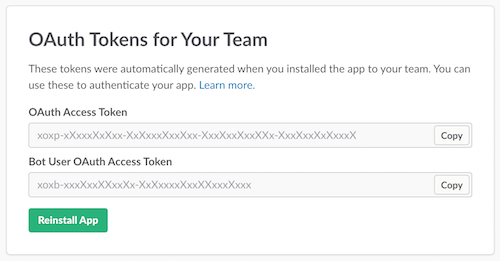
Initialize the client with the Bot User OAuth Token, from you'r app's config panel:
```from slackclient import SlackClient
bot_token = os.environ["SLACK_BOT_TOKEN"]
sc = SlackClient(bot_token)
with open('thinking_very_much.png') as file_content:
sc.api_call(
"files.upload",
channels="C3UKJTQAC",
file=file_content,
title="Test upload"
)
```
The XOXP token shown above pertains the the user who authed your app, and file uploads sent using that token will be uploaded on behalf of the user.
The XOXB token shown above pertains the the bot user of your app itself, and file uploads sent using that token will be uploaded on behalf of the application.
 Roach
on 5 Oct 2018
Roach
on 5 Oct 2018
how to add username in file upload? like if I want to upload a file and username should be XYZ.
I have a working example here but in response username is empty and sent message display with App name _Demo App_.
response = slack.api_call(
                'files.upload',
                channels='#website',
                file=io.BytesIO(file.read()),
                title='File from slack api',
                initial_comment='Create by XYZ',
                username='XYZ',
            )
 ibelal
on 8 Aug 2019
ibelal
on 8 Aug 2019
Related issues
 ErikKalkoken
·
3Comments
ErikKalkoken
·
3Comments
 seratch
·
3Comments
seratch
·
3Comments
 naveenjafer
·
4Comments
naveenjafer
·
4Comments
 kompotkot
·
4Comments
kompotkot
·
4Comments
 marshallino16
·
3Comments
marshallino16
·
3Comments
Most helpful comment
Just to tie up any loose ends in here, here's how to upload a file as the Bot User:
Initialize the client with the Bot User OAuth Token, from you'r app's config panel:
```from slackclient import SlackClient
bot_token = os.environ["SLACK_BOT_TOKEN"]
sc = SlackClient(bot_token)
with open('thinking_very_much.png') as file_content:
sc.api_call(
"files.upload",
channels="C3UKJTQAC",
file=file_content,
title="Test upload"
)
```
The XOXP token shown above pertains the the user who authed your app, and file uploads sent using that token will be uploaded on behalf of the user.
The XOXB token shown above pertains the the bot user of your app itself, and file uploads sent using that token will be uploaded on behalf of the application.