Python-language-server: CPU hang while analyzing PyQt5
import pandas as pd
import datetime
import pandas_datareader.data as web

start = datetime.datetime(2010, 1,1)
end = datetime.datetime.now()
df = web.DataReader("MSFT", "yahoo", start, end)


df.set_index("Date", inplace = True)

import matplotlib.pyplot as plt
from matplotlib import style

style.use('fivethirtyeight')


df['High'].plot()

plt.legend()
plt.show()
With:
 jakebailey
All 16 comments
Similar issue here, it stays at 100% forever "Analyzing in background, xxx items left". This started happening after updating to version "2019.3.6352". Seems though it picked up the virtual env and got stuck analyzing the site-packages.
 mhzed
on 4 Apr 2019
mhzed
on 4 Apr 2019
Same 100% cpu issue with my small project:
- It has been analyzing forever when I open vscode from code bin: \
/usr/local/bin/code -> /Applications/Visual Studio Code.app/Contents/Resources/app/bin/code

- It always remind me to enable pylint every time even through I have enabled pylint.
- Here is screen shot from
Development Tools:

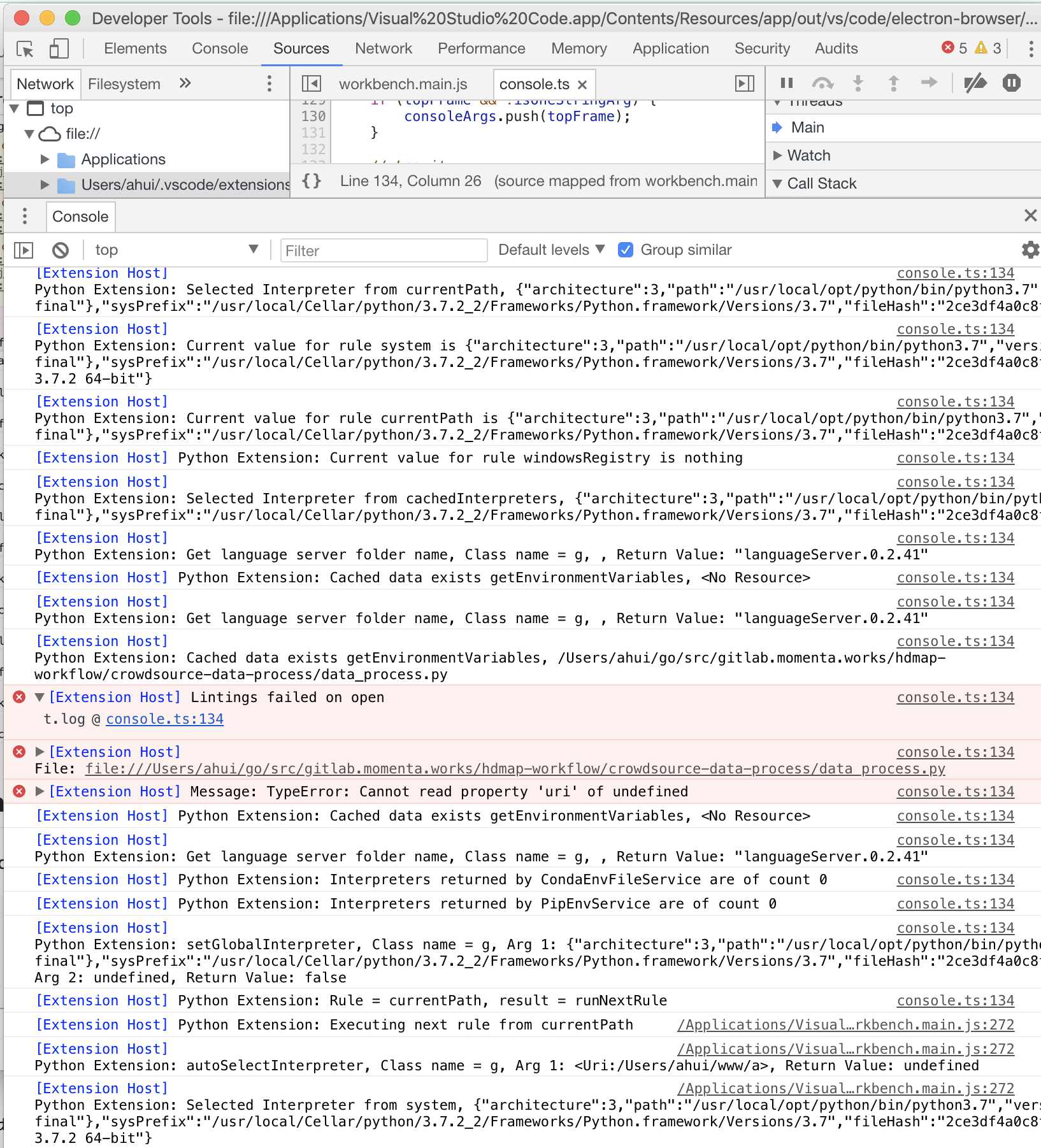
Environment data
With Python 3.7.2 installed:
```
vscode 1.32.3
Mac Mojave 10.14
pylint 2.3.1
astroid 2.2.5
Python 3.7.2 (default, Feb 12 2019, 08:15:36)
➜ pydemo$ code --list-extensions --show-versions
batisteo.[email protected]
donjayamanne.[email protected]
donjayamanne.[email protected]
magicstack.[email protected]
ms-python.[email protected]
ms-vscode.[email protected]
ms-vsliveshare.[email protected]
msjsdiag.[email protected]
mushan.[email protected]
Shan.[email protected]
tht13.[email protected]
VisualStudioExptTeam.[email protected]
vscodevim.[email protected]
wholroyd.[email protected]
yzane.[email protected]
yzhang.[email protected]
````
Related issue:
https://github.com/Microsoft/vscode-python/issues/5074
 ahuigo
on 4 Apr 2019
ahuigo
on 4 Apr 2019
@ahuigo, @mhzed - what is the LS version (displayed at startup in the output). 0.2.43 is latest.
 MikhailArkhipov
on 4 Apr 2019
MikhailArkhipov
on 4 Apr 2019
@MikhailArkhipov languageServer.0.2.41
[Extension Host] Python Extension: Get language server folder name, Class name = g, , Return Value: "languageServer.0.2.41"
Any more should I provide?
ahuigo
on 4 Apr 2019
Mine was 0.2.41.0
Just updated to 0.2.43.0 and now the problem appears to be gone.
mhzed
on 4 Apr 2019
@mhzed How to update it to 0.2.43.0 ?
ahuigo
on 4 Apr 2019
Delete languageServer.* folder under extension (use Open Extensions Folder command)
MikhailArkhipov
on 4 Apr 2019
mv /Users/ahui/.vscode/extensions/ms-python.python-2019.3.6352/languageServer.0.2.41 ~/backup
Remove 0.2.41 and updated to 0.2.43, the problem disappears now.
ahuigo
on 4 Apr 2019
it fixes the problem temporarily, it starts again after opening/closing couple of projects
 eyadsibai
on 6 Apr 2019
eyadsibai
on 6 Apr 2019
I still have this problem that high CPU usage.And if i enable pylint, the vscode will take up a lot of memory.
I have removed 0.2.41.
 ionlz
on 6 Apr 2019
ionlz
on 6 Apr 2019
It depends on what your code imports. For example, a single tensorflow import effectively means 3000 files to be analyzed. Which takes CPU cycles. Although we are working on additional optimizations and caching, in some cases there is little way around the fact that some libraries are very big with circular imports.
MikhailArkhipov
on 6 Apr 2019
If I import nodejs and golang directory , will it analyze node_modules and go files?
ahuigo
on 7 Apr 2019
No, of course not. Only py, pyd and other related Python files unless there are stubs, in which case the stubs are used rather than the library source.
MikhailArkhipov
on 7 Apr 2019
This thread is about CPU usage, if you believe you have a different issue we'd appreciate it if you could make another thread so we can handle it separately. Thanks!
jakebailey
on 8 Apr 2019
Root cause appears to be #907.
EDIT: But not completely.
jakebailey
on 9 Apr 2019
The hang that I was investigating in this issue appears to be fixed now that #942 is merged; we still analyze all of PyQt5 which takes a few seconds, but it's no longer taking minutes.
If there are other examples where the analysis appears to not complete then they should go into another issue (as I'd like to close this specific item as done).
jakebailey
on 15 Apr 2019
Related issues
 qubitron
·
6Comments
jakebailey
·
4Comments
qubitron
·
6Comments
jakebailey
·
4Comments
 rsalunga29
·
5Comments
rsalunga29
·
5Comments
 melwas
·
5Comments
jakebailey
·
4Comments
melwas
·
5Comments
jakebailey
·
4Comments