Python-docs-samples: Error when launch Dataflow job with Flex Template: Unable to open template file
Describe the issue
I'm hitting this error when I try to run a Dataflow job based in a Flex Template
Failed to read the job file : gs://dataflow-staging-us-east1-174292026413/staging/template_launches/2020-10-22_10_01_20-9271036278711479772/job_object with error message: (b728f225c9d413d5): Unable to open template file: gs://dataflow-staging-us-east1-174292026413/staging/template_launches/2020-10-22_10_01_20-9271036278711479772/job_object.."
This is the launch command:
gcloud dataflow flex-template run job_name \
--template-file-gcs-location=gs://path/template.json \
--parameters experiments=disable_flex_template_entrypoint_overrride \
--region=us-east1 \
--service-account-email=xxx@$PROJECT.iam.gserviceaccount.com \
--project=$PROJECT
The Service account I'm using for has Owner grant into the Project
Any thoughts?
Thanks!
 jasturiano
All 25 comments
@MelodyShen, I was also able to reproduce a similar error when running a Flex Template job using a service account. I also tried specifying a staging location in a bucket owned by the project and still got the same error. Are you aware of any issues and/or workarounds when using service accounts?
 davidcavazos
on 23 Oct 2020
davidcavazos
on 23 Oct 2020
Hi @jasturiano, would you mind providing more logs for the job? It is possible that this error was not caused by permission issue but the job object was not generated successfully. Thanks!
 MelodyShen
on 23 Oct 2020
MelodyShen
on 23 Oct 2020
Hi @MelodyShen
Unfortunately that one is the only log I can get from the console regarding the error, but yes I believe this is not a permission issue but a Docker or something related with one.
Regards!
jasturiano
on 23 Oct 2020
@jasturiano You can also check the INFO logs near this error. Sometimes the error logs are not marked with correct severity. Let me know if anything else I can help to debug the issue. Thanks!
MelodyShen
on 23 Oct 2020
Hi @jasturiano
I had a similar issue with the same error message. Turned out I forgot to invoke .run() method for the pipeline object, after fixing this my pipeline worked as expected
 RamazanYapparov
on 29 Nov 2020
RamazanYapparov
on 29 Nov 2020
I'm going to close this due to lack of activity, but please feel free to reopen with more info if needed!
 leahecole
on 14 Jan 2021
leahecole
on 14 Jan 2021
@davidcavazos I'm getting the same issue running the base wordcount example using flex templates (with or without specifying the service account). Interestingly the job actually successfully completes but shows as an error due to this issue. The runner is attempting to open "job_object" in the staging bucket, which doesn't exist.
 MousyBusiness
on 17 Jan 2021
MousyBusiness
on 17 Jan 2021
Same problem here! It worked fine a month ago but when I tried running a new batch, I got this same error. Any idea?
 svaeng
on 17 Jan 2021
svaeng
on 17 Jan 2021
I am having the same example problem with the wordcount example using Flex Templates for Java
 SpicySyntax
on 5 Feb 2021
SpicySyntax
on 5 Feb 2021
I'm not sure what caused the issue but I updated the packages used in my job (most notably apache-beam 2.25->2.27) and added a service account email to my job args (the service account has owner role). Then redeployed the template and now it seems to work again. I have a monthly batch job that I'm running so I can drop a note if I find myself here again next month!
svaeng
on 6 Feb 2021
I tried to add the following roles to my service account on my project, but had the same error.
  "roles/storage.admin",
  "roles/bigquery.jobUser",
  "roles/bigquery.dataOwner",
  "roles/bigquery.readSessionUser",
  "roles/dataflow.admin",
  "roles/dataflow.worker"
@svaeng can you show what the roles look like for that service account?
SpicySyntax
on 10 Feb 2021
@SpicySyntax It has project owner rights. And for those storage buckets that have uniform access control levels, it has storage admin rights. It is not clear to me whether a project owner has also storage admin roles baked in. I think by default the project owner role inherits storage legacy owner which works with the fine-grained access control level but not necessarily with uniform access control.
I have a strong feeling that my problem was related to these bucket configurations, although I wasn't able to figure it out. Maybe you could check how your temp files bucket is set up.
svaeng
on 11 Feb 2021
Hi there, I ran into the same issue. When I try to run my flex-template, I get the following error
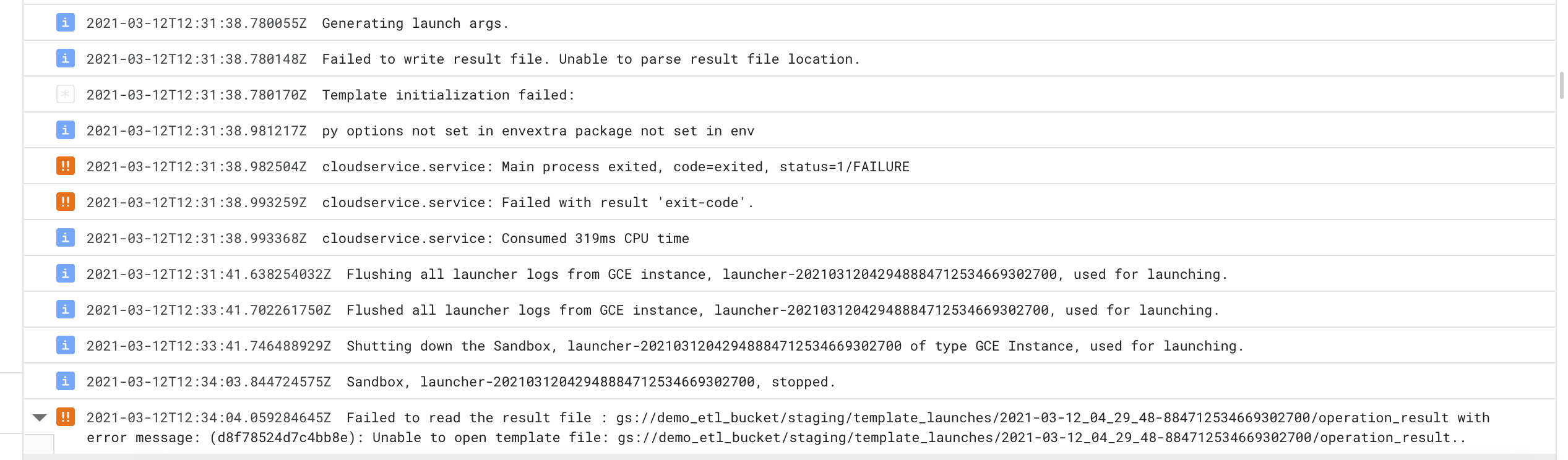
 ArtemGusevOdy
on 12 Mar 2021
ArtemGusevOdy
on 12 Mar 2021
I've found this error commonly when the job fails staging somehow. Usually because the FLEX_TEMPLATE_PYTHON_PY_FILE is pointing to the wrong file due to a typo. In my experience, it's usually a typo or something misconfigured in the Dockerfile.
davidcavazos
on 15 Mar 2021
Same issue here...

Thank you guys for your tips and hints..
I used also serviceaccount in args, using apache beam 2.27, I am not aware of any typo in Dockerfile but still getting this error :(
 makkkino
on 22 Mar 2021
makkkino
on 22 Mar 2021
Can you give us more information on the setup you're using? I've already communicated to the product team about having more actionable error messages, and I think it's on the way, but it'll take some time. In the meantime, it's kind of hard to know what's going wrong since the error message is pretty vague.
Do you get the same error with the code sample as it is? If not, do you get it after adding more requirements? Or is it after doing any other changes?
davidcavazos
on 23 Mar 2021
Sure, I will try to provide as much as I can....
We had old dataflow job which was not templated, so I am migrating it to flex template. I just followed this tutorial https://cloud.google.com/dataflow/docs/guides/templates/using-flex-templates to make the old dataflow work in flex template.
My current setup is this:
requirement.txt
grpcio==1.30.0
  apache-beam[gcp]==2.27.0
  glom==20.8.0
  ujson==1.35
  zstd==1.4.5.1
  pytest
  argparse
Docker file is same as in tutorial adjusted to my folder structure.
folder structure is:
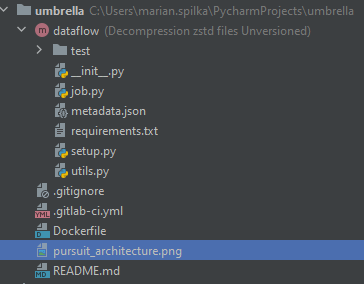
I didnt try pure code sample but I have same setup as it is in the template. I tried lot of tweaks like beam version change, user change, bucket change, way how arguments are read, but with no succcess.
this is how I trigger the job from gcloud (with generalized bucket and file names):
gcloud dataflow flex-template run "dataflow-flex-job" --template-file-gcs-location "gs://bucket/dataflow/templates/dataflow-tempatle.json" --parameters last_hour="2021-3-15-10",temp_location="gs://bucket/dataflow/decompression/temp/",staging_location="gs://bucket/dataflow/decompression/staging/",zone="europe-west1-b",num_workers=10 --region "europe-west1" --service-account-email [email protected]
makkkino
on 24 Mar 2021
It's hard to know what's happening. One thing I see is that grpcio is already a dependency of apache-beam[gcp] so it's safe to remove from the requirements, maybe it's an incompatible version (?).
Other than that, I would suggest going through the sample as it is. If that works, then start modifying it gradually and test each step to make sure it's still working.
davidcavazos
on 24 Mar 2021
Where do you host your Docker image? I got a similar issue when I hosted the image in Artifact Registry. The issues got resolved when I moved it to Container Registry.
 JordyHeusdensDT
on 15 Apr 2021
JordyHeusdensDT
on 15 Apr 2021
I am also experiencing the same error as the above users. I am using the Flex Templates with Java. @JordyHeusdensDT However for me the issue did not resolve itself when I moved to Container Registry.
EDIT: I fixed the issue with the template. After switching my code to use the .fromArgs construction method for the Pipeline Options (i.e. constucting the PipelineOptions from command-line args) it no longer encounters the error mentioned above
 tylercleveland1
on 16 Apr 2021
tylercleveland1
on 16 Apr 2021
@JordyHeusdensDT: Thx for hint. I use Container Registry all the time and the issue is still there.
@davidcavazos: I removed grpcio from requirements.txt but with no success :( . I dont have a capacity to try it again from pure template now. Maybe after some time ;)
makkkino
on 20 Apr 2021
I'm using java flex template. I got exact the same issue.
 zhong-sq
on 17 May 2021
zhong-sq
on 17 May 2021
Hello
i am getting exactly the same error. Have uploaded a basic job via flex template, and i keep on getting htis
021-05-21 22:25:11.161 BSTFailed to read the job file : gs://dataflow-staging-us-central1-682143946483/staging/template_launches/2021-05-21_14_22_52-13925108215779958842/job_object with error message: (d28021b72ccf0fba): Unable to open template file: gs://dataflow-staging-us-central1-682143946483/staging/template_launches/2021-05-21_14_22_52-13925108215779958842/job_object..
I really dont know what to look for.
Have chekced the INFO logs but cannot see anything obvious prior to the error
All i can see is this
{
  "insertId": "4610964806412114497:266730:0:2564",
  "jsonPayload": {
    "message": "Operation result location: gs://dataflow-staging-us-central1-682143946483/staging/template_launches/2021-05-21_14_22_52-13925108215779958842/operation_result",
    "line": "python_template.go:118"
  },
  "resource": {
    "type": "dataflow_step",
    "labels": {
      "step_id": "",
      "job_name": "flexqtr12018",
      "region": "us-central1",
      "project_id": "datascience-projects",
      "job_id": "2021-05-21_14_22_52-13925108215779958842"
    }
  },
  "timestamp": "2021-05-21T21:24:47.693500Z",
  "severity": "INFO",
  "labels": {
    "compute.googleapis.com/resource_id": "4610964806412114497",
    "compute.googleapis.com/resource_type": "instance",
    "dataflow.googleapis.com/job_name": "flexqtr12018",
    "compute.googleapis.com/resource_name": "launcher-2021052114225213925108215779958842",
    "dataflow.googleapis.com/region": "us-central1",
    "dataflow.googleapis.com/job_id": "2021-05-21_14_22_52-13925108215779958842"
  },
  "logName": "projects/datascience-projects/logs/dataflow.googleapis.com%2Flauncher",
  "receiveTimestamp": "2021-05-21T21:24:50.097214090Z"
}
But then nothing gets created in the /staging directory
Could anyone advise on what might be the problem?
I am using apache beam python version, 2.27
kind regards
Marco
 mmistroni
on 21 May 2021
mmistroni
on 21 May 2021
I found the problem in my java flex template.
I missed
pipeline.run();
in my main method, so the pipeline was setup, but did not actually run.
(I think GCP may want to make the error message more clear in this case.)
zhong-sq
on 23 May 2021
I had the same problem for python SDK. I had the same logs like above.
I decided to fix it by adding my custom service-account for dataflow jobs.
First I received an error with permission (my account has not had required permissions). I've added next roles:
Cloud Build Service Account and Cloud Build Viewer.
I'm not sure that both these roles are needed. But it works. I have some interesting logs like Unable to find image 'gcr.io/dataflow-templates-base/template-launcher-logger:flex_templates_base_image_release_20200803_RC00' locally and the same for my builded image.
Job is queued ~ 11 minutes (the longest period is the installing apache_beam)
 ibogretsov
on 25 May 2021
ibogretsov
on 25 May 2021
Related issues
 shezankazi
·
14Comments
shezankazi
·
14Comments
 0yster
·
7Comments
0yster
·
7Comments
 helloworldkr
·
8Comments
helloworldkr
·
8Comments
 ethagnawl
·
4Comments
ethagnawl
·
4Comments
 chan71
·
3Comments
chan71
·
3Comments
Most helpful comment
I've found this error commonly when the job fails staging somehow. Usually because the
FLEX_TEMPLATE_PYTHON_PY_FILEis pointing to the wrong file due to a typo. In my experience, it's usually a typo or something misconfigured in theDockerfile.