Python-docs-samples: Example does not contain authentication
In which file did you encounter the issue?
Did you change the file? If so, how?
Did not change the file.
Describe the issue
It's an example of a quickstart. So a quick-start should really contain how you're supposed to authenticate as well.
 jonathan-s
All 10 comments
I figured this one out. But I still think it would be helpful with an inline comment saying that you need to have the environment variable set with the path to the json file.
jonathan-s
on 9 Dec 2019
Noted - glad you figured it out. Out of curiosity - what was the path you took to get to this quickstart code? Via the docs, or something else? And how did you figure it out? Just trying to get some user insight :)
 leahecole
on 10 Dec 2019
leahecole
on 10 Dec 2019
I believe I read this page (https://cloud.google.com/storage/docs/reference/libraries#client-libraries-install-python) before I landed here. It was also in there that I saw that the authentication is done in that way, what tripped me up was that it was in a separate section to the code as well as the very implicit way of doing it. (Zen of python: explicit is better than implicit). Do you know why that design decision was made that way? I'm also curious as to why pointing to a json file for authentication. In my opinion it's not a great developer experience.
Normally I prefer the following kind of documentation -> https://googleapis.dev/python/storage/latest/index.html#example-usage You've got a list of methods that can be called and it explains it rather well.
But that doesn't show up in the search results. So it took a lot of clicking before I actually found that. So might be worth pointing to that documentation in more highly ranked search results.
jonathan-s
on 10 Dec 2019
@leahecole Can this be closed?
 andrewferlitsch
on 17 Mar 2020
andrewferlitsch
on 17 Mar 2020
Sorry this got lost in the shuffle! @frankyn can you PTAL and add your thoughts + resolve?
leahecole
on 11 May 2020
Hi @jonathan-s,
Thanks for your feedback!
We do go deeper into authentication methods here: https://cloud.google.com/docs/authentication/production#auth-cloud-explicit-python
This isn't a first-class citizen in the samples for various languages as you have seen in: https://cloud.google.com/storage/docs/reference/libraries#client-libraries-install-python. The authentication documentation is linked from reference/libraries but might be too subtle
From documentation: To run the client library, you must first set up authentication by creating a service account and setting an environment variable. Complete the following steps to set up authentication. For other ways to authenticate, see the GCP authentication documentation.
Question: Do you know why that design decision was made that way?
cc: @busunkim96 and @crwilcox who may have more background on the Python auth related question.
IIRC: Our examples opt for implicit credentials which makes it easier to manage credentials when deployed to a compute product on Google Cloud Platform, e.g. Google App Engine or Cloud Functions. Credentials are passed in through environment variables when deployed on these services and allows Google to manage the lifecycle of these credentials without your application code managing that explicitly.
When doing local development it could be easier to initialize the client with credentials passed in programmatically though.
Comment: Normally I prefer the following kind of documentation -> https://googleapis.dev/python/storage/latest/index.html#example-usage You've got a list of methods that can be called and it explains it rather well.
This documentation is pointed to from the links below reference/libraries, but probably isn't easy to find either because it's so low
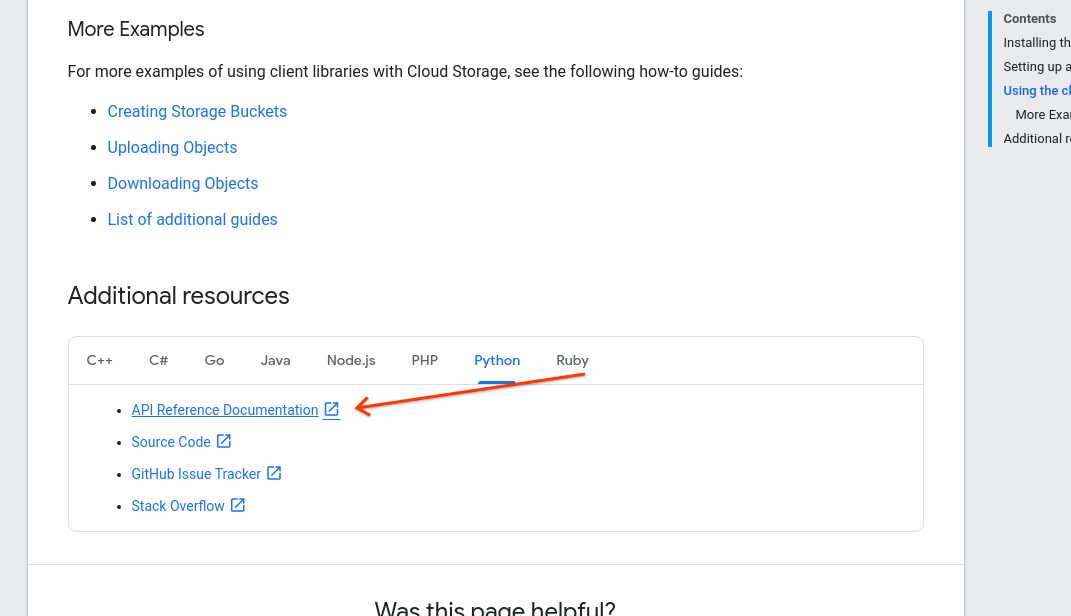
What could have made it easier to find?
Comment: I'm also curious as to why pointing to a json file for authentication. In my opinion it's not a great developer experience.
Could you tell me more of what you expect to happen instead?
Thanks again for reaching out.
 frankyn
on 12 May 2020
frankyn
on 12 May 2020
@frankyn As I mentioned in the very top. The example I encountered is not self contained (and I would assume many other examples are not either).
If you run the example at the very top WITHOUT exporting authentication as described somewhere else you won't be able to execute the code. If a developer only reads the example they would have been none the wiser with regards to authentication.
jonathan-s
on 12 May 2020
What do you think about a comment that states credentials are expected in the exported environment variable?
    from google.cloud import storage

    # Instantiates a client using implicit credentials expected
    # in environment variable GOOGLE_APPLICATION_CREDENTIALS
    storage_client = storage.Client()

    # The name for the new bucket
    bucket_name = "my-new-bucket"

    # Creates the new bucket
    bucket = storage_client.create_bucket(bucket_name)

    print("Bucket {} created.".format(bucket.name))
@frankyn, yes the libraries should 'just work' with implicit auth in many cases (App Engine, Compute Engine). See https://github.com/googleapis/google-auth-library-python/blob/master/google/auth/_default.py#L230-L254 for default credentials logic.
If you try to run that quickstart with no credentials in the environment, the auth library should raise an error pointing you to the authentication getting started docs. @jonathan-s Would you remember if you got this error when you first ran the quickstart?
Could not automatically determine credentials. Please set GOOGLE_APPLICATION_CREDENTIALS or
explicitly create credentials and re-run the application. For more
information, please see
https://cloud.google.com/docs/authentication/getting-started
 busunkim96
on 14 May 2020
busunkim96
on 14 May 2020
Following up - I'm of the opinion that it's best to let the Auth library handle this.
The way we recommend you authenticate to our libraries will change over time, and a comment is more likely to become stale. The Auth library has context about the environment and can raise a more specific error (e.g., user credentials don't work with this API).
If the guidance provided by the Auth library is confusing or insufficient, let's open issues on google-auth for further discussion.
busunkim96
on 15 May 2020
Related issues
![flaky-bot[bot] picture](https://avatars.githubusercontent.com/in/49504?v=4&s=40) flaky-bot[bot]
·
8Comments
flaky-bot[bot]
·
8Comments
 chan71
·
9Comments
chan71
·
9Comments
 ethagnawl
·
4Comments
ethagnawl
·
4Comments
 shezankazi
·
14Comments
shezankazi
·
14Comments
 matteo-mazzanti
·
7Comments
matteo-mazzanti
·
7Comments