Pytest: Flag to simply not catch exceptions at all
Problem
Using pytest 5.4.2 I don't see a flag that simply tells pytest to not catch any exceptions. So on the first test that raises and unhandled exception, pytest itself would exit with that exception.
Background
I'm trying to debug tests with vscode's Python extension's debugpy debugger. It does not support --pdb or --pdbcls. So there is no obvious way to get it to break on an exception. If pytest would simply not catch any exceptions, then any debugger could break on that unhandled exception. In this case I'm running a single test.
I'm sure it's been a design goal of pytest that it itself never "crashes" but in this case it would make it easy to debug pyttest tests with any debugger.
References
vscode/python/debug/py is working on a solution:
https://github.com/microsoft/debugpy/issues/275
- [x] a detailed description of the bug or suggestion
- [x] output of
pip listfrom the virtual environment you are using - [x] pytest and operating system versions
Environment
pytest 5.4.2
macOS 10.15.3
conda
Package Version
alabaster 0.7.12
appdirs 1.4.4
appnope 0.1.0
asciitree 0.3.3
astroid 2.4.1
attrs 19.3.0
Babel 2.8.0
backcall 0.1.0
bleach 3.1.5
cachey 0.2.1
certifi 2020.4.5.1
chardet 3.0.4
cycler 0.10.0
dask 2.17.2
decorator 4.4.2
defusedxml 0.6.0
docutils 0.16
entrypoints 0.3
fasteners 0.15
flake8 3.8.2
freetype-py 2.1.0.post1
fsspec 0.7.4
future 0.18.2
graphviz 0.14
HeapDict 1.0.1
idna 2.9
imageio 2.8.0
imagesize 1.2.0
ipykernel 5.3.0
ipython 7.14.0
ipython-genutils 0.2.0
ipywidgets 7.5.1
isort 4.3.21
jedi 0.17.0
Jinja2 2.11.2
jsonschema 3.2.0
jupyter 1.0.0
jupyter-client 6.1.3
jupyter-console 6.1.0
jupyter-core 4.6.3
kiwisolver 1.2.0
lazy-object-proxy 1.4.3
MarkupSafe 1.1.1
matplotlib 3.2.1
mccabe 0.6.1
mistune 0.8.4
monotonic 1.5
more-itertools 8.3.0
mypy 0.780
mypy-extensions 0.4.3
napari 0.3.2
napari-plugin-engine 0.1.5
napari-svg 0.1.3
nbconvert 5.6.1
nbformat 5.0.6
networkx 2.4
notebook 6.0.3
numcodecs 0.6.4
numpy 1.18.4
numpydoc 1.0.0
packaging 20.4
pandas 1.0.4
pandocfilters 1.4.2
parso 0.7.0
pexpect 4.8.0
pickleshare 0.7.5
Pillow 7.1.2
pip 20.0.2
pluggy 0.13.1
pooch 1.1.1
prometheus-client 0.8.0
prompt-toolkit 3.0.5
psutil 5.7.0
ptyprocess 0.6.0
py 1.8.1
pycodestyle 2.6.0
pyflakes 2.2.0
Pygments 2.6.1
pylint 2.5.2
PyOpenGL 3.1.5
pyparsing 2.4.7
PyQt5 5.14.2
PyQt5-sip 12.7.2
pyrsistent 0.16.0
pytest 5.4.2
pytest-faulthandler 2.0.1
pytest-ordering 0.6
pytest-qt 3.3.0
pytest-timeout 1.4.1
python-dateutil 2.8.1
pytz 2020.1
PyWavelets 1.1.1
PyYAML 5.3.1
pyzmq 19.0.1
qtconsole 4.7.4
QtPy 1.9.0
requests 2.23.0
scikit-image 0.17.2
scipy 1.4.1
Send2Trash 1.5.0
setuptools 46.4.0.post20200518
shiboken2 5.15.0
six 1.15.0
snowballstemmer 2.0.0
Sphinx 3.0.4
sphinxcontrib-applehelp 1.0.2
sphinxcontrib-devhelp 1.0.2
sphinxcontrib-htmlhelp 1.0.3
sphinxcontrib-jsmath 1.0.1
sphinxcontrib-qthelp 1.0.3
sphinxcontrib-serializinghtml 1.1.4
terminado 0.8.3
testpath 0.4.4
tifffile 2020.5.25
toml 0.10.1
toolz 0.10.0
torch 1.5.0
torchvision 0.6.0
tornado 6.0.4
traitlets 4.3.3
typed-ast 1.4.1
typing-extensions 3.7.4.2
urllib3 1.25.9
vispy 0.6.4
wcwidth 0.1.9
webencodings 0.5.1
wheel 0.34.2
widgetsnbextension 3.5.1
wrapt 1.12.1
xarray 0.15.1
zarr 2.4.0
 pwinston
All 9 comments
Does vscode set sys.breakpointhook?
You can cause pytest to crash with a plugin such as this, but don't do that :)
import pytest

@pytest.hookimpl(tryfirst=True)
def pytest_exception_interact(call):
    raise call.excinfo.value

@pytest.hookimpl(tryfirst=True)
def pytest_internalerror(excinfo):
    raise excinfo.value
 bluetech
on 24 Jun 2020
bluetech
on 24 Jun 2020
Your two hookimpl work great for me. I've wrapped then in a env var. So I can run pytest normally or when debugging I can set that var, and then the debugger breaks in the right spot.
I think there should be a pytest flag that does this. I know --pdb and --pdbcls and sys.breakpointhook are all trying to address this more elegantly. But none of the three seem to work with vscode yet, at least for exceptions. Simply letting pytest crash works with any debugger past, present and future. I can see why pytest would be uncomfortable with this idea, though, but it really hits the spot in this case.
This works 100% for me and maybe Google will send other people here. Thanks for such a quick and helpful response. This was the thread me asking vscode Python people how to make this work:
https://github.com/microsoft/debugpy/issues/275#issuecomment-648984822. They had some ideas but no real solution today. This stack overflow has the answer now.
pwinston
on 24 Jun 2020
Hi @pwinston,
Cool that the small plugin posted by @bluetech worked!
I think there should be a pytest flag that does this. I know --pdb and --pdbcls and sys.breakpointhook are all trying to address this more elegantly. But none of the three seem to work with vscode yet, at least for exceptions. Simply letting pytest crash works with any debugger past, present and future. I can see why pytest would be uncomfortable with this idea, though, but it really hits the spot in this case.
Indeed this an interesting use case, but as you guessed, I (as a core dev) am a bit uncomfortable to add this flag to the core. I think it would be better for VSCode itself to implement those two hooks in their runner, and have an UI flag to stop on exceptions at that point. It would then even be able to go up the stack, outside pytest internals, and drop the user closer to where the exception was originated.
Perhaps starting a discussion on VSCode's tracker, referring back to this issue, would be a good way to start this discussion?
 nicoddemus
on 25 Jun 2020
nicoddemus
on 25 Jun 2020
Would it fit if disabling the debugger plugin would trigger that behaviour?
 RonnyPfannschmidt
on 25 Jun 2020
RonnyPfannschmidt
on 25 Jun 2020
I'm very happy with this solution for me. And I'm not sure what the next best step is. So I'll probably bow out. I'm not sure if the debugpy folks in https://github.com/microsoft/debugpy/issues/275 will want to pursue anything further.
It's a pretty niche issue:
1) You are using pytest with vscode
2) You want to debug your tests (many people don't bother doing that)
3) You can't use Raised Exception because you have too many false positives.
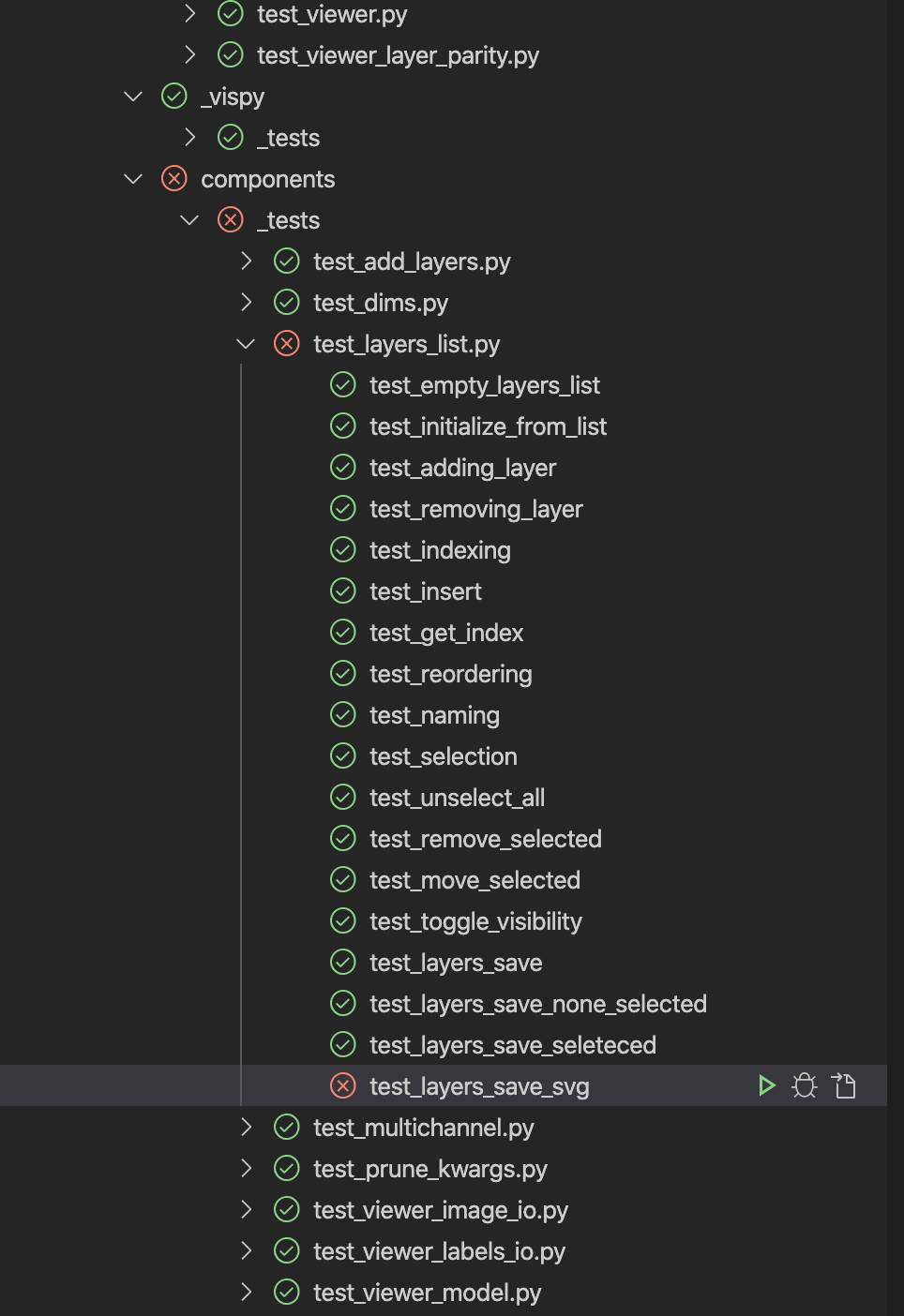
Amazing to see there are knowledgeable people behind both projects responding within hours. BTW, you've probably seen but VS Code has a Test view that works with pytest where you can see all the tests and run them one at a time or in groups:
pwinston
on 25 Jun 2020
BTW, you've probably seen but VS Code has a Test view that works with pytest where you can see all the tests and run them one at a time or in groups
Cool! I haven't seen that view from VS Code in particular, but PyCharm (which is the IDE I use) has a very similar view. 😁
I think we can close this for now then, thanks again @pwinston!
nicoddemus
on 25 Jun 2020
I stumbled upon this as well (I guess I'm in a "pretty niche" as well), in the issue mentioned above.
I looked for a long time for a flag in pytest to make it "crash" - I stumbled upon --pdb, which lead me astray. I believe an argument to pytest would be the most straightforward solution, more general than --pdb.
 mcgfeller
on 5 Sep 2020
mcgfeller
on 5 Sep 2020
@mcgfeller have you seen pytest-timeout ?
 graingert
on 5 Sep 2020
graingert
on 5 Sep 2020
@graingert Yes - but missing the connection to "crashing" on an error or assert?
mcgfeller
on 5 Sep 2020
Related issues
 jacquerie
·
3Comments
RonnyPfannschmidt
·
3Comments
jacquerie
·
3Comments
RonnyPfannschmidt
·
3Comments
 reaperhulk
·
3Comments
reaperhulk
·
3Comments
 jurisbu
·
3Comments
jurisbu
·
3Comments
 krassowski
·
3Comments
krassowski
·
3Comments