It seems that I can't reach pytest.org (https://downforeveryoneorjustme.com/pytest.org) but the docs are still accessible from Read the Docs at https://pytest.readthedocs.io/en/latest/
Is there some sort of DNS issue today?
 jonathansick
All 39 comments
/cc @hpk42
 blueyed
on 22 Jul 2019
blueyed
on 22 Jul 2019
As a side effect of this, intersphinx linking to pytest doc is broken. xref astropy/astropy#9033
 pllim
on 22 Jul 2019
pllim
on 22 Jul 2019
HTTP ERROR 502 - bad gateway. doc.pytest.org may be trying to fetch something from another web server and that server is down.
 jimfrimmel
on 22 Jul 2019
jimfrimmel
on 22 Jul 2019
i just got confirmation that the server behind it died, it may take a bit of time to remediate as its end of d over here
 RonnyPfannschmidt
on 22 Jul 2019
RonnyPfannschmidt
on 22 Jul 2019
https://twitter.com/fschulze/status/1153279631023312899 - @fschulze is working on it
RonnyPfannschmidt
on 22 Jul 2019
hi all. i only realize now that pytest.org is running via a server
that is indeed is down (same VM for devpi.net). The hoster (hetzner)
told us that the hardware is broken and it just got exchanged and
@fschulze is currently replaying a backup. Let's hope all goes well.
pytest.org should be back up then.
I am not totally sure currently how pytest.org's html is generated
and how it is served but IIRC then we had a PROXY-setting that redirects
to readthedocs.io -- but acts as pytest.org front with proper ssl-certs.
The reason it was on a separate VM is so that https works correctly -- if
serving through readthedocs the latter could not offer a valid SSL
cert for pytest.org -- maybe there is support for that today?
Maybe someone could take over this little machinery who is closer
to pytest day to day developments? I completely had forgotten
about the pytest setup when i discussed with @fschulze about
devpi.net being down ... i'd appreciate if we didn't have the pytest.org
responsibility -- devpi.net is more or less a non-advertised service
where we don't give much guarantees. pytest.org, in comparison,
is more mission critical, i guess ;)
On Mon, Jul 22, 2019 at 12:32 -0700, jimfrimmel wrote:
HTTP ERROR 502 - bad gateway. doc.pytest.org may be trying to fetch something from another web server and that server is down.
--
You are receiving this because you were mentioned.
Reply to this email directly or view it on GitHub:
https://github.com/pytest-dev/pytest/issues/5641#issuecomment-513922267
 hpk42
on 22 Jul 2019
hpk42
on 22 Jul 2019
With https://awesomewm.org/ we're using Github pages behind CloudFlare (free, provides SSL).
So this is likely to work with RTD then also.
I think it would be best if @hpk42 or @fschulze could set that up, since you control the DNS in the first place.
blueyed
on 22 Jul 2019
FWIW happy to give someone DNS modifying access -- preferably someone i, fschulze, ronny
or Bruno knows personally, as it also gives access to a few other DNS entries. Also
happy to transfer the domain itself to someone else. note that i am in vacation starting
end of this work -- so if someone wants to play with Daniel's or other suggested
setups.
On Mon, Jul 22, 2019 at 13:35 -0700, Daniel Hahler wrote:
With https://awesomewm.org/ we're using Github pages behind CloudFlare (free, provides SSL).
So this is likely to work with RTD then also.
I think it would be best if @hpk42 or @fschulze could set that up, since you control the DNS in the first place.--
You are receiving this because you were mentioned.
Reply to this email directly or view it on GitHub:
https://github.com/pytest-dev/pytest/issues/5641#issuecomment-513943644
hpk42
on 22 Jul 2019
On a – possibly – related note, the intersphinx objects.inv itself seems not very up-to-date, with some labels raising warnings (and broken links) like
WARNING: undefined label: pytest:pytest.raises (if the link has no caption the label must precede a section header)
others pointing to apparently outdated targets like pytest helpers.
 dhomeier
on 23 Jul 2019
dhomeier
on 23 Jul 2019
fwiw, I've been using cloudflare for my documentation / static websites and it's been working great for me (for example pre-commit.com is CF + github pages) -- I assume we could set up something similar with rtd
 asottile
on 23 Jul 2019
asottile
on 23 Jul 2019
Personally I'd be fine setting that up. Can someone give me some
pointers, so I don't have to spend much time searching for stuff?
CloudFlare -> RTD sounds fine to me.
 fschulze
on 23 Jul 2019
fschulze
on 23 Jul 2019
Here's RTD's docs for this: https://docs.readthedocs.io/en/stable/custom_domains.html -- as for cloudflare all you need is a free account and there's a little wizard which guides you through setting up the initial setup
asottile
on 23 Jul 2019
This seems slightly cursed. One of the nameservers I got from CloudFlare is unknown from the domain registrar, so I can't switch to them. I opened a ticket.
The replacement server we got also had hardware issues. We got yet another one.
For now I changed the DNS settings to point to readthedocs, but that doesn't provide https and the root domain pytest.org can't have a CNAME, so still doesn't work.
fschulze
on 23 Jul 2019
@fschulze my condolences, to be repeatedly held up by various technical failures out of your control must be very frustrating
RonnyPfannschmidt
on 23 Jul 2019
Seems to be back up! Thanks @fschulze!
 nicoddemus
on 23 Jul 2019
nicoddemus
on 23 Jul 2019
the config is not yet finished
RonnyPfannschmidt
on 23 Jul 2019
Oh really? Sorry, I can access it and assumed it was working. 😕
nicoddemus
on 23 Jul 2019
@asottile I don't think the current setup is correct. In the readthedocs documentation it says cloudflare provides SSL. But currently the site is served via http. At CloudFlare DNS settings I have set the CNAME.
fschulze
on 23 Jul 2019
Who has access to the pytest readthedocs account? It is possible that something needs to be set there, but I can't see that.
fschulze
on 23 Jul 2019
I do, what's your username there @fschulze?
nicoddemus
on 23 Jul 2019
Do we still care about planet.pytest.org? It also was on the old server, but none of the blogs have updated in quite a while.
fschulze
on 23 Jul 2019
@nicoddemus "fschulze", what else :)
fschulze
on 23 Jul 2019
😁 added you as maintainer
nicoddemus
on 23 Jul 2019
i believe planet can retire, if we ever want to have something like it again, i would propose something that uses github pages or sth like that * ci running once a day or so
RonnyPfannschmidt
on 23 Jul 2019
@fschulze there's a few settings you'll want to add as well -- here's screenshots from what I have for pre-commit.com:
(crypto tab)


And then to make pytest.org redirect to docs.pytest.org you'll want a page rule -- I don't have a precise example but here's a page rule I set up for asottile.dev:

hope this helps!
asottile
on 23 Jul 2019
Updated the readthedocs domain settings. I think everything now needs to settle until everything is in place.
The CloudFlare account might have been pointless after all, as it is only doing DNS now. I might move that back to Hetzner where the Domain itself is registered and delete the account again. The only useful feature at CloudFlare is CNAME handling for pytest.org which isn't supported natively by DNS.
fschulze
on 23 Jul 2019
@asottile what are your DNS settings? CNAME or A records? Currently I have everything as CNAME which bypasses the CloudFlare proxy.
fschulze
on 23 Jul 2019
I believe I'm routing through cloudflare (so a different setup):

asottile
on 23 Jul 2019
What is the canonical documentation URL? On the server we had docs.pytest.org and let everything else redirect there. In the readthedocs settings it was doc.pytest.org (without s). I changed it to docs for now, as that was what we had in effect for quite a while now.
Are the intersphinx links affected by that?
fschulze
on 23 Jul 2019
@asottile it seems like 192.30.252.153 are github pages.
fschulze
on 23 Jul 2019
cloudflare is a little misleading with that display there -- those are what internal-cloudflare uses to look up the results -- in reality it's serving through cloudflare I think?
$ dig pre-commit.com

; <<>> DiG 9.11.3-1ubuntu1.8-Ubuntu <<>> pre-commit.com
;; global options: +cmd
;; Got answer:
;; ->>HEADER<<- opcode: QUERY, status: NOERROR, id: 24743
;; flags: qr rd ra; QUERY: 1, ANSWER: 2, AUTHORITY: 0, ADDITIONAL: 1

;; OPT PSEUDOSECTION:
; EDNS: version: 0, flags:; udp: 4096
;; QUESTION SECTION:
;pre-commit.com.            IN  A

;; ANSWER SECTION:
pre-commit.com.     300 IN  A   104.28.9.189
pre-commit.com.     300 IN  A   104.28.8.189

;; Query time: 11 msec
;; SERVER: 127.0.1.1#53(127.0.1.1)
;; WHEN: Tue Jul 23 08:13:48 PDT 2019
;; MSG SIZE  rcvd: 75

$ whois 104.28.9.189 | grep OrgName
OrgName:        Cloudflare, Inc.
The CloudFlare account might have been pointless after all, as it is only doing DNS now. I might move that back to Hetzner where the Domain itself is registered and delete the account again.
Well, then it would fail on the next outage again, no? :)
(Besides DNS it should also help you with not having to care about SSL certs anymore)
blueyed
on 23 Jul 2019
I would also use CNAME and only serve pytest.org to redirect. The SSL certificates would be handled by rtd. Currently CloudFlare only provides DNS, nothing else and the DNS servers at Hetzner are managed by them, not me.
fschulze
on 23 Jul 2019
and only serve
pytest.orgto redirect
Isn't this the case now already? I.e. even if it is just a redirect it still needs working hardware for it.
edit Ah, you mean to use Hetzner's DNS only.. might make sense - I've used Cloudflare for Github pages, which do not have SSL themselves.
blueyed
on 23 Jul 2019
No, until the break down we proxied it, because rtd didn't provide SSL yet. That proxying is now gone. So the only part that would require the server is pytest.org, doc. docs. www. and blog. are all handled by other hosts. Anyway, maybe I'll just leave it as it is now and forget about it until there is some other change like CloudFlare gone or not providing free accounts or whatever.
It also seems like rtd doesn't do redirects to the canonical domain, so maybe we have to do some kind of redirect anyway, but maybe we can abuse a CloudFlare rule.
fschulze
on 23 Jul 2019
So, https is now working, but rtd isn't redirecting from http to https even though the setting says always use https. It could be that it will be activated later as they first wait for https to be working properly (for https it took a while and it says so in the docs).
The other issue is that docs.pytest.org is set as the canonical domain, but the others aren't redirected by rtd. Maybe someone should ask them about that. It should always work, regardless of http or https.
fschulze
on 24 Jul 2019
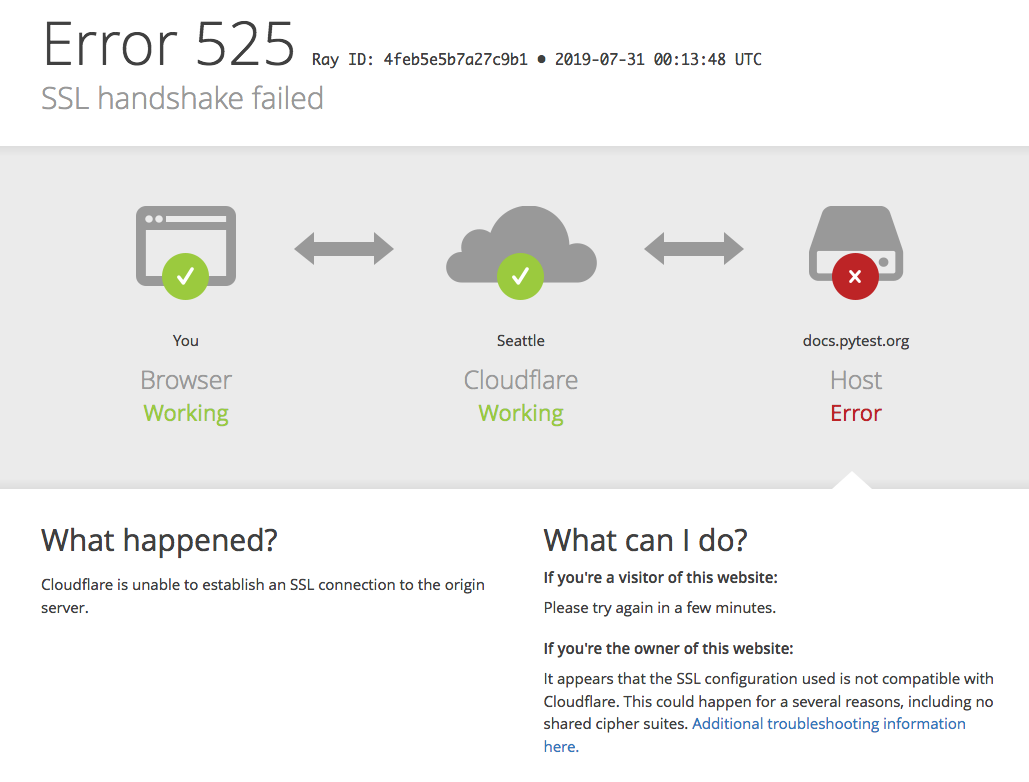
I'm assuming this is related to this issue: Currently getting a Cloudflare SSL handshake failure. :(
 mattsb42-aws
on 31 Jul 2019
mattsb42-aws
on 31 Jul 2019
@mattsb42-aws nope, that's the load balancer of rtd: https://twitter.com/readthedocs/status/1156337277640908801
fschulze
on 31 Jul 2019
Closing as fixed. Thanks!
blueyed
on 8 Aug 2019
Related issues
 reaperhulk
·
3Comments
reaperhulk
·
3Comments
 thakkardharmik
·
3Comments
thakkardharmik
·
3Comments
 dmtucker
·
3Comments
dmtucker
·
3Comments
 Balky79
·
3Comments
Balky79
·
3Comments
 nschloe
·
3Comments
nschloe
·
3Comments