Pysyft: pip install syft - ZSTD errors
Received lots of ZSTD errors on OSX Mac Sierra when installing 'pip install syft' within Anaconda. Tried the various workarounds in documentation and also tried installing from source - still had the same errors.
Running 'conda install gcc' fixed the issue for me. Which changed GCC in my conda environment from:
gcc --version
Configured with: --prefix=/Library/Developer/CommandLineTools/usr --with-gxx-include-dir=/usr/include/c++/4.2.1
Apple LLVM version 9.0.0 (clang-900.0.39.2)
Target: x86_64-apple-darwin16.7.0
Thread model: posix
To:
gcc --version
gcc (GCC) 4.8.5
Perhaps add this work-around to documentation if it will help others.
 phillipeloher
All 21 comments
Thanks for the indication!
 LaRiffle
on 10 Jun 2019
LaRiffle
on 10 Jun 2019
Thank you. I did see/try the 'pip install --upgrade --force-reinstall zstd' command, but it failed with similar ZSTD errors which led me to another work-around. Just wanted to mention incase others benefit from it.
phillipeloher
on 10 Jun 2019
I just bumped into a lot of error with zstd on an Ubuntu 16.04 machine a few hours ago. They were solved by running:
sudo apt-get install python3.6-dev
 DanyEle
on 10 Jun 2019
DanyEle
on 10 Jun 2019
I share also here the install procedure I use on Google colab, which is not very clean but works for people wanting to use the last updates from dev branch (and their amazing bugs!)
!pip install tf-encrypted
! URL="https://github.com/openmined/PySyft.git" && FOLDER="PySyft" && if [ ! -d $FOLDER ]; then git clone -b dev --single-branch $URL; else (cd $FOLDER && git pull $URL && cd ..); fi;
!cd PySyft; python setup.py install > /dev/null
import os
import sys
module_path = os.path.abspath(os.path.join('./PySyft'))
if module_path not in sys.path:
sys.path.append(module_path)
!pip install --upgrade --force-reinstall lz4
!pip install --upgrade --force-reinstall websocket
!pip install --upgrade --force-reinstall websockets
!pip install --upgrade --force-reinstall zstd
Hi I tried to install pysyft on OSX Mac Mojave and have an installation error regarding zstd
Requirement already satisfied: syft in ./anaconda3/envs/pysyft/lib/python3.7/site-packages/syft-0.1.19a1-py3.7.egg (0.1.19a1)
Requirement already satisfied: Flask>=1.0.2 in ./anaconda3/envs/pysyft/lib/python3.7/site-packages (from syft) (1.0.3)
Requirement already satisfied: flask_socketio>=3.3.2 in ./anaconda3/envs/pysyft/lib/python3.7/site-packages (from syft) (4.0.0)
Requirement already satisfied: lz4>=2.1.6 in ./anaconda3/envs/pysyft/lib/python3.7/site-packages (from syft) (2.1.6)
Requirement already satisfied: msgpack>=0.6.1 in ./anaconda3/envs/pysyft/lib/python3.7/site-packages (from syft) (0.6.1)
Requirement already satisfied: numpy>=1.14.0 in ./anaconda3/envs/pysyft/lib/python3.7/site-packages (from syft) (1.16.4)
Requirement already satisfied: scikit-learn>=0.21.0 in ./anaconda3/envs/pysyft/lib/python3.7/site-packages (from syft) (0.21.2)
Requirement already satisfied: tblib>=1.4.0 in ./anaconda3/envs/pysyft/lib/python3.7/site-packages (from syft) (1.4.0)
Requirement already satisfied: tf_encrypted>=0.5.4 in ./anaconda3/envs/pysyft/lib/python3.7/site-packages (from syft) (0.5.4)
Requirement already satisfied: torch>=1.1 in ./anaconda3/envs/pysyft/lib/python3.7/site-packages (from syft) (1.1.0)
Requirement already satisfied: torchvision>=0.3.0 in ./anaconda3/envs/pysyft/lib/python3.7/site-packages (from syft) (0.3.0)
Requirement already satisfied: websocket_client>=0.56.0 in ./anaconda3/envs/pysyft/lib/python3.7/site-packages (from syft) (0.56.0)
Requirement already satisfied: websockets>=7.0 in ./anaconda3/envs/pysyft/lib/python3.7/site-packages (from syft) (7.0)
Collecting zstd>=1.4.0.0 (from syft)
  Using cached https://files.pythonhosted.org/packages/8e/27/1ea8086d37424e83ab692015cc8dd7d5e37cf791e339633a40dc828dfb74/zstd-1.4.0.0.tar.gz
Requirement already satisfied: itsdangerous>=0.24 in ./anaconda3/envs/pysyft/lib/python3.7/site-packages (from Flask>=1.0.2->syft) (1.1.0)
Requirement already satisfied: click>=5.1 in ./anaconda3/envs/pysyft/lib/python3.7/site-packages (from Flask>=1.0.2->syft) (7.0)
Requirement already satisfied: Jinja2>=2.10 in ./anaconda3/envs/pysyft/lib/python3.7/site-packages (from Flask>=1.0.2->syft) (2.10.1)
Requirement already satisfied: Werkzeug>=0.14 in ./anaconda3/envs/pysyft/lib/python3.7/site-packages (from Flask>=1.0.2->syft) (0.15.4)
Requirement already satisfied: python-socketio>=2.1.0 in ./anaconda3/envs/pysyft/lib/python3.7/site-packages (from flask_socketio>=3.3.2->syft) (4.0.3)
Requirement already satisfied: joblib>=0.11 in ./anaconda3/envs/pysyft/lib/python3.7/site-packages (from scikit-learn>=0.21.0->syft) (0.13.2)
Requirement already satisfied: scipy>=0.17.0 in ./anaconda3/envs/pysyft/lib/python3.7/site-packages (from scikit-learn>=0.21.0->syft) (1.3.0)
Requirement already satisfied: tensorflow<2,>=1.12.0 in ./anaconda3/envs/pysyft/lib/python3.7/site-packages (from tf_encrypted>=0.5.4->syft) (1.13.1)
Requirement already satisfied: pyyaml>=5.1 in ./anaconda3/envs/pysyft/lib/python3.7/site-packages (from tf_encrypted>=0.5.4->syft) (5.1)
Requirement already satisfied: six in ./anaconda3/envs/pysyft/lib/python3.7/site-packages (from torchvision>=0.3.0->syft) (1.12.0)
Requirement already satisfied: pillow>=4.1.1 in ./anaconda3/envs/pysyft/lib/python3.7/site-packages (from torchvision>=0.3.0->syft) (6.0.0)
Requirement already satisfied: MarkupSafe>=0.23 in ./anaconda3/envs/pysyft/lib/python3.7/site-packages (from Jinja2>=2.10->Flask>=1.0.2->syft) (1.1.1)
Requirement already satisfied: python-engineio>=3.2.0 in ./anaconda3/envs/pysyft/lib/python3.7/site-packages (from python-socketio>=2.1.0->flask_socketio>=3.3.2->syft) (3.7.0)
Requirement already satisfied: gast>=0.2.0 in ./anaconda3/envs/pysyft/lib/python3.7/site-packages (from tensorflow<2,>=1.12.0->tf_encrypted>=0.5.4->syft) (0.2.2)
Requirement already satisfied: astor>=0.6.0 in ./anaconda3/envs/pysyft/lib/python3.7/site-packages (from tensorflow<2,>=1.12.0->tf_encrypted>=0.5.4->syft) (0.8.0)
Requirement already satisfied: wheel>=0.26 in ./anaconda3/envs/pysyft/lib/python3.7/site-packages (from tensorflow<2,>=1.12.0->tf_encrypted>=0.5.4->syft) (0.33.4)
Requirement already satisfied: grpcio>=1.8.6 in ./anaconda3/envs/pysyft/lib/python3.7/site-packages (from tensorflow<2,>=1.12.0->tf_encrypted>=0.5.4->syft) (1.21.1)
Requirement already satisfied: termcolor>=1.1.0 in ./anaconda3/envs/pysyft/lib/python3.7/site-packages (from tensorflow<2,>=1.12.0->tf_encrypted>=0.5.4->syft) (1.1.0)
Requirement already satisfied: tensorflow-estimator<1.14.0rc0,>=1.13.0 in ./anaconda3/envs/pysyft/lib/python3.7/site-packages (from tensorflow<2,>=1.12.0->tf_encrypted>=0.5.4->syft) (1.13.0)
Requirement already satisfied: absl-py>=0.1.6 in ./anaconda3/envs/pysyft/lib/python3.7/site-packages (from tensorflow<2,>=1.12.0->tf_encrypted>=0.5.4->syft) (0.7.1)
Requirement already satisfied: tensorboard<1.14.0,>=1.13.0 in ./anaconda3/envs/pysyft/lib/python3.7/site-packages (from tensorflow<2,>=1.12.0->tf_encrypted>=0.5.4->syft) (1.13.1)
Requirement already satisfied: keras-preprocessing>=1.0.5 in ./anaconda3/envs/pysyft/lib/python3.7/site-packages (from tensorflow<2,>=1.12.0->tf_encrypted>=0.5.4->syft) (1.1.0)
Requirement already satisfied: keras-applications>=1.0.6 in ./anaconda3/envs/pysyft/lib/python3.7/site-packages (from tensorflow<2,>=1.12.0->tf_encrypted>=0.5.4->syft) (1.0.8)
Requirement already satisfied: protobuf>=3.6.1 in ./anaconda3/envs/pysyft/lib/python3.7/site-packages (from tensorflow<2,>=1.12.0->tf_encrypted>=0.5.4->syft) (3.8.0)
Requirement already satisfied: mock>=2.0.0 in ./anaconda3/envs/pysyft/lib/python3.7/site-packages (from tensorflow-estimator<1.14.0rc0,>=1.13.0->tensorflow<2,>=1.12.0->tf_encrypted>=0.5.4->syft) (3.0.5)
Requirement already satisfied: markdown>=2.6.8 in ./anaconda3/envs/pysyft/lib/python3.7/site-packages (from tensorboard<1.14.0,>=1.13.0->tensorflow<2,>=1.12.0->tf_encrypted>=0.5.4->syft) (3.1.1)
Requirement already satisfied: h5py in ./anaconda3/envs/pysyft/lib/python3.7/site-packages (from keras-applications>=1.0.6->tensorflow<2,>=1.12.0->tf_encrypted>=0.5.4->syft) (2.9.0)
Requirement already satisfied: setuptools in ./anaconda3/envs/pysyft/lib/python3.7/site-packages (from protobuf>=3.6.1->tensorflow<2,>=1.12.0->tf_encrypted>=0.5.4->syft) (41.0.1)
Building wheels for collected packages: zstd
  Building wheel for zstd (setup.py) ... error
  ERROR: Complete output from command /Users/ducvu/anaconda3/envs/pysyft/bin/python -u -c 'import setuptools, tokenize;__file__='"'"'/private/var/folders/t_/0w9dt0ys3cbfr6g4jkb1c8780000gn/T/pip-install-m5xos6xa/zstd/setup.py'"'"';f=getattr(tokenize, '"'"'open'"'"', open)(__file__);code=f.read().replace('"'"'\r\n'"'"', '"'"'\n'"'"');f.close();exec(compile(code, __file__, '"'"'exec'"'"'))' bdist_wheel -d /private/var/folders/t_/0w9dt0ys3cbfr6g4jkb1c8780000gn/T/pip-wheel-uan2sja0 --python-tag cp37:
  ERROR: running bdist_wheel
  running build
  running build_ext
  building 'zstd' extension
  creating build
  creating build/temp.macosx-10.7-x86_64-3.7
  creating build/temp.macosx-10.7-x86_64-3.7/zstd
  creating build/temp.macosx-10.7-x86_64-3.7/zstd/lib
  creating build/temp.macosx-10.7-x86_64-3.7/zstd/lib/compress
  creating build/temp.macosx-10.7-x86_64-3.7/zstd/lib/common
  creating build/temp.macosx-10.7-x86_64-3.7/zstd/lib/decompress
  creating build/temp.macosx-10.7-x86_64-3.7/src
  gcc -Wno-unused-result -Wsign-compare -Wunreachable-code -DNDEBUG -g -fwrapv -O3 -Wall -Wstrict-prototypes -I/Users/ducvu/anaconda3/envs/pysyft/include -arch x86_64 -I/Users/ducvu/anaconda3/envs/pysyft/include -arch x86_64 -I/Users/ducvu/anaconda3/envs/pysyft/include/python3.7m -c zstd/lib/compress/zstd_compress.c -o build/temp.macosx-10.7-x86_64-3.7/zstd/lib/compress/zstd_compress.o -O2 -DVERSION="1.4.0.0" -DZSTD_MULTITHREAD=1 -Izstd/lib -Izstd/lib/common -Izstd/lib/compress -Izstd/lib/decompress
  In file included from /Users/ducvu/anaconda3/envs/pysyft/lib/gcc/x86_64-apple-darwin11.4.2/4.8.5/include-fixed/syslimits.h:7:0,
                   from /Users/ducvu/anaconda3/envs/pysyft/lib/gcc/x86_64-apple-darwin11.4.2/4.8.5/include-fixed/limits.h:34,
                   from zstd/lib/compress/zstd_compress.c:14:
  /Users/ducvu/anaconda3/envs/pysyft/lib/gcc/x86_64-apple-darwin11.4.2/4.8.5/include-fixed/limits.h:168:61: fatal error: limits.h: No such file or directory
   #include_next <limits.h>  /* recurse down to the real one */
                                                               ^
  compilation terminated.
  error: command 'gcc' failed with exit status 1
  ----------------------------------------
  ERROR: Failed building wheel for zstd
  Running setup.py clean for zstd
Failed to build zstd
Installing collected packages: zstd
  Running setup.py install for zstd ... error
    ERROR: Complete output from command /Users/ducvu/anaconda3/envs/pysyft/bin/python -u -c 'import setuptools, tokenize;__file__='"'"'/private/var/folders/t_/0w9dt0ys3cbfr6g4jkb1c8780000gn/T/pip-install-m5xos6xa/zstd/setup.py'"'"';f=getattr(tokenize, '"'"'open'"'"', open)(__file__);code=f.read().replace('"'"'\r\n'"'"', '"'"'\n'"'"');f.close();exec(compile(code, __file__, '"'"'exec'"'"'))' install --record /private/var/folders/t_/0w9dt0ys3cbfr6g4jkb1c8780000gn/T/pip-record-abluqg99/install-record.txt --single-version-externally-managed --compile:
    ERROR: running install
    running build
    running build_ext
    building 'zstd' extension
    creating build
    creating build/temp.macosx-10.7-x86_64-3.7
    creating build/temp.macosx-10.7-x86_64-3.7/zstd
    creating build/temp.macosx-10.7-x86_64-3.7/zstd/lib
    creating build/temp.macosx-10.7-x86_64-3.7/zstd/lib/compress
    creating build/temp.macosx-10.7-x86_64-3.7/zstd/lib/common
    creating build/temp.macosx-10.7-x86_64-3.7/zstd/lib/decompress
    creating build/temp.macosx-10.7-x86_64-3.7/src
    gcc -Wno-unused-result -Wsign-compare -Wunreachable-code -DNDEBUG -g -fwrapv -O3 -Wall -Wstrict-prototypes -I/Users/ducvu/anaconda3/envs/pysyft/include -arch x86_64 -I/Users/ducvu/anaconda3/envs/pysyft/include -arch x86_64 -I/Users/ducvu/anaconda3/envs/pysyft/include/python3.7m -c zstd/lib/compress/zstd_compress.c -o build/temp.macosx-10.7-x86_64-3.7/zstd/lib/compress/zstd_compress.o -O2 -DVERSION="1.4.0.0" -DZSTD_MULTITHREAD=1 -Izstd/lib -Izstd/lib/common -Izstd/lib/compress -Izstd/lib/decompress
    In file included from /Users/ducvu/anaconda3/envs/pysyft/lib/gcc/x86_64-apple-darwin11.4.2/4.8.5/include-fixed/syslimits.h:7:0,
                     from /Users/ducvu/anaconda3/envs/pysyft/lib/gcc/x86_64-apple-darwin11.4.2/4.8.5/include-fixed/limits.h:34,
                     from zstd/lib/compress/zstd_compress.c:14:
    /Users/ducvu/anaconda3/envs/pysyft/lib/gcc/x86_64-apple-darwin11.4.2/4.8.5/include-fixed/limits.h:168:61: fatal error: limits.h: No such file or directory
     #include_next <limits.h>  /* recurse down to the real one */
                                                                 ^
    compilation terminated.
    error: command 'gcc' failed with exit status 1
    ----------------------------------------
ERROR: Command "/Users/ducvu/anaconda3/envs/pysyft/bin/python -u -c 'import setuptools, tokenize;__file__='"'"'/private/var/folders/t_/0w9dt0ys3cbfr6g4jkb1c8780000gn/T/pip-install-m5xos6xa/zstd/setup.py'"'"';f=getattr(tokenize, '"'"'open'"'"', open)(__file__);code=f.read().replace('"'"'\r\n'"'"', '"'"'\n'"'"');f.close();exec(compile(code, __file__, '"'"'exec'"'"'))' install --record /private/var/folders/t_/0w9dt0ys3cbfr6g4jkb1c8780000gn/T/pip-record-abluqg99/install-record.txt --single-version-externally-managed --compile" failed with error code 1 in /private/var/folders/t_/0w9dt0ys3cbfr6g4jkb1c8780000gn/T/pip-install-m5xos6xa/zstd/
I also tried pip install --upgrade --force-reinstall zstd command, but I have the following error.
 Collecting zstd
  Using cached https://files.pythonhosted.org/packages/8e/27/1ea8086d37424e83ab692015cc8dd7d5e37cf791e339633a40dc828dfb74/zstd-1.4.0.0.tar.gz
Building wheels for collected packages: zstd
  Building wheel for zstd (setup.py) ... error
  ERROR: Complete output from command /Users/ducvu/anaconda3/envs/pysyft/bin/python -u -c 'import setuptools, tokenize;__file__='"'"'/private/var/folders/t_/0w9dt0ys3cbfr6g4jkb1c8780000gn/T/pip-install-00hap7sd/zstd/setup.py'"'"';f=getattr(tokenize, '"'"'open'"'"', open)(__file__);code=f.read().replace('"'"'\r\n'"'"', '"'"'\n'"'"');f.close();exec(compile(code, __file__, '"'"'exec'"'"'))' bdist_wheel -d /private/var/folders/t_/0w9dt0ys3cbfr6g4jkb1c8780000gn/T/pip-wheel-tl7z0e0e --python-tag cp37:
  ERROR: running bdist_wheel
  running build
  running build_ext
  building 'zstd' extension
  creating build
  creating build/temp.macosx-10.7-x86_64-3.7
  creating build/temp.macosx-10.7-x86_64-3.7/zstd
  creating build/temp.macosx-10.7-x86_64-3.7/zstd/lib
  creating build/temp.macosx-10.7-x86_64-3.7/zstd/lib/compress
  creating build/temp.macosx-10.7-x86_64-3.7/zstd/lib/common
  creating build/temp.macosx-10.7-x86_64-3.7/zstd/lib/decompress
  creating build/temp.macosx-10.7-x86_64-3.7/src
  gcc -Wno-unused-result -Wsign-compare -Wunreachable-code -DNDEBUG -g -fwrapv -O3 -Wall -Wstrict-prototypes -I/Users/ducvu/anaconda3/envs/pysyft/include -arch x86_64 -I/Users/ducvu/anaconda3/envs/pysyft/include -arch x86_64 -I/Users/ducvu/anaconda3/envs/pysyft/include/python3.7m -c zstd/lib/compress/zstd_compress.c -o build/temp.macosx-10.7-x86_64-3.7/zstd/lib/compress/zstd_compress.o -O2 -DVERSION="1.4.0.0" -DZSTD_MULTITHREAD=1 -Izstd/lib -Izstd/lib/common -Izstd/lib/compress -Izstd/lib/decompress
  In file included from /Users/ducvu/anaconda3/envs/pysyft/lib/gcc/x86_64-apple-darwin11.4.2/4.8.5/include-fixed/syslimits.h:7:0,
                   from /Users/ducvu/anaconda3/envs/pysyft/lib/gcc/x86_64-apple-darwin11.4.2/4.8.5/include-fixed/limits.h:34,
                   from zstd/lib/compress/zstd_compress.c:14:
  /Users/ducvu/anaconda3/envs/pysyft/lib/gcc/x86_64-apple-darwin11.4.2/4.8.5/include-fixed/limits.h:168:61: fatal error: limits.h: No such file or directory
   #include_next <limits.h>  /* recurse down to the real one */
                                                               ^
  compilation terminated.
  error: command 'gcc' failed with exit status 1
  ----------------------------------------
  ERROR: Failed building wheel for zstd
  Running setup.py clean for zstd
Failed to build zstd
Installing collected packages: zstd
  Running setup.py install for zstd ... error
    ERROR: Complete output from command /Users/ducvu/anaconda3/envs/pysyft/bin/python -u -c 'import setuptools, tokenize;__file__='"'"'/private/var/folders/t_/0w9dt0ys3cbfr6g4jkb1c8780000gn/T/pip-install-00hap7sd/zstd/setup.py'"'"';f=getattr(tokenize, '"'"'open'"'"', open)(__file__);code=f.read().replace('"'"'\r\n'"'"', '"'"'\n'"'"');f.close();exec(compile(code, __file__, '"'"'exec'"'"'))' install --record /private/var/folders/t_/0w9dt0ys3cbfr6g4jkb1c8780000gn/T/pip-record-wk6c1yyz/install-record.txt --single-version-externally-managed --compile:
    ERROR: running install
    running build
    running build_ext
    building 'zstd' extension
    creating build
    creating build/temp.macosx-10.7-x86_64-3.7
    creating build/temp.macosx-10.7-x86_64-3.7/zstd
    creating build/temp.macosx-10.7-x86_64-3.7/zstd/lib
    creating build/temp.macosx-10.7-x86_64-3.7/zstd/lib/compress
    creating build/temp.macosx-10.7-x86_64-3.7/zstd/lib/common
    creating build/temp.macosx-10.7-x86_64-3.7/zstd/lib/decompress
    creating build/temp.macosx-10.7-x86_64-3.7/src
    gcc -Wno-unused-result -Wsign-compare -Wunreachable-code -DNDEBUG -g -fwrapv -O3 -Wall -Wstrict-prototypes -I/Users/ducvu/anaconda3/envs/pysyft/include -arch x86_64 -I/Users/ducvu/anaconda3/envs/pysyft/include -arch x86_64 -I/Users/ducvu/anaconda3/envs/pysyft/include/python3.7m -c zstd/lib/compress/zstd_compress.c -o build/temp.macosx-10.7-x86_64-3.7/zstd/lib/compress/zstd_compress.o -O2 -DVERSION="1.4.0.0" -DZSTD_MULTITHREAD=1 -Izstd/lib -Izstd/lib/common -Izstd/lib/compress -Izstd/lib/decompress
    In file included from /Users/ducvu/anaconda3/envs/pysyft/lib/gcc/x86_64-apple-darwin11.4.2/4.8.5/include-fixed/syslimits.h:7:0,
                     from /Users/ducvu/anaconda3/envs/pysyft/lib/gcc/x86_64-apple-darwin11.4.2/4.8.5/include-fixed/limits.h:34,
                     from zstd/lib/compress/zstd_compress.c:14:
    /Users/ducvu/anaconda3/envs/pysyft/lib/gcc/x86_64-apple-darwin11.4.2/4.8.5/include-fixed/limits.h:168:61: fatal error: limits.h: No such file or directory
     #include_next <limits.h>  /* recurse down to the real one */
                                                                 ^
    compilation terminated.
    error: command 'gcc' failed with exit status 1
    ----------------------------------------
ERROR: Command "/Users/ducvu/anaconda3/envs/pysyft/bin/python -u -c 'import setuptools, tokenize;__file__='"'"'/private/var/folders/t_/0w9dt0ys3cbfr6g4jkb1c8780000gn/T/pip-install-00hap7sd/zstd/setup.py'"'"';f=getattr(tokenize, '"'"'open'"'"', open)(__file__);code=f.read().replace('"'"'\r\n'"'"', '"'"'\n'"'"');f.close();exec(compile(code, __file__, '"'"'exec'"'"'))' install --record /private/var/folders/t_/0w9dt0ys3cbfr6g4jkb1c8780000gn/T/pip-record-wk6c1yyz/install-record.txt --single-version-externally-managed --compile" failed with error code 1 in /private/var/folders/t_/0w9dt0ys3cbfr6g4jkb1c8780000gn/T/pip-install-00hap7sd/zstd/
 dvu4
on 24 Jun 2019
dvu4
on 24 Jun 2019
The solution that worked for me on MacOS Mojave 10.14.5:
conda create -n py3_6_3 python=3.6.3 anaconda
conda activate py3_6_3
conda install pytorch torchvision -c pytorch
pip install --upgrade --force-reinstall zstd
pip install syft
 mmalekzadeh
on 25 Jun 2019
mmalekzadeh
on 25 Jun 2019
Hey @dvu4
I'm facing the exactly similar issue on MacOS Mojave Ver 10.14.5. Were you able to find a solution to this issue?
Conda Version: 4.6.14
Python Version in Conda environment: python 3.7.3
Can anyone else with a similar configuration please help me with the installation?
 harmanpreet93
on 14 Jul 2019
harmanpreet93
on 14 Jul 2019
I just bumped into a lot of error with zstd on an Ubuntu 16.04 machine a few hours ago. They were solved by running:
sudo apt-get install python3.6-dev
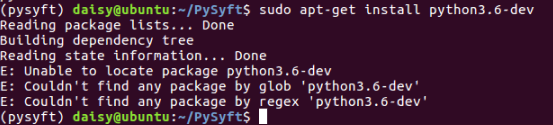
@DanyEle How can you do that successfully? I am on the Ubuntu16.04 too and I get the error that the zstd cannot be imported. And when I do as your guide I get the following error:
(pysyft) daisy@ubuntu:~/PySyft$ sudo apt-get install python3.6-dev
Reading package lists... Done
Building dependency tree
Reading state information... Done
E: Unable to locate package python3.6-dev
E: Couldn't find any package by glob 'python3.6-dev'
E: Couldn't find any package by regex 'python3.6-dev'
 keenlykeenly
on 15 Aug 2019
keenlykeenly
on 15 Aug 2019
I solved this issue by following the instructions on this page: https://discourse.mc-stan.org/t/compilation-error-in-pystan-macos-mojave/6383/3 .
I installed the package using:
sudo installer -pkg /Library/Developer/CommandLineTools/Packages/macOS_SDK_headers_for_macOS_10.14.pkg -target /.
 lolipopshock
on 23 Aug 2019
lolipopshock
on 23 Aug 2019
This was also solved by changing the gcc version to a more recent one using:
export CC=/usr/local/Cellar/gcc/9.2.0/bin/gcc-9
export CFLAGS="-Wa,-q"
and then running:
pip install --upgrade --force-reinstall zstd
LaRiffle
on 3 Sep 2019
This issue happened again on macOS Catalina and all the solutions above cannot fix it.
Same error message as above.
error: command 'gcc' failed with exit status 1
 wydwww
on 9 Oct 2019
wydwww
on 9 Oct 2019
Could you add more elements about the stacktrace? Haven't you find any useful information on stackaoverflow?
LaRiffle
on 10 Oct 2019
@LaRiffle I fixed the issue by installing the full Xcode and reinstalling the command line tools. The command pip install syft works well now. Please close this issue, thanks.
wydwww
on 10 Oct 2019
I had similar problems on my linux system. The problem is conda's gcc and ld conflict with the system's ones. Using a plain python virtualenvironment instead of conda solves the problem.
I created a PR #2662 to extend the readme on this issue.
 Titan-C
on 12 Oct 2019
Titan-C
on 12 Oct 2019
Well, it seems like conda has already some zstd header files in its include directory.
~/anaconda3/envs/pysyft/include/zstd.h
~/anaconda3/envs/pysyft/include/zstd_errors.h
When installing zstd, conda will add its include directory to gcc's search path. So when compiling zstd source file, gcc will use zstd.h in conda instead of its own.
The solution is simple, just move the headers somewhere else, install pysyft, and move them back.
 wuxibin89
on 15 Nov 2019
wuxibin89
on 15 Nov 2019
I upgraded my gcc version to 4.8.5 and also tried installing zstd using pip install --upgrade --force-reinstall zstd and also within a virtual environment. But it keeps failing with the error: command 'gcc' failed with exit status 1 error.
I'm using MacOS Mojave.
Here's the full stack trace:
gcc -Wno-unused-result -Wsign-compare -Wunreachable-code -DNDEBUG -g -fwrapv -O3 -Wall -Wstrict-prototypes -I/Users/judytraj/anaconda3/include -arch x86_64 -I/Users/judytraj/anaconda3/include -arch x86_64 -I/Users/judytraj/env/include -I/Users/judytraj/anaconda3/include/python3.6m -c zstd/lib/compress/zstd_compress.c -o build/temp.macosx-10.7-x86_64-3.6/zstd/lib/compress/zstd_compress.o -O2 -DVERSION="1.4.4.0" -DZSTD_MULTITHREAD=1 -Izstd/lib -Izstd/lib/common -Izstd/lib/compress -Izstd/lib/decompress
In file included from /Users/judytraj/anaconda3/lib/gcc/x86_64-apple-darwin11.4.2/4.8.5/include-fixed/syslimits.h:7:0,
from /Users/judytraj/anaconda3/lib/gcc/x86_64-apple-darwin11.4.2/4.8.5/include-fixed/limits.h:34,
from zstd/lib/compress/zstd_compress.c:14:
/Users/judytraj/anaconda3/lib/gcc/x86_64-apple-darwin11.4.2/4.8.5/include-fixed/limits.h:168:61: fatal error: limits.h: No such file or directory
#include_next
^
compilation terminated.
error: command 'gcc' failed with exit status 1
----------------------------------------
Command "/Users/judytraj/env/bin/python3 -u -c "import setuptools, tokenize;__file__='/private/var/folders/gl/nvvrj70x0jl8c_sjl8byd0580000gn/T/pip-install-53a8mopu/zstd/setup.py';f=getattr(tokenize, 'open', open)(__file__);code=f.read().replace('\rn', 'n');f.close();exec(compile(code, __file__, 'exec'))" install --record /private/var/folders/gl/nvvrj70x0jl8c_sjl8byd0580000gn/T/pip-record-61j83b2i/install-record.txt --single-version-externally-managed --compile --install-headers /Users/judytraj/env/include/site/python3.6/zstd" failed with error code 1 in /private/var/folders/gl/nvvrj70x0jl8c_sjl8byd0580000gn/T/pip-install-53a8mopu/zstd/
 judytraj007
on 17 Nov 2019
judytraj007
on 17 Nov 2019
In order to get rid of this _zstd_ error on Windows, you'll need to install a small package of Microsoft Visual C++ from here
After that try installing the package using pip install syft
 shuvamlal9
on 27 Feb 2020
shuvamlal9
on 27 Feb 2020
With conda environment on Mac, I found this to be useful for installing zstd, and ultimately using PySyft.
https://github.com/sergey-dryabzhinsky/python-zstd/issues/33#issuecomment-527252753
Change the gcc-version to a recent one:
export CC=/usr/local/Cellar/gcc/9.2.XX/bin/gcc-9(Check your gcc-version in this location before using the command)
export CFLAGS="-Wa,-q"Install zstd using pip.
Note: If you are using a conda environment, double-check that pip is installed in that environment. :)
pip install zstd
 guptakhil
on 7 Mar 2020
guptakhil
on 7 Mar 2020
For information, #3150 removes zstd so starting from the next release there won't be these kinds of problems 🎉
LaRiffle
on 8 Mar 2020
I have installed gcc using conda and updated it to 4.8 but things did work on MacOS Mojave 10.14.6.
The solution mentioned by in #python-zstd and @guptakhil12 works for me with a little modification. You just need to install the gcc using brew (if not installed) before exporting the new path.
Following are the steps that should do the trick.
Install gcc using brew
brew install gccChange the gcc-version to a recent the one installed by brew:
export CC=/usr/local/Cellar/gcc/9.3.0/bin/gcc-9(Note: Check your gcc-version in this location before using the command)
export CFLAGS="-Wa,-q"Install zstd using pip.
pip install zstd(This should work now)Install pysyft.
pip install syft[udacity]
 Hassamriaz
on 17 Mar 2020
Hassamriaz
on 17 Mar 2020
zstd is no longer used from release v0.2.4. I think we can close this issue for good now.
 Yugandhartripathi
on 27 Mar 2020
Yugandhartripathi
on 27 Mar 2020
Related issues
 iamtrask
·
3Comments
iamtrask
·
3Comments
 swaroopch
·
4Comments
swaroopch
·
4Comments
 s-marta
·
4Comments
s-marta
·
4Comments
 robert-wagner
·
4Comments
robert-wagner
·
4Comments
 durden62
·
3Comments
durden62
·
3Comments
Most helpful comment
Hi I tried to install pysyft on OSX Mac Mojave and have an installation error regarding zstd
I also tried
pip install --upgrade --force-reinstall zstdcommand, but I have the following error.