Pysimplegui: [ Bug - PySimpleGUI Tkinter ] Text padding not fully respected
2768
Type of Issues (Enhancement, Error, Bug, Question)
Bug
Operating System
Windows 7
Python version
3.8.5
PySimpleGUI Port and Version
sg.version='4.29.0 Released 25-Aug-2020'
sg.tclversion_detailed='8.6.9'
sg.sys.version='3.8.5 | packaged by conda-forge | (default, Jul 31 2020, 01:53:45) [MSC v.1916 64 bit (AMD64)]'
Your Experience Levels In Months or Years
2 years Python programming experience
5 years Programming experience overall
No Have used another Python GUI Framework (tkinter, Qt, etc) previously (yes/no is fine)?
You have completed these steps:
- [Y] Read instructions on how to file an Issue
- [Y] Searched through main docs http://www.PySimpleGUI.org for your problem
- [Y] Searched through the readme for your specific port if not PySimpleGUI (Qt, WX, Remi)
- [Y] Looked for Demo Programs that are similar to your goal http://www.PySimpleGUI.com
- [Y] Note that there are also Demo Programs under each port on GitHub
- [Y] Run your program outside of your debugger (from a command line)
- [Y] Searched through Issues (open and closed) to see if already reported
- [N] Try again by upgrading your PySimpleGUI.py file to use the current one on GitHub. Your problem may have already been fixed but is not yet on PyPI.
Description of Problem / Question / Details
When setting sg.Text padding to (0,0), some additional padding nevertheless is created, as shown in the below example with a series of single-character sg.Text. Unless I'm missing some other padding parameter, this seems like a bug.
The usage case for me is the desire to set the colour for each character in a string differently, to achieve a effect :rainbow: :)
Code To Duplicate
import PySimpleGUI as sg

print(f"{sg.version=}")
print(f"{sg.tclversion_detailed=}")
print(f"{sg.sys.version=}")

text = "What is your favorite color?"
textList = [sg.Text(c, pad=(0, 0)) for c in text]
layout = [[sg.Text(text)], textList]

window = sg.Window("Pick a color", layout)

while True:
    event, values = window.read()
    if event in (None, "Exit"):
        break
window.close()

 smurpau
All 10 comments
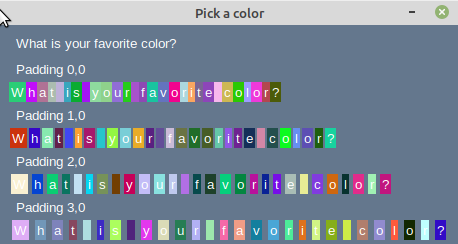
After doing a few tests I found that it appears padding doesn't mean what it may appear to mean. At least regarding the Text element.
import PySimpleGUI as sg
import random

def rcolor():
    return "#"+''.join([random.choice('0123456789ABCDEF') for j in range(6)])

text = "What is your favorite color?"
textList0 = [sg.Text(c, pad=(0, 0), background_color=rcolor()) for c in text]
textList1 = [sg.Text(c, pad=(1, 0), background_color=rcolor()) for c in text]
textList2 = [sg.Text(c, pad=(2, 0), background_color=rcolor()) for c in text]
textList3 = [sg.Text(c, pad=(3, 0), background_color=rcolor()) for c in text]

layout = [[sg.Text(text)],
           [sg.T('Padding 0,0')],textList0,
           [sg.T('Padding 1,0')],textList1,
           [sg.T('Padding 2,0')],textList2,
           [sg.T('Padding 3,0')],textList3,]

window = sg.Window("Pick a color", layout)

while True:
    event, values = window.read()
    if event in (None, "Exit"):
        break
window.close()
 mconger
on 22 Sep 2020
mconger
on 22 Sep 2020
Padding is the amount of space between elements.
In your window, it appears the amount of space _between_ the letters is the same, but the size of the letters themselves is different. That is because the font being used in your example is not a mono-spaced font so the letters themselves are of different widths.
Is this more like the window you expected?

Try setting the font when creating your window to a mono-spaced font. Courier is the most recognized but others include Consolas, fixedsys.
window = sg.Window("Pick a color", layout, font='Courier 14')
These test windows all look like creepy ransom notes!
 PySimpleGUI
on 22 Sep 2020
PySimpleGUI
on 22 Sep 2020
BTW, thank you both for posting ready-to-run, working example code. It makes working on these really nice and it's easy for everyone to try stuff out and see the results. I appreciate the time spent on them, even when they're short it still takes a little time.
PySimpleGUI
on 22 Sep 2020
BTW, thank you both for posting ready-to-run, working example code. It makes working on these really nice and it's easy for everyone to try stuff out and see the results. I appreciate the time spent on them, even when they're short it still takes a little time.
I've said it in other comments but worth restating - I get a lot of value from the code in many of the issues here. Even when someone posts code that doesn't do what they want it to I'll sometimes pick up a tip totally unrelated to their question.
mconger
on 22 Sep 2020
Yea, I do too.... Jason also does a great job of putting together examples.
I learn stuff all the time, especially beginners that are trying things that I've not thought of before or have an application that's different than any of the demos or other applications.
Here's a "weird PySimpleGUI tip of the day" for you...
I see you're willing to use the shortened names :-) I don't believe I've posted an official demo or recipe, but you can shorten window reads and element updates by dropping those calls from the line of code. In other words, by "calling" the window or the element it will call window.read or element.update.
You can do something like these if you're feeling super-lazy....
event, values = window()
It looks even stranger if you do it for update.
window['-RADIO1-'](value=True, background_color='#83142c', text_color='#f9d276')
Damn Mark, I'm still absorbing your example code. Very clever use of list comprehensions on many levels. I love this feature of Python and it's a lot of fun to be able to put it into practice by directly building a window's contents using them. Great stuff you did! I've not seen anything quite like your example.
PySimpleGUI
on 22 Sep 2020
Same with you @smurpau . I've not built a list of elements in a separate variable and then included it in a layout that I can recall:
textList = [sg.Text(c, pad=(0, 0)) for c in text]
layout = [[sg.Text(text)], textList]
I appreciate the praise, however, I believe it is probably the original poster's (OP) code you're looking at. I literally did nothing more than add the rcolor function and use his code to create a few extra lines.
The use of a variable and the "for" statement to create the sg.Text lines was totally the OP. That is another tip I have picked up too.
mconger
on 22 Sep 2020
I liked the rcolor function too... nice job of doing it without f-strings. Clever. I like clever. Just goes to show, like you pointed out, that even in the smallest bit of code there's new stuff to learn. Python's the first language I've used that has so many little tinker toy parts to play with. I got lucky choosing lists as the basic building block for layouts.
PySimpleGUI
on 22 Sep 2020
Same with you @smurpau . I've not built a list of elements in a separate variable and then included it in a layout that I can recall:
textList = [sg.Text(c, pad=(0, 0)) for c in text]
layout = [[sg.Text(text)], textList]
My GUIs are large full-screen deals with dozens of elements, so I tend to name elements/groups of elements and gradually build them up. Makes it a bit more modular and reusable.
I love the rcolor function too. To make it uber Pythonic you could replace the throwaway j with an _:
return "#"+''.join([random.choice('0123456789ABCDEF') for _ in range(6)])
I think any phrase has a creepy ransom note vibe when repeated multiple times with spaced exaggeration haha. I just picked it up from a cookbook example.
Thanks for explaining monospaced fonts. Courier does seem to be better (though less fun) than Comic Sans for this purpose, but it's still a little disappointing that the internal spacing between individual character elements adds about 25% versus a cohesive string. Oh well. Clearly this isn't a PSG text padding bug and can be closed :)
smurpau
on 23 Sep 2020
Related issues
 xuguojun168
·
3Comments
xuguojun168
·
3Comments
 DKatarakis
·
6Comments
DKatarakis
·
6Comments
 flowerbug
·
4Comments
flowerbug
·
4Comments
 ihouses
·
6Comments
ihouses
·
6Comments
 yogesh-aggarwal
·
3Comments
yogesh-aggarwal
·
3Comments
Most helpful comment
Yea, I do too.... Jason also does a great job of putting together examples.
I learn stuff all the time, especially beginners that are trying things that I've not thought of before or have an application that's different than any of the demos or other applications.
Here's a "weird PySimpleGUI tip of the day" for you...
I see you're willing to use the shortened names :-) I don't believe I've posted an official demo or recipe, but you can shorten window reads and element updates by dropping those calls from the line of code. In other words, by "calling" the window or the element it will call window.read or element.update.
You can do something like these if you're feeling super-lazy....
It looks even stranger if you do it for
update.