Pysimplegui: [ Question] My problem is infinit loop after non-responsive window
Type of Issues (Question)
Question
Operating System
Windows 10 Pro
Python version
3.8.4 (tags/v3.8.4:dfa645a, Jul 13 2020, 16:30:28) [MSC v.1926 32 bit (Intel)]
PySimpleGUI Port and Version
This is critical to know. Knowing where your PySimpleGUI.py file is located is just as important. You can get these by adding this to the top of your file and running it:
<module 'PySimpleGUI' from 'C:\\Users\\Jgil\\AppData\\Local\\Programs\\Python\\Python38-32\\lib\\site-packages\\PySimpleGUI\\__init__.py'>
4.26.0 Released 18-Jul-2020
Your Experience Levels In Months or Years
___YES______ Python programming experience
___YES______ Programming experience overall
_________ Have used another Python GUI Framework (tkinter, Qt, etc) previously (yes/no is fine)?
You have completed these steps:
- [YES ] Read instructions on how to file an Issue
- [ YES] Searched through main docs http://www.PySimpleGUI.org for your problem
- [ YES] Searched through the readme for your specific port if not PySimpleGUI (Qt, WX, Remi)
- [ YES] Looked for Demo Programs that are similar to your goal http://www.PySimpleGUI.com
- [ YES] Note that there are also Demo Programs under each port on GitHub
- [ YES] Run your program outside of your debugger (from a command line)
- [ YES] Searched through Issues (open and closed) to see if already reported
- [ YES] Try again by upgrading your PySimpleGUI.py file to use the current one on GitHub. Your problem may have already been fixed but is not yet on PyPI.
Description of Problem / Question / Details
  After finishing a daemon to get IP connectivity result, new window_write_event is created and handled at the main loop.
 However once popup message dissapear (as notification) the main loop enters in a infinite loop
Code To Duplicate
A short program that isolates and demonstrates the problem (i.e. please don't paste a link to your 400 line program.... instead paste your 10 line program in full).
Yes, it is a pain to narrow down problems, but it's part of the debugging process. Help me help you by providing something that can be executed so that work on getting you a fix or a workaround can immediately begin.
This pre-formatted code block is all set for you to paste in your bit of code:
import PySimpleGUI as sg
print(sg)
print(sg.version)

##

import PySimpleGUI as Sg  # For getting PySimpleGUI
import platform  # For getting the operating system name
import subprocess  # For executing a shell command
import threading  # For threading and daemons
import time  # For scheduler time
import gc  # For garbage collector


def ping_result_function(result, progressbar, window1):
    """
            Determine the current ping result from scheduler
            """
    if result is True:

        # status_result_update(window, 1)
        Sg.popup_notify('Connectivity Result', 'The device is reachable!', )
    else:

        # status_result_update(window, 2)
        Sg.popup('Connectivity Result', 'The device is unreachable!', button_type=4, auto_close=False, non_blocking=True,
                 line_width=30, no_titlebar=False, font='Lucida', background_color='Red', text_color='White',)

    window1[progressbar].update_bar(0)


def ping(host):
    """
    Returns True if host (str) responds to a ping request.
    Remember that a host may not respond to a ping (ICMP) request even if the host name is valid.
    """
    # Option for the number of packets as a function of
    param = '-n' if platform.system().lower() == 'windows' else '-c'
    # Building the command. Ex: "ping -c 1 google.com"
    command = ['ping', param, '4', host]
    return subprocess.call(command) == 0


def progress_bar(window1, option):
    """
        Update progress status bar. Other options are deleted
        """
    progressbar = '  '
    if option == 1:
        progressbar = 'Verification_Progressbar'

    for i in range(1000):
        window1[progressbar].update_bar(i + 1)

    return progressbar


def ping_thread(ip, option, window1):
    time.sleep(5)
    result = ping(ip)
    result1 = progress_bar(window1, option)
    result2 = result, result1
    print(result2)
    window.write_event_value('-PING_RESULT-', result2)
    return


def ping_long_function_thread(ip, option, window1):
    threading.Thread(target=ping_thread, args=(ip, option, window1), daemon=True).start()


verify_button = [[Sg.Button(key='Check', border_width=0, size=(10, 1), disabled=False,)]]


layout = [[Sg.Col([[Sg.Text('Enter the IP of the Device '), Sg.Input(key='-IP-V-', size=(20, 20)),
                   Sg.Checkbox('Connectivity Check', key='Connectivity_Check_v', enable_events=True)],
                  [Sg.ProgressBar(1000, orientation='h', size=(40, 30), key='Verification_Progressbar')], ],
                 key='-COL-VER-', visible=True)]]


window = Sg.Window('Window Test', layout, size=(500, 410), margins=(3, 3), border_depth=1, alpha_channel=0.9)

while True:

    events, values = window.read(timeout=100)
    print(events, values)

    # ############################ WINDOW CLOSED EVENT #############################

    if events in (Sg.WIN_CLOSED, 'Exit'):
        break

    # ##################  PING  HANDLING EVENT #########################

    if events == '-PING_RESULT-':

        if values['-PING_RESULT-'][0] is True:

            Sg.popup_notify('Connectivity Result', 'The device is reachable!', display_duration_in_ms=3000 )
        else:

            Sg.popup('Connectivity Result', 'The device is unreachable!', button_type=4, auto_close=False,
                     non_blocking=True,
                     line_width=30, no_titlebar=False, font='Lucida', background_color='Red', text_color='White', )

        window[values['-PING_RESULT-'][1]].update_bar(0)

    # ################## CONNECTIVITY HANDLING EVENT ###############################

    if events == 'Connectivity_Check_v':
        ping_long_function_thread(values['-IP-V-'], 1, window)


var = window.close
layout_main = None
window = None
gc.collect()
 jgilcorrea
All 57 comments
You can't make calls like update from within a thread. It appears that your thread is making a call to update_bar. Is this the point that you're seeing the problem?
 PySimpleGUI
on 24 Aug 2020
PySimpleGUI
on 24 Aug 2020
Yes indeed! In fact, I could not see this before!! So, your suggestion is to make the bar update once thread is finished?
jgilcorrea
on 24 Aug 2020
But if the result is unreachable and OK , CANCEL or X is pressed, then there is not this kind of behavior. Why is this occuring?
jgilcorrea
on 24 Aug 2020
You can't make calls to tkinter (i.e. PySimpleGUI) from a thread. update_bar in particular would be a bad call to make from a thread. tkinter has problems if it's not running as the mainthread. This is why write_event_value was created. You can do something similar yourself rather than using that mechanism. This function uses a Python Queue to communicate between a thread and the mainthread. PySimpleGUI is doing that communication for you using a Queue when you call write_event_value.
PySimpleGUI
on 24 Aug 2020
So, better if the update is called outside the Thread once is finished. Am I understanding you correctly?
jgilcorrea
on 24 Aug 2020
But If the idea it is to simulate the progress of the processing, what should I do for better display then?
jgilcorrea
on 24 Aug 2020
Yes. If you're going to update an element, do it outside the thread.
PySimpleGUI
on 24 Aug 2020
Take a look at some of the demo programs that show how to run long operations using threads. There are examples of how to do this kind of operation. The thread needs to communicate to your main event loop. It's within that event loop that you do the updates. In the past, applications create some kind of communications mechanism between the thread and the event loop. Not long ago the write call was added so the application wouldn't need to do this and PySimpleGUI would do it for you instead. It's a classic GUI threading problem that you run into with most GUI frameworks, tkinter especially.
PySimpleGUI
on 24 Aug 2020
This demo shows the kind of operation you're trying to perform.... showing the progress of a thread using a progress bar.
PySimpleGUI
on 24 Aug 2020
Take a look at some of the demo programs that show how to run long operations using threads. There are examples of how to do this kind of operation. The thread needs to communicate to your main event loop. It's within that event loop that you do the updates. In the past, applications create some kind of communications mechanism between the thread and the event loop. Not long ago the write call was added so the application wouldn't need to do this and PySimpleGUI would do it for you instead. It's a classic GUI threading problem that you run into with most GUI frameworks, tkinter especially.
I simply want to thank you for your patient and and support 💯
jgilcorrea
on 24 Aug 2020
I have checked some examples at Demo but it was sometimes difficullt to read/understand(for me) during multi-task events.
jgilcorrea
on 24 Aug 2020
Thank you very much indeed once again! I promise next time question, I am going to triple check the Demo programs which they are really very well done!!
jgilcorrea
on 24 Aug 2020
You're quite welcome. Thank you for taking the time to fill in the Issue form, submit an example, etc. I know it's a bit of a pain, but it helps having all of the data collected at one time and it gives you a list of stuff to check that may lead to you finding an answer on your own, without waiting for help.
Hopefully the demo will give you a design to follow that works for you. They're the best place to get "how to" examples for a wide variety of topics. The Cookbook is good for this as well, although not as many examples.
PySimpleGUI
on 24 Aug 2020
I hope I can finish this application soon and I hope you can help me to improve this as well. It will be my pleasure to receive your comments or suggestions
jgilcorrea
on 24 Aug 2020
Just a quick update: I have tottally left the progress bar update out of the Thread and only have updated it once window_write_events generates the new events inside the main loop. But I am still having the same issue. Is it mean I have to dig more into the Demo? by using communication with main loop? Is it correct?
jgilcorrea
on 24 Aug 2020
Just a quick update: I have tottally left the progress bar update out of the Thread and only have updated it once window_write_events generates the new events inside the main loop. But I am still having the same issue. Is it mean I have to dig more into the Demo? by using communication with main loop? Is it correct?
The same behavior you just explained to me also applies for popups?
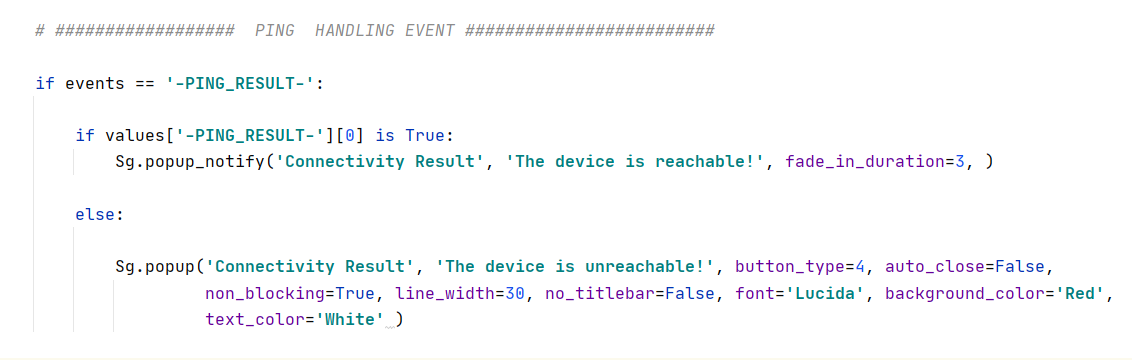
I also left both popups and also enters in a infinit loop 👎 . Really my appologies if I am bothering too much but I just want to understand better
jgilcorrea
on 24 Aug 2020
What do you mean by enters infinite loop? Does the call not return? Can you add print statements to ensure you understand the path your program is taking?
What I'm looking for is a simple program that demonstrates the specific problem you think that PySimpleGUI has without it being a test of your overall program. I can help debug PySimpleGUI problems.... but not overall application problems if that makes sense. By this I mean remove calls to ping, etc. If you think there's a problem with threads communication correctly with PySimpleGUI, then limit the example to just a thread.
popups are fine to call from your main program. You can't call them directly from a thread which it didn't appear you were trying to do.
I just want to understand better
Do you have a specific question?
PySimpleGUI
on 24 Aug 2020
Let me just try to explain you better step by step:
1- Please run this program:
import PySimpleGUI as Sg  # For getting PySimpleGUI
import platform  # For getting the operating system name
import subprocess  # For executing a shell command
import threading  # For threading and daemons
import time  # For scheduler time
import gc  # For garbage collector


def ping(host):
    """
    Returns True if host (str) responds to a ping request.
    Remember that a host may not respond to a ping (ICMP) request even if the host name is valid.
    """
    # Option for the number of packets as a function of
    param = '-n' if platform.system().lower() == 'windows' else '-c'
    # Building the command. Ex: "ping -c 1 google.com"
    command = ['ping', param, '4', host]
    return subprocess.call(command) == 0


def ping_thread(ip, option, window1):
    time.sleep(5)
    result1 = ping(ip)
    window.write_event_value('-PING_RESULT-', result1)
    return


def ping_long_function_thread(ip, option, window1):
    threading.Thread(target=ping_thread, args=(ip, option, window1), daemon=True).start()


verify_button = [[Sg.Button(key='Check', border_width=0, size=(10, 1), disabled=False,)]]


layout = [[Sg.Col([[Sg.Text('Enter the IP of the Device '), Sg.Input(key='-IP-V-', size=(20, 20)),
                   Sg.Checkbox('Connectivity Check', key='Connectivity_Check_v', enable_events=True)],
                  [Sg.ProgressBar(1000, orientation='h', size=(40, 30), key='Verification_Progressbar')], ],
                 key='-COL-VER-', visible=True)]]


window = Sg.Window('Window Test', layout, size=(500, 410), margins=(3, 3), border_depth=1, alpha_channel=0.9)

while True:

    events, values = window.read(timeout=100)
    print(events, values)

    # ############################ WINDOW CLOSED EVENT #############################

    if events in (Sg.WIN_CLOSED, 'Exit'):
        break

    # ##################  PING  HANDLING EVENT #########################

    if events == '-PING_RESULT-':

         Sg.popup_notify('Connectivity Result', 'The device is reachable!', fade_in_duration=3, )

    # ################## CONNECTIVITY HANDLING EVENT ###############################

    if events == 'Connectivity_Check_v':
        ping_long_function_thread(values['-IP-V-'], 1, window)


var = window.close
layout_main = None
window = None
gc.collect()
2- Leave the Input empty and click checkbox named connectivity check:
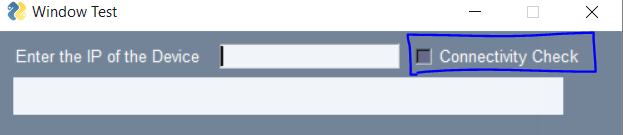
3- Check the events generated as '-PING_RESULT-' and check popup is display after this is done:

4- After you check the events, you will find the main window just dissapears with tons of None events being not possible to recover the main window:
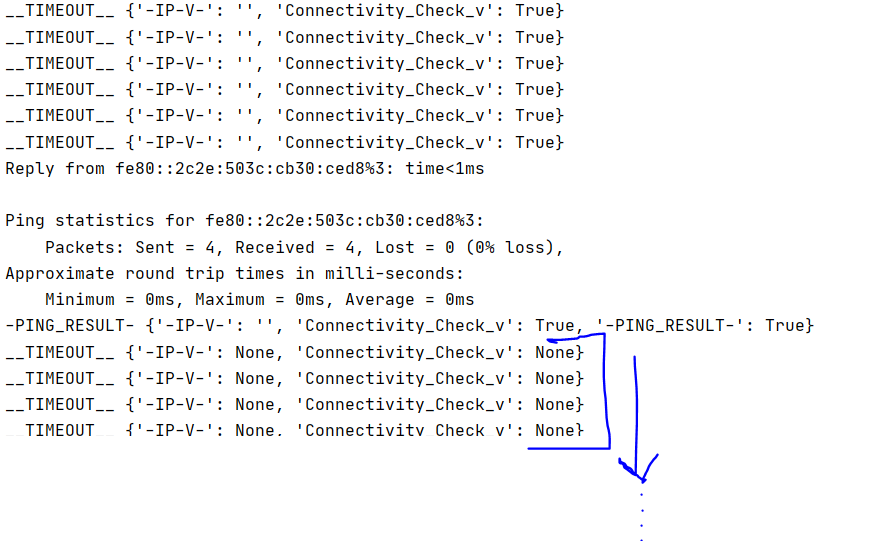
This is what I meant by infinit loop :) . Now that makes more sense?
jgilcorrea
on 24 Aug 2020
I don't get the same result. It continues to work for me.
But you shouldn't be getting a None result. That part looks odd.
Can you try without the notify popup? Just do a print there instead or some other kind of autoclose popup? The notify popup isn't used much so it may have a problem that I've not seen that's causing problems with the main window.
PySimpleGUI
on 24 Aug 2020
In theory you shouldn't need to run your event loop with a timeout. It can safely pend, waiting for the thread to complete. You'll need a timeout if you're going to be polling for something, but I don't see that in this example. You're using the write function which removes the need for a polling loop with a timeout.
PySimpleGUI
on 24 Aug 2020
I see you're running 4.26.0. You may want to upgrade to the latest which is 4.28.0 just to be sure you're running the latest release and that something wasn't fixed in between.
PySimpleGUI
on 24 Aug 2020
WIN10 / Python 3.8.3 / PySimpleGUI 4.28.0.15
Short code here:
import PySimpleGUI as sg  # For getting PySimpleGUI
import platform  # For getting the operating system name
import subprocess  # For executing a shell command
import threading  # For threading and daemons
import time  # For scheduler time

def ping(host):
    """
    Returns True if host (str) responds to a ping request.
    Remember that a host may not respond to a ping (ICMP) request even if the host name is valid.
    """
    # Option for the number of packets as a function of
    param = '-n' if platform.system().lower() == 'windows' else '-c'
    # Building the command. Ex: "ping -c 1 google.com"
    command = ['ping', param, '4', host]
    return subprocess.call(command) == 0

# ================================
# PySimpleGUI code start from here
# ================================

def ping_thread():
    time.sleep(1)
    ping("192.168.1.1")   # Get trouble here !!!
    result = True, 'Verification_Progressbar'
    window.write_event_value('Result', result)
    return

layout = [
    [sg.Button('Check')],
    [sg.ProgressBar(1000, orientation='h', size=(40, 30), key='Progress_bar')],
]

window = sg.Window('Window Test', layout)

while True:

    event, values = window.read(timeout=1000)
    print(event, values)
    if event == sg.WINDOW_CLOSED:
        break
    elif event == 'Check':
        threading.Thread(target=ping_thread, daemon=True).start()
    elif event == 'Result':
        for i in range(1000):
            window['Progress_bar'].update_bar(i + 1)
        sg.popup_notify('Connectivity Result', 'The device is reachable!',
            fade_in_duration=3 )
        window['Progress_bar'].update_bar(0)

window.close()
No matter timeout set or not, after ping("192,168,1,1"), while loop failed to work and always print __TIMEOUT__, {} for event, values here, again and agin. At the same time, main window disappeared.
If remark line __ping("192,168,1,1")__, it will work fine.
Console output:
__TIMEOUT__ {}
Check {}     <------- Check Button event
__TIMEOUT__ {}

Pinging 192.168.1.1 with 32 bytes of data:    <-------------
Reply from 10.79.250.2: Destination net unreachable.        |
__TIMEOUT__ {}                                              |
Reply from 10.79.250.2: Destination net unreachable.        |
__TIMEOUT__ {}                                              |
Reply from 10.79.250.2: Destination net unreachable.        | ping('192.168.1.1')
__TIMEOUT__ {}                                              |
Reply from 10.79.250.2: Destination net unreachable.        |
                                                            |
Ping statistics for 192.168.1.1:                            |
    Packets: Sent = 4, Received = 4, Lost = 0 (0% loss), <--
Result {'Result': (True, 'Verification_Progressbar')}  <------ Result Event
__TIMEOUT__ {}    <----- window disapeared, and all the same event, values
__TIMEOUT__ {}           shown in very short time from now on and non-stop.
__TIMEOUT__ {}
__TIMEOUT__ {}
Not sure what's wrong for using subprocess.call(['ping', '-n', '4', '192.168.1.1']) in threading.
 jason990420
on 24 Aug 2020
jason990420
on 24 Aug 2020
This is exactly what is happening to me!! Something I am going to do it is to upgrade pyCharm or change the function to check the behavior then. But if i find something i will simply let you know, unless you have more suggestions ?
jgilcorrea
on 24 Aug 2020
I think I know what might be happening. The process is being "forked". I think this will cause a duplication of the current environment. There are a couple things that may help.
- Make sure nothing runs outside of a function. Place your code that makes the window, runs the event loop, etc, into a function
main(). Add theif __name__== '__main__': main()at the bottom of the file.
This is the demo that does a multiprocessed shell command for example that uses subprocess.call:
import subprocess
import PySimpleGUI as sg
import threading


"""
    Demo - Run a shell command while displaying an animated GIF to inform the user the
    program is still running.
    If you have a GUI and you start a subprocess to run a shell command, the GUI essentually
    locks up and often the operation system will off to terminate the program for you.

    This demo fixes this situation by running the subprocess as a Thread.   This enables
    the subproces to run async to the main program.  The main program then simply runs a loop,
    waiting for the thread to complete running.

    The output from the subprocess is saved and displayed in a scrolled popup.
"""


def process_thread():
    global proc
    proc = subprocess.run('pip list', shell=True, stdout=subprocess.PIPE)


def main():
    thread = threading.Thread(target=process_thread, daemon=True)
    thread.start()

    while True:
        sg.popup_animated(sg.DEFAULT_BASE64_LOADING_GIF, 'Loading list of packages', time_between_frames=100)
        thread.join(timeout=.1)
        if not thread.is_alive():
            break
    sg.popup_animated(None)

    output = proc.__str__().replace('\\r\\n', '\n')
    sg.popup_scrolled(output, font='Courier 10')


if __name__ == '__main__':
    main()
- Try using popen to start the subprocess. This bit of code is from the Demo_Script_Launcher and is what is used a number of places to run a subprocess and get the results. It outputs to the window directly which you don't want/need. It's more the popen I'm talking about trying.
def runCommand(cmd, timeout=None, window=None):
    nop = None
    """ run shell command
    @param cmd: command to execute
    @param timeout: timeout for command execution
    @param window: the PySimpleGUI window that the output is going to (needed to do refresh on)
    @return: (return code from command, command output)
    """
    p = subprocess.Popen(cmd, shell=True, stdout=subprocess.PIPE, stderr=subprocess.STDOUT)
    output = ''
    for line in p.stdout:
        line = line.decode(errors='replace' if (sys.version_info) < (3, 5) else 'backslashreplace').rstrip()
        output += line
        print(line)
        window.refresh() if window else nop        # yes, a 1-line if, so shoot me

    retval = p.wait(timeout)
    return (retval, output)
I think placing the code into a main function will fix this.
PySimpleGUI
on 25 Aug 2020
I've made a change and checked into GitHub that might impact this problem. I no longer close the "hidden master window" when there are no other windows detected open. This might have an impact on this problem. I think this problem is still one of a duplicated / forked environment due to the multiprocess that's causing the new process to interfere with the old one. Placing all the of code into functions should help this. But, in case it doesn't getting the new PySimpleGUI.py from GitHub might. Version is 4.28.0.22
PySimpleGUI
on 25 Aug 2020
It seems work fine for my code after upgrade to 4.28.0.22
No __name__ checked, also no runCommand.
jason990420
on 25 Aug 2020
I was just about to comment you about previous statements 👍 . I just left few items on ping function regarless of the IP value per se and I could see the same behavior. However , I have modifed popup_notify to pupup_no_buttons message and it seems to work fine. But still I have the doubt about what is causing this. Have a look these two codes:
Example 1:
import PySimpleGUI as Sg  # For getting PySimpleGUI
import threading  # For threading and daemons
import time  # For scheduler time
import gc  # For garbage collector


def ping_thread(ip, option, window1):
    time.sleep(10)
    print('FINISH')
    window1.write_event_value('-PING_RESULT-', False)
    return


def ping_long_function_thread(ip, option, window1):
    threading.Thread(target=ping_thread, args=(ip, option, window1), daemon=True).start()


verify_button = [[Sg.Button(key='Check', border_width=0, size=(10, 1), disabled=False,)]]


layout = [[Sg.Col([[Sg.Text('Enter the IP of the Device '), Sg.Input(key='-IP-V-', size=(20, 20)),
                   Sg.Checkbox('Connectivity Check', key='Connectivity_Check_v', enable_events=True)],
                  [Sg.ProgressBar(1000, orientation='h', size=(40, 30), key='Verification_Progressbar')], ],
                 key='-COL-VER-', visible=True)]]


window = Sg.Window('Window Test', layout, size=(500, 410), margins=(3, 3), border_depth=1, alpha_channel=0.9)

while True:

    events, values = window.read()
    print(events, values)

    # ############################ WINDOW CLOSED EVENT #############################

    if events in (Sg.WIN_CLOSED, 'Exit'):
        break

    # ##################  PING  HANDLING EVENT #########################

    if events == '-PING_RESULT-':

          Sg.popup_notify('Connectivity Result', 'The device is reachable!', fade_in_duration=3, )

    # ################## CONNECTIVITY HANDLING EVENT ###############################

    if events == 'Connectivity_Check_v':
        ping_long_function_thread(values['-IP-V-'], 1, window)

var = window.close
layout_main = None
window = None
gc.collect()


"

Example 2:

"
import PySimpleGUI as Sg  # For getting PySimpleGUI
import threading  # For threading and daemons
import time  # For scheduler time
import gc  # For garbage collector


def ping_thread(ip, option, window1):
    time.sleep(10)
    print('FINISH')
    window1.write_event_value('-PING_RESULT-', False)
    return


def ping_long_function_thread(ip, option, window1):
    threading.Thread(target=ping_thread, args=(ip, option, window1), daemon=True).start()


verify_button = [[Sg.Button(key='Check', border_width=0, size=(10, 1), disabled=False,)]]


layout = [[Sg.Col([[Sg.Text('Enter the IP of the Device '), Sg.Input(key='-IP-V-', size=(20, 20)),
                   Sg.Checkbox('Connectivity Check', key='Connectivity_Check_v', enable_events=True)],
                  [Sg.ProgressBar(1000, orientation='h', size=(40, 30), key='Verification_Progressbar')], ],
                 key='-COL-VER-', visible=True)]]


window = Sg.Window('Window Test', layout, size=(500, 410), margins=(3, 3), border_depth=1, alpha_channel=0.9)

while True:

    events, values = window.read()
    print(events, values)

    # ############################ WINDOW CLOSED EVENT #############################

    if events in (Sg.WIN_CLOSED, 'Exit'):
        break

    # ##################  PING  HANDLING EVENT #########################

    if events == '-PING_RESULT-':
         Sg.popup_no_buttons('Connectivity Result', 'The device is reachable')

    # ################## CONNECTIVITY HANDLING EVENT ###############################

    if events == 'Connectivity_Check_v':
        ping_long_function_thread(values['-IP-V-'], 1, window)

var = window.close
layout_main = None
window = None
gc.collect()
The only difference is the popup message type: Example 1 uses popup_notify and Example 2 uses popup_no_buttons instead.
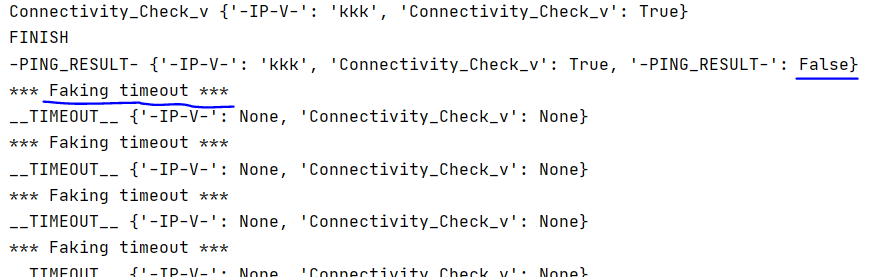
However if I change to popup only with OK button:

Then I got the faking timeout too:
[ EDITED for formatting ] - please format your code when pasting code into a comment. Edit this comment to see what you need to add.
jgilcorrea
on 25 Aug 2020
It seems work fine for my code after upgrade to 4.28.0.22
No __name__ checked, also no runCommand.
Let me check this version out too
jgilcorrea
on 25 Aug 2020
The faking timeout is a clue.
_Definitely_ place your code that is sitting outside of a function into a main function and add the name check. This is critical for programs that are calling subprocess as a "fork" occurs that duplicates your environment and will execute this code outside of the function. _It's really important you try this change._
PySimpleGUI
on 25 Aug 2020
When pasting code, place these strings around your code or else it won't format correctly.
```python
code goes here
```
That's three backward quotes that are needed.
PySimpleGUI
on 25 Aug 2020
The faking timeout is a clue.
_Definitely_ place your code that is sitting outside of a function into a main function and add the name check. This is critical for programs that are calling subprocess as a "fork" occurs that duplicates your environment and will execute this code outside of the function. _It's really important you try this change._
That's why I have started to dig into this because I could not where I was running a subprocess. As you saw even without the "PING" function the same behavior was ocurring.
jgilcorrea
on 25 Aug 2020
When pasting code, place these strings around your code or else it won't format correctly.
code goes hereThat's three backward quotes that are needed.
My bad I thought i did it correctly 👎 .
jgilcorrea
on 25 Aug 2020
It seems work fine for my code after upgrade to 4.28.0.22
No name checked, also no runCommand.Let me check this version out too
After upgrading to the version you just shared, it seems to work fine now. Simply thank you
jgilcorrea
on 25 Aug 2020
Not any faking timeout or missbehavior. You just are awesome and really thanks for helping me this out
jgilcorrea
on 25 Aug 2020
Did you place your code into a main function? I'm pretty sure the root problem to this is the forking of your code when you make the subprocess call.
PySimpleGUI
on 25 Aug 2020
Did you place your code into a main function? I'm pretty sure the root problem to this is the forking of your code when you make the subprocess call.
Yes, I have placed the code into a main function but I ran into the same behavior. After, I upgraded PSG version then the behavior is not ocurring anymore
jgilcorrea
on 25 Aug 2020
Did you place your code into a main function? I'm pretty sure the root problem to this is the forking of your code when you make the subprocess call.
Yes, I have placed the code into a main function but I ran into the same behavior. After, I upgraded PSG version then the behavior is not ocurring anymore
The behavior was only present when buttons or auto_close funtions were enabled and not frame enabled. But if frame is enabled and buttons or auto_close functions were disabled then there is no chance for the fork to be noticed. (or at least what I have seen on my tests)
jgilcorrea
on 25 Aug 2020
I'm concerned that the upgrade simply changed the timing of things and that it's basically luck that's enabling it to work at the moment. You have to ensure that the PySimpleGUI code isn't duplicated as part of the multiprocessing run. What do you mean by "frame enabled"?
PySimpleGUI
on 25 Aug 2020
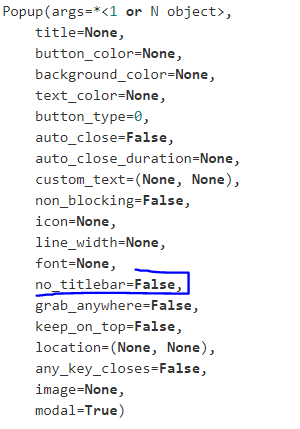
Got it!! Prior open this ticket, I just figure this out by enabling frame and leaving the buttons out of the screen. What I meant by "frame" is setting the no_tittle_bar in True:

jgilcorrea
on 25 Aug 2020
OK, no titlebar. That's the right term.
There was a change added over the weekend to the no-titlebar code. On the Raspberry Pi a no-titlebar window didn't receive focus. I'm wondering if the fact the window didn't have focus have anything to do with the subprocess. Doesn't make sense that it would, but that's the only difference I can think of where no titlebar would have an impact.
Can you summarize again what role no titlebar played? Was it on the popup only that the no titlebar made a difference? I'm getting confused as to what variables had what kind of impact on the problem. Having a titlebar or not shouldn't have an impact on the ability to run a subprocess, but that's the impression I got from your statement that "no chance for the fork to be noticed". Maybe I should simply ask what you mean by this.
PySimpleGUI
on 25 Aug 2020
You are understanding correctly. But let me just summarize in most simple steps for you:
Step 1: I ran the following program from the beggining in order to display a kind or error when an "Error" occur. However, I
realized (after clicking on error button) that the program just received a None event entering in "infinit loop" (as I
stated before). PD: This behavior occurred with all the buttons choices as: OK/CANCEL, OK, ERROR, ERROR/CANCEL, etc
import PySimpleGUI as Sg  # For getting PySimpleGUI
import threading  # For threading and daemons
import time  # For scheduler time
import gc  # For garbage collector


def ping_thread(ip, option, window1):
    time.sleep(10)
    print('FINISH')
    window1.write_event_value('-PING_RESULT-', False)
    return


def ping_long_function_thread(ip, option, window1):
    threading.Thread(target=ping_thread, args=(ip, option, window1), daemon=True).start()


verify_button = [[Sg.Button(key='Check', border_width=0, size=(10, 1), disabled=False,)]]


layout = [[Sg.Col([[Sg.Text('Enter the IP of the Device '), Sg.Input(key='-IP-V-', size=(20, 20)),
                   Sg.Checkbox('Connectivity Check', key='Connectivity_Check_v', enable_events=True)],
                  [Sg.ProgressBar(1000, orientation='h', size=(40, 30), key='Verification_Progressbar')], ],
                 key='-COL-VER-', visible=True)]]


window = Sg.Window('Window Test', layout, size=(500, 410), margins=(3, 3), border_depth=1, alpha_channel=0.9)

while True:

    events, values = window.read()
    print(events, values)

    # ############################ WINDOW CLOSED EVENT #############################

    if events in (Sg.WIN_CLOSED, 'Exit'):
        break

    # ##################  PING  HANDLING EVENT #########################

    if events == '-PING_RESULT-':

          # with popup_error
         Sg.popup_error('Connectivity Result', 'The device is reachable', )

    # ################## CONNECTIVITY HANDLING EVENT ###############################

    if events == 'Connectivity_Check_v':
        ping_long_function_thread(values['-IP-V-'], 1, window)

var = window.close
layout_main = None
window = None
gc.collect()
Step 2: Due to previous step (Step 1) , I have decided to check what would happen when "X" button from the title_bar was
pressed and I have seen the None event was not generated.
Step 3: I have decided to modify the popup window with no buttons and just leave the "X" button
Step 4: Just checking some functionalities from the popup message, I have decided to modify the popup to hide it automatically
from the main window after the result appeared
Then, I just change some values such as :
# ##################  PING  HANDLING EVENT #########################

    if events == '-PING_RESULT-':

         Sg.popup('Connectivity Result', 'The device is reachable', auto_close=True, no_titlebar=True)

    # ################## CONNECTIVITY HANDLING EVENT ###############################
Step 5: I have seen the same behavior (explained in Step 1) and I have decided to open a ticket to check this out just to verify
no bugs or any other mistake on my hands 👍
Now make more sense right?
jgilcorrea
on 25 Aug 2020
OK, no titlebar. That's the right term.
There was a change added over the weekend to the no-titlebar code. On the Raspberry Pi a no-titlebar window didn't receive focus. I'm wondering if the fact the window didn't have focus have anything to do with the subprocess. Doesn't make sense that it would, but that's the only difference I can think of where no titlebar would have an impact.Can you summarize again what role no titlebar played? Was it on the popup only that the no titlebar made a difference? I'm getting confused as to what variables had what kind of impact on the problem. Having a titlebar or not shouldn't have an impact on the ability to run a subprocess, but that's the impression I got from your statement that "no chance for the fork to be noticed". Maybe I should simply ask what you mean by this.
I also agree with you in getting confused but I hope my summary helps you to understand what I have written before 🔢
jgilcorrea
on 25 Aug 2020
There's a big difference in the last example than the one with the ticket initially.... the subprocess call. This is what I've viewed as being the critical problem throughout and the reason for wanting to place all of the code inside of a main function so that a fork in the process didn't result in more calls to PySimpleGUI.
PySimpleGUI
on 25 Aug 2020
There's a big difference in the last example than the one with the ticket initially.... the subprocess call. This is what I've viewed as being the critical problem throughout and the reason for wanting to place all of the code inside of a main function so that a fork in the process didn't result in more calls to PySimpleGUI.
Well, I agree but the last example just avoid the subprocess call due to I did not clearly got subprocess stuff. So, I have decided to leave this out and show you (with a short example) the behavior 👍
jgilcorrea
on 25 Aug 2020
I also used another method to generate the PING function but I also noticed as you said: "better if I just place a simple code that shows exactly what I am seeing" :)
jgilcorrea
on 25 Aug 2020
The simpler the better. I wasn't aware that a version without a subprocess call has a problem.
Does the last example you posted, without a subprocess call, exhibit the problem?
I've not seen the error on my system using the last posted examples. Can you post the version of your code that does not contain a subprocess call but does show a problem with PySimpleGUI?
PySimpleGUI
on 25 Aug 2020
There is also a new version of PySimpleGUI I would like you to try. It's version 4.28.0.23. There was a bug that started in version 4.27.4 that was just fixed. It impacted certain programs that used multiple windows. I doubt it'll have a negative impact, but since it's a change to how windows are created, it would be good to test it against since this is going to become the new release shortly.
PySimpleGUI
on 25 Aug 2020
The simpler the better. I wasn't aware that a version without a subprocess call has a problem.
Does the last example you posted, without a subprocess call, exhibit the problem?
I've not seen the error on my system using the last posted examples. Can you post the version of your code that does not contain a subprocess call but does show a problem with PySimpleGUI?
Indeed! The last code I have posted without subprocess call does exhibit the problem! And as I have stated before, this behavior just disappeared right after I have upgraded the PSG version to 4.28.0.22 💯
jgilcorrea
on 25 Aug 2020
There is also a new version of PySimpleGUI I would like you to try. It's version 4.28.0.23. There was a bug that started in version 4.27.4 that was just fixed. It impacted certain programs that used multiple windows. I doubt it'll have a negative impact, but since it's a change to how windows are created, it would be good to test it against since this is going to become the new release shortly.
I will just try this out and keep you posted about the results. I will simply put previous code on it and see 👍
jgilcorrea
on 25 Aug 2020
Thank you for clarifying. I see a faking timeout message but that doesn't necessarily mean there's an error. It's more a diagnostic message for me that a somewhat set of things have happened.
Hopefully the newest version won't cause problems for you!
PySimpleGUI
on 25 Aug 2020
Just to be clear, this is the code I'm testing with. I'm using a popup with no titlebar as I believe this is where you are seeing problems:
import PySimpleGUI as Sg  # For getting PySimpleGUI
import threading  # For threading and daemons
import time  # For scheduler time
import gc  # For garbage collector


def ping_thread(ip, option, window1):
    time.sleep(10)
    print('FINISH')
    window1.write_event_value('-PING_RESULT-', False)
    return


def ping_long_function_thread(ip, option, window1):
    threading.Thread(target=ping_thread, args=(ip, option, window1), daemon=True).start()


verify_button = [[Sg.Button(key='Check', border_width=0, size=(10, 1), disabled=False,)]]


layout = [[Sg.Col([[Sg.Text('Enter the IP of the Device '), Sg.Input(key='-IP-V-', size=(20, 20)),
                   Sg.Checkbox('Connectivity Check', key='Connectivity_Check_v', enable_events=True)],
                  [Sg.ProgressBar(1000, orientation='h', size=(40, 30), key='Verification_Progressbar')], ],
                 key='-COL-VER-', visible=True)]]


window = Sg.Window('Window Test', layout, size=(500, 410), margins=(3, 3), border_depth=1, alpha_channel=0.9)

while True:

    events, values = window.read()
    print(events, values)

    # ############################ WINDOW CLOSED EVENT #############################

    if events in (Sg.WIN_CLOSED, 'Exit'):
        break

    # ##################  PING  HANDLING EVENT #########################

    if events == '-PING_RESULT-':

          # with popup_error
        Sg.popup('Connectivity Result', 'The device is reachable', auto_close=True, no_titlebar=True)

        # Sg.popup_no_titlebar('Connectivity Result', 'The device is reachable', )

    # ################## CONNECTIVITY HANDLING EVENT ###############################

    if events == 'Connectivity_Check_v':
        ping_long_function_thread(values['-IP-V-'], 1, window)

var = window.close
layout_main = None
window = None
gc.collect()
Just to be clear, this is the code I'm testing with. I'm using a popup with no titlebar as I believe this is where you are seeing problems:
import PySimpleGUI as Sg  # For getting PySimpleGUI
import threading  # For threading and daemons
import time  # For scheduler time
import gc  # For garbage collector


def ping_thread(ip, option, window1):
    time.sleep(10)
    print('FINISH')
    window1.write_event_value('-PING_RESULT-', False)
    return


def ping_long_function_thread(ip, option, window1):
    threading.Thread(target=ping_thread, args=(ip, option, window1), daemon=True).start()


verify_button = [[Sg.Button(key='Check', border_width=0, size=(10, 1), disabled=False,)]]


layout = [[Sg.Col([[Sg.Text('Enter the IP of the Device '), Sg.Input(key='-IP-V-', size=(20, 20)),
                   Sg.Checkbox('Connectivity Check', key='Connectivity_Check_v', enable_events=True)],
                  [Sg.ProgressBar(1000, orientation='h', size=(40, 30), key='Verification_Progressbar')], ],
                 key='-COL-VER-', visible=True)]]


window = Sg.Window('Window Test', layout, size=(500, 410), margins=(3, 3), border_depth=1, alpha_channel=0.9)

while True:

    events, values = window.read()
    print(events, values)

    # ############################ WINDOW CLOSED EVENT #############################

    if events in (Sg.WIN_CLOSED, 'Exit'):
        break

    # ##################  PING  HANDLING EVENT #########################

    if events == '-PING_RESULT-':

          # with popup_error
        Sg.popup('Connectivity Result', 'The device is reachable', auto_close=True, no_titlebar=True)

        # Sg.popup_no_titlebar('Connectivity Result', 'The device is reachable', )

    # ################## CONNECTIVITY HANDLING EVENT ###############################

    if events == 'Connectivity_Check_v':
        ping_long_function_thread(values['-IP-V-'], 1, window)

var = window.close
layout_main = None
window = None
gc.collect()
That's totally correct! Previous code is what I used to simulate the previous behavior 💯
jgilcorrea
on 25 Aug 2020
I just upgrade to 4.28.0.23 version and so far it is perfectly working! You are a master 🥇 Thanks for giving me the chance to test this version too 👍 . I have seen you have corrected some windows issues I have seen before in previous tickets 🥇 . Simply thanks
jgilcorrea
on 25 Aug 2020
Awesome! I'm going to try and get this version posted to PyPI since it fixes a lot of stuff and there are tons of new features. I wanted to get these last couple of problems nailed first and it seems like the big items are fixed. I'm glad your code is working ok with it! Whew
PySimpleGUI
on 25 Aug 2020
Awesome! I'm going to try and get this version posted to PyPI since it fixes a lot of stuff and there are tons of new features. I wanted to get these last couple of problems nailed first and it seems like the big items are fixed. I'm glad your code is working ok with it! Whew
I am more than happy to know that I least I have help you in some way. It is nice to know (nowadays) awesome people working on amazing things! The amount of knowledge that I am getting because of you is unbelievable and the best it is to share with others makes it just perfect!. Once again thank you very much indeed!
jgilcorrea
on 26 Aug 2020
OK, sounds like this one can be closed. Another user posted a multiprocessing solution this morning where he mentioned the need to place the main code into a function in order to stop the multiprocessing call from recreating the window. This is the exact same problem was we discussed.
PySimpleGUI
on 26 Aug 2020
sed.
I did see the issue there. Sounds like this is most commonly made
jgilcorrea
on 26 Aug 2020
Related issues
 lucasea777
·
3Comments
lucasea777
·
3Comments
 yogesh-aggarwal
·
3Comments
yogesh-aggarwal
·
3Comments
 ihouses
·
6Comments
ihouses
·
6Comments
 xuguojun168
·
3Comments
xuguojun168
·
3Comments
 mozesa
·
5Comments
mozesa
·
5Comments
Most helpful comment
Awesome! I'm going to try and get this version posted to PyPI since it fixes a lot of stuff and there are tons of new features. I wanted to get these last couple of problems nailed first and it seems like the big items are fixed. I'm glad your code is working ok with it! Whew