Pysimplegui: [ Bug] My problem is about turning it into .exe
Type of Issues (Enhancement, Error, Bug, Question)
Error, Bug
Operating System
wondows 10
Python version
3.8.2
PySimpleGUI Port and Version
4.16.0
C:\Users\Shibo\AppData\Local\Programs\Python\Python38-32\Lib\site-packages\PySimpleGUI
Your Experience Levels In Months or Years
newebie in gui but ok in python
You have completed these steps:
- [x] Read instructions on how to file an Issue
- [x] Searched through main docs http://www.PySimpleGUI.org for your problem
- [x] Searched through the readme for your specific port if not PySimpleGUI (Qt, WX, Remi)
- [x] Looked for Demo Programs that are similar to your goal http://www.PySimpleGUI.com
- [x] Note that there are also Demo Programs under each port on GitHub
- [x] Run your program outside of your debugger (from a command line)
- [x] Searched through Issues (open and closed) to see if already reported
yes
Description of Problem / Question / Details
hello, i just finished my program but after usig cx freeze i got error about tkinter ans pyinstaler said
cant run this script
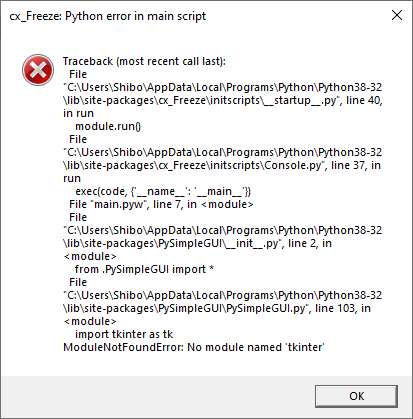
itrie a bunch of different setup.py manual copy of tkinter etc and nothing ;(
if you have an idea thank :)
```
 ShibaeO
All 21 comments
There are instructions in the readme on using PyInstaller. There is also a "EXE Maker" program that ha a GUI to make it easier (PySimpleGUI-EXEMaker).
https://pypi.org/project/pysimplegui-exemaker/
Or the source is in the demo programs section:
https://github.com/PySimpleGUI/PySimpleGUI/blob/master/DemoPrograms/Demo_EXE_Maker.py
It was used to make the EXE files for the COVID Graphing program that you'll find here : https://github.com/PySimpleGUI/PySimpleGUI-COVID19
It's not always a smooth process however.
 PySimpleGUI
on 28 Mar 2020
PySimpleGUI
on 28 Mar 2020
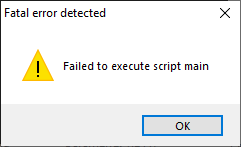
Still the same problem with your app, i tried to open with .bat to maybe get a log about the bug but nothing. maybe because i dont use class ?
thx for your insanly fast anwser ^^
ShibaeO
on 28 Mar 2020
with pyinstaller with the command --log-level=ERROR i got a list of module wich failed to be import
missing module named ScrolledText - imported by PySimpleGUI.PySimpleGUI (conditional)
missing module named tkFont - imported by PySimpleGUI.PySimpleGUI (conditional)
missing module named tkColorChooser - imported by PySimpleGUI.PySimpleGUI (conditional)
missing module named ttk - imported by PySimpleGUI.PySimpleGUI (conditional)
missing module named tkFileDialog - imported by PySimpleGUI.PySimpleGUI (conditional)
missing module named Tkinter - imported by PySimpleGUI.PySimpleGUI (conditional)
but a lot of my import for my program.
ShibaeO
on 28 Mar 2020
I'm running 3.6. Not sure exactly what to tell you other than it looks like tkinter has problems. Stackoverflow likely has information on troubleshooting tkinter problems with pyinstaller.
I'm confused by the other message with the screenshot. What exactly did you try and run? Not all programs compile well. The COVID19 program that is posted here: https://github.com/PySimpleGUI/PySimpleGUI-COVID19
was compiled using the exemaker program. Perhaps a good test would be to run the EXE Maker program (under the Demo Programs folder in this GitHub) to duplicate creation of an EXE like the one posted in the COVID19 repo.

It's a program that's known to build and run. The py file is here:
https://raw.githubusercontent.com/PySimpleGUI/PySimpleGUI-COVID19/master/COVID19_Confirmed_Cases_Graphs.py
PySimpleGUI
on 28 Mar 2020
I found a alternative wich is nuitka wish is super but in standalone mode the gui dont start
ShibaeO
on 28 Mar 2020
You'll find lengthy discussions on the Nuitka GitHub about tkinter / PySimpleGUI. I thought that @JorjMcKie wrote a program that aids in building exes using nuitka. Someone was on Twitter this past week giving it a try as well. I've not used it as pyinstaller has worked really well.
PySimpleGUI
on 28 Mar 2020
thx for your sharing :)
ShibaeO
on 28 Mar 2020
Seems to work thx you so much
ShibaeO
on 28 Mar 2020
What did you find that works? Were there specific instructions posted that you followed?
PySimpleGUI
on 28 Mar 2020
https://github.com/Nuitka/NUITKA-Utilities on this repo
exe_maker.py work fine and super simple
onefile-maker-windows.py working too but the readme is not super detailled you have to install https://nsis.sourceforge.io/Download on c:/
edit : nefile-maker-windows.py is working but not with my program
and now im trying the hinted compilation wich had some bug
but overall i follow the readme of the repo
ShibaeO
on 28 Mar 2020
Oh wow.... I knew @JorjMcKie worked hard on this and I'm sure he told me all about this happening, but I didn't recall that a PySimpleGUI based utility was hosted in the Nuikta repo itself. That's really awesome to see.
Side note on these types of utilities....
It's a great example of how a little bit of PySimpleGUI code can take a command line utility and turn it into an application that anyone is capable of using. A single feature can be made into an entire application as well. The PyIDM project showed how adding a GUI to youtube-dl can make for a fantastic application.
Because of the way PySimpleGUI is architected and the linear nature of user code, it truly is a trivial to add a GUI onto the front of an existing command line program. The typical OOP / callback based architectures aren't as easy use like this. GUIs where you hand over execution by calling a master mainloop that doesn't return makes it somewhat difficult.
It's possible (and easy) to write front-end GUIs as a single line of Python code. All it's doing is collecting some parameters and returning which is a single line of code with PySimpleGUI.
Anyway, glad you found a way to get an EXE file. I assume it's so that you can distribute your application to other people. Can you share anything about what you're making or have screenshot you can post?
PySimpleGUI
on 28 Mar 2020
https://github.com/ShibaeO/SteamAccountManger---SAM this my project
screenshot is on the repo
the exe isnt on the repo but if you want i can send you the exe but i have to fix something. and my app is not entirely finished i know its kinf of weird to try to turning it into an exe before finishing it but i like work like that ^^
but thx for all your help
and yes on my repo i have a program wich i build the gui with tkinter and when i saw it now im : noway I HAVE to re-build it with pysimplegui
ShibaeO
on 28 Mar 2020
Be sure and post screenshots in your readme files. They're super easy to add and they draw in a lot of readers / users. They're just nice to look at and see what people are accomplishing. Even if someone doesn't use your program this time around, you may very well inspire them to write and publish something. I also like to steal designs and ideas from users any chance I get.
PySimpleGUI
on 28 Mar 2020
How do you like using configparser?
I like the look of .ini files, but I've been using json instead. I just used them on this COVID19 graphing program. https://github.com/PySimpleGUI/PySimpleGUI-COVID19
What I like about them is that I'm working with Python dictionaries when I use them and it's only a couple of lines of code to do all of the disk I/O. I'm into "simple" and reading/writing a Python dictionary as the way to save/load settings seemed about as simple as I was going to find.
I've been working on a Template for PySimpleGUI Desktop Widgets and am leaning towards using json as the setting mechanism for the templates. The settings function is always a basic:
- Create a settings window
- Read and close the window
- Convert "values" dictionary into dictionary to save as JSON
- Call json.dump
The startup is just the opposite... json.load, etc.
Anyway... interested in how you like .ini files.
PySimpleGUI
on 28 Mar 2020
I tried json and can't found a solution to add and remove an account without deleting all the data or something else , and i dont know why i love ini and config parser is pretty simple to use and it work for what i do :)
i want program which work ^^
thx for folowing my project :)
im going to see you covid19 im currious how did you used json, tuto and general doc didn't help me to do what i wish
good luck and thx for you work
ShibaeO
on 28 Mar 2020
ok ok ok ....
your program is like ; my brain explode ^^
ShibaeO
on 28 Mar 2020
oh... sorry.... uhmm.... it's not super well documented I suppose. The idea was to get it out there.
But the settings code is pretty well self-contained. There are 2 functions that do the read/write. And then the rest of it is that you're using a Python dictionary to hold all the settings.
I've been using them as little databases too. I mean, you get a key and associated data in a dictionary... that sounds a lot like a database to me.
Lemme know where you need help in the code and I'll do my best to go back and document it better.
PySimpleGUI
on 29 Mar 2020
Here's the part that deals with settings....
SETTINGS_FILE = path.join(path.dirname(__file__), r'C19-Graph.cfg')

DEFAULT_SETTINGS = {'rows':MAX_ROWS, 'cols':MAX_COLS, 'theme':'Dark Blue 17', 'forecasting':False,
                    'graph_x_size':GRAPH_SIZE[0], 'graph_y_size':GRAPH_SIZE[1], 'display days':DISPLAY_DAYS,
                    'data source':'confirmed'}

########################################## SETTINGS ##########################################
def load_settings():
    try:
        with open(SETTINGS_FILE, 'r') as f:
            settings = jsonload(f)
    except:
        sg.popup_quick_message('No settings file found... will create one for you', keep_on_top=True, background_color='red', text_color='white')
        settings = change_settings(DEFAULT_SETTINGS)
        save_settings(settings)
    return settings


def save_settings(settings, chosen_locations=None):
    if chosen_locations:
        settings['locations'] = chosen_locations
    with open(SETTINGS_FILE, 'w') as f:
        jsondump(settings, f)
The key is to carry around the dictionary in its entirety. If you change anything, then you write the entire thing out to disk.
PySimpleGUI
on 29 Mar 2020
i think i will keep my deer configParser but thx for your explication :)
ShibaeO
on 29 Mar 2020
Wasn't suggesting you switch. I was asking how you liked what you're doing as a way to determine if I want to switch.
PySimpleGUI
on 29 Mar 2020
I think this can be closed. If you need something else lemme know and we can re-open if required. I don't see anything at the moment though.
PySimpleGUI
on 3 Apr 2020
Related issues
 yogesh-aggarwal
·
3Comments
yogesh-aggarwal
·
3Comments
 mozesa
·
4Comments
mozesa
·
4Comments
 martinmeteor
·
4Comments
martinmeteor
·
4Comments
 scmanjarrez
·
5Comments
scmanjarrez
·
5Comments
 eyeonus
·
6Comments
eyeonus
·
6Comments
Most helpful comment
Here's the part that deals with settings....
The key is to carry around the dictionary in its entirety. If you change anything, then you write the entire thing out to disk.