Pysimplegui: Broken Table after update to PySimpleGUI 4.17
Type of Issues (Enhancement, Error, Bug, Question)
Operating System windows 32
Python version 3.6
PySimpleGUI Port and Version tkinter port
This is critical to know. Knowing where your PySimpleGUI.py file is located is just as important. You can get these by adding this to the top of your file and running it:
import PySimpleGUI as sg
print(sg)
print(sg.version)
Your Experience Levels In Months or Years
_________ Python programming experience
_________ Programming experience overall
_________ Have used another Python GUI Framework (tkiner, Qt, etc) previously (yes/no is fine)?
You have completed these steps:
- [ x] Read instructions on how to file an Issue
- [ x] Searched through main docs http://www.PySimpleGUI.org for your problem
- [x ] Searched through the readme for your specific port if not PySimpleGUI (Qt, WX, Remi)
- [ x] Looked for Demo Programs that are similar to your goal http://www.PySimpleGUI.com
- [x ] Note that there are also Demo Programs under each port on GitHub
- [ x] Run your program outside of your debugger (from a command line)
- [x ] Searched through Issues (open and closed) to see if already reported
Description of Problem / Question / Details
I was using PySimpleGUI 4.16 and after update to version 4.17 the table shrinks with equal columns size
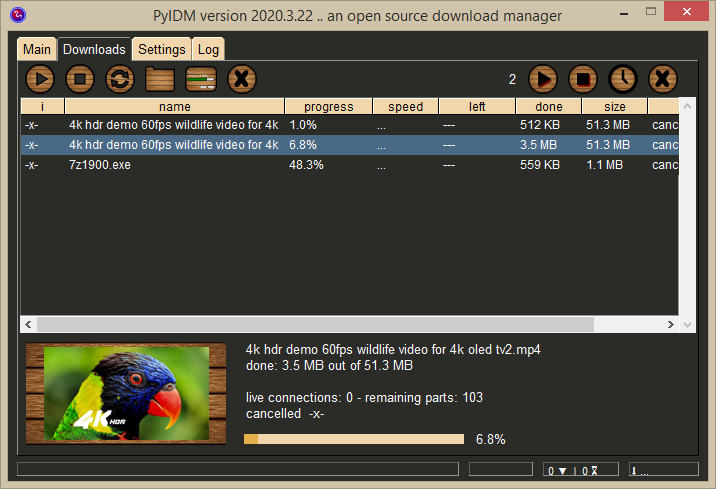
here is a normal snapshot of my application with version 4.16, the table fills the window and have different column sizes, i.e. i made the column with header "name" is bigger than others, and column with header "i" is the smallest

and this is what happened when i used version 4.17, even after setting auto_size_columns=False, no change
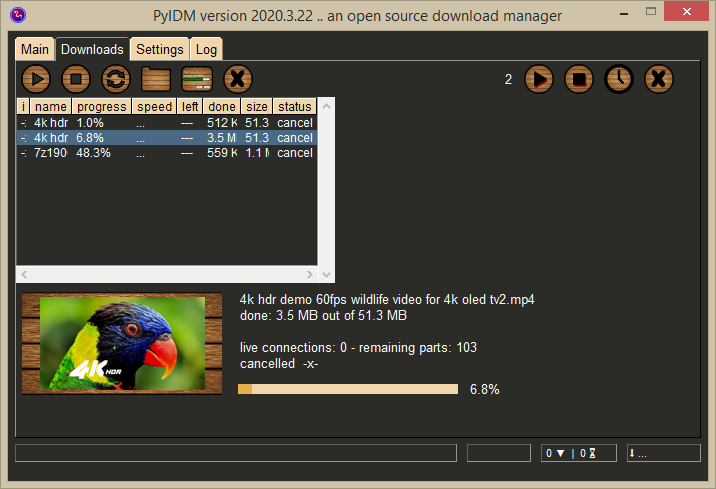
after that i downgraded to version 4.16, the table filled the window but the columns became the same size, really i don't know what happened

Code To Duplicate
this is not a working example this is just the table part i'm using
headings = ['i', 'name', 'progress', 'speed', 'left', 'done', 'size', 'status']

# this is what control the size of each column
spacing = [' ' * 4, ' ' * 30, ' ' * 3, ' ' * 6, ' ' * 7, ' ' * 6, ' ' * 6, ' ' * 10]

 # table
[sg.Table(values=[spacing], headings=headings, size=(70, 10), justification='left',
              vertical_scroll_only=False, key='table', enable_events=True, font='any 9',
              right_click_menu=table_right_click_menu, auto_size_columns=False)],
 pyIDM
pyIDM
All 19 comments
this is the working screenshot with version 4.16, i just removed "auto_size_columns=False" completely like before
still can't figure out how to get same results with version 4.17
pyIDM
on 26 Mar 2020
I'll jump right on this today.
There were changes put in to actually measure strings for column widths that are based on the font used in the table. Before it was a very primitive measurement. I'll see what went wrong. Hopefully will be able to at least reverse the problem quickly.
 PySimpleGUI
on 26 Mar 2020
PySimpleGUI
on 26 Mar 2020
How are you setting the column sizes? The are several paths that you can follow to end up with different sizes. What options are set that you use? It sounds like it's the column header you are relying on.
Are you using the "Column Width" table? I don't see that in your call.
There were a number of changes dealing with setting the width. While I'm working it you may want to investigate the column width parameter https://pysimplegui.readthedocs.io/en/latest/#table-element_1
It was meant to be the mechanism for being able to specify exact column sizes rather than making headers with spaces or some other means.
PySimpleGUI
on 26 Mar 2020
This row isn't the only thing in your table I assume
spacing = [' ' * 4, ' ' * 30, ' ' * 3, ' ' * 6, ' ' * 7, ' ' * 6, ' ' * 6, ' ' * 10]
You add it to your table with your other values to control the spacing?
PySimpleGUI
on 26 Mar 2020
I found a bug in the autosize width computation.
Please try the attached.
There are other changes still so you're unlikely to get exactly the same table pixel for pixel. Widths are measured more accurately.
Also the height of the row is measured based on the font used in the table.
If there are multiple problems you have, let's break them out individually. The first is clearly the messed up autosized columns. Please try this fix and let me know how it does.
PySimpleGUI
on 26 Mar 2020
New version uploaded to GitHub... 4.17.0.3
You can try the new upgrade utility if you want to have it overwrite your pip installed copy. You can reinstall using pip and it'll overwrite it back to the old version if you want to change it back.
python PySimpleGUI.PySimpleGUI upgrade
PySimpleGUI
on 26 Mar 2020
Released fixed to PyPI as 4.18.0
Please let me know if it clears up your problem.
PySimpleGUI
on 26 Mar 2020
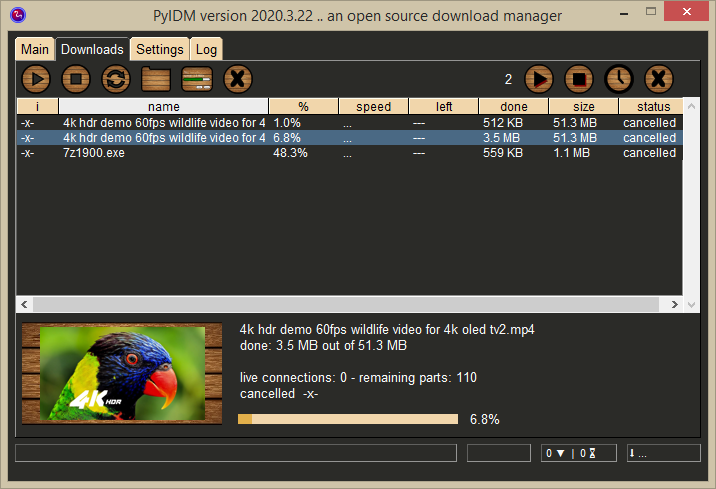
I installed new PyPi release 4.18, with some tweaks to spacing I managed to get the desired results
for the table parameters, i added max_col_width=100 because it is defaulted to 20 and dumped size parameter and used num_rows=12 instead
#old_spacing = [' ' * 4, ' ' * 20, ' ' * 5, ' ' * 6, ' ' * 7, ' ' * 6, ' ' * 6, ' ' * 6]
spacing = [' ' * 6, ' ' * 30, ' ' * 10, ' ' * 10, ' ' * 10, ' ' * 10, ' ' * 10, ' ' * 10]

# table
[sg.Table(values=[spacing], headings=headings, num_rows=12, justification='left',
              vertical_scroll_only=False, key='table', enable_events=True, font='any 9',
              right_click_menu=table_right_click_menu, max_col_width=100)],
here is a screenshot of the results, also i see an improvement in font vertical spacing
This row isn't the only thing in your table I assume
spacing = [' ' * 4, ' ' * 30, ' ' * 3, ' ' * 6, ' ' * 7, ' ' * 6, ' ' * 6, ' ' * 10]
You add it to your table with your other values to control the spacing?
this row is the only thing that allow me to control columns different sizes, i have nothing else which do this effect
pyIDM
on 26 Mar 2020
this row is the only thing that allow me to control columns different sizes, i have nothing else which do this effect
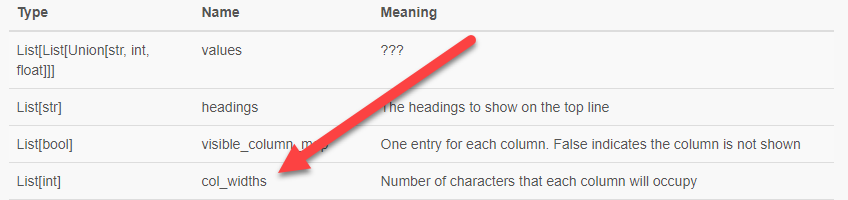
Maybe you missed the mention of the "column widths" parameter above in the discussion.
https://pysimplegui.readthedocs.io/en/latest/#table-element_1
PySimpleGUI
on 26 Mar 2020
Maybe you missed the mention of the "column widths" parameter above in the discussion.
oh sorry, I will try this option and see how it goes
pyIDM
on 26 Mar 2020
I hope it works! It's been a while. You may be testing something that's also broken 😔
PySimpleGUI
on 26 Mar 2020
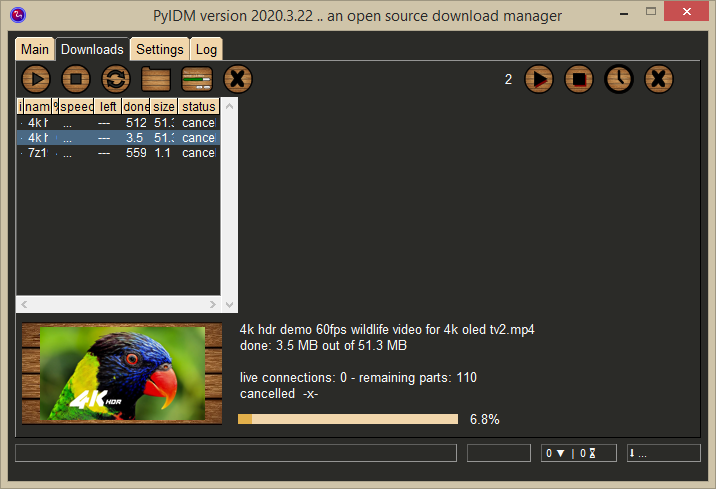
Sorry, col_widths option doesn't work or maybe i am using it wrong, here is my code
spacing = ['a', 'b', 'c', 'd', 'e', 'f', 'g', 'h']  # random values
col_widths=[6, 30, 10, 10, 10, 10, 10, 10]

# table
[sg.Table(values=[spacing], headings=headings, num_rows=12, justification='left',
              vertical_scroll_only=False, key='table', enable_events=True, font='any 9',
              right_click_menu=table_right_click_menu, max_col_width=100,
              col_widths=col_widths)],
results are not good
pyIDM
on 26 Mar 2020
Damn, sorry. I'll look at it.
PySimpleGUI
on 26 Mar 2020
Here is a full example
import PySimpleGUI as sg
sg.SetOptions(font='Helvetica 10', auto_size_buttons=True, progress_meter_border_depth=0,
              border_width=1)

headings = ['i', 'name', '%', 'speed', 'left', 'done', 'size', 'status']

spacing = ['a', 'b', 'c', 'd', 'e', 'f', 'g', 'h']

# uncomment below and it works
# spacing = [' ' * 6, ' ' * 30, ' ' * 10, ' ' * 10, ' ' * 10, ' ' * 10, ' ' * 10, ' ' * 10]

col_widths=[6,30,10,10,10,10,10,10]

layout = [# table
          [sg.Table(values=[spacing], headings=headings, num_rows=12, justification='left',
                    vertical_scroll_only=False, key='table', enable_events=True, font='any 9',
                    max_col_width=100, col_widths=col_widths)]
         ]

# window
window = sg.Window(title='', layout=layout, size=(700, 450), margins=(2, 2))()
result without using spacing

pyIDM
on 26 Mar 2020
You have auto_size_columns still enabled.
Thank you for the working example. It makes working on these kinds of problems much more efficient.
Change to this:
          [sg.Table(values=[spacing], headings=headings, auto_size_columns=False, num_rows=12, justification='left',
                    vertical_scroll_only=False, key='table', enable_events=True, font='any 9',
                    max_col_width=100, col_widths=col_widths)]

PySimpleGUI
on 26 Mar 2020
You have
auto_size_columnsstill enabled.
Oh thanks,
using col_widths is more elegant and make sense other than the workaround i used
it works for me as expected
thanks for your effort :+1:
pyIDM
on 26 Mar 2020
Awesome! Congrats.
Have to keep you running. You exercise the code better than any other application than I'm aware of.
BTW, there have been a rash of YouTube downloader posted on Reddit recently. Make sure you get into the action / get on the list if someone makes one. This one I noticed today:
https://www.reddit.com/r/Python/comments/fpcgnb/this_weeks_trend_seems_to_be_youtube_downloaders/
Glad everything's working ok with 4.18.0, and better with the row heights since I'm using the font to measure the heights now.
PySimpleGUI
on 26 Mar 2020
BTW, there have been a rash of YouTube downloader posted on Reddit recently. Make sure you get into the action / get on the list if someone makes one.
yea, I see some of these posts recently,
I've already received a couple of nice feedback from PyIDM users, they surprised by the download speed,
however it uses youtube-dl to fetch data, yet it depend on libcurl with multithreading and high download speeds, for example PyIDM is almost 10 times faster than youtube-dl in downloading fragmented videos, and 1.5 times faster than aria2 which has a multi_connection support
and will continue improve its performance and appearance in same time keeping it simple
Thanks for making improvements to PySimpleGUI, it will help enhance my GUI better,
i will submit any issues while my working on GUI
thanks again :+1:
pyIDM
on 26 Mar 2020
Closing this one since the fixes have been released as version 4.18.0 on PyPI.
Keep up the good work!!! I see that users are quite pleased with what you've made.
PySimpleGUI
on 27 Mar 2020
Related issues
 lucasea777
·
3Comments
lucasea777
·
3Comments
 MikeTheWatchGuy
·
6Comments
MikeTheWatchGuy
·
6Comments
 xuguojun168
·
3Comments
xuguojun168
·
3Comments
 DKatarakis
·
6Comments
DKatarakis
·
6Comments
 mozesa
·
4Comments
mozesa
·
4Comments