Pysimplegui: [ Question] How to show a background image
Type of Issues (Enhancement, Error, Bug, Question)
Operating System
Python version
PySimpleGUI Port and Version
Your Experience Levels In Months or Years
___1 year______ Python programming experience
____1.5 years_____ Programming experience overall
______yes___ Have used another Python GUI Framework (tkiner, Qt, etc) previously (yes/no is fine)?
You have completed these steps:
- [x ] Read instructions on how to file an Issue
- [ x] Searched through main docs http://www.PySimpleGUI.org for your problem
- [x ] Searched through the readme for your specific port if not PySimpleGUI (Qt, WX, Remi)
- [ x] Looked for Demo Programs that are similar to your goal http://www.PySimpleGUI.com
- [ x] Note that there are also Demo Programs under each port on GitHub
- [ x] Run your program outside of your debugger (from a command line)
- [ x] Searched through Issues (open and closed) to see if already reported
Code or partial code causing the problem

I want to implement an interface like this,
The first step is to implement the toolbar above.

I have two ideas on how to implement this toolbar.
- Place inputtext, button and other elements on an element (eg: sg.Text(' '3030, background_color='read')).
I tried
e=window.Elem('the_elem').Widget
E.place(x=0, y=20)
, but this doesn't work, because after moving the element through the "place" method, the moved element will be overwritten by the element I originally wanted to put below. - Use this image as the background image of the window object, then implement these buttons one by one.

But I found that the sg.window object has no properties similar to "background_file" and no Widget properties.
After I read the official tutorial, I still can't find the correct way to set the background of the window and put some elements on top of another element.
Can I just give it up and re-use tkinter or pyqt?
I would be very grateful if anyone can help.
 wangbaolong36gmail
All 19 comments
The only port of PySimpleGUI that supports having a background image is PySimpleGUIQt. You'll find a parameter in the Window call named background_image.
PySimpleGUI and tkinter calls are not meant to be mixed. You can't move elements around within a layout.
What is the image you've included? What is it from?
It's important you understand that PySimpleGUI is meant to generate a more or less static window layout. There are ways to make it more dynamic, but it's not done generally speaking.
Please spend some time reading the documentation http://www.PySimpleGUI.org to better understand how it's used. Accessing the underlying .Widget is a "last resort" meant to allow users to extend the PySimpleGUI capability. It's not at all a place to start your coding.
If you want to duplicate the window you supplied, then you need to go through the design process and look at each element that goes into that window and decide if it'll work. The column on the left is going to be a problem if you want icons and for it to be partially collapsible.
This window has a LOT of Elements in it. It's a large project no matter what GUI framework you're using. I'm not saying it can't be done. I'm saying be prepared to spend a lot of time on this project.
You might want to look at the Media Player demonstration and youtube video as an introduction to doing the media playback part as well as an introduction as to how PySimpleGUI works.
https://github.com/israel-dryer/Media-Player
Reading other people's code, and the demo programs, is an excellent way to get educated on how PySimpleGUI works.
 PySimpleGUI
on 10 Nov 2019
PySimpleGUI
on 10 Nov 2019
To make this toolbar:

I would make a Column Element to put everything inside of and set the background color to 'red'.
Inside place each element next to each other in a "layout".
What you seem to be trying to do is mix tkinter and PySimpleGUI directly. It doesn't work that way. The entire idea is to NOT write in tkinter or Qt but instead just use the PySimpleGUI objects.
PySimpleGUI
on 10 Nov 2019
To make this toolbar:
I would make a Column Element to put everything inside of and set the background color to 'red'.
Inside place each element next to each other in a "layout".
What you seem to be trying to do is mix tkinter and PySimpleGUI directly. It doesn't work that way. The entire idea is to NOT write in tkinter or Qt but instead just use the PySimpleGUI objects.
It's a great idea to put all of these elements in a "Column" object. I thought that the column object can only place elements vertically, which led me to not think of this in the first place. Thank you very much for your suggestion.
wangbaolong36gmail
on 11 Nov 2019
The only port of PySimpleGUI that supports having a background image is PySimpleGUIQt. You'll find a parameter in the Window call named
background_image.PySimpleGUI and tkinter calls are not meant to be mixed. You can't move elements around within a layout.
What is the image you've included? What is it from?
It's important you understand that PySimpleGUI is meant to generate a more or less static window layout. There are ways to make it more dynamic, but it's not done generally speaking.
Please spend some time reading the documentation http://www.PySimpleGUI.org to better understand how it's used. Accessing the underlying .Widget is a "last resort" meant to allow users to extend the PySimpleGUI capability. It's not at all a place to start your coding.
If you want to duplicate the window you supplied, then you need to go through the design process and look at each element that goes into that window and decide if it'll work. The column on the left is going to be a problem if you want icons and for it to be partially collapsible.
This window has a LOT of Elements in it. It's a large project no matter what GUI framework you're using. I'm not saying it can't be done. I'm saying be prepared to spend a lot of time on this project.
You might want to look at the Media Player demonstration and youtube video as an introduction to doing the media playback part as well as an introduction as to how PySimpleGUI works.
https://github.com/israel-dryer/Media-Player
Reading other people's code, and the demo programs, is an excellent way to get educated on how PySimpleGUI works.
The only port of PySimpleGUI that supports having a background image is PySimpleGUIQt. You'll find a parameter in the Window call named
background_image.PySimpleGUI and tkinter calls are not meant to be mixed. You can't move elements around within a layout.
What is the image you've included? What is it from?
It's important you understand that PySimpleGUI is meant to generate a more or less static window layout. There are ways to make it more dynamic, but it's not done generally speaking.
Please spend some time reading the documentation http://www.PySimpleGUI.org to better understand how it's used. Accessing the underlying .Widget is a "last resort" meant to allow users to extend the PySimpleGUI capability. It's not at all a place to start your coding.
If you want to duplicate the window you supplied, then you need to go through the design process and look at each element that goes into that window and decide if it'll work. The column on the left is going to be a problem if you want icons and for it to be partially collapsible.
This window has a LOT of Elements in it. It's a large project no matter what GUI framework you're using. I'm not saying it can't be done. I'm saying be prepared to spend a lot of time on this project.
You might want to look at the Media Player demonstration and youtube video as an introduction to doing the media playback part as well as an introduction as to how PySimpleGUI works.
https://github.com/israel-dryer/Media-Player
Reading other people's code, and the demo programs, is an excellent way to get educated on how PySimpleGUI works.
These pictures come from a Chinese music player, I want to use the web crawler and pysimplegui to imitate it to implement a player of its own, of course, just for personal interest.
I have been a cursory review of the official guide before, and I may have to check it again.
https://github.com/israel-dryer/Media-Player I also saw this project on github, but through the "readme" file, I found that our ideas are not too consistent. Thank you again for your suggestion.
wangbaolong36gmail
on 11 Nov 2019
Think of a Column element as being a "window inside the window". That's essentially what it is because it takes a layout just like a window does.
For your red toolbar, your Column would be 1 long row of elements. Maybe 2 rows as I don't know exactly what you want on it.
Columns are a great way to group elements together. It is a "container element".
You can create the kind of player you're looking for, I just wanted to make sure you understood that it is going to take time and effort. It's not a simple interface and the drag and drop designer for PySimpleGUI is not complete yet.
PySimpleGUI
on 11 Nov 2019
Closing this issue... The original issue has been answered about background images. If you have additional questions or problems, feel free to open another Issue.
PySimpleGUI
on 12 Nov 2019
Think of a Column element as being a "window inside the window". That's essentially what it is because it takes a
layoutjust like a window does.For your red toolbar, your Column would be 1 long row of elements. Maybe 2 rows as I don't know exactly what you want on it.
Columns are a great way to group elements together. It is a "container element".
You can create the kind of player you're looking for, I just wanted to make sure you understood that it is going to take time and effort. It's not a simple interface and the drag and drop designer for PySimpleGUI is not complete yet.
Excuse me, I have a new problem, it almost crashes me.
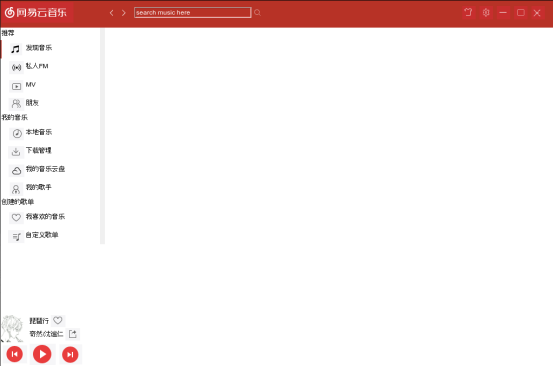
This is my latest development. I first implemented the toolbar on the left. After all the elements have been added, I want to add a function to scroll up and down the page by scrolling with the mouse wheel. I intend to do this by binding the event to the element. , like this,
"my_elem.Widget.bind("
my_elem.Widget.bind("
"
But I found that there are uncontrollable parts in the Column object.
For example, between two buttons placed one above the other,
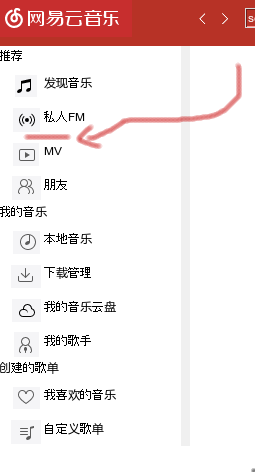
However, this is not over yet. I still don't know how to correctly move the position of the elements in the window. I always use the "Widget.place" method, he always makes mistakes, I need to keep trying to find the correct parameters, sometimes I can't find it at all. I looked at the examples in the documentation and found that they are mostly static layouts, without moving the position of the elements. Another drawback of this method is that moving an element through "place" will also cause other elements to change position. Once this happens, your entire layout will be a mess.
For example: When I add a new element to the right of the left toolbar, the left toolbar will not be able to page, otherwise the element just placed on the right will replace its position, and it will disappear. such:
It turned out to be like this:
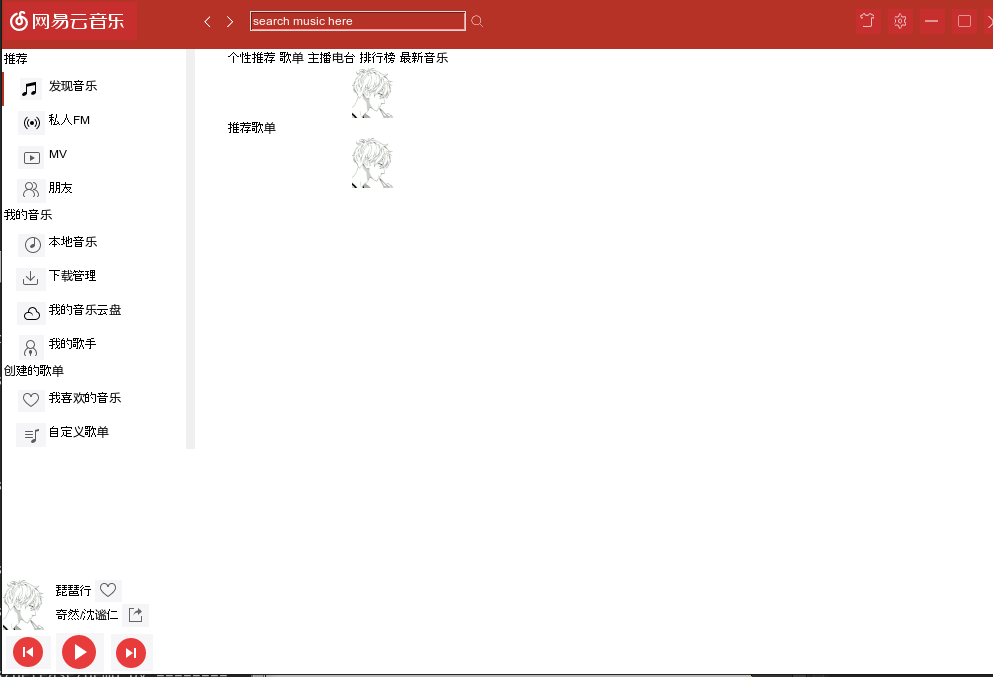
After moving the left element, it becomes like this::
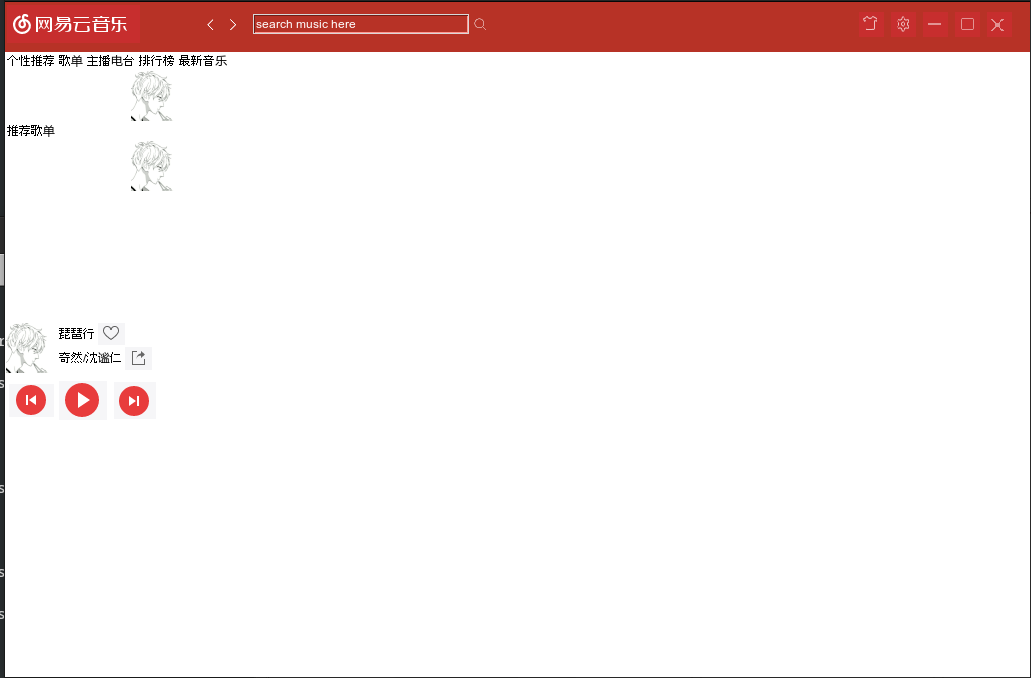
Maybe my ability to express is not very good, this is my code, if you have time, you can run it, maybe this will give you a better understanding of what I said.
Https://github.com/wangbaolong36gmail/pysimplegui_media_player
very sorry for interrupting you!
wangbaolong36gmail
on 12 Nov 2019
Think of a Column element as being a "window inside the window". That's essentially what it is because it takes a
layoutjust like a window does.
For your red toolbar, your Column would be 1 long row of elements. Maybe 2 rows as I don't know exactly what you want on it.
Columns are a great way to group elements together. It is a "container element".
You can create the kind of player you're looking for, I just wanted to make sure you understood that it is going to take time and effort. It's not a simple interface and the drag and drop designer for PySimpleGUI is not complete yet.Excuse me, I have a new problem, it almost crashes me.
This is my latest development. I first implemented the toolbar on the left. After all the elements have been added, I want to add a function to scroll up and down the page by scrolling with the mouse wheel. I intend to do this by binding the event to the element. , like this,
"my_elem.Widget.bind("", window['move_l_t_down'].ButtonReboundCallback)
my_elem.Widget.bind("", window['move_l_t_up'].ButtonReboundCallback)
"But I found that there are uncontrollable parts in the Column object.
For example, between two buttons placed one above the other,
However, this is not over yet. I still don't know how to correctly move the position of the elements in the window. I always use the "Widget.place" method, he always makes mistakes, I need to keep trying to find the correct parameters, sometimes I can't find it at all. I looked at the examples in the documentation and found that they are mostly static layouts, without moving the position of the elements. Another drawback of this method is that moving an element through "place" will also cause other elements to change position. Once this happens, your entire layout will be a mess.
For example: When I add a new element to the right of the left toolbar, the left toolbar will not be able to page, otherwise the element just placed on the right will replace its position, and it will disappear. such:
It turned out to be like this:
After moving the left element, it becomes like this::
Maybe my ability to express is not very good, this is my code, if you have time, you can run it, maybe this will give you a better understanding of what I said.
Https://github.com/wangbaolong36gmail/pysimplegui_media_player
very sorry for interrupting you!
I set pad=0 and expand( (True, True) ), but those areas are still uncontrollable, and I don't know which areas belong to that object.
wangbaolong36gmail
on 12 Nov 2019
There are known problems with the scrollwheel at the moment.
I still don't know how to correctly move the position of the elements in the window.
You have figured out the problem and stated it well... the examples, and PySimpleGUI itself, is meant for static layouts. Attempting to directly use tkinter calls to "place" elements is not going to lead to success.
The reason you haven't figured it out is there's nothing to figure out. It's not a supported feature.
PySimpleGUI is meant to cover 80% of the GUI problems. You're project falls outside of that 80% and into the 20% of much more advanced programs. PySimpleGUI also isn't a "reactive" kind of GUI. It won't reconfigure itself with window size changes for example.
I don't recommend trying to do your project with PySimpleGUI... it is simply beyond the scope of what's possible at the moment. You're better off using something like Qt for this kind of project. I'm not sure how else to describe the gap between your project and the PySimpleGUI library capabilities.
It would be great to see something like your application running on PySimpleGUI, but I don't have the ability to support an effort like this that pushes beyond the typical GUIs it's meant to create. I hope you understand the situation.
PySimpleGUI
on 12 Nov 2019
It seems like you're learning tkinter calls pretty well. Switch over to tkinter entirely and you'll be able to use the calls you're trying to use now that are in conflict with PySimpleGUI. Using the Widget variables a lot is a sign that you're outside the bounds of the normal world of PySimpleGUI. Information about it is covered in the "Extending PySimpleGUI" section of the documentation.
The .Widget capability is meant for simple configuration changes that are perhaps not exposed by the PySimpleGUI APIs yet. It is not meant to be used on a frequent basis to push the boundaries so much.
Some problems are simply not part of the PySimpleGUI space.
PySimpleGUI
on 12 Nov 2019
It seems like you're learning tkinter calls pretty well. Switch over to tkinter entirely and you'll be able to use the calls you're trying to use now that are in conflict with PySimpleGUI. Using the Widget variables a lot is a sign that you're outside the bounds of the normal world of PySimpleGUI. Information about it is covered in the "Extending PySimpleGUI" section of the documentation.
The .Widget capability is meant for simple configuration changes that are perhaps not exposed by the PySimpleGUI APIs yet. It is not meant to be used on a frequent basis to push the boundaries so much.
Some problems are simply not part of the PySimpleGUI space.
Thanks, but I feel that pysimplegui may actually be able to complete this project, and maybe some other python library help is needed.
Who can say this accurately? It is only my own interest to do this project.
And I feel that pysimplegui's Widget module is amazing. it's more powerful than i thinked before, It has been exciting and exciting for me several times today. For example, it works great: "Change the cursor in the input box from black to white", and, by bindingand , it can correctly listen for mouse wheel events. (Although setting the element's return_keyboard_event to True does not monitor the mouse wheel action, I also noticed "Experiment is all I can say." ) ,
In a word, i will still try it by using pysimplegui . if really can't make it, i will use pyqt insteaded. I think it is very cool if i can use pysimlegui to complete this program!
wangbaolong36gmail
on 12 Nov 2019
For scrolling, Column elements have a built-in scroll bar. The mouse scrollwheel has a bug at the moment though.
PySimpleGUI
on 12 Nov 2019
Some problems are simply not part of the PySimpleGUI space.
Who can say this accurately
I can, from experience.
The other message that I don't believe is coming through very well is that the amount of support you're requiring exceeds the capabilities I have to offer.
You are using "extended" calls. Once you start messing with tkinter directly like this it makes it nearly impossible to support. Support here is meant for PySimpleGUI support, not support of the quirks of tkinter or how to extend PySimpleGUI to create specific features.
It's great you're trying a difficult problem and you find it enjoyable. Go for it. Just understand that I will not be able to work through each and every issue you run up against. It's just not possible.
PySimpleGUI
on 12 Nov 2019
I noticed you mentioned googling. Your best bet is to check the documentation, cookbook and demo files.... especially the main docs: http://www.PySimpleGUI.org
PySimpleGUI
on 12 Nov 2019
I noticed you mentioned googling. Your best bet is to check the documentation, cookbook and demo files.... especially the main docs: http://www.PySimpleGUI.org
i am not him, this is him
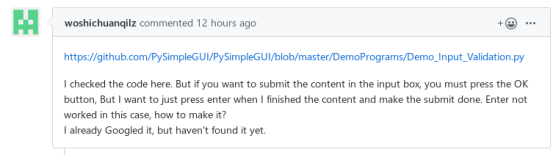
i just replied the question , and the question is not rasied by me .....
"For scrolling, Column elements have a built-in scroll bar. The mouse scrollwheel has a bug at the moment though."
i know, but the built-in scroll bar is a bit ugly, i want to build a scroll by myself,
and i have read the main docs carefully ........ :pensive:
wangbaolong36gmail
on 13 Nov 2019
Oh! I'm sorry for mixing you up! Trying to pay attention and keep everything sorted out.
i want to build a scroll by myself,
and i have read the main docs carefully
A good / great assumption to make if you don't find a feature you're looking for, especially a customization of some sort, is to assume it's not implemented. You're welcome to open up enhancement requests for new feature requests. Just understand that there are a good number of other things ahead of fixing that "the built-in scroll bar is a bit ugly".
I've tried to give you the heads up a couple of times that your project, with the way you've defined it, is not a fit for PySimpleGUI. What you'll end up doing is what you're doing now, spending a whole lot of time researching and trying to do things that are so specialized and so detailed that you're not building anything. It's not fun to watch someone bright bang their head into the wall, fighting technology that isn't going to be beaten.
The "spirit" of this package, the target audience, the projects that are likely to find success are those interested in getting from Point A to Point B, where the emphasis is on creating a GUI that enables the user to interact with the program in a particular way. This is what PySimpleGUI is designed to do and was architected to do. It's not meant to be a highly customized GUI package where you can tweak every part of a GUI's Widgets. You can still do a lot to make PySimpleGUI more polished than a simple gray window, but replacing the scrollbars with custom ones isn't one of them.
I don't mean to be critical, but you're trying to use a saw like a hammer. You've got the wrong tool for the job you're trying to do. No matter how much you want to use this saw like a hammer, you're not going to do a very good job of driving in very many nails. Those that you do manage to go in will be done poorly and will take a long time, not to mention that driving nails with a saw is no fun.
If you want to build a highly visually configurable GUI in Python, then use Qt. Or use a Web technology. It's not a bad goal to create a GUI where the controls are customized... it's just not one you're going to be successful at doing using this tool.
One other thing to remember here is that there are currently 4 active ports of PySimpleGUI. Features are meant to be portable across those different platforms. When a feature is supported on one platform, the expectation is that it'll be covered across all of them. This will have the effect of making the features not be as specialized and instead focus on what's similar.
It's great that you like PySimpleGUI and want to use it. I suggest using it for projects that you have someday that are a better fit. This project with the way it's defined now isn't a good fit.
PySimpleGUI
on 13 Nov 2019
Oh! I'm sorry for mixing you up! Trying to pay attention and keep everything sorted out.
i want to build a scroll by myself,
and i have read the main docs carefullyA good / great assumption to make if you don't find a feature you're looking for, especially a customization of some sort, is to assume it's not implemented. You're welcome to open up enhancement requests for new feature requests. Just understand that there are a good number of other things ahead of fixing that "the built-in scroll bar is a bit ugly".
I've tried to give you the heads up a couple of times that your project, with the way you've defined it, is not a fit for PySimpleGUI. What you'll end up doing is what you're doing now, spending a whole lot of time researching and trying to do things that are so specialized and so detailed that you're not building anything. It's not fun to watch someone bright bang their head into the wall, fighting technology that isn't going to be beaten.
The "spirit" of this package, the target audience, the projects that are likely to find success are those interested in getting from Point A to Point B, where the emphasis is on creating a GUI that enables the user to interact with the program in a particular way. This is what PySimpleGUI is designed to do and was architected to do. It's not meant to be a highly customized GUI package where you can tweak every part of a GUI's Widgets. You can still do a lot to make PySimpleGUI more polished than a simple gray window, but replacing the scrollbars with custom ones isn't one of them.
I don't mean to be critical, but you're trying to use a saw like a hammer. You've got the wrong tool for the job you're trying to do. No matter how much you want to use this saw like a hammer, you're not going to do a very good job of driving in very many nails. Those that you do manage to go in will be done poorly and will take a long time, not to mention that driving nails with a saw is no fun.
If you want to build a highly visually configurable GUI in Python, then use Qt. Or use a Web technology. It's not a bad goal to create a GUI where the controls are customized... it's just not one you're going to be successful at doing using this tool.
One other thing to remember here is that there are currently 4 active ports of PySimpleGUI. Features are meant to be portable across those different platforms. When a feature is supported on one platform, the expectation is that it'll be covered across all of them. This will have the effect of making the features not be as specialized and instead focus on what's similar.
It's great that you like PySimpleGUI and want to use it. I suggest using it for projects that you have someday that are a better fit. This project with the way it's defined now isn't a good fit.
thank you for so many reply, my method to do it is really somethings wrongs,
really, the tools is very useful to build a Interactive gui fastly, but my need is not to do this,
ok, i have to say that i will transform my program from it to pyqt .
one way or another, thank you for maintaining this interesting project!
wangbaolong36gmail
on 13 Nov 2019
I simply want to see you be successful. If pysimplegui can help then that's great, but if it cannot, then want to steer you away from it. Sorry to be discouraging but if I see a problem I speak up.
 MikeTheWatchGuy
on 13 Nov 2019
MikeTheWatchGuy
on 13 Nov 2019
You may want to look at PySide2 if you're going to use Qt.
PySimpleGUI
on 13 Nov 2019
Related issues
 scmanjarrez
·
5Comments
MikeTheWatchGuy
·
6Comments
MikeTheWatchGuy
·
5Comments
MikeTheWatchGuy
·
3Comments
scmanjarrez
·
5Comments
MikeTheWatchGuy
·
6Comments
MikeTheWatchGuy
·
5Comments
MikeTheWatchGuy
·
3Comments
 mozesa
·
5Comments
mozesa
·
5Comments
Most helpful comment
Think of a Column element as being a "window inside the window". That's essentially what it is because it takes a
layoutjust like a window does.For your red toolbar, your Column would be 1 long row of elements. Maybe 2 rows as I don't know exactly what you want on it.
Columns are a great way to group elements together. It is a "container element".
You can create the kind of player you're looking for, I just wanted to make sure you understood that it is going to take time and effort. It's not a simple interface and the drag and drop designer for PySimpleGUI is not complete yet.