Pysimplegui: [Bug] My problem is ".!toplevel.!frame2.!labelframe.!frame.!entry"
Type of Issues
_Bug_
Operating System
_Win10_
Python version
_3.7.4_
PySimpleGUI Port and Version
_4.4.1_
Your Experience Levels
_10 months_
Code or partial code causing the problem
Traceback (most recent call last):
  File "C:/Users/mozesa/PycharmProjects/ball-neck-swiveling-angle/swivelingangle/app.py", line 408, in <module>
    main()
  File "C:/Users/mozesa/PycharmProjects/ball-neck-swiveling-angle/swivelingangle/app.py", line 70, in main
    window["_GX_"].Update(state_change_handler.gx)
  File "C:\Users\mozesa\PycharmProjects\ball-neck-swiveling-angle\venv\lib\site-packages\PySimpleGUI\PySimpleGUI.py", line 839, in Update
    self.TKEntry.icursor(tk.END)
  File "C:\Python\Python37-32\lib\tkinter\__init__.py", line 2685, in icursor
    self.tk.call(self._w, 'icursor', index)
_tkinter.TclError: invalid command name ".!toplevel.!frame2.!labelframe.!frame.!entry"
From time to time I got the upper traceback.
What should I provide you to help finding the problem.
Thanks for your help in advance.
Update: It happens only (randomly) when I invoke an sg.Print() command.
 mozesa
All 22 comments
Looking at the trace, it appears to be happening because of this update call:
window["_GX_"].Update(state_change_handler.gx)
Can you tell me more about what that key points to and what the variable state_change_handler.gx is?
 PySimpleGUI
on 10 Oct 2019
PySimpleGUI
on 10 Oct 2019
In my project I use a State design pattern.
The state_change_handler.gx is a class's property and it is defined in the Context (the interface of interest to clients).
There are some snippets below.
As you can see the the gx point to the appropriate Base State's method.
class Context:
[...]
    @property
    def gx(self) -> BaseState.gx:
        return self._state.gx
[...]
    def transition_to(self, state: BaseState) -> None:
        print(f"Context: Transition to {type(state).__name__}")
        if self._state:
            self._state.close()
        self._state = state
        self._state.state_change_handler = self
[...]
class BaseState(ABC):
    def __init__(self):
        # This state_change_handler variable will be assign to an instance of
        # StateChangeHandler class in order to reach the handler itself via self.
        self.state_change_handler = None

        self._qt = Quaternion()
        self._gx = nan
        self._gy = nan
        self._gz = nan

    @property
    def qt(self) -> Quaternion:
        return self._qt
Is it possible that this error is caused by the transition, ie. when I change from one_concrete_state to another_concrete_state. I can imagine that there can be a short interval when there isn't any method on the end of return self._state.gx.
What do you think?
I really appreciate your help.
mozesa
on 11 Oct 2019
Dear PySimpleGui,
now I have the necessary steps to reproduce the problem.
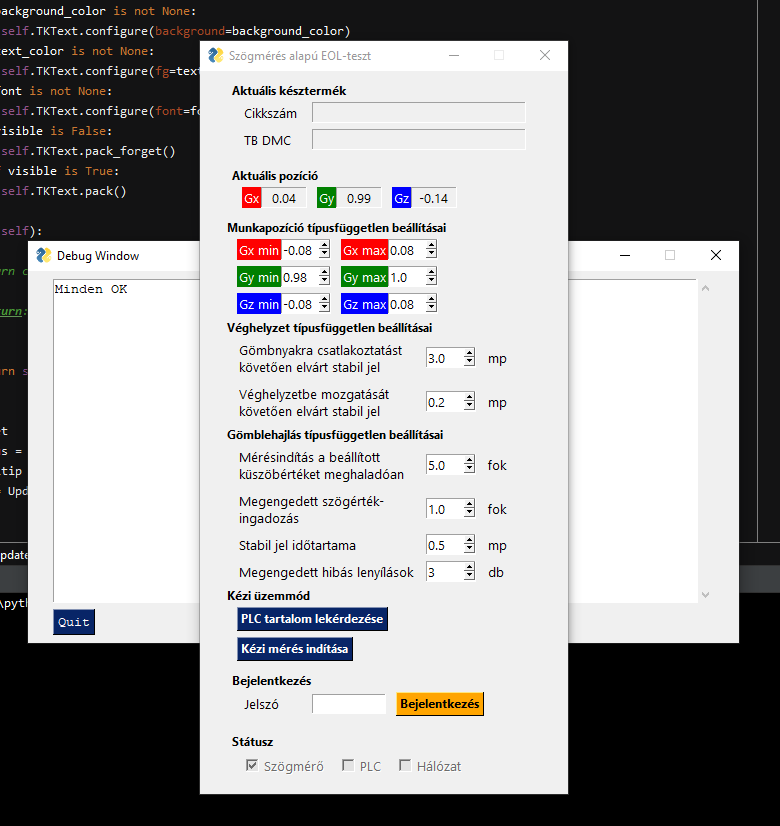
So If I close the Debug Window with the X but not the _Quit_, next time whenever I click on the button _Kézi mérés indítás_ it gives me the know traceback.
Traceback (most recent call last):
  File "C:/Users/mozesa/PycharmProjects/ball-neck-swiveling-angle/swivelingangle/app.py", line 371, in <module>
    main()
  File "C:/Users/mozesa/PycharmProjects/ball-neck-swiveling-angle/swivelingangle/app.py", line 49, in main
    window["_GX_"].Update(value=state_change_handler.gx)
  File "C:\Users\mozesa\PycharmProjects\ball-neck-swiveling-angle\venv\lib\site-packages\PySimpleGUI\PySimpleGUI.py", line 839, in Update
    self.TKEntry.icursor(tk.END)
  File "C:\Python\Python37-32\lib\tkinter\__init__.py", line 2685, in icursor
    self.tk.call(self._w, 'icursor', index)
_tkinter.TclError: invalid command name ".!toplevel.!frame2.!labelframe.!frame.!entry"
But if I leave the Debug Window by clicking on the _Quit_ button prior, it never gives the error again regardless of using X or Quit in the following occasions.
mozesa
on 11 Oct 2019
Thank you for the added troubleshooting. Very helpful, especially since you've narrowed it down to reproducible steps.
Are you calling sg.Print somewhere as a result of clicking the button:
Kézi mérés indítás
Setting aside those steps, just looking at at the crash itself and the data it provides, without taking into consideration of the actions you took ahead of it....
Trying to determine what about the Update itself is causing an issue. It appears that you're calling Update on an Input Element when the crash happens. That's what line 839 is located in - Input.Update. The question is why is the closing of the debug window affecting the Update of an input element.
The statement that is generating the error is this one:
self.TKEntry.icursor(tk.END)
Which is moving the cursor to the end of the Input Element, after changing the value of the Input Element.
You mentioned what sounded like a "race condition" existing for some portion of your code. Does that do anything with this Input Element with the key _GX_?
Are you performing any operations on the Input Element like making it visible or invisible? Or any other operations on it other than the Update? Or is the Window itself going through any changes as a result of pressing that button?
The debug window is an important data point, but so is the crash itself and looking at the state of things relating to it, especially since that's what this issue is actually about.
I recall putting in a fix for closing the debug window with an X, but not sure how long ago that way. I'll look through the code in that area to see where the problem may lay as well as try to reproduce it locally.
If you can answer the questions I've posted, that would help keep us moving is a good direction.
PySimpleGUI
on 11 Oct 2019
I really appreacite your help.
Actually there is not direct connection between the _debug window_ and the _Kézi mérés indítás_ pushbutton.
- When I click on the mentioned button, a mesure starts.
- When it finishes its run, a data saving takes place.
- When the data saved succesfully, an sg.Print("OK") command is invoked.
If I close the _first_ sg.Print debug window by X, the next time, when I go through the aforementioned steps, I get an error.
It is interesting that if I use the _Quit_ button first, then I never get error, regardless the following X, or Quit.

I did a test.
I modificated the sg.Input to sg.Text
It altered the error msg.
Actually the gui close itself, without any error msg. Just closes itself.
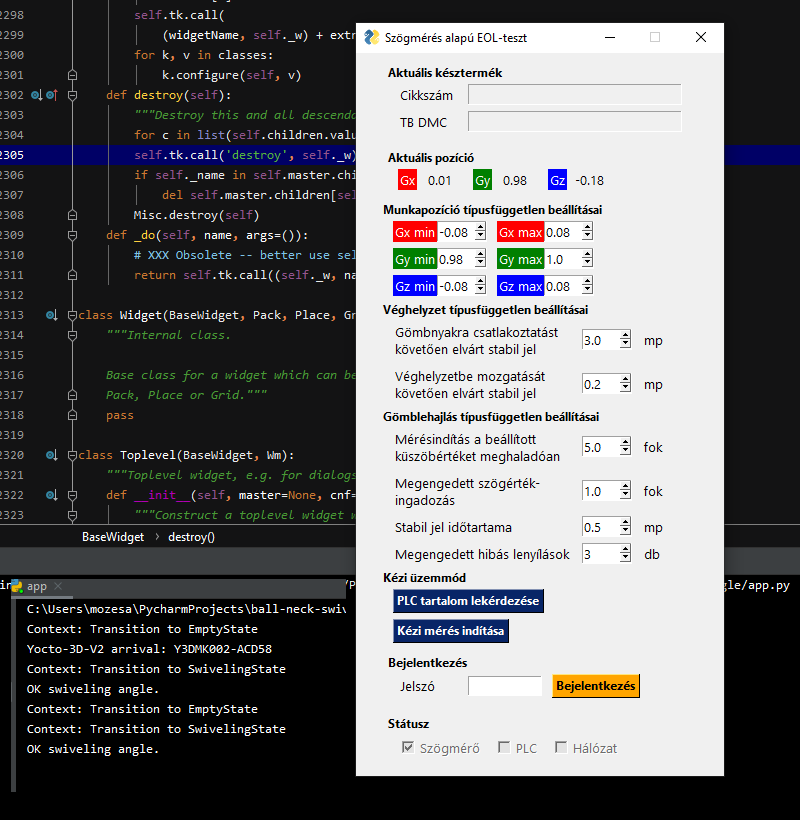
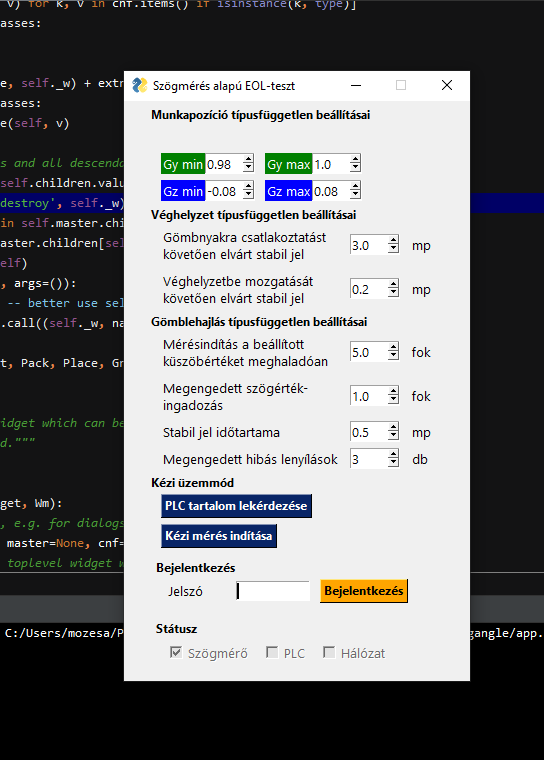
On the next picture you would see my pycharm.
Interesting :)
PS.: I use a timer (which is a threading stuff) but that's all, nothing more.
And there isn't any connection between the timer and the gui.
I use those filds (ie. _GX_, _GY_, _GZ_) to make visible the three values.
I don't make visible, hide or anythin but Update theirs values.
Finally, I got the traceback.
Exception in thread Thread-64:
Traceback (most recent call last):
  File "C:\Python\Python37-32\lib\threading.py", line 926, in _bootstrap_inner
    self.run()
  File "C:\Python\Python37-32\lib\threading.py", line 1178, in run
    self.function(*self.args, **self.kwargs)
  File "C:\Users\mozesa\PycharmProjects\ball-neck-swiveling-angle\swivelingangle\statechangehandler\statechangehandler.py", line 392, in evaluate_result
    str(datetime.now()),
  File "C:\Users\mozesa\PycharmProjects\ball-neck-swiveling-angle\swivelingangle\resultshandler\resultshandler.py", line 47, in store_result
    sg.Print("OK :-)")
  File "C:\Users\mozesa\PycharmProjects\ball-neck-swiveling-angle\venv\lib\site-packages\PySimpleGUI\PySimpleGUI.py", line 9273, in EasyPrint
    DebugWin.debug_window.Print(*args, end=end, sep=sep)
  File "C:\Users\mozesa\PycharmProjects\ball-neck-swiveling-angle\venv\lib\site-packages\PySimpleGUI\PySimpleGUI.py", line 9225, in Print
    event, values = self.window.Read(timeout=0)
  File "C:\Users\mozesa\PycharmProjects\ball-neck-swiveling-angle\venv\lib\site-packages\PySimpleGUI\PySimpleGUI.py", line 5409, in Read
    event, values = self._ReadNonBlocking()
  File "C:\Users\mozesa\PycharmProjects\ball-neck-swiveling-angle\venv\lib\site-packages\PySimpleGUI\PySimpleGUI.py", line 5540, in _ReadNonBlocking
    self.TKroot.destroy()
  File "C:\Python\Python37-32\lib\tkinter\__init__.py", line 2305, in destroy
    self.tk.call('destroy', self._w)
RuntimeError: main thread is not in main loop
Are you using any threads?
Or I guess I should have asked, how are you using threads?
Are any of the threads calling any PySimpleGUI calls or using any of the objects created from PySimpleGUI?
PySimpleGUI
on 11 Oct 2019
I use the following package: https://pypi.org/project/resettabletimer/
This is the only way that I use a thread.
self._timer = ResettableTimer(rest_interval_for_unlocking, self.evaluate_result)
def evaluate_result(self) -> None:
        if (
            self._angle_min <= self.swiveling_angle <= self._angle_max
            and self._duration_min <= self._duration <= self._duration_max
        ):
            print("OK swiveling angle.")
            _result = 1  # OK

        # NOK
        else:
            _result = 0  # NOK
            self.state_change_handler.max_life -= 1
            if self.state_change_handler.max_life <= 0:
                print("NOK swiveling angle.")

            else:
                print("NOK swiveling angle")

        store_result(
            self._part_no,
            self._tb_dmc,
            self._step_no,
            self._angle,
            self._duration,
            self._gyro_sensor.get_highestValue(),
            _result,
            self._angle_min,
            self._angle_max,
            self._duration_min,
            self._duration_max,
            str(datetime.now()),
        )
        self.state_change_handler.transition_to(EmptyState())
My intention is not to interact with PySimpleGui from a thread. I read that it is not thread safe.
mozesa
on 11 Oct 2019
Yea, this is likely the culprit. Closing the window with an X is causing the internal tkinter stuff to need to be deleted, cleaned up. When it goes to do this, it finds itself not running in the same thread as the original call.
tkinter could also be getting confused about which window was destroyed if the threading gets confused which could be why both an input and a text element being updated are both causing problems, although different ones.
Tkinter itself is clearly confused and that happens when threads are introduced. There are some examples of how you can safely use threads with PySimpleGUI.
None of the thread code touches any object or variable that the GUI uses? How does the thread communicate with the GUI ultimately? Are they sharing something that the thread updates and the GUI reads?
PySimpleGUI
on 12 Oct 2019
Hmm I am super excited :)
Is it possible that the below line cause the headache?
self.state_change_handler.transition_to(EmptyState())
I mean is it possible that the self.state_change_handler.transition_to() cause that my StateChangeHandler class continues their "life" in a thread?
The below is the transition_to method.
def transition_to(self, concrete_state: BaseState) -> None:
        print(f"Context: Transition to {type(concrete_state).__name__}")
        if self._state:
            self._state.close()
            self._state = None

        self._state = concrete_state
        self._state.state_change_handler = self
Actually I use the thread timer to have a check of a condition after a certain period of time.
And the main()
def main():
    state_change_handler =StateChangeHandler(EmptyState())
    yocto_device_handler = YoctoDeviceHandler(state_change_handler)
    plc_handler = PLCHandler()

    # Create the Window.
    window = sg.Window("Szögmérés alapú EOL-teszt", layout=layout, keep_on_top=True, disable_close=True, finalize=True)

    # Hide the admin related things
    window["_POSITION_WORK_"].Update(visible=False)
    window["_STATUS_LOCKED_"].Update(visible=False)
    window["_STATUS_UNLOCKED_"].Update(visible=False)
    window["_MODE_MANUAL_"].Update(visible=False)

    # Event Loop to process "events".
    while True:
        event, values = window.Read(timeout=50)

        YAPI.HandleEvents()
        YAPI.UpdateDeviceList()
        window["_GX_"].Update(value=state_change_handler.gx)
        window["_GY_"].Update(value=state_change_handler.gy)
        window["_GZ_"].Update(value=state_change_handler.gz)

        window["_STATUS_SENSOR_"].Update(bool(yocto_device_handler.sensor))

        if event is None or event == "Cancel":
            break
And actually I don't want to communicate from thread. I expect from thread to change from one state to another.
    @property
    def gx(self) -> float:
        return self._gx

    @property
    def gy(self) -> float:
        return self._gy

    @property
    def gz(self) -> float:
        return self._gz

    def quaternion_callback(self, qt_w: float, qt_x: float, qt_y: float, qt_z: float) -> None:
        self._qt = Quaternion(qt_w, qt_x, qt_y, qt_z).normalised
        self._gx = round(2 * (self.qt.x * self.qt.z - self.qt.w * self.qt.y), 2)
        self._gy = round(2 * (self.qt.w * self.qt.x + self.qt.y * self.qt.z), 2)
        self._gz = round(self.qt.w ** 2 - self.qt.x ** 2 - self.qt.y ** 2 + self.qt.z ** 2, 2)

        return self.post_method()

    @abstractmethod
    def post_method(self) -> None:
        """ It be called at the end of every quaternion_callback() run. """
        pass

    @abstractmethod
    def evaluate_result(self) -> None:
        """ It is called when timer reaches zero. """
        pass

    @abstractmethod
    def close(self) -> None:
        """ Its aim to close the instance properly. """
        pass
Is it possible for you to run the exact same path of code without having the timer library involved? Can you shut it off and simulate the change by using button clicks or something like that?
In theory you could run a timer by using a timeout value on your read calls. But for now, let's just try and isolate if there is any interference going on with that other package.
PySimpleGUI
on 12 Oct 2019
Yes, it is possible, but I can try out that only on Monday. :)
I will be here to report the result.
Have a good weekend.
I really appreciate your help.
mozesa
on 12 Oct 2019
I just noticed this clue in the last traceback you provided.
  File "C:\Users\mozesa\PycharmProjects\ball-neck-swiveling-angle\swivelingangle\resultshandler\resultshandler.py", line 47, in store_result
    sg.Print("OK :-)")
That's the call to PySimpleGUI that tkinter is complaining about being not in the main thread. Is that sg.Print call being made from one of these timers going off by any chance?
PySimpleGUI
on 13 Oct 2019
No, the timer won't call the sg.Print function.
The timer only starts the state change.
Tomorrow I will change the code to leave out the timer.
mozesa
on 13 Oct 2019
Can you check line 47 and see where it came from?
PySimpleGUI
on 13 Oct 2019
Hmm it is weird...
There is there the sg.Print and it is called from the timer.
But originally the sg.Print was in the main loop, and didn't belong to the timer but there was the "_GX_" error.
I altered its position because I had to test without PLC, that time I didn't know about its threading problem.
Tomorrow, I will go back to the backup where I was when I opened this issue.
mozesa
on 13 Oct 2019
Well, now you know you have to be mega careful and literally build an impassable wall between the threads and the GUI.
PySimpleGUI
on 13 Oct 2019
I could make a snippet by which I can reproduce the error.
Here is the code.
import PySimpleGUI as sg

layout = [
    [sg.Text("1st -> Click on sg.Print() button.", font=("Segoe UI", 10))],
    [sg.Text("2nd -> Then close it with the X.", font=("Segoe UI", 10))],
    [sg.Text("3rd -> Click on the sg.Print() agin.", font=("Segoe UI", 10))],
    [sg.Button("sg.Print()", font=("Segoe UI Black", 10), button_color=("black", "orange"), key="_PRINT_")],
]

window = sg.Window("Title", layout=layout)

while True:
    event, values = window(timeout=50)

    if event == None:
        break

    elif event == "_PRINT_":
        sg.Print("sg.Print called.")

window.Close()
Test cases:
- Click on sg.Print button, then close the debug window by X and then click again the sg.Print button. Now it should exit.
- Click on sg.Print button, then close the debug window by Quit button, then click again on the sg.Print button then close it again by Quit. It runs.
mozesa
on 14 Oct 2019
I could do something by comment the line 9227 self.Close()

Now I can close the debug window both by X and Quit, it won't make the main window exit.
mozesa
on 16 Oct 2019
I see this is indeed still a problem.
The problem is in how tkinter returns, or doesn't return, the fact that the window was closed. It's been a long-term, not so fun of a problem to solve, but one that needs solving clearly.
PySimpleGUI
on 7 Jan 2020
The reason that commenting out the line of code helped in this situation is the bug itself is that the count of the number of open windows gets off. PySimpleGUI believes all of the windows have closed which causes the application window to close. Still looking through it. It's a very specific kind of situation with non-blocking windows, closing with the X, etc, that leads to this particular bug. Looking to see if code can be added/changed that deals with the count correctly.
PySimpleGUI
on 8 Jan 2020
OK, I think the problem with the debug window is fixed now. The test harness you supplied was extremely helpful and was used to verify the problem was fixed (as well as debug what the problem was to begin with)
PySimpleGUI
on 8 Jan 2020
Released yesterday to PyPI as version 4.17.0
PySimpleGUI
on 25 Mar 2020
Related issues
 lucasea777
·
3Comments
lucasea777
·
3Comments
 DKatarakis
·
6Comments
DKatarakis
·
6Comments
 yogesh-aggarwal
·
3Comments
yogesh-aggarwal
·
3Comments
 MikeTheWatchGuy
·
6Comments
MikeTheWatchGuy
·
6Comments
 scmanjarrez
·
5Comments
scmanjarrez
·
5Comments