Pysimplegui: [Inspiration] Windows info message
Type of Issues (Enhancement, Error, Bug, Question)
Inspiration
Operating System
Windows 10
Python version
3.7.4
PySimpleGUI Port and Version
PySimpleGUI 4.5.0.19 Unreleased
Your Experience Levels In Months or Years
7 MONTHS - Python programming experience
2 YEARS (JavaScript / PHP) - Programming experience overall
NO - Have used another Python GUI Framework (tkiner, Qt, etc) previously (yes/no is fine)?
You have completed these steps:
- [x] Read instructions on how to file an Issue
- [x] Searched through main docs http://www.PySimpleGUI.org for your problem
- [x] Searched through the readme for your specific port if not PySimpleGUI (Qt, WX, Remi)
- [x] Looked for Demo Programs that are similar to your goal http://www.PySimpleGUI.com
- [x] Note that there are also Demo Programs under each port on GitHub
- [x] Run your program outside of your debugger (from a command line)
- [x] Searched through Issues (open and closed) to see if already reported
Code or partial code causing the problem
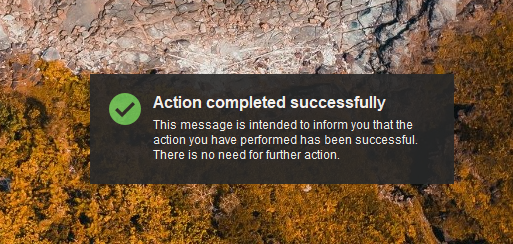
I recently read that the Windows info message can't be easily create. I think PySimpleGUIQt includes a function that can. But I wanted to stay with PySimpleGUI. There are several modules that promise this function, but partly only if certain settings are set in Windows (Windows notifications are now suppressed by default) or if the registry is edited.
I wanted to avoid all this hassle and so I made my own solution, which I would like to share (of course it would be smoother to build a class out of it):
import PySimpleGUI as sg
import textwrap
import time
import os
#-------------------------------------------------------------------
# message
win_title = "Action completed successfully"
win_msg = "This message is intended to inform you that the action you have performed has been successful. There is no need for further action."
win_msg = textwrap.fill(win_msg, 50)
win_msg_lines = win_msg.count("\n")+1

# fade setup
win_alpha = 0.0
win_faded_in = False

# images
cd = os.path.dirname(os.path.realpath(__file__))
img_success = cd + r"\success_32x32.png"
img_error = cd + r"\error_32x32.png"

# colors
win_color = "#282828"
text_color = "#ffffff"

# screen size
screen_res_x, screen_res_y = sg.Window.get_screen_size()

# window size
win_width = 364
win_height = 66+(14.8*win_msg_lines)
win_margin = 60

# display duration (1 sec = 1000 ms)
win_display_duration = 10000
#-------------------------------------------------------------------

sg.SetOptions(margins=(0,0), element_padding=(0,0))

layout = [[sg.Graph(canvas_size=(win_width,win_height), graph_bottom_left=(0,win_height), graph_top_right=(win_width,0), background_color="red", key="graph", change_submits=True)]]

window = sg.Window(win_title, layout, background_color="red", transparent_color="red", no_titlebar=True, location=(screen_res_x-win_width-win_margin, screen_res_y-win_height-win_margin), keep_on_top=True, alpha_channel=str(win_alpha), finalize=True)

graph = window["graph"]

rectangle = graph.DrawRectangle([win_width,win_height],[-win_width,-win_height], fill_color=win_color, line_color=win_color)
image = graph.DrawImage(filename=img_success, location=(20,20))
text = graph.DrawText(win_title, location=(64,20), color=text_color, font=("Arial", 12, "bold"), text_location=sg.TEXT_LOCATION_TOP_LEFT)
text = graph.DrawText(win_msg, location=(64,44), color=text_color, font=("Arial", 9), text_location=sg.TEXT_LOCATION_TOP_LEFT)

graph.Widget.config(cursor="hand2")

while True:

    if win_faded_in == True:
        event, values = window(timeout=win_display_duration)
        # fade_out
        win_alpha = 0.9
        for i in range(int(win_alpha*10), -1, -1):
            i = str(i / 10.0)
            window.TKroot.attributes('-alpha', i)
            time.sleep(0.02)
        break
    else:
        event, values = window(timeout=100)
        # fade_in
        for i in range(int(win_alpha*10), 10, 1):
            i = str(i / 10.0)
            window.TKroot.attributes('-alpha', i)
            time.sleep(0.02)

        win_faded_in = True

    mouse = values["graph"]

    if event is None:
        break
    if event is "GetPos":
        LocationD = window.CurrentLocation()
        print(LocationD)

    if event == "graph":
        if mouse == (None, None):
            continue
        else:
            # fade_out
            win_alpha = 0.9
            for i in range(int(win_alpha*10), -1, -1):
                i = str(i / 10.0)
                window.TKroot.attributes('-alpha', i)
                time.sleep(0.02)
            break
Preview:
Images:


 ncotrb
All 9 comments
VERY nice indeed! I'll study and play with it. Love that you're being bold and trying things that haven't been done before.
You don't need to do the direct tkinter calls for stuff like changing the alpha channel on the window. You can use window.set_alpha(value). The key for anything that deals with window changes is that if you want them to be immediately visible, you need to call window.refresh()
 PySimpleGUI
on 24 Sep 2019
PySimpleGUI
on 24 Sep 2019
Sorry to have butchered your code like this, but wanted to tweak a couple of things and see what you think.
I changed the images to be BASE64 so that you don't need files. There's a GREAT demo program that makes this a trivial thing to do. Get the program Demo_Base64_Image_Encoder.py and you'll never need to include any .png files again with your projects.
I also changed the basic logic at the end by removing the while loop and also used PySimpleGUI calls to do the fade in;/out.
These are not criticisms... just how I would do things a little differently.
I'm impressed at your use of the new constructs like window(timeout=xxx). Indeed!! Tastey stuff. Loved the hand! VERY inspiring!
This is SO COOL!
import PySimpleGUI as sg
import textwrap
import time
x = b'iVBORw0KGgoAAAANSUhEUgAAACAAAAAgCAMAAABEpIrGAAAAA3NCSVQICAjb4U/gAAAACXBIWXMAAADlAAAA5QGP5Zs8AAAAGXRFWHRTb2Z0d2FyZQB3d3cuaW5rc2NhcGUub3Jnm+48GgAAAIpQTFRF////20lt30Bg30pg4FJc409g4FBe4E9f4U9f4U9g4U9f4E9g31Bf4E9f4E9f4E9f4E9f4E9f4FFh4Vdm4lhn42Bv5GNx5W575nJ/6HqH6HyI6YCM6YGM6YGN6oaR8Kev9MPI9cbM9snO9s3R+Nfb+dzg+d/i++vt/O7v/fb3/vj5//z8//7+////KofnuQAAABF0Uk5TAAcIGBktSYSXmMHI2uPy8/XVqDFbAAAA8UlEQVQ4y4VT15LCMBBTQkgPYem9d9D//x4P2I7vILN68kj2WtsAhyDO8rKuyzyLA3wjSnvi0Eujf3KY9OUP+kno651CvlB0Gr1byQ9UXff+py5SmRhhIS0oPj4SaUUCAJHxP9+tLb/ezU0uEYDUsCc+l5/T8smTIVMgsPXZkvepiMj0Tm5txQLENu7gSF7HIuMreRxYNkbmHI0u5Hk4PJOXkSMz5I3nyY08HMjbpOFylF5WswdJPmYeVaL28968yNfGZ2r9gvqFalJNUy2UWmq1Wa7di/3Kxl3tF1671YHRR04dWn3s9cXRV09f3vb1fwPD7z9j1WgeRgAAAABJRU5ErkJggg=='
check = b'iVBORw0KGgoAAAANSUhEUgAAACAAAAAgCAMAAABEpIrGAAAAA3NCSVQICAjb4U/gAAAACXBIWXMAAAEKAAABCgEWpLzLAAAAGXRFWHRTb2Z0d2FyZQB3d3cuaW5rc2NhcGUub3Jnm+48GgAAAHJQTFRF////ZsxmbbZJYL9gZrtVar9VZsJcbMRYaMZVasFYaL9XbMFbasRZaMFZacRXa8NYasFaasJaasFZasJaasNZasNYasJYasJZasJZasJZasJZasJZasJYasJZasJZasJZasJZasJaasJZasJZasJZasJZ2IAizQAAACV0Uk5TAAUHCA8YGRobHSwtPEJJUVtghJeYrbDByNjZ2tvj6vLz9fb3/CyrN0oAAADnSURBVDjLjZPbWoUgFIQnbNPBIgNKiwwo5v1fsQvMvUXI5oqPf4DFOgCrhLKjC8GNVgnsJY3nKm9kgTsduVHU3SU/TdxpOp15P7OiuV/PVzk5L3d0ExuachyaTWkAkLFtiBKAqZHPh/yuAYSv8R7XE0l6AVXnwBNJUsE2+GMOzWL8k3OEW7a/q5wOIS9e7t5qnGExvF5Bvlc4w/LEM4Abt+d0S5BpAHD7seMcf7+ZHfclp10TlYZc2y2nOqc6OwruxUWx0rDjNJtyp6HkUW4bJn0VWdf/a7nDpj1u++PBOR694+Ftj/8PKNdnDLn/V8YAAAAASUVORK5CYII='
# -------------------------------------------------------------------
# message
win_title = "Action completed successfully"
win_msg = "This message is intended to inform you that the action you have performed has been successful. There is no need for further action."
win_msg = textwrap.fill(win_msg, 50)
win_msg_lines = win_msg.count("\n") + 1
# fade setup
win_alpha = 0.0
win_faded_in = True
# images
img_success = check
img_error = x
# colors
win_color = "#282828"
text_color = "#ffffff"
# screen size
screen_res_x, screen_res_y = sg.Window.get_screen_size()
# window size
win_width = 364
win_height = 66 + (14.8 * win_msg_lines)
win_margin = 60
# display duration (1 sec = 1000 ms)
win_display_duration = 10000
# -------------------------------------------------------------------
layout = [[sg.Graph(canvas_size=(win_width, win_height), graph_bottom_left=(0, win_height), graph_top_right=(win_width, 0), background_color="red", key="graph",
change_submits=True)]]
window = sg.Window(win_title, layout, background_color="red", transparent_color="red", no_titlebar=True,
location=(screen_res_x - win_width - win_margin, screen_res_y - win_height - win_margin), keep_on_top=True, alpha_channel=str(win_alpha), margins=(0,0), element_padding=(0,0),
finalize=True)
graph = window["graph"]
rectangle = graph.DrawRectangle([win_width, win_height], [-win_width, -win_height], fill_color=win_color, line_color=win_color)
image = graph.DrawImage(data=img_success, location=(20, 20))
text = graph.DrawText(win_title, location=(64, 20), color=text_color, font=("Arial", 12, "bold"), text_location=sg.TEXT_LOCATION_TOP_LEFT)
text = graph.DrawText(win_msg, location=(64, 44), color=text_color, font=("Arial", 9), text_location=sg.TEXT_LOCATION_TOP_LEFT)
graph.Widget.config(cursor="hand2")
if win_faded_in == True:
for i in range(1,90): # fade in
window.set_alpha(i/100)
window.refresh()
time.sleep(.02)
event, values = window(timeout=win_display_duration)
for i in range(100,1,-1): # fade out
window.set_alpha(i/100)
window.refresh()
time.sleep(.02)
else:
event, values = window(timeout=win_display_duration)
How about something like this as a demo?
import PySimpleGUI as sg
import textwrap
import time

'''
    Notification Window Demo Program
    Shamelessly stolen from PySimpleGUI user ncotrb

    Displays a small informational window with an Icon and a message in the lower right corner of the display
    Option to fade in/out or immediatealy display.
'''


# -------------------------------------------------------------------
# fade in/out info and default window alpha
USE_FADE_IN = True
WINDOW_ALPHA = 0.9

# colors
WIN_COLOR = "#282828"
TEXT_COLOR = "#ffffff"

DEFAULT_DISPLAY_DURATION_IN_MILLISECONDS = 10000

# -------------------------------------------------------------------

def display_notification(title, message, icon, display_duration_in_ms=DEFAULT_DISPLAY_DURATION_IN_MILLISECONDS, use_fade_in=True):
    # Compute location and size of the window
    message = textwrap.fill(message, 50)
    win_msg_lines = message.count("\n") + 1

    screen_res_x, screen_res_y = sg.Window.get_screen_size()
    win_margin = 60  # distance from screen edges
    win_width, win_height = 364, 66 + (14.8 * win_msg_lines)

    layout = [[sg.Graph(canvas_size=(win_width, win_height), graph_bottom_left=(0, win_height), graph_top_right=(win_width, 0), key="-GRAPH-", background_color=WIN_COLOR, enable_events=True)]]

    window = sg.Window(title, layout, background_color=WIN_COLOR, no_titlebar=True,
                       location=(screen_res_x - win_width - win_margin, screen_res_y - win_height - win_margin), keep_on_top=True, alpha_channel=0, margins=(0,0), element_padding=(0,0),
                       finalize=True)

    rectangle = window["-GRAPH-"].draw_rectangle((win_width, win_height), (-win_width, -win_height), fill_color=WIN_COLOR, line_color=WIN_COLOR)
    image = window["-GRAPH-"].draw_image(data=icon, location=(20, 20))
    text = window["-GRAPH-"].draw_text(title, location=(64, 20), color=TEXT_COLOR, font=("Arial", 12, "bold"), text_location=sg.TEXT_LOCATION_TOP_LEFT)
    text = window["-GRAPH-"].draw_text(message, location=(64, 44), color=TEXT_COLOR, font=("Arial", 9), text_location=sg.TEXT_LOCATION_TOP_LEFT)

    window["-GRAPH-"].Widget.config(cursor="hand2")

    if use_fade_in == True:
        for i in range(1,int(WINDOW_ALPHA*100)):          # fade in
            window.set_alpha(i/100)
            window.refresh()
            time.sleep(.02)
        event, values = window(timeout=display_duration_in_ms)
        for i in range(int(WINDOW_ALPHA*100),1,-1):       # fade out
            window.set_alpha(i/100)
            window.refresh()
            time.sleep(.02)
    else:
        window.set_alpha(WINDOW_ALPHA)
        event, values = window(timeout=display_duration_in_ms)

if __name__ == '__main__':
    # Base64 Images to use as icons in the window
    img_error = b'iVBORw0KGgoAAAANSUhEUgAAACAAAAAgCAMAAABEpIrGAAAAA3NCSVQICAjb4U/gAAAACXBIWXMAAADlAAAA5QGP5Zs8AAAAGXRFWHRTb2Z0d2FyZQB3d3cuaW5rc2NhcGUub3Jnm+48GgAAAIpQTFRF////20lt30Bg30pg4FJc409g4FBe4E9f4U9f4U9g4U9f4E9g31Bf4E9f4E9f4E9f4E9f4E9f4FFh4Vdm4lhn42Bv5GNx5W575nJ/6HqH6HyI6YCM6YGM6YGN6oaR8Kev9MPI9cbM9snO9s3R+Nfb+dzg+d/i++vt/O7v/fb3/vj5//z8//7+////KofnuQAAABF0Uk5TAAcIGBktSYSXmMHI2uPy8/XVqDFbAAAA8UlEQVQ4y4VT15LCMBBTQkgPYem9d9D//x4P2I7vILN68kj2WtsAhyDO8rKuyzyLA3wjSnvi0Eujf3KY9OUP+kno651CvlB0Gr1byQ9UXff+py5SmRhhIS0oPj4SaUUCAJHxP9+tLb/ezU0uEYDUsCc+l5/T8smTIVMgsPXZkvepiMj0Tm5txQLENu7gSF7HIuMreRxYNkbmHI0u5Hk4PJOXkSMz5I3nyY08HMjbpOFylF5WswdJPmYeVaL28968yNfGZ2r9gvqFalJNUy2UWmq1Wa7di/3Kxl3tF1671YHRR04dWn3s9cXRV09f3vb1fwPD7z9j1WgeRgAAAABJRU5ErkJggg=='
    img_success = b'iVBORw0KGgoAAAANSUhEUgAAACAAAAAgCAMAAABEpIrGAAAAA3NCSVQICAjb4U/gAAAACXBIWXMAAAEKAAABCgEWpLzLAAAAGXRFWHRTb2Z0d2FyZQB3d3cuaW5rc2NhcGUub3Jnm+48GgAAAHJQTFRF////ZsxmbbZJYL9gZrtVar9VZsJcbMRYaMZVasFYaL9XbMFbasRZaMFZacRXa8NYasFaasJaasFZasJaasNZasNYasJYasJZasJZasJZasJZasJZasJYasJZasJZasJZasJZasJaasJZasJZasJZasJZ2IAizQAAACV0Uk5TAAUHCA8YGRobHSwtPEJJUVtghJeYrbDByNjZ2tvj6vLz9fb3/CyrN0oAAADnSURBVDjLjZPbWoUgFIQnbNPBIgNKiwwo5v1fsQvMvUXI5oqPf4DFOgCrhLKjC8GNVgnsJY3nKm9kgTsduVHU3SU/TdxpOp15P7OiuV/PVzk5L3d0ExuachyaTWkAkLFtiBKAqZHPh/yuAYSv8R7XE0l6AVXnwBNJUsE2+GMOzWL8k3OEW7a/q5wOIS9e7t5qnGExvF5Bvlc4w/LEM4Abt+d0S5BpAHD7seMcf7+ZHfclp10TlYZc2y2nOqc6OwruxUWx0rDjNJtyp6HkUW4bJn0VWdf/a7nDpj1u++PBOR694+Ftj/8PKNdnDLn/V8YAAAAASUVORK5CYII='

    title = "Action completed successfully"
    message = "This message is intended to inform you that the action you have performed has been successful. There is no need for further action."
    display_notification(title, message, img_success, 4000, True)
I'm more than impressed that you were able to make the code even more compacted. Here it becomes clear how much programming resembles a language that can be spoken bumpy or elegantly! :-D
I would be very happy if this snippet makes it into the demos!
In future examples (still have some ideas), I will definitely include the images, which is much more practical.
ncotrb
on 25 Sep 2019
_You did all the hard work! You came up with the idea. You wrote all the code._
I just used some "insider knowledge" to do things like setting the background colors in a way that didn't require the VERY CLEVER use of the transparent background color to get around issues you were having with the window outlines, etc.
I've been practicing a bit on how to compact down PySimpleGUI programs. 😏 One of the reasons I read and play with all PySimpleGUI code I can find is that it helps build these kinds of skills for me. And gives me access to COOL sh*t like this that you've so nicely given permission to give away.
So, nothing particularly magical about what I did, at all. ALL of the credit goes your way. I just squished stuff and made it into a function call. This file could in theory be imported and used to generate these awesome windows. I'm going to be including them in some of my personal projects. Instead of popping up messages from the system tray, there are times I want something more and this is perfect for it.
You could also do it perhaps without the Graph Element, but I'm unsure how exactly to make sure everything is clickable so that no matter where you click you'll get an event (the blank window space in particular) I don't see a need to at this point however because it WORKS.
One advantage to using a Graph Element is that it MAY be possible to do some crazy toaster-like animation. Have to think long and hard about how.....
PySimpleGUI
on 25 Sep 2019
I was further inspired to attempt to run my "toaster" code as a PROCESS, using multiprocessing as a way to run multiple "threads" of tkinter window in a single program. I ultimately wasn't able to get it all working.
What I want to do is enable people to use this code as a "library" of sorts that can be called from other PySimpleGUI code with the goal being that you make a call to display a notification window that then immediately returns to the caller while the fade up, click, fade down logic all happens behind the scenes while your user code continues to work. It's a "Fire and forget" thing that I envision.
Here is the code to toaster.py that I've been working with. It is when I try to use it from another .py file that I run into trouble.
I clearly do not yet understand the multiprocessing module. The reason for the Thread code that is currently commented out is that when I imported this file and tried to get the process to start and immediately return to the caller, it wouldn't immediately return. I figured I knew how to start threadss in a way that immediately return, so why not use that? TKINTER put a quick end to that idea as it detected that threads were being used despite the fact that the thread actually kicks off a new PROCESS which I thought tkinter would be quite happy about.
import PySimpleGUI as sg
import textwrap
import time
from multiprocessing import Process
from threading import Thread

'''
    Notification Window Demo Program
    Shamelessly stolen from PySimpleGUI user ncotrb

    Displays a small informational window with an Icon and a message in the lower right corner of the display
    Option to fade in/out or immediatealy display.
'''


# -------------------------------------------------------------------
# fade in/out info and default window alpha
USE_FADE_IN = True
WINDOW_ALPHA = 0.9
WIN_MARGIN = 60

# colors
WIN_COLOR = "#282828"
TEXT_COLOR = "#ffffff"

DEFAULT_DISPLAY_DURATION_IN_MILLISECONDS = 10000

# Base64 Images to use as icons in the window
image64_error = b'iVBORw0KGgoAAAANSUhEUgAAACAAAAAgCAMAAABEpIrGAAAAA3NCSVQICAjb4U/gAAAACXBIWXMAAADlAAAA5QGP5Zs8AAAAGXRFWHRTb2Z0d2FyZQB3d3cuaW5rc2NhcGUub3Jnm+48GgAAAIpQTFRF////20lt30Bg30pg4FJc409g4FBe4E9f4U9f4U9g4U9f4E9g31Bf4E9f4E9f4E9f4E9f4E9f4FFh4Vdm4lhn42Bv5GNx5W575nJ/6HqH6HyI6YCM6YGM6YGN6oaR8Kev9MPI9cbM9snO9s3R+Nfb+dzg+d/i++vt/O7v/fb3/vj5//z8//7+////KofnuQAAABF0Uk5TAAcIGBktSYSXmMHI2uPy8/XVqDFbAAAA8UlEQVQ4y4VT15LCMBBTQkgPYem9d9D//x4P2I7vILN68kj2WtsAhyDO8rKuyzyLA3wjSnvi0Eujf3KY9OUP+kno651CvlB0Gr1byQ9UXff+py5SmRhhIS0oPj4SaUUCAJHxP9+tLb/ezU0uEYDUsCc+l5/T8smTIVMgsPXZkvepiMj0Tm5txQLENu7gSF7HIuMreRxYNkbmHI0u5Hk4PJOXkSMz5I3nyY08HMjbpOFylF5WswdJPmYeVaL28968yNfGZ2r9gvqFalJNUy2UWmq1Wa7di/3Kxl3tF1671YHRR04dWn3s9cXRV09f3vb1fwPD7z9j1WgeRgAAAABJRU5ErkJggg=='
image64_success = b'iVBORw0KGgoAAAANSUhEUgAAACAAAAAgCAMAAABEpIrGAAAAA3NCSVQICAjb4U/gAAAACXBIWXMAAAEKAAABCgEWpLzLAAAAGXRFWHRTb2Z0d2FyZQB3d3cuaW5rc2NhcGUub3Jnm+48GgAAAHJQTFRF////ZsxmbbZJYL9gZrtVar9VZsJcbMRYaMZVasFYaL9XbMFbasRZaMFZacRXa8NYasFaasJaasFZasJaasNZasNYasJYasJZasJZasJZasJZasJZasJYasJZasJZasJZasJZasJaasJZasJZasJZasJZ2IAizQAAACV0Uk5TAAUHCA8YGRobHSwtPEJJUVtghJeYrbDByNjZ2tvj6vLz9fb3/CyrN0oAAADnSURBVDjLjZPbWoUgFIQnbNPBIgNKiwwo5v1fsQvMvUXI5oqPf4DFOgCrhLKjC8GNVgnsJY3nKm9kgTsduVHU3SU/TdxpOp15P7OiuV/PVzk5L3d0ExuachyaTWkAkLFtiBKAqZHPh/yuAYSv8R7XE0l6AVXnwBNJUsE2+GMOzWL8k3OEW7a/q5wOIS9e7t5qnGExvF5Bvlc4w/LEM4Abt+d0S5BpAHD7seMcf7+ZHfclp10TlYZc2y2nOqc6OwruxUWx0rDjNJtyp6HkUW4bJn0VWdf/a7nDpj1u++PBOR694+Ftj/8PKNdnDLn/V8YAAAAASUVORK5CYII='


# -------------------------------------------------------------------

def _display_notification(title, message, icon=image64_success, display_duration_in_ms=DEFAULT_DISPLAY_DURATION_IN_MILLISECONDS, use_fade_in=True, alpha=0.9, location=None):
    print('In the proc!!')
    # Compute location and size of the window
    message = textwrap.fill(message, 50)
    win_msg_lines = message.count("\n") + 1

    screen_res_x, screen_res_y = sg.Window.get_screen_size()
    win_margin = WIN_MARGIN  # distance from screen edges
    win_width, win_height = 364, 66 + (14.8 * win_msg_lines)

    layout = [[sg.Graph(canvas_size=(win_width, win_height), graph_bottom_left=(0, win_height), graph_top_right=(win_width, 0), key="-GRAPH-", background_color=WIN_COLOR, enable_events=True)]]

    win_location = location if location is not None else (screen_res_x - win_width - win_margin, screen_res_y - win_height - win_margin)
    window = sg.Window(title, layout, background_color=WIN_COLOR, no_titlebar=True,
                       location=win_location, keep_on_top=True, alpha_channel=0, margins=(0,0), element_padding=(0,0),
                       finalize=True)

    window["-GRAPH-"].draw_rectangle((win_width, win_height), (-win_width, -win_height), fill_color=WIN_COLOR, line_color=WIN_COLOR)
    window["-GRAPH-"].draw_image(data=icon, location=(20, 20))
    window["-GRAPH-"].draw_text(title, location=(64, 20), color=TEXT_COLOR, font=("Arial", 12, "bold"), text_location=sg.TEXT_LOCATION_TOP_LEFT)
    window["-GRAPH-"].draw_text(message, location=(64, 44), color=TEXT_COLOR, font=("Arial", 9), text_location=sg.TEXT_LOCATION_TOP_LEFT)

    window["-GRAPH-"].Widget.config(cursor="hand2")

    if use_fade_in == True:
        for i in range(1,int(alpha*100)):          # fade in
            window.set_alpha(i/100)
            window.refresh()
            time.sleep(.02)
        event, values = window(timeout=display_duration_in_ms)
        for i in range(int(alpha*100),1,-1):       # fade out
            window.set_alpha(i/100)
            window.refresh()
            time.sleep(.02)
    else:
        window.set_alpha(alpha)
        event, values = window(timeout=display_duration_in_ms)
    print('Exiting the notification process')


def the_thread(title, message, icon=image64_success, display_duration_in_ms=DEFAULT_DISPLAY_DURATION_IN_MILLISECONDS, use_fade_in=True, alpha=0.9, location=None):
    proc = Process(target=_display_notification, args=(title, message, icon,display_duration_in_ms, use_fade_in, alpha, location),)
    proc.run()

def display_notification(title, message, icon=image64_success, display_duration_in_ms=DEFAULT_DISPLAY_DURATION_IN_MILLISECONDS, use_fade_in=True, alpha=0.9, location=None):
    print('In display notification')

    # Thread(target=the_thread, args=(title, message, icon,display_duration_in_ms, use_fade_in, alpha, location), daemon=True).start()

    proc = Process(target=_display_notification, args=(title, message, icon,display_duration_in_ms, use_fade_in, alpha, location),daemon=True )
    proc.run()
    print('Done starting notification process')
    print('Back from start')
    # proc.join()

if __name__ == '__main__':
    title = "Action completed successfully"
    message = "This message is intended to inform you that the action you have performed has been successful. There is no need for further action."
    display_notification(title, message, image64_error, 4000, True)
Hello Mike, the multithread method is a brilliant idea of yours. In this way the user activities in the main window would not be blocked. I very much hope that you succeed in implementing it to your satisfaction. It's great that this info toast window will help you in your everyday life! :-)
Maybe I will be able to realize the window toast pop animation. I think I already have an idea how this could work...
In the meantime I have added some small things to the non-thread version. Now the window also expands flexibly if the title goes over several lines of text. Furthermore, the user can now determine in which corner of the screen the message should be displayed.
import PySimpleGUI as sg
import textwrap
import time

'''
    Notification Window Demo Program
    Inspired by PySimpleGUI user ncotrb
    Displays a small informational window with an Icon and a message in the lower right corner of the display
    Option to fade in/out or immediatealy display.
'''

# -------------------------------------------------------------------
# fade in/out info and default window alpha
USE_FADE_IN = True
WINDOW_ALPHA = 0.9
WIN_MARGIN = 70

# colors
WIN_COLOR = "#121212"
TEXT_COLOR = "#ffffff"

DEFAULT_DISPLAY_DURATION_IN_MILLISECONDS = 10000

# default window location (1 = top_left, 2 = top_right, 3 = bottom_left, 4 = bottom_right)
DEFAULT_WIN_LOC = 4

# base64 images to use as icons in the window
image64_error = b'iVBORw0KGgoAAAANSUhEUgAAACAAAAAgCAMAAABEpIrGAAAAA3NCSVQICAjb4U/gAAAACXBIWXMAAADlAAAA5QGP5Zs8AAAAGXRFWHRTb2Z0d2FyZQB3d3cuaW5rc2NhcGUub3Jnm+48GgAAAIpQTFRF////20lt30Bg30pg4FJc409g4FBe4E9f4U9f4U9g4U9f4E9g31Bf4E9f4E9f4E9f4E9f4E9f4FFh4Vdm4lhn42Bv5GNx5W575nJ/6HqH6HyI6YCM6YGM6YGN6oaR8Kev9MPI9cbM9snO9s3R+Nfb+dzg+d/i++vt/O7v/fb3/vj5//z8//7+////KofnuQAAABF0Uk5TAAcIGBktSYSXmMHI2uPy8/XVqDFbAAAA8UlEQVQ4y4VT15LCMBBTQkgPYem9d9D//x4P2I7vILN68kj2WtsAhyDO8rKuyzyLA3wjSnvi0Eujf3KY9OUP+kno651CvlB0Gr1byQ9UXff+py5SmRhhIS0oPj4SaUUCAJHxP9+tLb/ezU0uEYDUsCc+l5/T8smTIVMgsPXZkvepiMj0Tm5txQLENu7gSF7HIuMreRxYNkbmHI0u5Hk4PJOXkSMz5I3nyY08HMjbpOFylF5WswdJPmYeVaL28968yNfGZ2r9gvqFalJNUy2UWmq1Wa7di/3Kxl3tF1671YHRR04dWn3s9cXRV09f3vb1fwPD7z9j1WgeRgAAAABJRU5ErkJggg=='
image64_success = b'iVBORw0KGgoAAAANSUhEUgAAACAAAAAgCAMAAABEpIrGAAAAA3NCSVQICAjb4U/gAAAACXBIWXMAAAEKAAABCgEWpLzLAAAAGXRFWHRTb2Z0d2FyZQB3d3cuaW5rc2NhcGUub3Jnm+48GgAAAHJQTFRF////ZsxmbbZJYL9gZrtVar9VZsJcbMRYaMZVasFYaL9XbMFbasRZaMFZacRXa8NYasFaasJaasFZasJaasNZasNYasJYasJZasJZasJZasJZasJZasJYasJZasJZasJZasJZasJaasJZasJZasJZasJZ2IAizQAAACV0Uk5TAAUHCA8YGRobHSwtPEJJUVtghJeYrbDByNjZ2tvj6vLz9fb3/CyrN0oAAADnSURBVDjLjZPbWoUgFIQnbNPBIgNKiwwo5v1fsQvMvUXI5oqPf4DFOgCrhLKjC8GNVgnsJY3nKm9kgTsduVHU3SU/TdxpOp15P7OiuV/PVzk5L3d0ExuachyaTWkAkLFtiBKAqZHPh/yuAYSv8R7XE0l6AVXnwBNJUsE2+GMOzWL8k3OEW7a/q5wOIS9e7t5qnGExvF5Bvlc4w/LEM4Abt+d0S5BpAHD7seMcf7+ZHfclp10TlYZc2y2nOqc6OwruxUWx0rDjNJtyp6HkUW4bJn0VWdf/a7nDpj1u++PBOR694+Ftj/8PKNdnDLn/V8YAAAAASUVORK5CYII='
# -------------------------------------------------------------------

def display_notification(title, message, icon=image64_success, win_location=DEFAULT_WIN_LOC, display_duration_in_ms=DEFAULT_DISPLAY_DURATION_IN_MILLISECONDS, use_fade_in=True, alpha=0.9):
    # compute location and size of the window
    title = textwrap.fill(title, 35)
    win_title_lines = title.count("\n") + 1
    message = textwrap.fill(message, 50)
    win_msg_lines = message.count("\n") + 1

    screen_res_x, screen_res_y = sg.Window.get_screen_size()

    win_width, win_height = 364, 50 + (19 * win_title_lines) + (14.8 * win_msg_lines)

    if win_location <= 1:
        win_location_calc = (WIN_MARGIN, WIN_MARGIN)
    if win_location == 2:
        win_location_calc = (screen_res_x - win_width - WIN_MARGIN, WIN_MARGIN)
    if win_location == 3:
        win_location_calc = (WIN_MARGIN, screen_res_y - win_height - WIN_MARGIN)
    if win_location >= 4:
        win_location_calc = (screen_res_x - win_width - WIN_MARGIN, screen_res_y - win_height - WIN_MARGIN)

    layout = [[sg.Graph(canvas_size=(win_width, win_height), graph_bottom_left=(0, win_height), graph_top_right=(win_width, 0), key="-GRAPH-", background_color=WIN_COLOR, enable_events=True)]]

    window = sg.Window(title, layout, background_color=WIN_COLOR, no_titlebar=True, location=win_location_calc, keep_on_top=True, alpha_channel=0, margins=(0,0), element_padding=(0,0), finalize=True)

    window["-GRAPH-"].draw_rectangle((win_width, win_height), (-win_width, -win_height), fill_color=WIN_COLOR, line_color=WIN_COLOR)
    window["-GRAPH-"].draw_image(data=icon, location=(20, 20))
    window["-GRAPH-"].draw_text(title, location=(64, 18), color=TEXT_COLOR, font=("Arial", 12, "bold"), text_location=sg.TEXT_LOCATION_TOP_LEFT)
    window["-GRAPH-"].draw_text(message, location=(64, 28 + (19 * win_title_lines)), color=TEXT_COLOR, font=("Arial", 9), text_location=sg.TEXT_LOCATION_TOP_LEFT)

    window["-GRAPH-"].Widget.config(cursor="hand2")

    if use_fade_in == True:
        for i in range(1,int(WINDOW_ALPHA*100)):        # fade in
            window.set_alpha(i/100)
            window.refresh()
            time.sleep(.02)
        event, values = window(timeout=display_duration_in_ms)
        for i in range(int(WINDOW_ALPHA*100),1,-1):     # fade out
            window.set_alpha(i/100)
            window.refresh()
            time.sleep(.02)
    else:
        window.set_alpha(WINDOW_ALPHA)
        event, values = window(timeout=display_duration_in_ms)

if __name__ == '__main__':
    title = "Lorem ipsum dolor sit amet, consetetur sadipscing elitr, sed diam nonumy!"
    message = "Lorem ipsum dolor sit amet, consetetur sadipscing elitr, sed diam nonumy eirmod tempor invidunt ut labore et dolore magna aliquyam erat, sed diam voluptua. At vero eos et accusam et justo duo dolores et ea rebum."

    display_notification(title, message, image64_success, 4, 4000, True)
This program was released a while back as a Demo Program. Closing this Issue for now. Still have in the back of my head wanting to make this a multi-processed kind of addition.
The Demo Program is named: Demo_Notification_Window_Fade_In_out.py
PySimpleGUI
on 14 Dec 2019
Hi @ncotrb !
I'm preparing to release an evolved version of this code as ptoaster.
I've made several changes this week to it including removing of the sleeps and direct calls into tkinter. The biggest change is to make it multi-processed. This enables users to call this code and continue execution without any delays at all.
I'm trying to locate the source of the two images so that I can perhaps find a few others to add to it. A question mark, exclamation mark, etc, would be good additions.
I'll follow up here when it's released as well.
PySimpleGUI
on 18 Jan 2020
Related issues
 xuguojun168
·
3Comments
xuguojun168
·
3Comments
 thelou1s
·
4Comments
thelou1s
·
4Comments
 mozesa
·
5Comments
mozesa
·
5Comments
 DKatarakis
·
6Comments
DKatarakis
·
6Comments
 ihouses
·
6Comments
ihouses
·
6Comments
Most helpful comment
How about something like this as a demo?