Pysimplegui: Problem with multiple users in the REMI implementation
I'm in the early stages of understanding PySimpleGUIWeb and had some basic questions. If they end up being more involved than I thought I may consider splitting this post into multiple; but here goes.
My basic goal would be to create a GUI which allows multiuser support. The easiest example is probably a timer, which has a start button and displays the time elapsed. Consider initially the single user functionality, a single button which says "Start", when clicked a timer starts and the button text changes to "Stop". Pressing again the button stops the timer.
Example code below:
import PySimpleGUIWeb as sg
import time

layout = [[sg.Button('Start', key='button')],
          [sg.Text('00:00:00.000', key='text')]]


win = sg.Window('Timer', layout=layout,
                web_multiple_instance=True,
                )

started = False

while True:
    event, values = win.Read(timeout=0.01)
    if event is None:
        break
    elif event == 'button':
        if started:
            win.Element('button').Update(text='Start')
        else:
            win.Element('button').Update(text='Stop')
            t_start = time.time()
        started = not started
    if started:
        t_elapsed = time.time() - t_start
        minutes = t_elapsed // 60
        hours = t_elapsed // 3600
        seconds = t_elapsed % 60 // 1
        ms = t_elapsed * 1000 % 1000
        win.Element('text').Update(
            value=f'{hours:02.0f}:{minutes:02.0f}:{seconds:02.0f}.{ms:03.0f}')
I was hoping the above setup would allow the following:
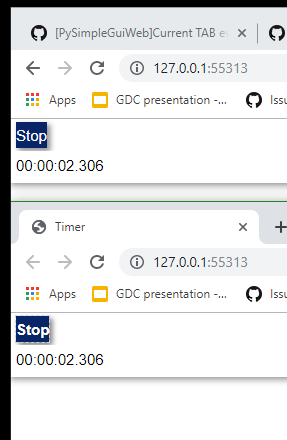
User 1 opens the webpage and clicks start, User 2 opens the webpage and both pages show the timer runing and both show the button text being "Stop". Once one of the users clicks the button it would stop for both users.
Is the above behaviour possible? Right now the behaviour I observe is the following:
User 1 opens the webpage and clicks start, the timer starts running <= expected
User 2 opens the webpage, this results in User 1 timer to stop updating
If User 1 or User 2 clicks on the button, the timer and button update for User 2, but no change for what User 1 sees
It seems as if the button callbacks are still properly linked but the updates are only done for User 2
If User 1 or User 2 close the window the app closes, not sure how to check if there is still a connected session in which case I'd want the app to persist, almost like a webpage where closing the tab doesn't kill the server
 evan54
All 25 comments
The program you provided does exactly what you've stated you wanted.
You need to fill out the form so that the environment, versions, etc. are known.
Your timeout value should be in milliseconds.
There does seem to be an issue where the server is stopped when it shouldn't be.
 MikeTheWatchGuy
on 4 Aug 2019
MikeTheWatchGuy
on 4 Aug 2019
Operating System: Ubuntu 18.04.2 LTS
Python version: 3.7.3
PySimpleGUI Port and Version: Remi (can't find the version)
Please let me know if you need anything further
evan54
on 4 Aug 2019
Browser?
PySimpleGUIWeb version if you're running the pip installed version. If you're not running the pip installed version, then when did you get the PySimpleGUIWeb.py file you're running.
MikeTheWatchGuy
on 4 Aug 2019
Google Chrome - Version 76.0.3809.87 (Official Build) (64-bit)
PySimpleGUIWeb
Name: PySimpleGUIWeb
Version: 0.28.1
Summary: A port of PySimpleGUI that runs in a web browser. Utilizes Remi as the GUI framework
Home-page: https://github.com/PySimpleGUI/PySimpleGUI
Author: PySimpleGUI
Author-email: [email protected]
License: UNKNOWN
Requires: remi
Required-by:
evan54
on 4 Aug 2019
Worry not, help is on the way!
 PySimpleGUI
on 5 Aug 2019
PySimpleGUI
on 5 Aug 2019
Just an idea from another user here:
If you are using 'web_multiple_instance=True' I think you probably want to also specify 'disable_Close=True'; this setting prevents the backend server process exiting when one of the user sessions exits.
However I think with web_multiple_instance=True each session might get a separate timer, if you really want to share the timer and screen objects between user sessions then perhaps leave the web_multiple_instance at False. I did that initially and it was really interesting (but not what I wanted) so now I use web_multiple_instance=True so as to get independent sessions for my users.
 gwingnhbc
on 6 Aug 2019
gwingnhbc
on 6 Aug 2019
ok so the good news is that the disable_close=False trick worked and now I have the originally desired behaviour. I also removed the web_multiple_instances=True so it defaults to False but I'm not sure it mattered.
evan54
on 7 Aug 2019
Great. The web_multiple_instances value had a very significant effect when I (briefly) used it. With it as 'True' I got a typical (and desired) behaviour where each web user got their own user session. Set to 'False' it was as if there was a single web page that each user had rendered on their session so each user could see in real time updates other users were making - that might be great if you are writing a game or something but was definitely not desired behaviour for a 'normal' utility app.
gwingnhbc
on 7 Aug 2019
So it sounds like you got the expected behaviour, ie web_multiple_instances=True, so this should also work properly?
evan54
on 7 Aug 2019
The Window parameter web_multiple_instance is passed directly to Remi, unchanged as a parameter to the call to remi.start where that function has a parameter named, you guessed it, web_multiple_instance. Like several of these web settings, they are "flow through" variables that pass through PySimpleGUI to Remi.
The Window parameter disable_close is one you'll find in all PySimpleGUI ports. In the PySimpleGUIWeb port, it controls what happens when a disconnect or unload event happens. Without it being set to True close events will unload the entire application. It really is meant to convey CLOSE in a big way.
MikeTheWatchGuy
on 7 Aug 2019
Hello, I'm trying the example provided by @evan54 and I can confirm that multiple instances mode don't work for me. I'm using the most updated PySimpleGuiWeb version from github.
@gwingnhbc are you sure you successfully used multiple instances=True in the past?
EDIT: As I can see in the code, multiple_instance=True can't be actually supported. @MikeTheWatchGuy Am I right or maybe I'm missing something?
Instead multiple_instance=False works perfectly with multiple users connected to the same Window.
 dddomodossola
on 9 Aug 2019
dddomodossola
on 9 Aug 2019
I'm trying to make an experimental version of PySimpleGuiWeb with support for multiple_instances=True, but I'm not sure If it will work. I will inform you about this.
dddomodossola
on 9 Aug 2019
multiple_instance is a setting that "Flows through" PySimpleGUIWeb. It's passed as a parameter when a Window is created. I then pass it right on to Remi when Remi is started. It's not used in my code anywhere else.
In terms of multiple_instances where multiple people can connect and each will be given a new PySimpleGUI thread of some sort so that each is running their own event loop is well beyond the reach of the package from where it sits today.
My assumption was that it was used solely for the purpose of allowing multiple connections, not multiple sessions that are independent.
MikeTheWatchGuy
on 9 Aug 2019
@MikeTheWatchGuy thank you for the explanation. Now it makes sense. And in this view the library works correctly and this Issue is not applicable.
I studied Yesterday a possible implementation of multiple instances giving to each user a new Thread running their own loop. It would require important changes not only to the library itself, but also its usage by the user. As you correctly says, this is beyond the the package purpose and would compromise its actual consistency.
dddomodossola
on 9 Aug 2019
PySimpleGUIWeb supports multiple connections, not multiple independent sessions
I'm wondering if perhaps there's a misunderstanding. Maybe it's me that's misunderstanding for that matter.... happens a lot.
PySimpleGUIWeb is a GUI. It's a front-end to your Python program that runs in a web browser. If you look at the anatomy of a PySimpleGUIWeb program it's straightforward, linear, no-callbacks architecture.
It is not spawning your program as a thread again and again as each connection is made.
Here's the most basic of PySimpleGUIWeb programs (not meaning to say you're at this level.... this if for illustration of course)
import PySimpleGUIWeb as sg

layout = [[sg.Text('It is just me and my watchers')],
          [sg.Button('OK')]]

window = sg.Window('My new window', layout)

while True:             # Event Loop
    event, values = window.Read()
    if event is None:
        break
    print(event, values)
There's nothing here that addresses or enables more than 1 person at a time to see anything but the same thing.
If a "web server" is needed, then things will need to change a bit for that to happen. Context for each user is needed, etc. It would be an enhancement to say the least.
One PySimpleGUI difference from using the frameworks directly is that you are running your own event loop. Normally the underlying framework does this for you and in the process could do advanced operations such as state handling for multiple sessions.
I hope this clears things up a bit.
MikeTheWatchGuy
on 9 Aug 2019
I want to circle back to the original poster's request. I think this thread may have taken a wrong turn.
The first port had this description for the desired behavior:
I was hoping the above setup would allow the following:
User 1 opens the webpage and clicks start, User 2 opens the webpage and both pages show the timer runing and both show the button text being "Stop". Once one of the users clicks the button it would stop for both users.
Is the above behaviour possible?
This should work perfectly now and is what @evan54 was looking for.
Then another conversation began with @gwingnhbc . This is where I think a misunderstanding about how PySimpleGUIWeb works started and seems completely different than the original post.
Does this seem right to others?
MikeTheWatchGuy
on 9 Aug 2019
Yes of course, that's right. So, in relation to the original request, I can confirm that all works perfectly.
dddomodossola
on 9 Aug 2019
I clearly have some documenting to do :-)
MikeTheWatchGuy
on 9 Aug 2019
I clearly have some documenting to do :-)
Excuse me @MikeTheWatchGuy, this misunderstanding was caused by my limited knowledge about all aspects about PySimpleGui. That's me that have to study, your documentation is fine.
dddomodossola
on 9 Aug 2019
Is it normal to have multiple "App instances" debug messages printed for a single connect.
When I run the file PySimpleGUIWeb.py, I see the typical test harness. That is, the default web browser opens as directed by Remi. It connects and all's well.
However, what I see printed on the console are these messages:
C:\Python\Anaconda3\python.exe C:/Users/mike/.PyCharmCE2019.1/config/scratches/scratch_441.py
new App instance 2218314656008
new App instance 2218314796112
new App instance 2218314796112
new App instance 2218319851760
new App instance 2218319853440
I'm confused. This seems like a really bad thing. There was only a single connection.
MikeTheWatchGuy
on 10 Aug 2019
This is caused by different browser's connection attempts. And remi handles this behaviour, overwriting unuseful instances. This was causing strange pysimpleguiweb problem, already fixed in the last bugfix.
dddomodossola
on 10 Aug 2019
Do you mean I shouldn't be seeing this in the version that you supplied and that I posted here on GitHub?
MikeTheWatchGuy
on 10 Aug 2019
I mean that it's ok that more than one App instances are created. The message appears because we put a print command in the last pysimpleguiweb bugfix. Just comment or delete that print statement. ;-)
dddomodossola
on 10 Aug 2019
Can you please confirm as of which versions this has been fixed? Also, did it also require a REMI update?
Thank you for the help!
evan54
on 11 Aug 2019
Does not require a Remi update that I'm aware of.
The version checked into GitHub is what was tested a few days back specifically on your code with your scenario.
MikeTheWatchGuy
on 11 Aug 2019
Related issues
 eyeonus
·
6Comments
eyeonus
·
6Comments
 lucasea777
·
3Comments
lucasea777
·
3Comments
 scmanjarrez
·
5Comments
scmanjarrez
·
5Comments
 mozesa
·
4Comments
mozesa
·
4Comments
 yogesh-aggarwal
·
3Comments
yogesh-aggarwal
·
3Comments