Pysimplegui: [Enhancement] Cursor Symbols on Buttons and maybe other elements
Type of Issues (Enhancement, Error, Bug, Question)
Enhancement
Operating System
Windows 10
Python version
3.7.3
PySimpleGUI Port and Version
PySimpleGUI-TK 4.0.0
Code or partial code causing the problem
Hello Mike, it's me again. I came across a nice function in TKinter when I tried to put a hand symbol over a toggle button with an image, as it is always done in the browser over a link. Unfortunately there are only a few predefined symbols in TKinter, but maybe you can think of a great way to embed them or make it possible, to display your own symbols as importet image file...
Here is the TKinter example:
import tkinter

win = tkinter.Tk()

B1 = tkinter.Button(win, text ="circle", cursor="circle")
B2 = tkinter.Button(win, text ="plus", cursor="plus")

B1.pack()
B2.pack()

win.mainloop()

Kind regards, Nico
 ncotrb
All 12 comments
I'll log it as an enhancement request. It's going to be a ways down the list. One thing to keep in mind is that features you bring up need to port across 4 platforms. It's not just tkinter related features. Some elements differ between the ports, but the features tend to remain the same.
 MikeTheWatchGuy
on 15 Jul 2019
MikeTheWatchGuy
on 15 Jul 2019
It's not yet documented in the readme, but if you don't mind being tied down to tkinter, you can "extend" the SDK by operating directly on the tkinter widgets. You access them through element.Widget. You're more likely to get your feature quicker this way.
MikeTheWatchGuy
on 15 Jul 2019
Thanks for your reaction, fast as a rocket. Of course, that's just a suggestion. I'm sure you have a lot of other important things to do. Thank you for your effort.
Have a nice week =)
ncotrb
on 15 Jul 2019
Hey.... "you can't get what you don't ask for" are words I live by.
MikeTheWatchGuy
on 15 Jul 2019
Hello Mike, I may report that I made it with your hint :-)
import PySimpleGUI as sg
import os

background = "#ffffff"
sg.SetOptions(background_color=background, element_background_color=background)

btn_status = True

cd = os.path.dirname(os.path.realpath(__file__))
toggle_btn_on = cd + r"\toggle_btn_on.png"
toggle_btn_off = cd + r"\toggle_btn_off.png"

layout = [[sg.Button(image_filename=toggle_btn_on, border_width=0, key="toggle_btn", button_color=(background, background))]]

window  = sg.Window("test").Layout(layout).Finalize()

window.FindElement("toggle_btn").Widget.config(cursor="hand2")

while True:
    event, values = window.Read()

    if event == None or event == "Exit":
        break
    if event == "toggle_btn":
        if btn_status == True:
            btn_status = False
            print(btn_status)
            window.FindElement("toggle_btn").Update(image_filename=toggle_btn_off)
        else:
            btn_status = True
            print(btn_status)
            window.FindElement("toggle_btn").Update(image_filename=toggle_btn_on)
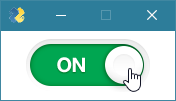
ncotrb
on 18 Jul 2019
There are many different cursor variants:
cursor="X_cursor"
cursor="based_arrow_down"
cursor="based_arrow_up"
cursor="boat"
cursor="bogosity"
cursor="bottom_left_corner"
cursor="bottom_right_corner"
cursor="bottom_side"
cursor="bottom_tee"
cursor="box_spiral"
cursor="center_ptr"
cursor="circle"
cursor="clock"
cursor="coffee_mug"
cursor="cross"
cursor="dot"
cursor="dotbox"
cursor="double_arrow"
cursor="draft_large"
cursor="draft_small"
cursor="draped_box"
cursor="exchange"
cursor="fleur"
cursor="gobbler"
cursor="gumby"
cursor="hand1"
cursor="hand2"
cursor="heart"
cursor="icon"
cursor="iron_cross"
cursor="left_ptr"
cursor="left_side"
cursor="left_tee"
cursor="leftbutton"
cursor="ll_angle"
cursor="lr_angle"
cursor="man"
cursor="middlebutton"
cursor="mouse"
cursor="pencil"
cursor="pirate"
cursor="plus"
cursor="question_arrow"
cursor="right_ptr"
cursor="right_side"
cursor="right_tee"
cursor="rightbutton"
cursor="rtl_logo"
cursor="sailboat"
cursor="sb_down_arrow"
cursor="sb_v_double_arrow"
cursor="sb_h_double_arrow"
cursor="sb_left_arrow"
cursor="sb_right_arrow"
cursor="shuttle"
cursor="sizing"
cursor="sb_up_arrow"
cursor="spider"
cursor="spraycan"
cursor="star"
cursor="target"
cursor="tcross"
cursor="top_left_arrow"
cursor="top_left_corner"
cursor="top_right_corner"
cursor="top_side"
cursor="top_tee"
cursor="trek"
cursor="ul_angle"
cursor="watch"
cursor="xterm"
Awesome! This is a prime example of why I decided to open up and standardize access to the underlying Widgets, on all ports. It enables PySimpleGUI to be extended by end users should they reach a point where PySimpleGUI ends but you want a little more functionality in that area.
Best I can tell, it required adding a single line of code to your program.
Your Toggle Button implementation is _genius_. I'm impressed.
I would love to get those 2 PNG files. I want to make a demo program that uses them by turning them into Base64 versions and including them with the code. Are they copyrighted by any chance?
MikeTheWatchGuy
on 18 Jul 2019
I am pleased that you would like to use this code snippet. You are welcome to optimize it.
However, I have NO rights to the PNG files. I created them from a Photoshop file.
Here the owner / the source:
https://dribbble.com/shots/1003682-Simple-Toggle-Switch-PSD
If you like, I can build your own very similar variant in Photoshop in about 12-14 hours, which you can use completely free, without any legal claims. The creation is relatively fast.
ncotrb
on 18 Jul 2019
Sure! I'll take a pair of free buttons!!! Lemme know if you want a comment in the file to point to your site or something in return. It's the least I can do.
I've also got a buddy that's a multi-decade graphic designer (worked at Atari way back as an example) that could probably crank some out for me pretty quick if you're too busy.
Yea, of course I would want to use your code. You've demonstrated something that comes up a LOT, "How do I make a nice looking GUI?" No matter how many times I post and say "custom graphics" is the answer, the same question gets posted. Oy.......
So, I'm thinking this example will really help. My current "Custom buttons" demo program is pretty lame.
MikeTheWatchGuy
on 19 Jul 2019
Hello, as promised you will find the zipped toggle button below.
I designed the button very similar. You don't need to mention my name. It is enough for me to know that it serves a good purpose.
Toggle-Button.zip
ncotrb
on 19 Jul 2019
AWESOME!!!!!
This is just plain awesome. Some users are going to be very thankful indeed.
I totally understand the name thing. Mine is disappearing more and more ;-)
MikeTheWatchGuy
on 19 Jul 2019
I have added your buttons to a demo that I didn't recall existing, a Toggle Button demo.
Now there's the simple text/color version and the spiffy graphical version.
I've uploaded it to Repl.it for an instant look:
https://repl.it/@PySimpleGUI/ToggleButtonGraphicDemo
MikeTheWatchGuy
on 19 Jul 2019
Related issues
 xuguojun168
·
3Comments
xuguojun168
·
3Comments
 DKatarakis
·
6Comments
DKatarakis
·
6Comments
 eyeonus
·
6Comments
eyeonus
·
6Comments
 scmanjarrez
·
5Comments
scmanjarrez
·
5Comments
 mozesa
·
4Comments
mozesa
·
4Comments