Pysimplegui: Dynamic load more GUI elements
Is it possible to dynamically load more GUI elements after the initial layout is displayed?
 zappfinger
All 13 comments
No. The way to get past this is to quickly create an identical window and show it on top of the old one. Here's an example using PySimpleGUIQt. Same code works using PySimpleGUI import.

import PySimpleGUIQt as sg
num_buttons = 2
layout = [[sg.Text('Your typed chars appear here:'), sg.Text('', key='_OUTPUT_')],
[sg.Input(do_not_clear=True, key='_IN_')],
*[[sg.Button('Button'),] for i in range(num_buttons)],
[sg.Button('Add Rows'), sg.Button('Delete Rows' ), sg.Button('Exit')]]
location = (600,600)
window = sg.Window('Window Title', location=location).Layout(layout)
num_buttons = 2
while True: # Event Loop
event, values = window.Read()
print(event, values)
if event is None or event == 'Exit':
break
if event == 'Add Rows' or event == 'Delete Rows':
num_buttons += -2 if event == 'Delete Rows' else 2
layout = [[sg.Text('Your typed chars appear here:'), sg.Text('', key='_OUTPUT_')],
[sg.Input(do_not_clear=True, key='_IN_')],
*[[sg.Button('Button'),] for i in range(num_buttons)],
[sg.Button('Add Rows'), sg.Button('Delete Rows'), sg.Button('Exit')]]
window1 = sg.Window('Window Title', location=location).Layout(layout)
window.Close()
window = window1
window.Close()
 MikeTheWatchGuy
on 3 Dec 2018
MikeTheWatchGuy
on 3 Dec 2018
I don't recall now how I got elements to "disappear", but I managed to "hide" elements that were in a Window then review them later. The Qt window expanded when I made them visible again. I think all I set was the size parameter
Can you describe the behavior you want for your window?
MikeTheWatchGuy
on 3 Dec 2018
In my case I would create a template with some sliders (like you have seen) on the bottom part of the layout, leaving enough room above that to load additional instruments (with their sliders, buttons, etc) later on. So an instrument has it's own layout that I would like to merge into the existing layout.
zappfinger
on 3 Dec 2018
You could add another window to the first one too. Stack them one on top of the other. Open the second window just under the first.
MikeTheWatchGuy
on 3 Dec 2018
I would run this as a 2-window solution, like a toolbar of sorts. Make it have no titlebar so that it appears to be an extension of the first one.
MikeTheWatchGuy
on 3 Dec 2018
If you want to do a "merge" you will need to get a new layout to do it. It's not possible to "add to" a layout once the Window is created in PySimpleGUI.
To do it as a single window you will have to replace the window as I showed example I posted.
It's a bit of a pain, but it works reliably. Running multiple windows is tricky, but is done by some people without issue. I think you could do it either way depending on exactly what you want.
MikeTheWatchGuy
on 3 Dec 2018
I made another Issue, #846 with a Request where I've started a discussion of dynamic windows.
Here is what I would be able to offer with quite a bit of additional development:
MikeTheWatchGuy
on 4 Dec 2018
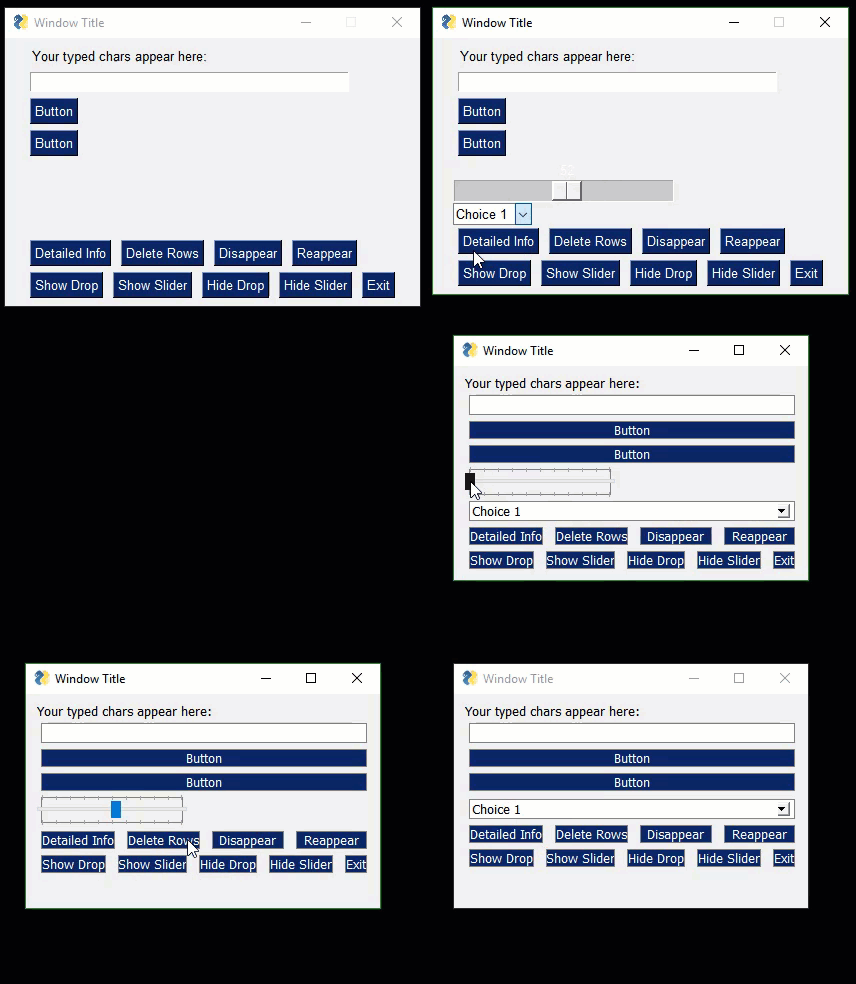
With PySimpleGUIQt, I am able to "grow" and shrink a window. In reality, all of the elements are pre-created. I'm simply setting them to 'visible' to show them.
I added support for visible to the Column element and was able to enable / disable multiple elements within that column. I also added it for Combobox and Sliders for this example.
The result was this:

For your application, using one Column Element for each of the groups of elements you want to control could work out really really well.
You would build your window layout with ALL of the Columns inside the layout. I have added a visible parameter to the Column element so that you can create an invisible Column.
I have checked the code into the DEV branch. If you want to try it, download a new PySimpleGUIQt.py file from the Dev branch and then you'll be able to run this sample code:
import PySimpleGUIQt as sg

col = [[sg.Button('Button 1'),] for i in range(10)]
col2 = [[sg.Slider((1,10)) for i in range(10)]]

num_buttons = 2
layout = [[sg.Text('Your typed chars appear here:'), sg.Text('', key='_OUTPUT_')],
            [sg.Input(do_not_clear=True, key='_IN_')],
            *[[sg.Button('Button'),] for i in range(num_buttons)],
            [sg.Slider(range=(1,100), text_color='white', orientation='h', key='SLIDER'),
            sg.Drop(('Choice 1', 'choice 2'), key='DROP'), sg.Stretch()],
            [sg.Button('Detailed Info'), sg.Button('Delete Rows' ), sg.Button('Disappear') ,sg.Button('Reappear')],
            [sg.Button('Show Sliders'), sg.Button('Show Buttons'), sg.Button('Hide Sliders') ,sg.Button('Hide Buttons') , sg.Button('Exit')],
            [sg.Column(col, key='COL', visible=False), sg.Column(col2, key='COL2', visible=False)]
          ]

window = sg.Window('Window Title', resizable=True).Layout(layout).Finalize()

window.Element('SLIDER').Update(visible=False)
window.Element('SLIDER').Update(visible=False)
window.Refresh()
window.Refresh()

window.Size = window.Size

num_buttons = 2
while True:             # Event Loop
    event, values = window.Read()
    print(event, values, window.Size)
    if event is None or event == 'Exit':
        break
    if event == 'Detailed Info':
        layout = [[sg.Button('Option %s'%i) for i in range(num_buttons)],
                  [sg.Button('Add Rows'), sg.Button('Delete Rows'), sg.Button('Exit')]]
        window1 = sg.Window('Window Title', no_titlebar=True,).Layout(layout)
        # window.Close()
        # window = window1
        window1.Read(timeout=0)
    if event == 'Hide Buttons':
        window.Element('SLIDER').Update(visible=False)
        window.Element('COL').Update(visible=False)
    elif event == 'Show Buttons':
        window.Element('SLIDER').Update(visible=True)
        window.Element('COL').Update(visible=True)
    elif event == 'Hide Sliders':
        window.Element('COL2').Update(visible=False)
        window.Element('DROP').Update(visible=False)
    elif event == 'Show Sliders':
        window.Element('COL2').Update(visible=True)
        window.Element('DROP').Update(visible=True)

    window.Refresh()
    window.Refresh()
    window.Size =  window.Size

    print(window.Size[0])
window.Close()
Here's where I think things are....
If you are going to be using tkinter, then I suggest a 2-window solution.
If you are going with Qt, then I would suggest trying to make a "dynamic" display. I would need to be implementing features out ahead of you. I need to implement visible parameters on all of the elements and hook into Qt. I've already done this with the Combobx, Slider, and Column.
I want to do it in a way that enables creation of invisible Elements, not just changing visible elements to invisible ones.
MikeTheWatchGuy
on 4 Dec 2018
Thanks, I will go over the options and see what suits me best.
zappfinger
on 4 Dec 2018
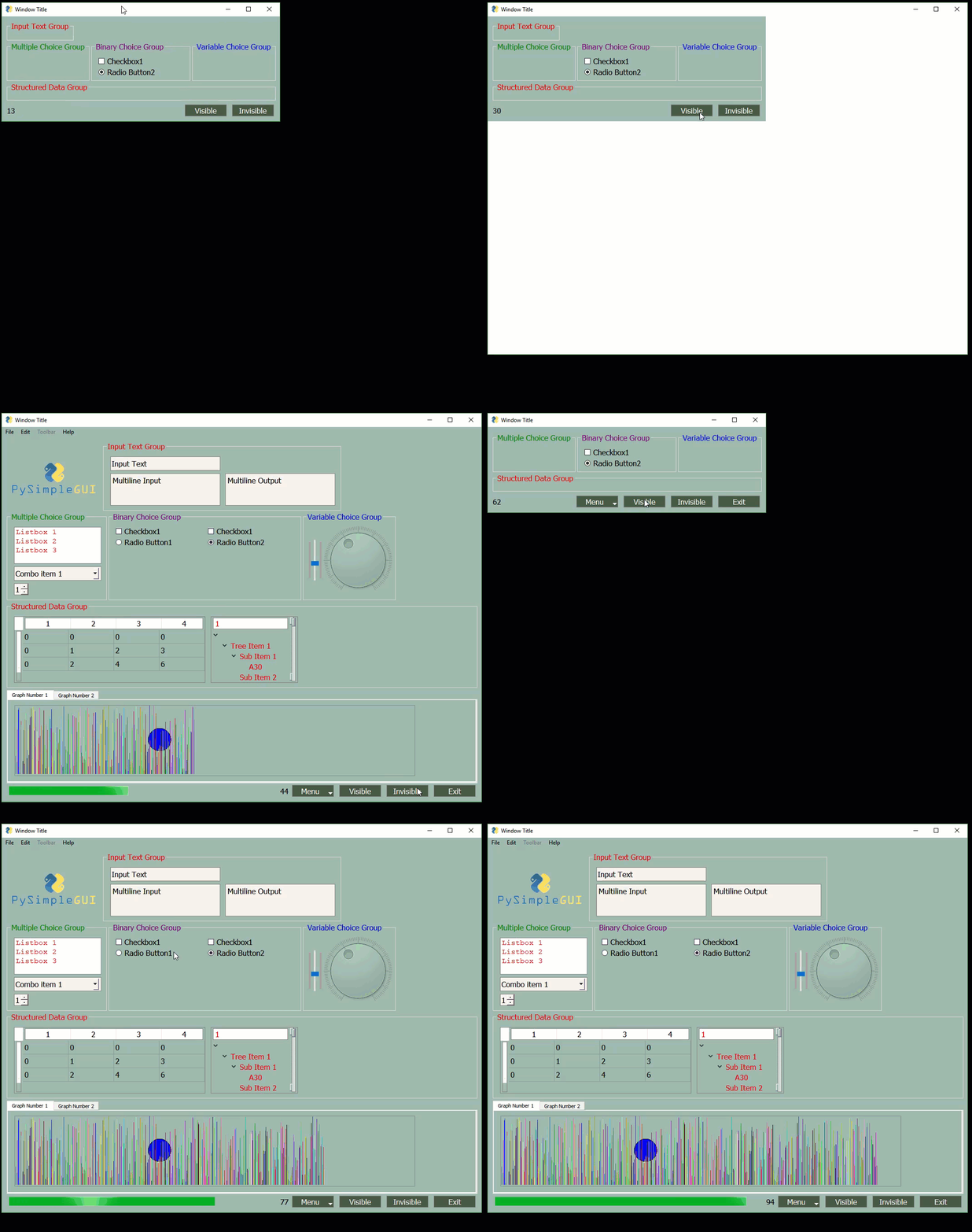
I have been making changes that I think will fit well with the scenario you've described. The way you can do it using the code I've just added (not yet posted) is to create a Frame or Column for each "instrument". Then when the instrument you want to modify is selected, you call "Update" on the previously created Frame and set the visible parameter to True.
It will only work for Qt at the moment. I have some concerns about your application and Qt. There are drawing primitives that are not yet complete. The draw rectangle is not done yet, but I can quickly get it done should you want to go this way.
While I'm waiting to hear what you want to do, I'm going to experiment with adding this option to tkinter for the Frame and Column elements. Then at least you'll be able to make a bank of Elements that can be switched on/off. The problem will be in getting the window to "expand" and contract correctly. That problem I solved on Qt, but not yet on tkinter.
Here's an example of what I can currently hide...
MikeTheWatchGuy
on 4 Dec 2018
I have developed a way to do exactly what you are looking for. The Pane Element will allow you to show one "Column" of information at a time and switch out the entire column for another one.
Let's say you have 4 instruments with 4 different sets of controls. You will make 4 columns for those controls and add them to a Pane Element, as a list. After creating / finalizing the window, you can make the individual columns invisible except for the one you are wanting to show.
MikeTheWatchGuy
on 14 Dec 2018
Going to close this one since I don't believe there's more to do on it.
MikeTheWatchGuy
on 2 May 2019
Related issues
 flowerbug
·
4Comments
flowerbug
·
4Comments
 xuguojun168
·
3Comments
xuguojun168
·
3Comments
 mozesa
·
5Comments
mozesa
·
4Comments
mozesa
·
5Comments
mozesa
·
4Comments
 OPMUSER
·
5Comments
OPMUSER
·
5Comments
Most helpful comment
With PySimpleGUIQt, I am able to "grow" and shrink a window. In reality, all of the elements are pre-created. I'm simply setting them to 'visible' to show them.
I added support for
visibleto the Column element and was able to enable / disable multiple elements within that column. I also added it for Combobox and Sliders for this example.The result was this:
For your application, using one Column Element for each of the groups of elements you want to control could work out really really well.
You would build your window layout with ALL of the Columns inside the layout. I have added a
visibleparameter to theColumnelement so that you can create an invisible Column.I have checked the code into the DEV branch. If you want to try it, download a new PySimpleGUIQt.py file from the Dev branch and then you'll be able to run this sample code: