Pyright: Auto-imports tries to import from stubs, not from package
Describe the bug
The auto-import feature (that is amazing, super useful, and fast, I'm loving it) suggests importing from an external stubs package instead of the actual package.
To Reproduce
- Create an environment and install
sqlalchemyand the third-party stubssqlalchemy-stubs. - For the purposes of a minimal example, just a simple dummy code like this demonstrates it:
some_column = Colum
...and hit autocomplete, to get SQLAlchemy's Column.
Then the suggestion is to import from sqlalchemy-stubs.
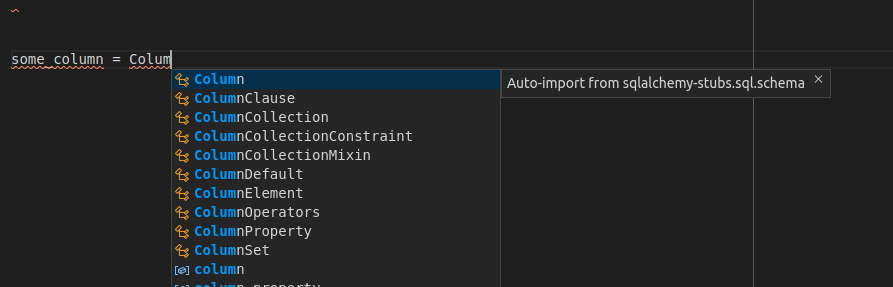
And hitting enter, tries to import from sqlalchemy-stubs, which is also an invalid name:
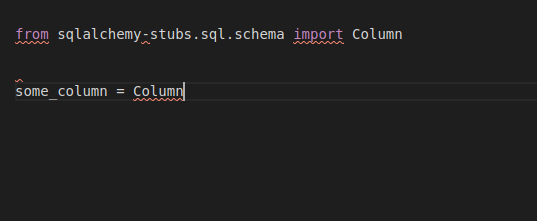
from sqlalchemy-stubs.sql.schema import Column

some_column = Column
Expected behavior
I would expect it to suggest and import from SQLAlchemy.
Ideally something like:
from sqlalchemy import Column

some_column = Column
I imagine it would be more probably something like:
from sqlalchemy.sql.schema import Column

some_column = Column
Screenshots or Code
(included as part of the explanation)
VS Code extension or command-line
Are you running pyright as a VS Code extension or a command-line tool? Which version? You can find the version of the VS Code extension by clicking on the Pyright icon in the extensions panel.
VS Code extension: 1.1.34
Additional context
:shrug:
 tiangolo
All 5 comments
The auto-import feature will suggest completions only for modules that have already been imported from somewhere in your project. It's not enough for a package to simply be installed. So I'm confused by the behavior you're seeing.
I tried to repro it with a fresh project, and I'm not able to. I'd appreciate it if you could create a minimal repro case with a new project.
It's worth noting that the sqlalchemy-stubs rely on a custom mypy plugin that will not work with pyright. That's because sqlalchemy contains dynamic behaviors that cannot be expressed using the standard Python static type annotations.
 erictraut
on 5 May 2020
erictraut
on 5 May 2020
Thanks for looking into this!
About the plug-in, yeah, I know it has a mypy plugin and that part is only supported by mypy. Nevertheless, the same package also has stubs for SQLAlchemy. And in fact, the support from Pyright for SQLAlchemy using the stubs is amazing, it works by default and works better than any other tool/editor I've seen.
Also, you are right, it only suggests imports after having already something imported from a package.
Here's a minimal way to reproduce it, step by step:
// Create a project
$ mkdir pyright-sqlalchemy

// Enter the project
$ cd pyright-sqlalchemy

// Create a venv
$ python -m venv env

// Activate the venv
$ source env/bin/activate

// Install SQLAlchemy and the stubs
$ pip install sqlalchemy sqlalchemy-stubs

// Open VS Code
$ code .
- Create a file
sandbox.pyand open it. - The Python plugin loads.
- Select the environment from the lower-left corner to be the one just created.
- Type:
from sqlalchemy import Column

some_column = Column(Integ)
After Integ, trigger auto-completion, to get the automatic import of Integer.
The suggestion of import is from sqlalchemy-stubs and it gets imported from there:
from sqlalchemy import Column
from sqlalchemy-stubs.sql.sqltypes import Integer

some_column = Column(Integer)
The extra info I have, in case it's useful. I understand that if a package with stubs is installed, and is named with the name of the package plus a -stubs sufix, like <name of package>-stubs, or in the case of sqlalchemy, named sqlalchemy-stubs it is used automatically, without having to do anything else to import it explicitly, etc. Ref: PEP 561
That's how it works with mypy and that's how it seems to be working with Pyright. Wen I trigger auto-completion for some instance of a class imported from SQLAlchemy, Pyright gives me the correct options, taken from the stubs package.
The only issue seems to be with auto-imports.
I just asked my wife to help me replicate this in her Windows and it seems to have the same behavior.
tiangolo
on 6 May 2020
Thanks for the excellent repro steps!
This will be fixed in the next version of pyright.
erictraut
on 8 May 2020
This is now fixed in version 1.1.36, which I just published.
erictraut
on 10 May 2020
Thank you!
Indeed, it is now fixed, that was fast! :dash: Thanks! :tada:
tiangolo
on 14 May 2020
Related issues
 giyyapan
·
3Comments
giyyapan
·
3Comments
 tamuhey
·
3Comments
tamuhey
·
3Comments
 benjaminsaljooghi
·
3Comments
benjaminsaljooghi
·
3Comments
 mmicu
·
3Comments
mmicu
·
3Comments
 christopher-hesse
·
3Comments
christopher-hesse
·
3Comments
Most helpful comment
Thanks for the excellent repro steps!
This will be fixed in the next version of pyright.