Pyright: Incorrect "'str' is not defined" error messages
Describe the bug
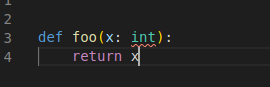
I see the error messages:
'str' is not defined
'int' is not defined
'float' is not defined
'ValueError' is not defined
for all the base python objects.
To Reproduce
- I see this when working on a project using internal python packages (pip installed) and conda environment for handling the dependencies. Even inside the project if I switch python interpreter to /usr/bin/python3 I see those errors as well.
- It does not occur when using /usr/bin/python3 and just editing some random .py files in separate window of VS Code.
- It does work correctly from command line.
VS Code extension or command-line
I'm running pyright 1.1.23 in VS Code 1.42.1.
Additional context
Using conda environments for python packages.
 twolodzko
All 9 comments
I'm guessing that you have a file called "builtins.py" or "builtins.pyi" that is being used instead of the standard "builtins.pyi", which defines the built-in types like str and int.
Do you have the pyright.useLibraryCodeForTypes setting set to true in VS Code?
Do you have a pyrightconfig.json file with typeshedPath defined?
 erictraut
on 19 Feb 2020
erictraut
on 19 Feb 2020
Thanks for response.
- I don't have any
builtins.*file defined by me in the codebase pyright.useLibraryCodeForTypesis false, but changing it does not seem to solve the problem- I didn't create or edit pyrightconfig.json
twolodzko
on 19 Feb 2020
If you open the Output panel in VS Code and choose "Pyright" from the menu, you should see debugging output from the Pyright extension. Do you see any information that might help us diagnose this problem?
erictraut
on 19 Feb 2020
I see this (edited):
Pyright language server starting
Server root directory: /home/USER/.vscode/extensions/ms-pyright.pyright-1.1.23
Starting service instance "MYPROJECT"
Received updated settings
No configuration file found.
Setting pythonPath for service "MYPROJECT": "/home/USER/.miniconda3/envs/ENV/bin/python"
typingsPath /home/USER/MYPROJECT/typings is not a valid directory.
Searching for source files
Found 46 source files
Hmm, nothing unusual there. I'm running short on ideas. Without access to your project, it may be difficult to diagnose.
Here are a few things you could try to provide additional clues...
If you create a new project (e.g. called MYPROJECT2) and use the same python interpreter and then create a random .py file, do you see the same behavior?
If you make a copy of your project and start deleting source files (e.g. binary search by deleting half, then half again, etc.) does the problem go away at some point?
erictraut
on 20 Feb 2020
Unfortunately, I had also a hard time trying to produce a reproducible example from the scratch.
What I tested also is removing all the cache find . -name '__pycache__' -exec rm -rf {} \; and .pyc files find . -name '*.pyc' -exec rm -rf {} \;, but with no luck.
Surprisingly, what worked is when I tried following your instructions and moved the files to different folder (just cp whole project folder to new location) then the errors, when opening the files in VS Code in new location didn't appear. I doubt this helps with debugging the problem, but hopefully for me it works again.
twolodzko
on 20 Feb 2020
I'm glad to hear you find a workaround. Unfortunately, that still doesn't give me much to go on. I may need to add some additional logging in the next version to see if we can gather more clues.
erictraut
on 20 Feb 2020
I've added a way to enable verbose logging when using the VS Code extension (the same as the "--verbose" switch in the command line version). I'm hoping this will give us additional clues.
To use the new functionality:
- Wait until I publish the new version of Pyright. I'll let you know here when I do.
- Within your project, create a minimal pyrightconfig.json file that includes the following:
{
    "verboseOutput": true
}
- Open the Output panel in VS Code and choose Pyright.
You should see substantially more logging than before.
erictraut
on 2 Mar 2020
Great, thanks. As said, this is solved for me since the problem disappeared after starting with clear working directory, so you can probably close this one as unconfirmed. If it re-appears I might always to either comment with posting the additional output, or start a new issue with more details.
twolodzko
on 2 Mar 2020
Related issues
 tiangolo
·
3Comments
tiangolo
·
3Comments
 benjaminsaljooghi
·
3Comments
benjaminsaljooghi
·
3Comments
 giyyapan
·
3Comments
giyyapan
·
3Comments
 nupanick
·
3Comments
nupanick
·
3Comments
 namoshizun
·
3Comments
namoshizun
·
3Comments