Pyright: rename symbol only seems to apply to open files
Describe the bug
The docs state: "Rename Symbol to rename all references to a symbol within a code base". In my tests it only seems to rename all references to a symbol in currently opened files.
To Reproduce
test1.py:
from .test2 import some_function

some_function()
test2.py
def some_function():
    pass
pyrightconfig.json
{
    "include": [
        "."
    ]
}
1) Open only test2.py
2) Rename some_function to other_function
3) Open test1.py, and it still says some_function
Expected behavior
I would expect that test1.py would also have the symbol changed, and indeed it does if I open both files before performing the rename.
Alternatively, the description could be updated to say that it only applies to open files in the current code base.
VS Code extension or command-line
VSCode extension 1.1.6
 christopher-hesse
All 7 comments
I'm not able to repro this problem. When I rename a symbol anywhere within the workspace, VS Code opens all of the affected files. They are initially marked unsaved, but if you choose "Save All", they will all get written to disk.
I followed your detailed repro steps (thanks!), and it worked for me there as well. VS Code opened a second tab called "test2.py", and both tabs were marked "modified and unsaved". Here's the screen shot.
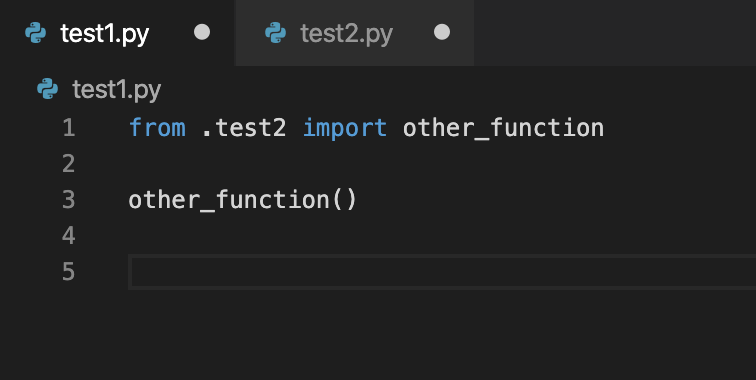
The "Rename Symbol" functionality uses the same code paths as "Find All References", so if you're still able to repro this problem, pleases try "Find All References" as well and let me know if that also fails to find references in files that are not opened.
 erictraut
on 30 Nov 2019
erictraut
on 30 Nov 2019
Thanks for trying it out! I disabled all other extensions and some tab-related settings but it still seems to happen to me.
The tip about "Find All References" was useful though.
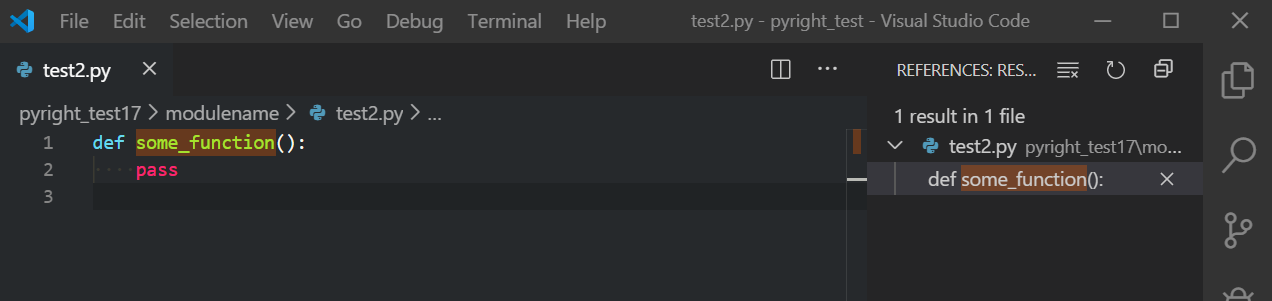
I opened two VSCode windows, in the first one I then did open folder on the "pyright_test" folder, in the second I did open folder on "pyright_test17".
Here's me opening test2.py and then doing "right click -> Find All References" on "some_function":
Window 1
Window 2
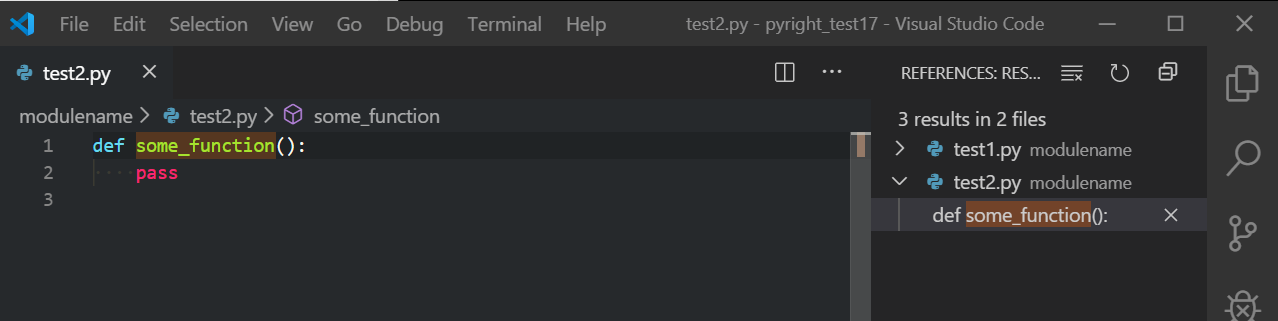
Note that if I do "Find All References" on "some_function" in "test1.py", it works fine in both cases.
I'm not sure if this is some weird interaction with some setting I have, any ideas?
christopher-hesse
on 30 Nov 2019
Hmm, I'm not able to repro what you're seeing. Please give it a try with pyright 1.1.7, which I just published. I can't think of anything that I fixed that would affect this behavior, but it's worth double checking.
erictraut
on 30 Nov 2019
I figured out the problem. When pyright starts, it determines which source files it should track as part of your program. This is normally specified by the "include" section of your pyrightconfig.json file. If no "include" section is provided, it assumes "." (all source files under your workspace root folder minus any that are specified in the "exclude" section).
If no pyrightconfig.json is present, pyright doesn't add any tracked files to your program. If you open a file, it will temporarily treat it like a tracked file and analyze it, along with any files it imports.
In your case, you have a pyrightconfig.json file in the inner directory but not in the outer directory. When you opened test1.py, pyright automatically analyzed test2.py because it was imported from the former, but the opposite wasn't true.
I think the correct behavior here is to always assume "." if there is no pyrightconfig.json present. This used to be somewhat risky because pyright defaulted to checking and reporting errors for all files that it found. This can be very CPU intensive and take a long time for large code bases. Now that I've changed the default to check and report errors only for open files, I think it's safe to make this change.
erictraut
on 30 Nov 2019
Great, thanks for investigating!
I often have a root folder open in a single window containing multiple projects (and thus multiple pyrightconfig.jsons), is that supported by pyright currently?
christopher-hesse
on 30 Nov 2019
Pyright supports multi-root workspaces ("Add Folder to Workspace..."), and each workspace root can have its own pyrightconfig.json file. The roots within a multi-root workspace are assumed to be peers, not nested within each other.
Pyright doesn't support multiple pyrightconfig.json files within a normal (single-root) workspace. It looks only in the root directory. All other config files will be ignored.
erictraut
on 30 Nov 2019
This is now fixed in 1.1.8, which I just published.
erictraut
on 4 Dec 2019
Related issues
 B4rtware
·
3Comments
B4rtware
·
3Comments
 dbrattli
·
3Comments
dbrattli
·
3Comments
 Afsarsoft
·
3Comments
Afsarsoft
·
3Comments
 benjaminsaljooghi
·
3Comments
benjaminsaljooghi
·
3Comments
 tiangolo
·
3Comments
tiangolo
·
3Comments