Pyright: Incorrect "'symbol' is unknown import symbol" in 1.0.83
Describe the bug
For constructions like from module import symbol Pyright 1.0.83 for VS Code reports that 'symbol' is unknown import symbol if the module was installed with pip. The same behaviour does not exist in 1.0.82.
To Reproduce
I am using a virtual environment created with pyenv. Install any package with pip. Create a new file or open an existing one and import any symbol from the package.
Expected behavior
Pyright should not show the error.
Screenshots or Code
Minimal example:
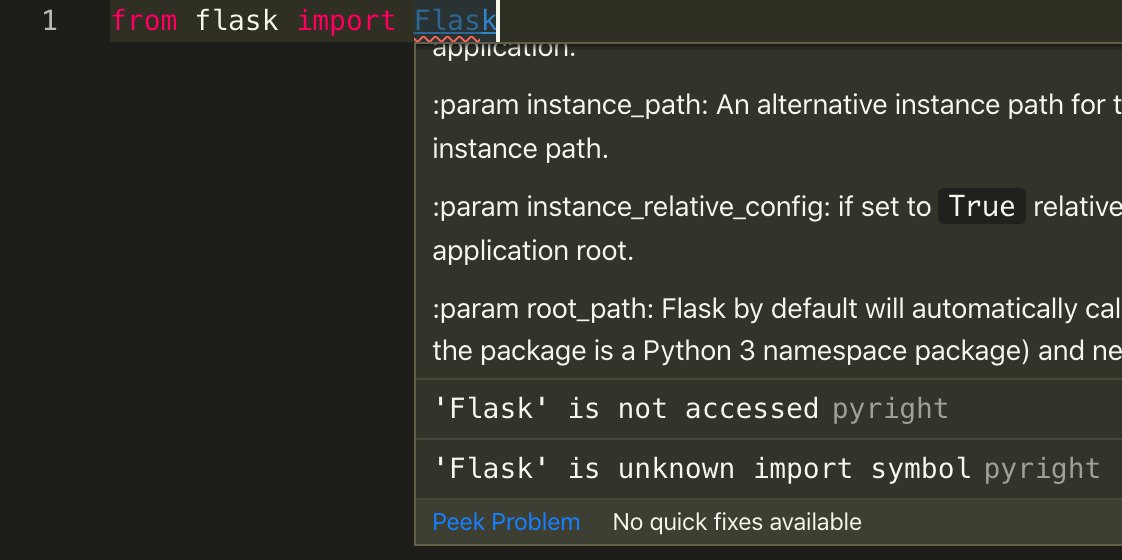
from flask import Flask
VS Code extension or command-line
VS Code extension 1.0.83.
Additional context
I have not checked if the problem exists in venvs created with anything else than pyenv. I encountered the problem on macOS.
 hugodutka
All 11 comments
Confirm issue also shows up with environments created with pipenv.
 sotanodroid
on 7 Nov 2019
sotanodroid
on 7 Nov 2019
Thanks for the bug report. I'm able to repro the problem, and I'll work on a fix.
 erictraut
on 7 Nov 2019
erictraut
on 7 Nov 2019
OK, I found the cause of this regression. A fix will be in the next version. Sorry for the inconvenience.
erictraut
on 7 Nov 2019
This is now fixed in 1.0.84, which I just published.
erictraut
on 8 Nov 2019
@erictraut I am still seeing this issue. Perhaps my configuration file is wrong. Here is a very basic example.
math.py
PI = 3.1415928

def add(n1, n2):
    return n1 + n2
typings/math.pyi
PI: float

def add(n1: float, n2: float) -> float: ...
demo.py
from math import PI, add

print(add('2', PI)) # expecting type error for first argument
pyrightconfig.json
{
  "strict": ["."]
}
When I enter pyright I get:
Found 4 source files
/Users/mark/Documents/programming/languages/Python/types/demo.py
  1:18 - error: "PI" is unknown import symbol (reportGeneralTypeIssues)
  1:22 - error: "add" is unknown import symbol (reportGeneralTypeIssues)
  3:7 - error: Argument type is unknown
    Argument corresponds to parameter "values" in function "print" (reportUnknownArgumentType)
/Users/mark/Documents/programming/languages/Python/types/math.py
  3:9 - error: Type of parameter "n1" is unknown (reportUnknownParameterType)
  3:13 - error: Type of parameter "n2" is unknown (reportUnknownParameterType)
  4:12 - error: Return type is unknown (reportUnknownVariableType)
  3:5 - error: Return type is unknown (reportUnknownParameterType)
 mvolkmann
on 1 Oct 2020
mvolkmann
on 1 Oct 2020
math is the name of a stdlib module, and it's resolving to the math.pyi that ships with pyright.
As a workaround, choose a name other than math for your module.
erictraut
on 1 Oct 2020
@erictraut Ah, that helped! It now catches the type error I expected it to catch. But also thinks the parameter and return types in math_util.py are unknown. Shouldn't it think they are known because I define them in math_util.pyi?
Found 4 source files
/Users/mark/Documents/programming/languages/Python/types/demo.py
  3:11 - error: Argument of type "Literal['2']" cannot be assigned to parameter "n1" of type "float" in function "add"
    "Literal['2']" is incompatible with "float" (reportGeneralTypeIssues)
/Users/mark/Documents/programming/languages/Python/types/math_util.py
  3:9 - error: Type of parameter "n1" is unknown (reportUnknownParameterType)
  3:13 - error: Type of parameter "n2" is unknown (reportUnknownParameterType)
  4:12 - error: Return type is unknown (reportUnknownVariableType)
  3:5 - error: Return type is unknown (reportUnknownParameterType)
5 errors, 0 warnings, 0 infos
Pyright will use the types from math_util.pyi when analyzing demo.py, but you are also asking pyright to type check the file math_util.py. By default, pyright will analyze all ".py" files in the workspace. If you want to include or exclude specific files or directories, you need to configure it to do so.
If math_util.py is your own module, you could just provide types inline within the code rather than mess around with the added complexity of a type stub file.
erictraut
on 1 Oct 2020
@erictraut Thanks for explaining that. IIUC this differs from how mypy works. I think mypy first checks for types in .pyi files and those override any types in corresponding .py files. It doesn't report errors for omitting types in .py files if the corresponding .pyi file defines them.
The only reason I put the types in a .pyi file is that I just wanted to learn how to use those files.
mvolkmann
on 1 Oct 2020
If you ask mypy to analyze math_util.py, it will do so even if a math_util.pyi happens to be present. If you analyze a different file (like demo.py) that imports math_util, mypy will use the type information from math_util.pyi. Pyright does the same thing.
AFAIK, mypy doesn't offer a "strict" mode that emits errors for unknown types, so in that respect pyright differs from mypy.
erictraut
on 1 Oct 2020
Ah, I didn't catch the distinction between running "pyright" and running "pyright demo.py". Thanks!
mvolkmann
on 1 Oct 2020
Related issues
 tamuhey
·
3Comments
tamuhey
·
3Comments
 Congee
·
3Comments
tamuhey
·
3Comments
Congee
·
3Comments
tamuhey
·
3Comments
 christopher-hesse
·
3Comments
christopher-hesse
·
3Comments
 benjaminsaljooghi
·
3Comments
benjaminsaljooghi
·
3Comments
Most helpful comment
OK, I found the cause of this regression. A fix will be in the next version. Sorry for the inconvenience.