Pyrevit: Revit 2021.1.2 not showing as installed
Describe the bug
I've tried installing versions 4.8.5 (signed) today and previously had tried v4.84 (signed and CLI). When I start Revit 2021, the pyRevit tab isn't there. It works great on 2020.2.3 though. I've tried multiple commands suggested in other issues and nothing has worked yet. My guess is it's not finding the install path correctly 'D:Program FilesAutodeskRevit 2021', but I'm not a programmer, so just a guess.
To Reproduce
Steps to reproduce the behavior:
- Install pyRevit_4.8.5_signed.exe
- Launch Revit 2021
- No pop-up, no pyRevit ribbon tab
Expected behavior
I expected the pyRevit tab to show in 2021, just as it does in 2020.
Screenshots


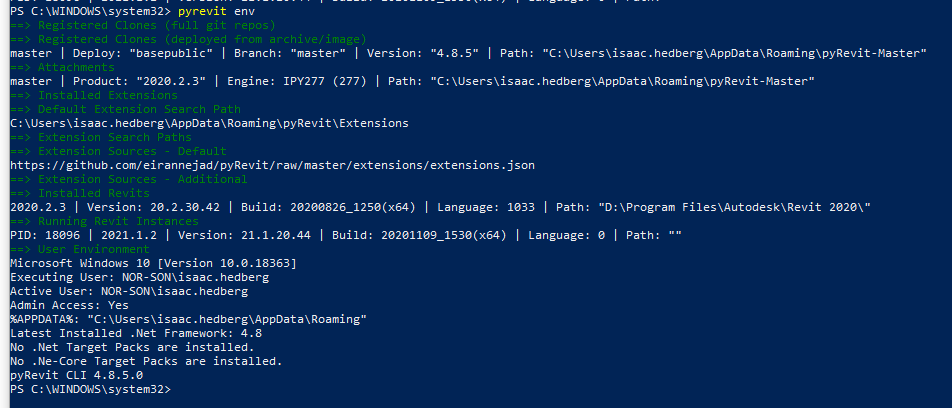
Desktop (please complete the following information):
- OS: Windows 10 Pro v1909 build 18363.778
- pyRevit Version: 4.8.5
- pyRevit Environment:
==> Registered Clones (full git repos)
==> Registered Clones (deployed from archive/image)
master | Deploy: "basepublic" | Branch: "master" | Version: "4.8.5" | Path: "C:Usersisaac.hedbergAppDataRoamingpyRevit-Master"
==> Attachments
master | Product: "2020.2.3" | Engine: IPY277 (277) | Path: "C:Usersisaac.hedbergAppDataRoamingpyRevit-Master"
==> Installed Extensions
==> Default Extension Search Path
C:Usersisaac.hedbergAppDataRoamingpyRevitExtensions
==> Extension Search Paths
==> Extension Sources - Default
https://github.com/eirannejad/pyRevit/raw/master/extensions/extensions.json
==> Extension Sources - Additional
==> Installed Revits
2020.2.3 | Version: 20.2.30.42 | Build: 20200826_1250(x64) | Language: 1033 | Path: "D:Program FilesAutodeskRevit 2020"
==> Running Revit Instances
PID: 18096 | 2021.1.2 | Version: 21.1.20.44 | Build: 20201109_1530(x64) | Language: 0 | Path: ""
==> User Environment
Microsoft Windows 10 [Version 10.0.18363]
Executing User: NOR-SONisaac.hedberg
Active User: NOR-SONisaac.hedberg
Admin Access: Yes
%APPDATA%: "C:Usersisaac.hedbergAppDataRoaming"
Latest Installed .Net Framework: 4.8
No .Net Target Packs are installed.
No .Ne-Core Target Packs are installed.
pyRevit CLI 4.8.5.0
Additional context
Output.log file
output.log
 Strider11
All 9 comments
Take a look at this please and let me know if it fixes the issue
pyRevit already knows Revit 2021.1.2 so it is very odd that it is not listing it. Would you mind exporting this key Computer\HKEY_LOCAL_MACHINE\SOFTWARE\Microsoft\Windows\CurrentVersion\Uninstall\{7346B4A0-2100-0510-0000-705C0D862004} from your registry and sending it to me? Thanks!
 eirannejad
on 22 Mar 2021
eirannejad
on 22 Mar 2021
Thank you, Ehsan. I had already tried the suggestions in the link, prior
to posting, but ran it all again anyway.
[image: image.png]
Attached is the registry export.
Ike
On Sun, Mar 21, 2021 at 10:13 PM Ehsan Iran-Nejad @.*>
wrote:
Take a look at this please and let me know if it fixes the issue
pyRevit already knows Revit 2021.1.2 so it is very odd that it is not
listing it. Would you mind exporting this key
ComputerHKEY_LOCAL_MACHINESOFTWAREMicrosoftWindowsCurrentVersionUninstall{7346B4A0-2100-0510-0000-705C0D862004}
from your registry and sending it to me? Thanks!—
You are receiving this because you authored the thread.
Reply to this email directly, view it on GitHub
https://github.com/eirannejad/pyRevit/issues/1188#issuecomment-803732034,
or unsubscribe
https://github.com/notifications/unsubscribe-auth/AGPXDTL2K3IKTQAXHZHCAGLTE2YWRANCNFSM4ZK46RRA
.
Strider11
on 22 Mar 2021
I don't see attachments when you reply to a github notification. Please send that to my email :D thank you!
eirannejad
on 23 Mar 2021
I tried that as well, and it didn't work for me either.
 teflaherty67
on 23 Mar 2021
teflaherty67
on 23 Mar 2021
I don't see attachments when you reply to a github notification. Please send that to my email :D thank you!
I did reply to your email, not on Github. Should I send a new email?
Strider11
on 25 Mar 2021
Ok mine and your settings seem identical except for the build number
Last request. Would you mind running pyrevit revits --installed --debug and share the report log? This provides a detailed report of what pyrevit can see in the registry and what it is not seeing 2021
eirannejad
on 25 Mar 2021
Here is the current Log.
debug.txt
Strider11
on 25 Mar 2021
@Strider11 Okay I thought I had found a bug but Nope. Based on the log, it does not seem like your Revit is installed in a standard location
Debug: Product not found at expected path "C:\Program Files\Autodesk\Revit 2021"
👉 Could you check the path to 2021 Revit.exe?
To make this work you can manually edit the InstallLocation key under the registry path Computer\HKEY_LOCAL_MACHINE\SOFTWARE\Microsoft\Windows\CurrentVersion\Uninstall\{7346B4A0-2100-0510-0000-705C0D862004} to the actual installation path in my case C:\Program Files\Autodesk\Revit 2021\
eirannejad
on 25 Mar 2021
@eirannejad Correct, my Revit is installed on the D: drive (larger HDD) rather than the C: drive (smaller SSD.)
Changing the path in the registry and re-running pyrevit attach master 277 --installed seems to have fixed it.
Thank you so much!!
Strider11
on 26 Mar 2021
Related issues
 pmcmm
·
3Comments
pmcmm
·
3Comments
 jkcameron
·
5Comments
jkcameron
·
5Comments
 TheBIMsider
·
5Comments
TheBIMsider
·
5Comments
 Robbo1234
·
4Comments
Robbo1234
·
4Comments
 kuldeep3618x
·
4Comments
kuldeep3618x
·
4Comments