pyRevit Tab Coloring - More contrasting color scheme
The current colors baked into this tool are too similar to immediately differentiate....
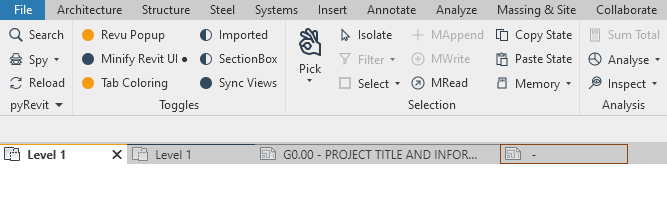
Some ideas:
- Change the colors to be more contrasting and unique. Perhaps the first 5 colors are Blue, Yellow, Red, Green, then Purple.
- Ideally, Color the whole tab. Right now it is only a single pixel width line at the top of the tab. If this was implemented, the current colors may not need to change at all.
- Give users the option to select their own colors from the settings dialogue.
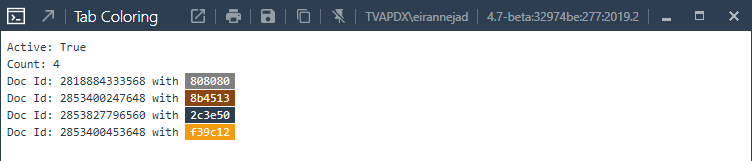
- Grey [808080], barely noticeable on the background of the default Revit tab color which is also grey.
- Yellow [f39c12], this one is ok, it stands out.
- Brown [8b4513], difficult next to the yellow from the default grey tab.
- Navy [2c3e50], difficult next to the grey.
 wfinley87
All 8 comments
@wfinley87 Coming on the next release
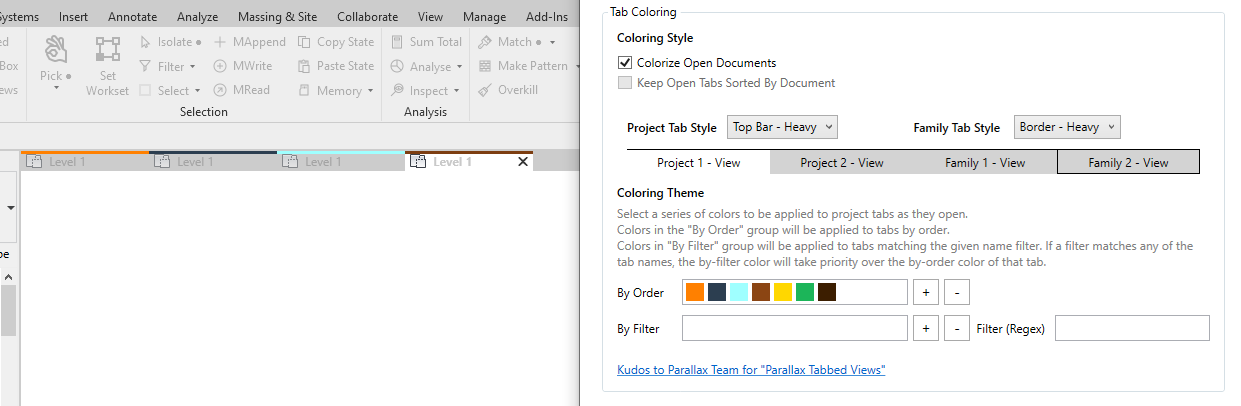
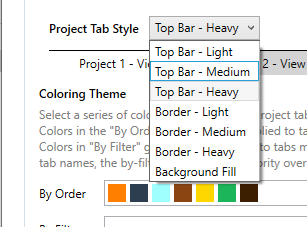
Here are the styling options. Let me know if you can think of more
 eirannejad
on 19 Mar 2021
eirannejad
on 19 Mar 2021
Dope! Cant wait for this update!!!
 CHBIV007
on 19 Mar 2021
CHBIV007
on 19 Mar 2021
@eirannejad This is amazing! Thank you so much for your dedication to this project.
wfinley87
on 19 Mar 2021
Implemented and will be published with next release
eirannejad
on 19 Mar 2021
@eirannejad - is there a way to color the whole tab instead of just the edge? (Like what parallax team did https://www.parallaxteam.com/tabbed-views/ ?)
 apsis0215
on 8 Apr 2021
apsis0215
on 8 Apr 2021
Yeah use the Background Fill option 🧐
eirannejad
on 8 Apr 2021
I notice the "Keep Open Tabs Sorted By Document" checkbox is disabled. Is this for a future feature? or is there a different way to set it?
Do you have documentation/examples on how the "By Filter" option is supposed to be used? I was thinking to use it to make our Project Template tabs red by using \w+.rte for the filter. I tried .rte and just rte. I noticed the default was Project 1 (with a space) so I also tried Project1 (which is actually Revit's first new project name), but nothing worked...
 RevitIRL
on 26 Apr 2021
RevitIRL
on 26 Apr 2021
@revitirl The filter works based on the tab title not the project file name but that something I can certainly add.
eirannejad
on 27 Apr 2021
Related issues
 amastrobera
·
3Comments
amastrobera
·
3Comments
 jkcameron
·
5Comments
jkcameron
·
5Comments
 DuncanLithgow
·
3Comments
DuncanLithgow
·
3Comments
 Arsany123
·
4Comments
Arsany123
·
4Comments
 thazell
·
5Comments
thazell
·
5Comments
Most helpful comment
Yeah use the Background Fill option 🧐