Pyrevit: pyrevit tab does not show up
I have Revit 2017 installed with PyRevit. I just installed Revit and Revit LT 2021 versions. The PyRevit tab doesn't show up in the 2021 versions. Can I not have PyRevit installed in both 2017 and 2021?
 sharkmullet
All 21 comments
I don't think Revit LT loads third-party addons
 eirannejad
on 7 May 2020
eirannejad
on 7 May 2020
Ok, but it is also not loading in full Revit 2021
sharkmullet
on 7 May 2020
Okay then. Please open a command prompt, run pyrevit env and share the results here so I can take a look.
eirannejad
on 8 May 2020
Here it is:
==> Registered Clones (full git repos)
==> Registered Clones (deployed from archive/image)
master | Deploy: "basepublic" | Branch: "master" | Version: "4.7.6" | Path:
"C:\Users\tyler\AppData\Roaming\pyRevit-Master"
==> Attachments
Unnamed-72DBEF6 | Product: "2017.2.3" | Engine: 277 | Path:
"C:\ProgramData\pyRevit\pyRevit-v45\pyRevit" | Manifest:
"C:\ProgramData\Autodesk\Revit\Addins\2017\pyRevit.addin"
==> Installed Extensions
==> Default Extension Search Path
C:\Users\tyler\AppData\Roaming\pyRevit\Extensions
==> Extension Search Paths
==> Extension Sources - Default
https://github.com/eirannejad/pyRevit/raw/master/extensions/extensions.json
==> Extension Sources - Additional
==> Installed Revits
2021 First Customer Ship | Version: 21.0.0.383 | Build: 20200220_1100(x64)
| Language: 1033 | Path: "C:\Program Files\Autodesk\Revit LT 2021"
2021 First Customer Ship | Version: 21.0.0.383 | Build: 20200220_1100(x64)
| Language: 1033 | Path: "C:\Program Files\Autodesk\Revit 2021"
2017.2.3 | Version: 17.0.1150.0 | Build: 20171027_0315(x64) | Language:
1033 | Path: "C:\Program Files\Autodesk\Revit 2017"
==> Running Revit Instances
==> User Environment
Microsoft Windows 10 [Version 10.0.18362]
Executing User: THINKPAD\Tyler
Active User: THINKPAD\Tyler
Admin Access: No
%APPDATA%: "C:\Users\tyler\AppData\Roaming"
Latest Installed .Net Framework: 4.8
No .Net Target Packs are installed.
No .Ne-Core Target Packs are installed.
pyRevit CLI 0.25.0.0
sharkmullet
on 8 May 2020
Seems like you have another installation of pyRevit under C:\ProgramData\pyRevit\pyRevit-v45\pyRevit
Open a command prompt and run:
pyrevit attach master 277 --installed
This should attach pyRevit to all your installed Revit versions. If you see any more errors send me a pyrevit env again so I can see the changes
eirannejad
on 8 May 2020
Ok great. This will not disable my revit 2017 pyrevit will it?
On Fri, May 8, 2020 at 8:10 AM Ehsan Iran-Nejad notifications@github.com
wrote:
Seems like you have another installation of pyRevit under
C:\ProgramData\pyRevit\pyRevit-v45\pyRevitOpen a command prompt and run:
pyrevit attach master 277 --installed
This should attach pyRevit to all your installed Revit versions. If you
see any more errors send me a pyrevit env again so I can see the changes—
You are receiving this because you authored the thread.
Reply to this email directly, view it on GitHub
https://github.com/eirannejad/pyRevit/issues/890#issuecomment-625862444,
or unsubscribe
https://github.com/notifications/unsubscribe-auth/AAVZE4P5CGTCSW3SKSLSF7TRQQOFNANCNFSM4MXN5K7Q
.
sharkmullet
on 8 May 2020
It will. Use this command instead for Revit 2021
pyrevit attach master 277 2021
this will attach to 2021 only
Or run these:
# registers the old clone you have
pyrevit clones add oldpyrevit "C:\ProgramData\pyRevit\pyRevit-v45\pyRevit"
# attaches the new installation to all Revits
pyrevit attach master 277 --installed
# reattaches the old clone to 2017
pyrevit attach oldpyrevit 277 2017
I ran the first one. It works! Thank you
On Fri, May 8, 2020 at 8:23 AM Ehsan Iran-Nejad notifications@github.com
wrote:
It will. Use this command instead for Revit 2021
pyrevit attach master 277 2021
this will attach to 2021 only
Or run these:
pyrevit clones add oldpyrevit "C:\ProgramData\pyRevit\pyRevit-v45\pyRevit"
pyrevit attach master 277 --installed
pyrevit attach oldpyrevit 277 2017—
You are receiving this because you authored the thread.
Reply to this email directly, view it on GitHub
https://github.com/eirannejad/pyRevit/issues/890#issuecomment-625868340,
or unsubscribe
https://github.com/notifications/unsubscribe-auth/AAVZE4I6WMGMJ7JGRQM44S3RQQPV5ANCNFSM4MXN5K7Q
.
sharkmullet
on 8 May 2020
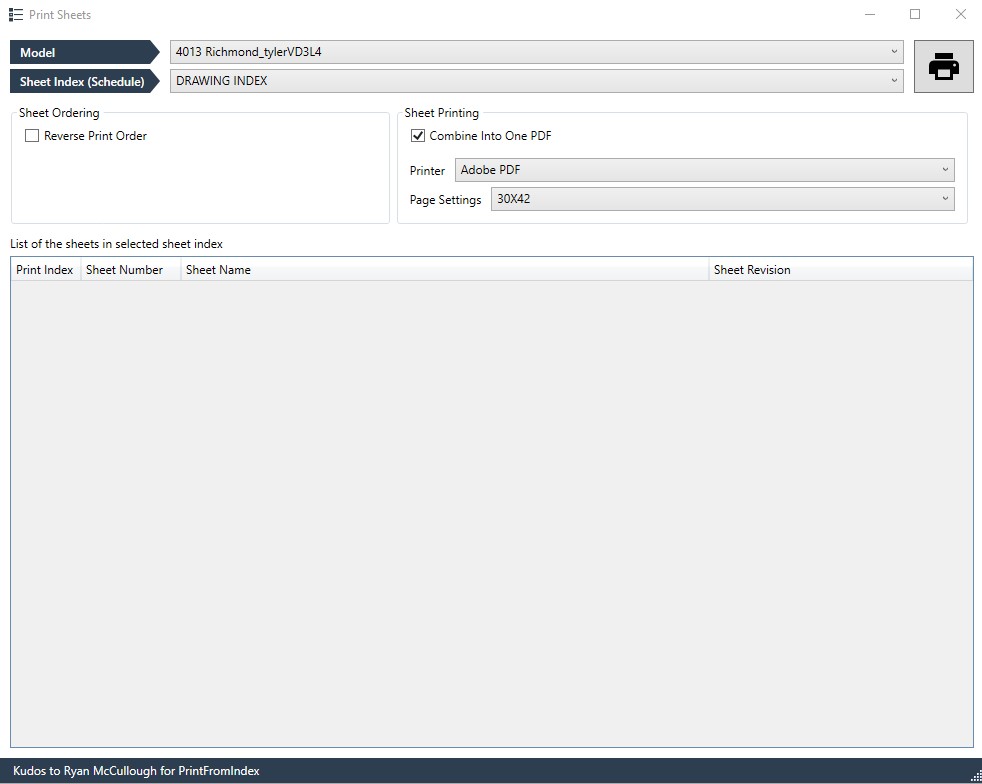
Can I re-open this? I cannot print, the dialog looks like below. Should there be a list of drawings? The index is not empty. I tried repairing pyrevit with a fresh download, but it removed the tab again. After running the CMD from before, it loads, but I still cannot print. I need to have pyrevit 2021 & 2017 because I have projects in both, but if I can't I will update the 2017 version.
sharkmullet
on 15 May 2020
I have the same issue. I installed the latest in Revit 2021 and it does not show as a tab in the menu bar. I tried the instruction above and still not show. Is there another way to make it work and show up in Revit 2021?
I uninstalled and deleted the pyrevit folder. And installed fresh.
I also tried installing it in the main C folder & created PyRevit folder.
Any suggestion, is much appreciated.
Thanks.
 Rocky-EA
on 22 Sep 2020
Rocky-EA
on 22 Sep 2020
@sharkmullet Would you mind exporting your sheet index to a text file and share that here? (Export using the Revit export to CSV option)
eirannejad
on 22 Sep 2020
@Rocky-EA Would you mind running pyrevit env in your command line and share the report please?
eirannejad
on 22 Sep 2020
@eirannejad I found out that for some reason I'm missing "pyrevit.addin" in the C:\Users\name\AppData\Roaming\Autodesk\Revit\Addins\2021 folder. I copied one from my other laptop and use that. I just modified the drive letter & name.
But it works in pyRevit_4.7.6, which is what the laptop has. So I used that install for now. The 4.8 beta3, I'm getting errors. So I uninstalled that and installed 4.7.6. I'm afraid to install 4.8 as it might mess up my system and couldnt make pyrevit work.
I'm a BIM manager and have zero programming knowledge.
Rocky-EA
on 22 Sep 2020
@Rocky-EA You can use the pyrevit attach option of the pyRevit CLI to create the necessary .addin files and attach pyRevit to your installed Revit versions
See this for more info on the CLI: https://www.notion.so/pyRevit-CLI-c50de95259114db795db5bd3f19f8e2a
eirannejad
on 22 Sep 2020
@Rocky-EA You can use the
pyrevit attachoption of the pyRevit CLI to create the necessary.addinfiles and attach pyRevit to your installed Revit versionsSee this for more info on the CLI: https://www.notion.so/pyRevit-CLI-c50de95259114db795db5bd3f19f8e2a
Thank you so much. Just want to express my sincere appreciation.
Rocky-EA
on 22 Sep 2020
@Rocky-EA @sharkmullet So I just updated the hosts file information (has information about all revit versions) on the repo. Please open a command prompt and run pyrevit update. This will grab the most recent versions of these info files and places them under %APPDATA%/pyRevit/Cache. Then you can run pyrevit revits --installed to list the installed Revits. If it shows the correct Revit versions listed, then it is finding the data correctly.
Now you can re-attach pyRevit to all installed Revit versions using pyrevit attach master 277 --installed
Let me know if this works.
eirannejad
on 22 Sep 2020
And like magic pyRevit has returned to my Revit. Thank you for your assistance.
 Fozibehr
on 23 Sep 2020
Fozibehr
on 23 Sep 2020
my issue is similar w revit 2020--pyRevit not showing up:
C:\Users\Greg Wartak>pyrevit env
==> Registered Clones (full git repos)
==> Registered Clones (deployed from archive/image)
==> Attachments
==> Installed Extensions
==> Default Extension Search Path
C:\Users\Greg Wartak\AppData\Roaming\pyRevit\Extensions
==> Extension Search Paths
==> Extension Sources - Default
https://github.com/eirannejad/pyRevit/raw/master/extensions/extensions.json
==> Extension Sources - Additional
==> Installed Revits
2020.2.1 (New Install) | Version: 20.2.12.1 | Build: 20200210_1400(x64) | Language: 1033 | Path: "C:\Program Files\Autodesk\Revit 2020\"
2018 First Customer Ship | Version: 18.0.0.420 | Build: 20170223_1515(x64) | Language: 1033 | Path: "C:\Program Files\Autodesk\Revit 2018\"
2017 First Customer Ship | Version: 17.0.416.0 | Build: 20160225_1515(x64) | Language: 1033 | Path: "C:\Program Files\Autodesk\Revit 2017\"
==> Running Revit Instances
PID: 19568 | 2020.2.1 (New Install) | Version: 20.2.12.1 | Build: 20200210_1400(x64) | Language: 0 | Path: "C:\Program Files\Autodesk\Revit 2020"
==> User Environment
Microsoft Windows 10 [Version 10.0.19041]
Executing User: LAPTOP-GREGOR\Greg Wartak
Active User: LAPTOP-GREGOR\Greg Wartak
Admin Access: No
%APPDATA%: "C:\Users\Greg Wartak\AppData\Roaming"
Latest Installed .Net Framework: 4.8
No .Net Target Packs are installed.
No .Ne-Core Target Packs are installed.
pyRevit CLI 4.8.6.0
C:\Users\Greg Wartak>
 delarquitecto
on 30 Mar 2021
delarquitecto
on 30 Mar 2021
Could anyone help me understand why it is not showing up?
delarquitecto
on 30 Mar 2021
It's not attached. See this please https://www.notion.so/pyrevitlabs/pyRevit-Is-Installed-But-Does-Not-Load-f6495adb56254e9e8021f8a68e3b2ab7
eirannejad
on 30 Mar 2021
brilliant! it worked! thank you eirannejad
delarquitecto
on 30 Mar 2021
Related issues
 DuncanLithgow
·
3Comments
DuncanLithgow
·
3Comments
 kuldeep3618x
·
4Comments
kuldeep3618x
·
4Comments
 TheBIMsider
·
5Comments
TheBIMsider
·
5Comments
 amastrobera
·
3Comments
amastrobera
·
3Comments
 thumDer
·
4Comments
thumDer
·
4Comments
Most helpful comment
And like magic pyRevit has returned to my Revit. Thank you for your assistance.