pyRevit cannot load, if certain unicode symbols in configfile
Describe the bug
Hi Ehsan! I am going to continue topic with unicode chars. It is similiar to #511 but looks much more strange. I'll explain why.
To Reproduce
So to crash pyRevit on start, just add these lines to config (symbol is S ligature - ß)
[TestConfigconfig]
x = "\u00df"
Okay, everything could happen with unicode and python. But! The strange thing - if you change it to another unicode symbol - let's say cyrillic Ы - and restart revit, it works again!
[TestConfigconfig]
x = "\u042b"
Screenshots
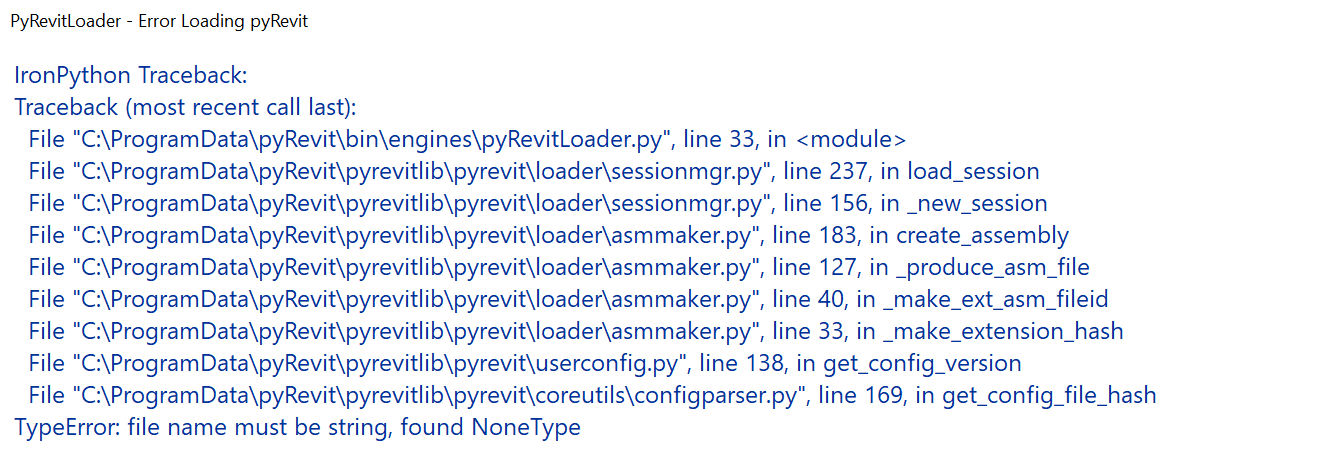
Desktop (please complete the following information):
- OS: Win 10 Home Rus / Win 10 Pro German
- pyRevit Version: 4.6.23 / 4.6.18
- pyRevit Environment:
==> Registered Clones (full git repos)
dev47 | Branch: "release/4.7-beta" | Version: "4.7.0-beta:233e7c9" | Path: "C:\Users\Alex\AppData\Roaming\pyRevit\pyRevitAlex"
main46-22 | Branch: "master" | Version: "4.6.22:28f9d35" | Path: "C:\Users\Alex\AppData\Roaming\pyRevit\pyRevit46-22"
==> Registered Clones (deployed from archive/image)
beta47 | Deploy: "base" | Branch: "release/4.7-beta" | Version: "4.7.0-beta" | Path: "C:\Users\Alex\AppData\Roaming\pyRevit\pyRevitBeta"
main46 | Deploy: "base" | Branch: "master" | Version: "4.6.19" | Path: "C:\Users\Alex\AppData\Roaming\pyRevit\pyRevitCopy"
main46-23 | Deploy: "base" | Branch: "master" | Version: "4.6.23" | Path: "C:\Users\Alex\AppData\Roaming\pyRevit\pyRevit46-23\main46-23"
==> Attachments
main46-23 | Product: "Autodesk Revit 2018.2" | Engine: 279 | Path: "C:\Users\Alex\AppData\Roaming\pyRevit\pyRevit46-23\main46-23" | Manifest: "C:\Users\Alex\AppData\Roaming\Autodesk\Revit\Addins\2018\pyRevit.addin"
==> Installed Extensions
pyApex | Type: UIExtension | Repo: "https://github.com/apex-project/pyApex.git" | Installed: "C:\Users\Alex\AppData\Roaming\pyRevit\Extensions\pyApex.extension"
PyRevitPlus | Type: UIExtension | Repo: "https://github.com/gtalarico/pyrevitplus.git" | Installed: "C:\Users\Alex\AppData\Roaming\pyRevit\Extensions\PyRevitPlus.extension"
==> Default Extension Search Path
C:\Users\Alex\AppData\Roaming\pyRevit\Extensions
==> Extension Search Paths
C:\Users\Alex\AppData\Roaming\pyRevit\Extensions
==> Extension Sources - Default
https://github.com/eirannejad/pyRevit/raw/master/extensions/extensions.json
==> Extension Sources - Additional
==> Installed Revits
Autodesk Revit 2018.2 | Version: 18.2.0.51 | Build: 20170927_1515(x64) | Language: 1033 | Path: "C:\Program Files\Autodesk\Revit 2018"
==> Running Revit Instances
PID: 15052 | Autodesk Revit 2018.2 | Version: 18.2.0.51 | Build: 20170927_1515(x64) | Language: 0 | Path: "C:\Program Files\Autodesk\Revit 2018"
==> User Environment
Microsoft Windows 10 [Version 10.0.17134]
Executing User: ALEX-NB\Alex
Active User: ALEX-NB\Alex
Adming Access: No
%APPDATA%: "C:\Users\Alex\AppData\Roaming"
Latest Installed .Net Framework: 4.7.2
Installed .Net Target Packs: v3.5 v4.6.1 v4.6.2 v4.7
No .Ne-Core Target Packs are installed.
pyRevit CLI 0.11.0.0
 melnikovalex
>All comments
I am using json.dump to create string repr for the config values. It was set to enforce ASCII and it would break on some unicode characters (doesn't happen in cpython). Resolved this. See the commit and grab the revised configparser.py or pull the release/4.6.24 for testing.
 eirannejad
on 29 May 2019
eirannejad
on 29 May 2019
Related issues
 Arsany123
·
4Comments
Arsany123
·
4Comments
 amastrobera
·
3Comments
amastrobera
·
3Comments
 thazell
·
5Comments
thazell
·
5Comments
 jogilec
·
4Comments
jogilec
·
4Comments
 jkcameron
·
5Comments
jkcameron
·
5Comments
Most helpful comment
I am using
json.dumpto create string repr for the config values. It was set to enforce ASCII and it would break on some unicode characters (doesn't happen in cpython). Resolved this. See the commit and grab the revisedconfigparser.pyor pull therelease/4.6.24for testing.