Pyrevit: Dynamo conflict here again?
Describe the bug
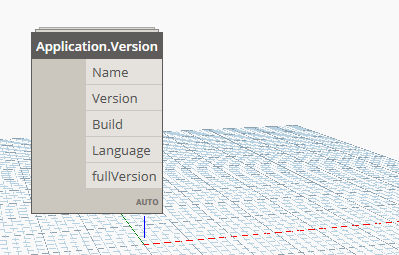
Hey Ehsan. Shortly - when I open Dynamo script there are no wires between nodes, some of the nodes are disappearing. There is an error in Dynamo console:
This graph has a nodeview with id:2d0d810a-6489-46ab-8686-a86bb1755f6d and name:Watch, but does not contain a matching nodeModel
After deleting pyRevit.addin - it works correctly again
I found a thread about this issue on Dynamo forum https://forum.dynamobim.com/t/nodes-dissapear-after-reopening-file/30954
I hope it could help and the problem is not so big.
I will try to reproduce it in another environment later and let you know
Thank you!
To Reproduce
Steps to reproduce the behavior:
- With installed pyRevit run Dynamo
- Create a new layout with couple of connected nodes (it seems like the problem is only with nodes from packages). While you're creating it some nodes are also not working.
- Close Dynamo and open again, load the script - there will be no wires more, some of the nodes disappeared
- Restart Revit without pyRevit, open the script in Dynamo - it is okay again
Screenshots
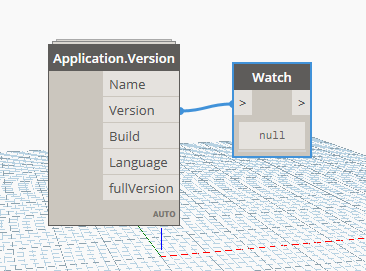
Dynamo sample while creating (it doesnt works, there is null in Watch)
And after reopening the same file looks like this
Desktop (please complete the following information):
- OS: Windows 8.1 Pro (German)
- pyRevit Version 4.6.15
- Dynamo Version 2.0.1
- pyRevit Environment:
==> Registered Clones (full git repos)
==> Registered Clones (deployed from archive)
master | Deploy: "basepublic" | Branch: "master" | Version: "4.6.15" | Path: "C:
\Users\alex\AppData\Roaming\pyRevit-Master"
==> Attachments
Autodesk Revit 2018.3.1 | Clone: "master" | Engine: "273"
==> Installed UI Extensions
==> Installed Library Extensions
==> Default Extension Search Path
C:\Users\alex\AppData\Roaming\pyRevit\Extensions
==> Extension Search Paths
==> Extension Sources - Default
https://github.com/eirannejad/pyRevit/raw/master/extensions/extensions.json
==> Extension Sources - Additional
==> Installed Revits
Autodesk Revit 2018.3.1 | Version: 18.3.1.2 | Language: 1033 | Path: "C:\Program
 Files\Autodesk\Revit 2018\"
==> Running Revit Instances
PID: 4940 | Autodesk Revit 2018.3.1 | Version: 18.3.1.2 | Language: 0 | Path: "C
:\Program Files\Autodesk\Revit 2018"
==> User Environment
Microsoft Windows 8.1 [Version 6.3.9600]
Executing User: NETWORK\alex
Active User: NETWORK\alex
Adming Access: No
%APPDATA%: "C:\Users\alex\AppData\Roaming"
Latest Installed .Net Framework: "4.7.2"
No .Net Target Packs are installed.
pyRevit CLI 0.9.0.0
 melnikovalex
All 30 comments
Thanks @melnikovalex for sharing this issue and the link to the very interesting thread on dynamo forum. Yes these issues are caused by different dll versions used by the addons. I responded to the thread there and will take a look on my side to see if I can improve things.
 eirannejad
on 14 Feb 2019
eirannejad
on 14 Feb 2019
Just tested on another machine - the same problem :(
melnikovalex
on 14 Feb 2019
It's going to be the same everywhere. This is not a pyRevit issue.
However:
You can delete the pyRevit/bin/NewtonSoft.Json.dll or replace it with C:/Program Files/Autodesk/Revit 201X/NewtonSoft.Json.dll and pyRevit still works fine.
This should solve the problem
eirannejad
on 15 Feb 2019
However:
You can delete thepyRevit/bin/NewtonSoft.Json.dllor replace it withC:/Program Files/Autodesk/Revit 201X/NewtonSoft.Json.dlland pyRevit still works fine.This should solve the problem
For some reason that did not help. I've tried to replace it with version 8 (from Dynamo), 9 (from Revit) and to delete it. Could it be cached somehow?
melnikovalex
on 18 Feb 2019
Interesting. Maybe another addon is loading this as well. Open Revit with pyRevit and run Spy > List Loaded Assemblies and let it finish listing all assemblies. Then run a search for NewtonSoft and find all loaded versions and see where they're loaded from.
eirannejad
on 18 Feb 2019
Without any changes in pyRevit\bin (version 12.0.1 is still there) it loads this one: Newtonsoft.Json 9.0.0.0 C:\Program Files\Autodesk\Revit 2018\Newtonsoft.Json.dll
melnikovalex
on 19 Feb 2019
So pyRevit is loading and only one Newtonsoft.Json is loaded??? Then why is Dynamo breaking?
eirannejad
on 19 Feb 2019
That is the question -maybe some other dlls cause the conflict? I will try to test what else could it be
melnikovalex
on 21 Feb 2019
@melnikovalex I'd start by verifying there is only one version of Newtonsoft.Json is loaded. Generally if pyRevit is loaded, you should see two different versions on the Spy > List Loaded Assemblies report.
eirannejad
on 21 Feb 2019
@melnikovalex I'd start by verifying there is only one version of
Newtonsoft.Jsonis loaded. Generally if pyRevit is loaded, you should see two different versions on theSpy > List Loaded Assembliesreport.
I've checked one more time on a newly created VM with Revit 2019 default installtion (with eTransmit, Model Review, Batch Print, Collaboration and Dynamo 1.3 (?) ). So for me it is only Newtonsoft.JSON.dll v.9.0.0.0 from Revit folder
melnikovalex
on 26 Feb 2019
@melnikovalex I know there is only one in Revit folder. "Loaded" assemblies matter. Would you mind sending me a the full report from Spy > List Loaded Assemblies tool?
eirannejad
on 26 Feb 2019
Here you go: https://gist.github.com/melnikovalex/eb7589d7c71020485af02a10b0eabcef
Interesting - I couldn't reproduce the issue on empty installation of 2019. Either because of empty Revit or because of 2019 version.
melnikovalex
on 26 Feb 2019
Which pyRevit version are you using. Ya you have definitely only one Newtonsoft.JSON.dll loaded. No idea where is the conflict tho.
eirannejad
on 26 Feb 2019
pyRevit 4.6.16
I've tested clean installation of Revit 2018 with the same conditions - the issue is here again
melnikovalex
on 26 Feb 2019
@melnikovalex
There is also another thread for this on the DynamoBIM github. So far, issue has not yet been resolved.Here is the link for your reference.
 kaiaurelienzhu
on 26 Feb 2019
kaiaurelienzhu
on 26 Feb 2019
Well what I'm not fully understanding and trying to figure out is that if pyRevit's Newtonsoft.JSON.dll is not loaded, then what's causing the conflict. It might be another dll.
Per the conversation on dynamo issue seems like @melnikovalex has isolated this to pyRevit whether the culprit is Newtonsoft dll or not
eirannejad
on 27 Feb 2019
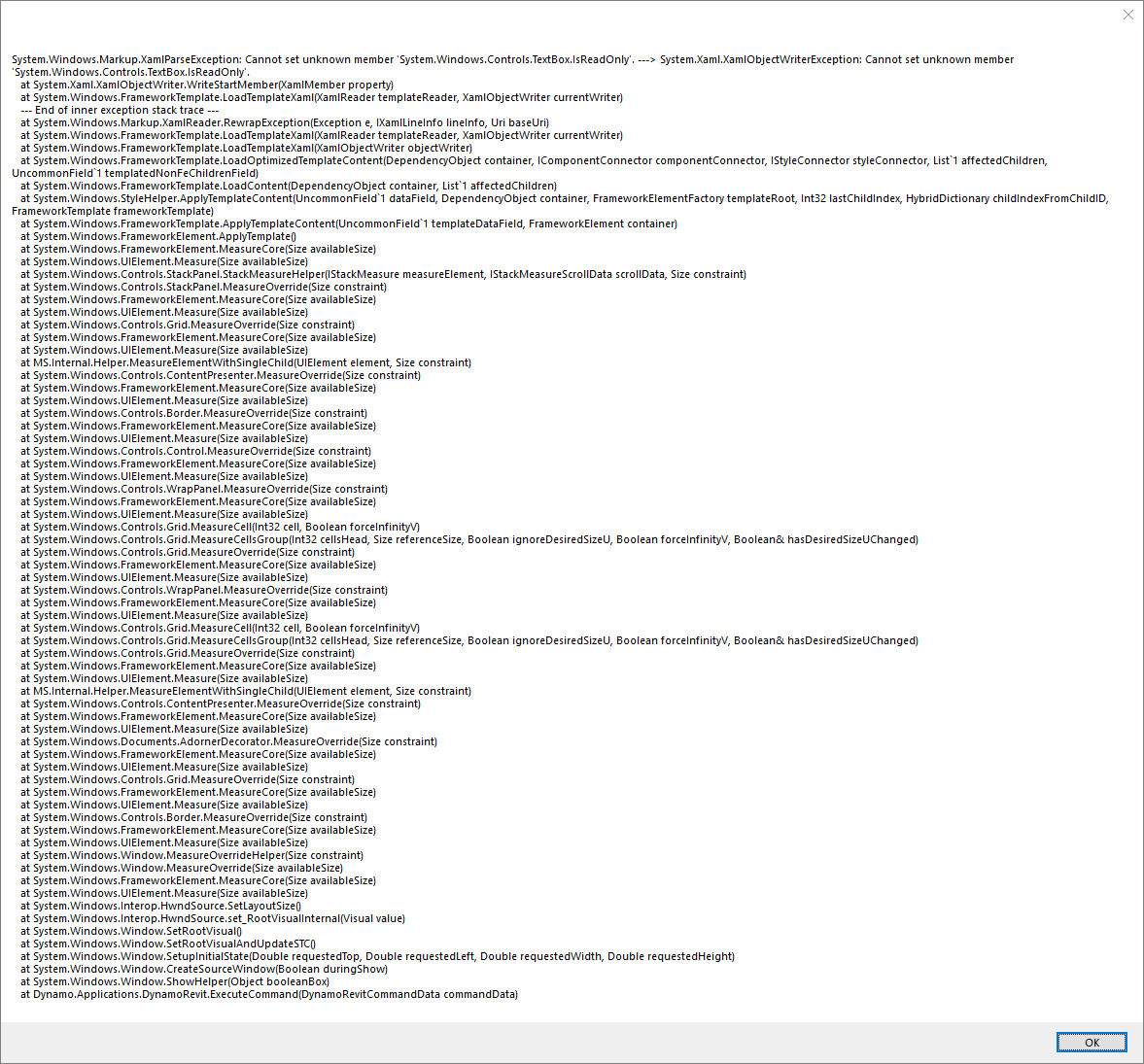
Hmm mine has a completely different issue
eirannejad
on 27 Feb 2019
Hmm I'm confused. See for yourself
Loaded assemblies - No pyRevit - Before Dynamo load
before.txt
Loaded assemblies - No pyRevit - After Dynamo load
after.txt
Loaded assemblies - with pyRevit - Before Dynamo load and running any pyRevit commands
py-before.txt
Loaded assemblies - with pyRevit - After running a few pyRevit commands
py-after.txt
Loaded assemblies - with pyRevit - After Dynamo load
HERE IS THE DYNAMO LOAD ERROR
dyn-after-py.txt
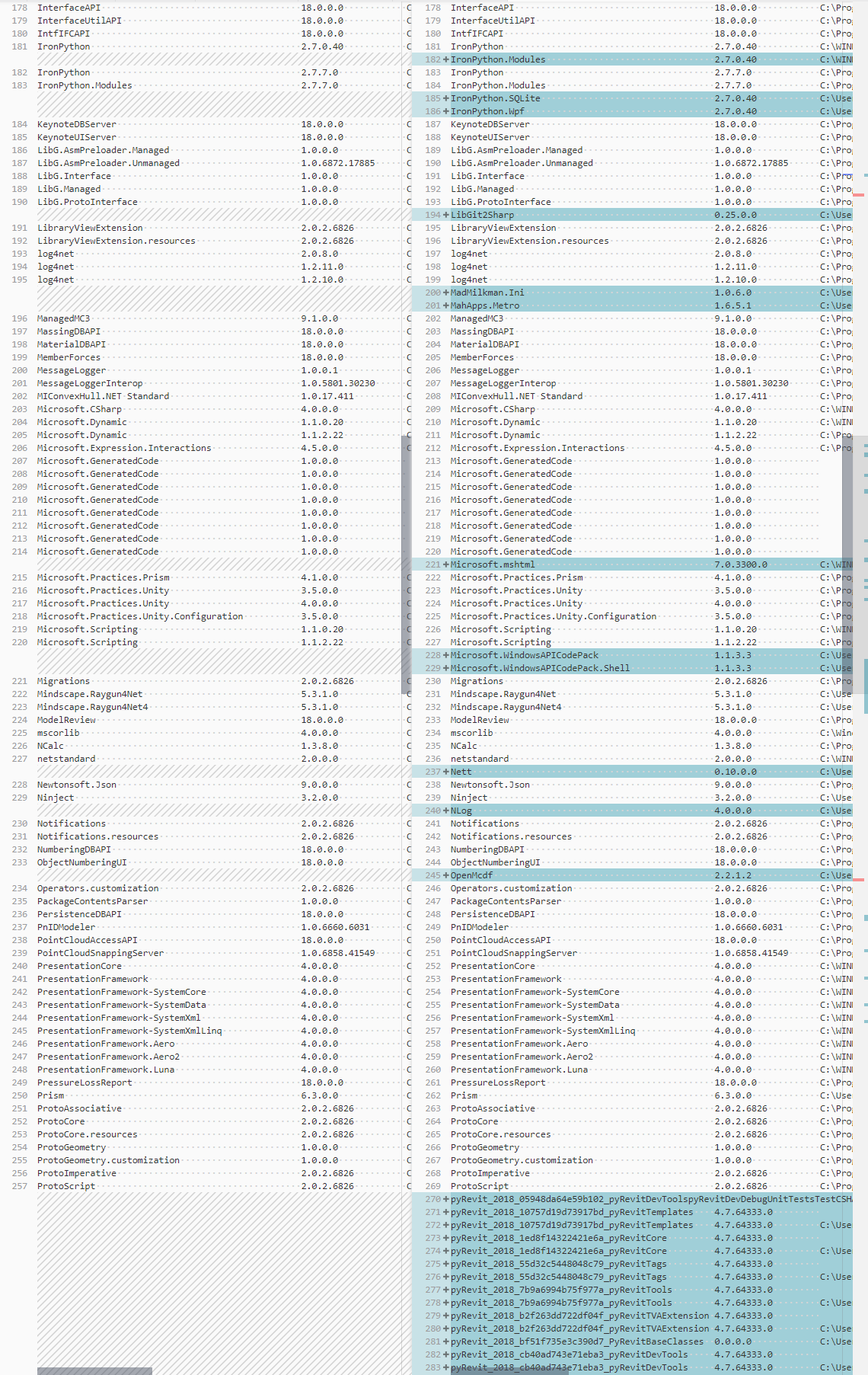
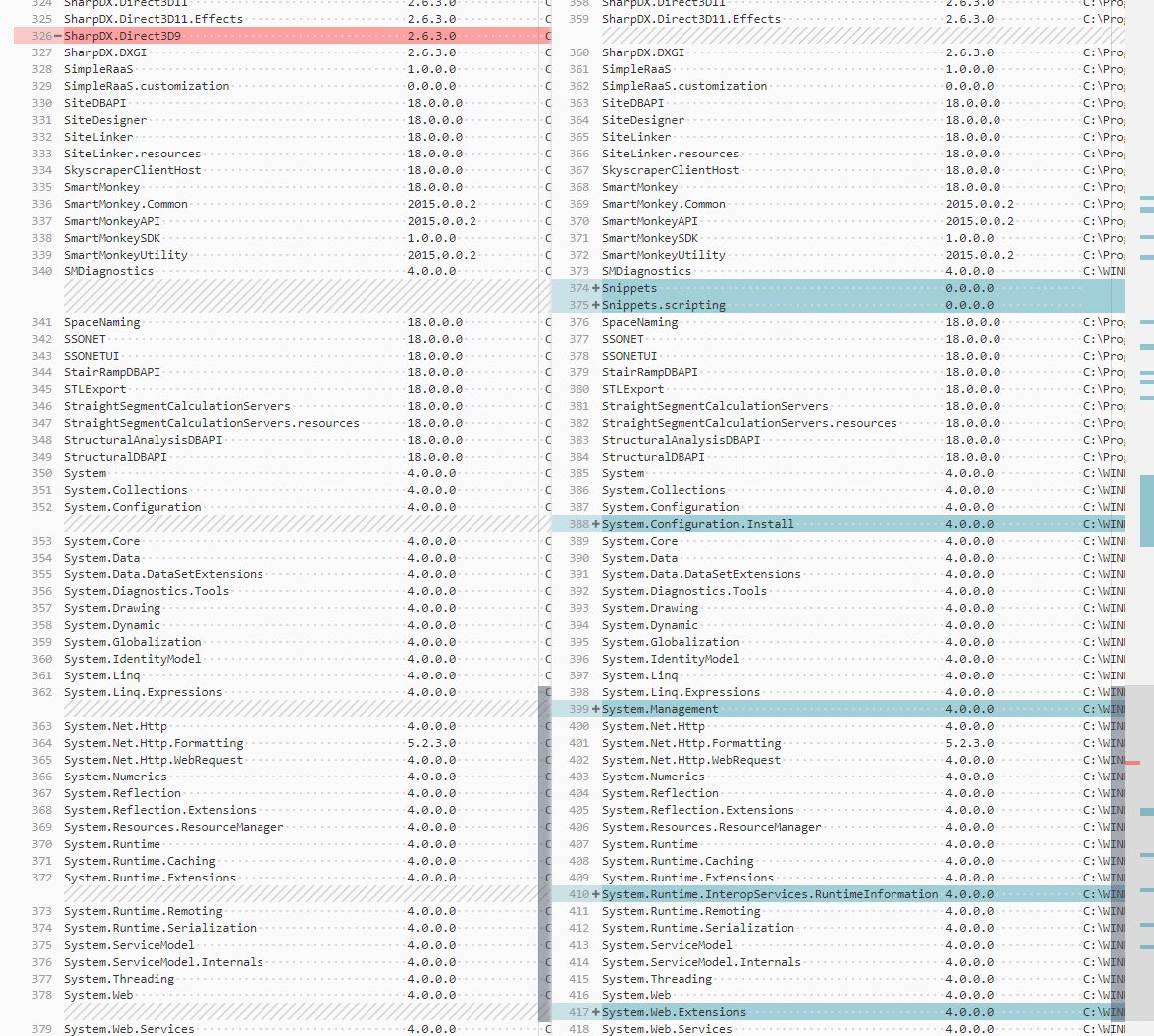
Running a diff between Left: after.txt and Right: dyn-after-py.txt to see what has been loaded with pyRevit that might be causing the issue. I can't seem to find the root cause.


eirannejad
on 27 Feb 2019
Hmm mine has a completely different issue
I had the same alert several times, but I couldn't find any regularity there. It appears sometimes or could not show itself at all (e.g. on VM I haven't seen it).
melnikovalex
on 27 Feb 2019
@eirannejad I have an experiment I would like to try but I have not gotten time yet to do it - it may be faster for you if you have the time/desire.
I see that pyRevit targets .net 4.7.1 - and the problems we see here are in 2018- not in 2019. I believe though have been unable to confirm that 2018 hosted an older version of the .net framework (unrelated to what version the user has installed on their machine) and so addins are loaded into an older framework version of .net in 2018. - again - unconfirmed. I would like to rebuild pyRevit targeting say - .net.4.5.2 - and see if the problem is solved in 2018. It may be that multi targeting pyRevit to different versions of .net for different versions of Revit solves this issue.
 mjkkirschner
on 7 Mar 2019
mjkkirschner
on 7 Mar 2019
Hi @eirannejad and @mjkkirschner,
I have Dynamo 2.0.2 and pyRevit 4.6.x installed and running on Revit 2019.
Both run fine independently but note there still are issues getting these
two to run together in 2019, not just 2018. I get around the conflict by
invoking two instances of Revit now, one for pyRevit and one for Dynamo. I
do not have 2018 installed but can do that if needed.
Do you think the underlying conflict is in Newtonsoft.Json library version
or somewhere else? the linked Dynamo github issue seems inconclusive.
Either way, I can help build and test and isolate. I know how to build
pyRevit now and have built the newest dev versions as well as older
versions Ehsan has created. Happy to help if you can write down the
particular cases we want to test for.
-matt
On Thu, Mar 7, 2019 at 11:26 AM Michael Kirschner notifications@github.com
wrote:
@eirannejad https://github.com/eirannejad I have an experiment I would
like to try but I have not gotten time yet to do it - it may be faster for
you if you have the time/desire.I see that pyRevit targets .net 4.7.1 - and the problems we see here are
in 2018- not in 2019. I believe though have been unable to confirm that
2018 hosted an older version of the .net framework (unrelated to what
version the user has installed on their machine) and so addins are loaded
into an older framework version of .net in 2018. - again - unconfirmed. I
would like to rebuild pyRevit targeting say - .net.4.5.2 - and see if the
problem is solved in 2018. It may be that multi targeting pyRevit to
different versions of .net for different versions of Revit solves this
issue.—
You are receiving this because you are subscribed to this thread.
Reply to this email directly, view it on GitHub
https://github.com/eirannejad/pyRevit/issues/525#issuecomment-470594173,
or mute the thread
https://github.com/notifications/unsubscribe-auth/ABFs-HhKh-qIKo6b4RAD61N0JMh5mrFJks5vUT2zgaJpZM4a70io
.
 tatlin
on 8 Mar 2019
tatlin
on 8 Mar 2019
@tatlin Any specifics on issues you're seeing on 2019?
eirannejad
on 8 Mar 2019
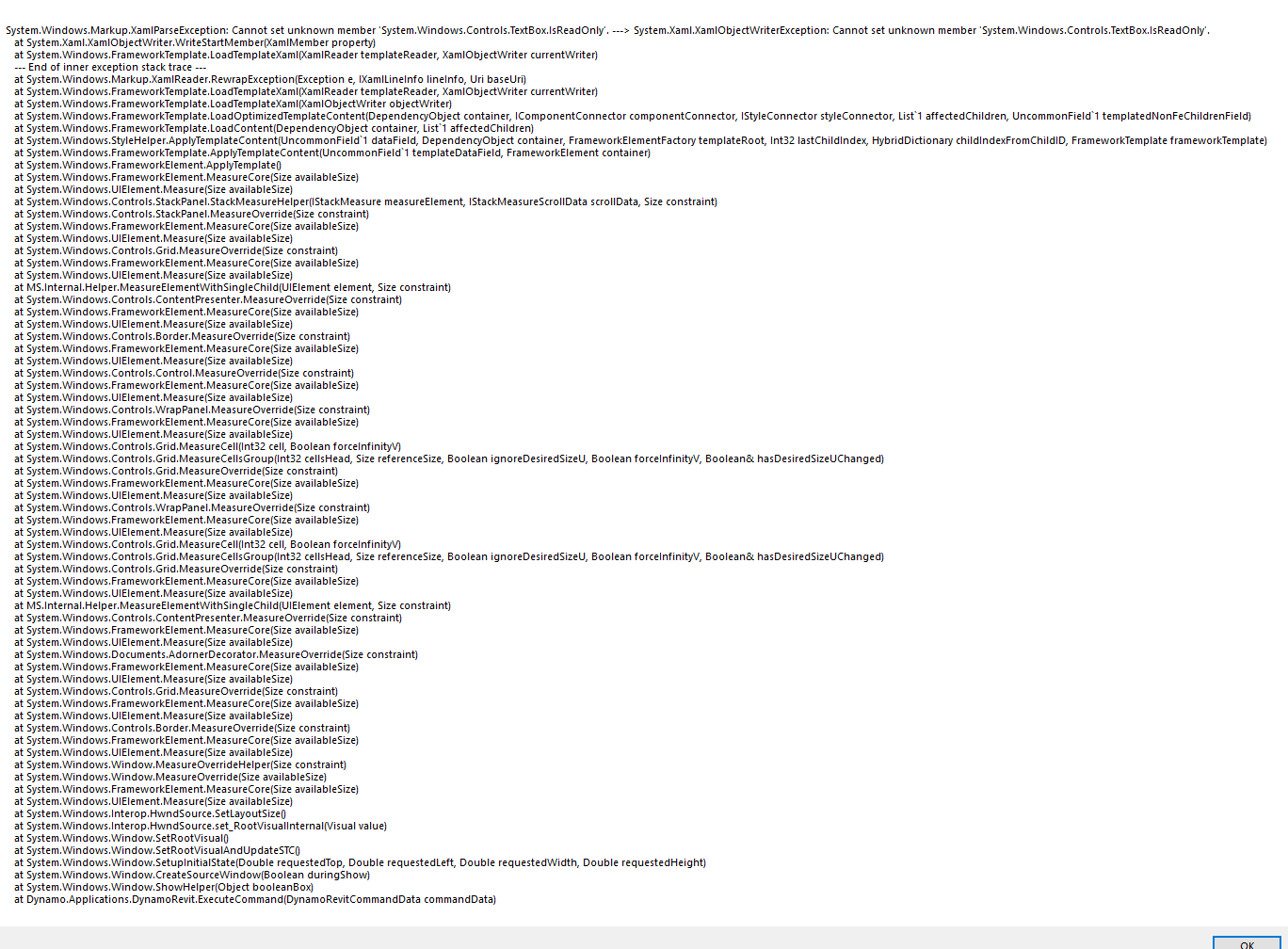
after opening Revit 2019.2 and having the vanilla pyRevit addin loaded, when I try to invoke Dynamo 2.0.2 it bombs out in a similar manner discussed in this thread. see attached screenshot. Nothing really shows in the DynamoRevit or DynamoCore Logs.
tatlin
on 8 Mar 2019
Okay. See issue #538. This is most probably related. I'm working on making the pyRevit binder smart about responding to bindings for its own dlls only. Will keep you posted. I have a hunch this is the root cause.
eirannejad
on 8 Mar 2019
Confirmed the pyRevit internal binding resolver was the root cause. Making it only respond to requests coming from pyRevit assemblies resolved both #535 and issues listed on this thread.
The commit about is for 4.7 on develop branch. I'll back port this change to 4.6 and will publish with 4.6.18
eirannejad
on 8 Mar 2019
@tatlin Hey Matt. You can switch to release/4.6.18 now, build the Labs solution and run tests.
eirannejad
on 8 Mar 2019
Will try later tonight.
tatlin
on 8 Mar 2019
Per user feedback this issue seems to be resolved for now.
eirannejad
on 13 Mar 2019
Re #578
Recompiled Newtonsoft.Json (12.0.1) recompile to pyRevitLabs.Json (.NET 4.7.1)
This removes the conflict between pyRevit and other addons using a different version of Newtonsoft.Json
eirannejad
on 1 May 2019
@tatlin Seems like the TextBox.ISReadOnly conflict with Dynamo is a framwork bug
Resolved here: https://github.com/eirannejad/pyRevit/commit/ee7b74993386219375779c4a45f774c1a23174c0
eirannejad
on 18 May 2019
Related issues
 thumDer
·
4Comments
thumDer
·
4Comments
 Robbo1234
·
4Comments
Robbo1234
·
4Comments
 Tyree
·
3Comments
Tyree
·
3Comments
 AlexVilaOrtega
·
3Comments
AlexVilaOrtega
·
3Comments
 pihglez
·
4Comments
pihglez
·
4Comments