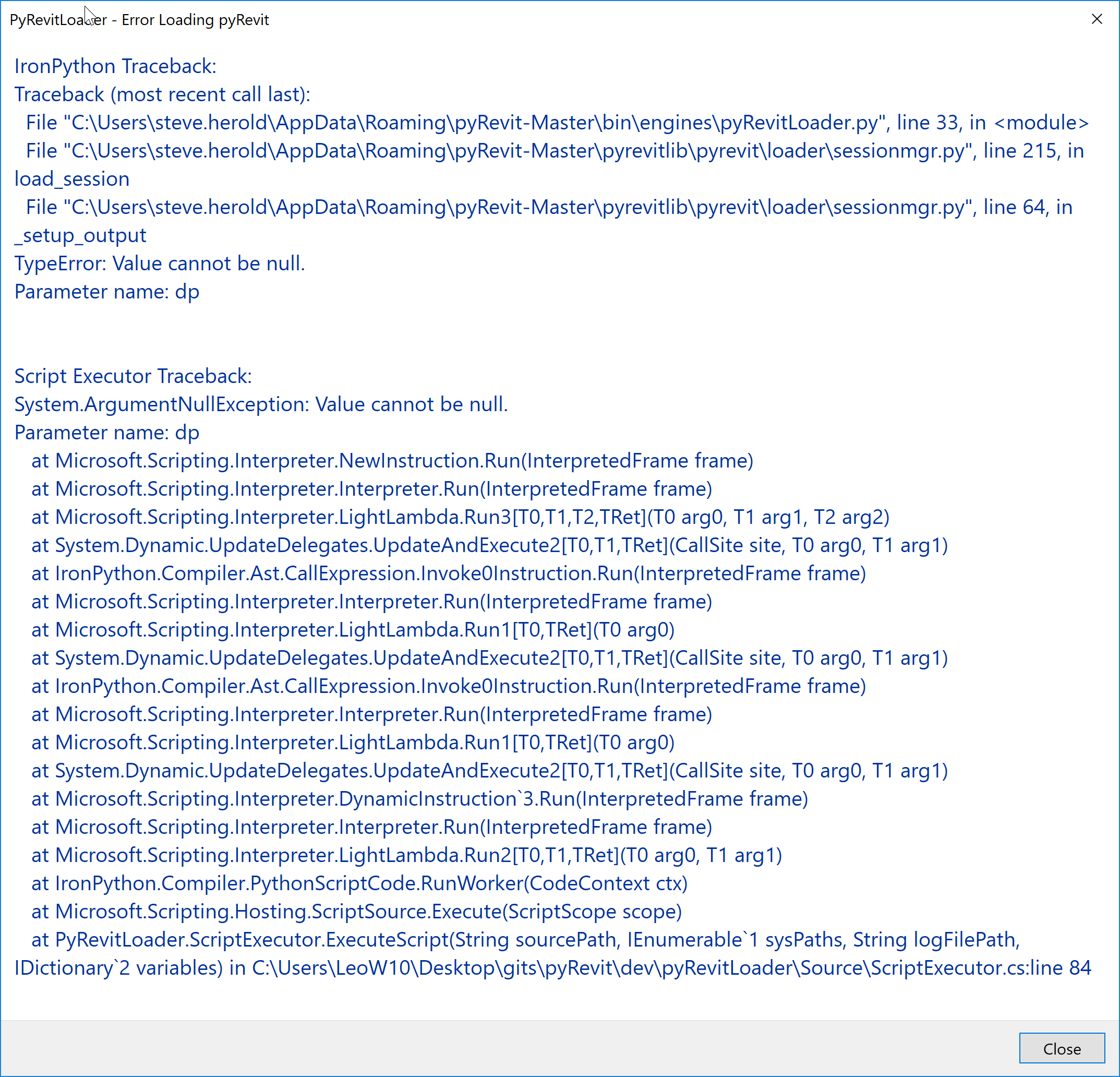
pyRevit error on startup after latest update 4.6.12 i was on 4.6.8
cant load pyrevit anymore
==> Registered Clones (full git repos)
==> Registered Clones (deployed from archive)
Name: "master" | Deploy: "basepublic" | Path: "C:\Users\steve.herold\AppData\Roaming\pyRevit-Master"
==> Attachments
Autodesk Revit 2016 Update 8 for R2 (2016.1.8) | Clone: "master" | Engine: "277"
Autodesk Revit 2017.2.4 | Clone: "master" | Engine: "277"
Autodesk Revit 2018.3.2 | Clone: "master" | Engine: "277"
Autodesk Revit 2018.3.2 | Clone: "master" | Engine: "277"
Autodesk Revit 2019.0.2 | Clone: "master" | Engine: "277"
==> Installed UI Extensions
==> Installed Library Extensions
==> Extension Search Paths
C:\Users\steve.herold\Documents\Revit\Pyrevit\pyRevitMEP.extension
==> Extension Sources - Default
https://github.com/eirannejad/pyRevit/raw/master/extensions/extensions.json
==> Extension Sources - Additional
==> Installed Revits
Autodesk Revit 2016 Update 8 for R2 (2016.1.8) | Version: 16.0.1205.0 | Language: 1033 | Path: "C:\Program Files\Autodesk\Revit 2016\"
Autodesk Revit 2017.2.4 | Version: 17.0.1158.0 | Language: 1033 | Path: "C:\Program Files\Autodesk\Revit 2017\"
Autodesk Revit 2018.3.2 | Version: 18.3.2.7 | Language: 1033 | Path: "C:\Program Files\Autodesk\Revit LT 2018\"
Autodesk Revit 2018.3.2 | Version: 18.3.2.7 | Language: 1033 | Path: "C:\Program Files\Autodesk\Revit 2018\"
Autodesk Revit 2019.0.2 | Version: 19.0.20.1 | Language: 1033 | Path: "C:\Program Files\Autodesk\Revit 2019\"
==> Running Revit Instances
PID: 15568 | Autodesk Revit 2018.3.2 | Version: 18.3.2.7 | Language: 0 | Path: "C:\Program Files\Autodesk\Revit 2018"
==> User Environment
Microsoft Windows 10 [Version 10.0.16299]
Executing User: CANSELCORP\Steve.Herold
Active User: CANSELCORP\Steve.Herold
Adming Access: No
%APPDATA%: "C:\Users\steve.herold\AppData\Roaming"
Latest Installed .Net Framework: "4.7.1"
Error: Could not find a part of the path 'C:\Program Files (x86)\Reference Assemblies\Microsoft\Framework\.NETFramework'.
Run with "--debug" option to see debug messages
need help it not working only erro message at startup
 Superstiv
All 6 comments
This has happened before due to conflict with other addons. What other addons do you have installed?
 eirannejad
on 23 Jan 2019
eirannejad
on 23 Jan 2019
Too Many might it be hive add-on I know I had issue with it
Superstiv
on 23 Jan 2019
See these https://github.com/eirannejad/pyRevit/issues/442 https://github.com/eirannejad/pyRevit/issues/480
eirannejad
on 23 Jan 2019
ive uninstall hive and drofus it work
Superstiv
on 23 Jan 2019
👍1
No need to uninstall dRofus. After first load, close Revit and re-open. Dialog won't come back on subsequent open attempts as long as the user profile is populated for pyRevit. dRofus development is working on a fix.
 dbaldacchino
on 23 Jan 2019
dbaldacchino
on 23 Jan 2019
👍3
thanks
Superstiv
on 23 Jan 2019
Was this page helpful?
0 / 5 - 0 ratings
Related issues
 thazell
·
5Comments
thazell
·
5Comments
 AlexVilaOrtega
·
3Comments
AlexVilaOrtega
·
3Comments
 jkcameron
·
5Comments
jkcameron
·
5Comments
 kuldeep3618x
·
4Comments
kuldeep3618x
·
4Comments
 thumDer
·
4Comments
thumDer
·
4Comments
Most helpful comment
No need to uninstall dRofus. After first load, close Revit and re-open. Dialog won't come back on subsequent open attempts as long as the user profile is populated for pyRevit. dRofus development is working on a fix.