Describe the bug
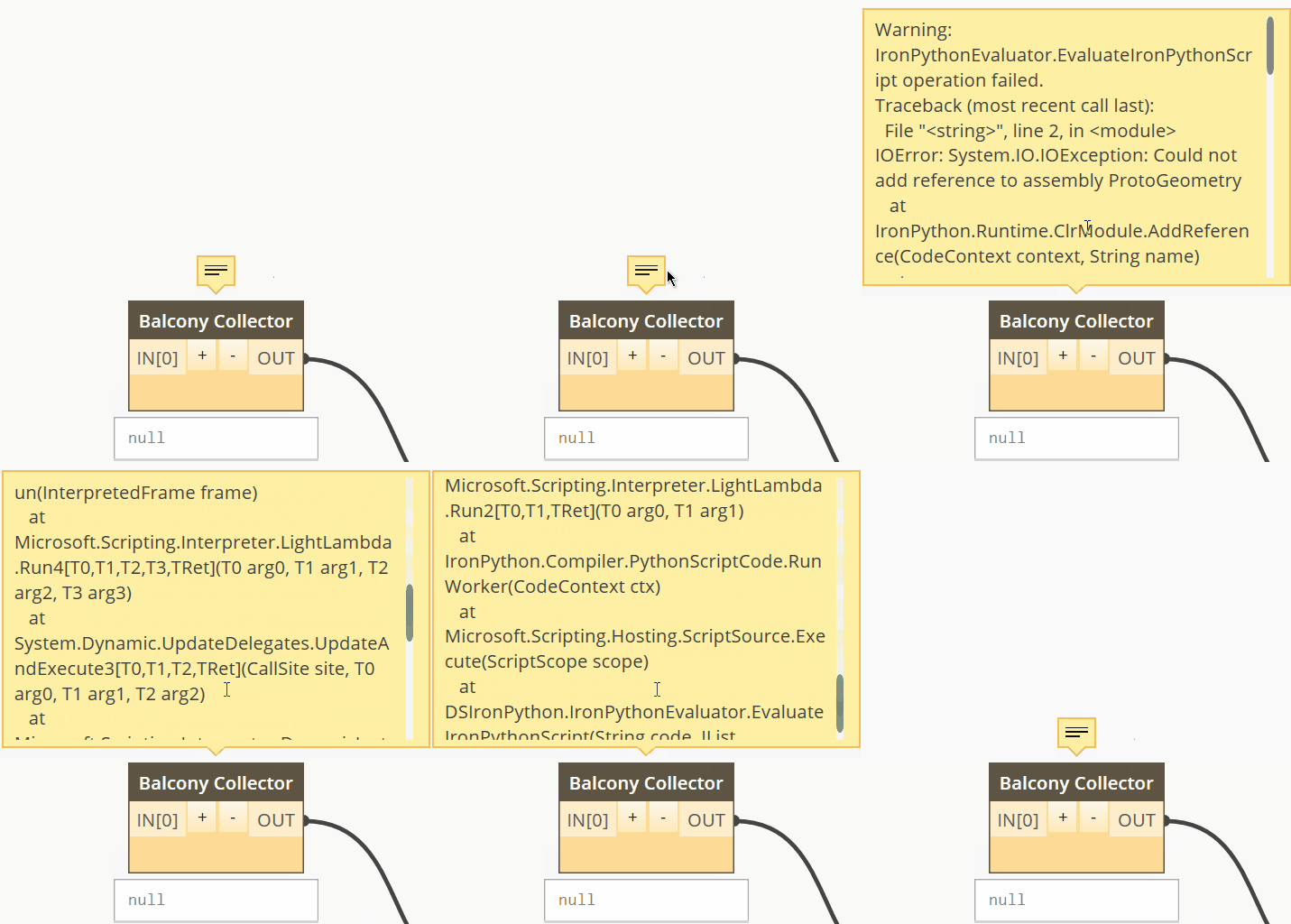
Loading any type of references within Dynamo(1.3.3) with Python creates an error that these don't exist.
Changing the pyRevit Python engines has no affect and the error persists. Removing pyRevit from Revit in the version I'm using Dynamo solves my issue.
Steps to reproduce the behavior:
- Open any version of Dynamo where pyRevit is installed, with any version of IronPython running
- Create a Python node
- add this code, or any code that loads references
```import clr
clr.AddReference('ProtoGeometry')
from Autodesk.DesignScript.Geometry import *
clr.AddReference("RevitServices")
import RevitServices
from RevitServices.Persistence import DocumentManager
from RevitServices.Transactions import TransactionManager
clr.AddReference("RevitAPI")
import Autodesk
from Autodesk.Revit.DB import *
4. See error
**Expected behavior**
References to load in Dynamo
**Screenshots**
**Desktop (please complete the following information):**
- OS: Win10
- pyRevit Version 4.6.11
- pyRevit Environment: ==>
Registered Clones (full git repos)
==> Registered Clones (deployed from archive)
Name: "master" | Deploy: "basepublic" | Path: "C:\Users\USER\AppData\Roaming\pyRevit-Master"
==> Attachments
Autodesk Revit 2018.3.2 | Clone: "master" | Engine: "277"
==> Installed UI Extensions
Name: "pyApex" | Repo: "" | Installed: "C:\Users\USER\Desktop\qRevit\pyApex.extension"
Name: "qRevit" | Repo: "" | Installed: "C:\Users\USER\Desktop\qRevit\qRevit.extension"
==> Installed Library Extensions
==> Extension Search Paths
C:\Users\USER\Desktop\qRevit
==> Extension Sources - Default
https://github.com/eirannejad/pyRevit/raw/master/extensions/extensions.json
==> Extension Sources - Additional
==> Installed Revits
Autodesk Revit 2017.2.3 | Version: 17.0.1150.0 | Language: 1033 | Path: "C:\Program Files\Autodesk\Revit 2017"
Autodesk Revit 2018.3.2 | Version: 18.3.2.7 | Language: 1033 | Path: "C:\Program Files\Autodesk\Revit 2018"
==> Running Revit Instances
PID: 3376 | Autodesk Revit 2017.2.3 | Version: 17.0.1150.0 | Language: 0 | Path: "C:\Program Files\Autodesk\Revit 2017"
PID: 18620 | Autodesk Revit 2018.3.2 | Version: 18.3.2.7 | Language: 0 | Path: "C:\Program Files\Autodesk\Revit 2018"
==> User Environment
Microsoft Windows 10 [Version 10.0.16299]
Executing User: USER
Active User: USER
Adming Access: No
%APPDATA%: "C:\Users\USER\AppData\Roaming"
Latest Installed .Net Framework: "4.7.1"
pyRevit CLI 0.3.0.0
```
Additional context
 winterweken
All 6 comments
Removing pyRevit from Revit in the version I'm using Dynamo solves my issue.
Are you able to remove pyRevit from just revit 2018 and leave it running in revit 2019? If so, how?
I'm experiencing similar issues to yours. For my projects, using dynamo in 2018 and pyRevit in 2019 would work for me (temporarily).
 ghost
on 21 Jan 2019
ghost
on 21 Jan 2019
Also, have you tried these steps: https://github.com/eirannejad/pyRevit/issues/231#issuecomment-324454892
It didn't seem to fix anything for me but it may for you.
ghost
on 21 Jan 2019
Removing pyRevit from Revit in the version I'm using Dynamo solves my issue.
Are you able to remove pyRevit from just revit 2018 and leave it running in revit 2019? If so, how?
I'm experiencing similar issues to yours. For my projects, using dynamo in 2018 and pyRevit in 2019 would work for me (temporarily).
Within pyRevits settings you can set which version it active in.
winterweken
on 21 Jan 2019
Within pyRevits settings you can set which version it active in.
Of course! Thank you.
ghost
on 21 Jan 2019
No solution to this in sight. Dynamo3D has moved up to v2 with many changes and it doesn't make sense to spend time trying to find the underlying issue. It's going to be a heisenbug anyway since there is incompatibility between the two IronPython engines.
 eirannejad
on 12 Feb 2019
eirannejad
on 12 Feb 2019
Thanks for the follow up!
winterweken
on 13 Feb 2019
Related issues
 thumDer
·
4Comments
thumDer
·
4Comments
 pmcmm
·
3Comments
pmcmm
·
3Comments
 kuldeep3618x
·
4Comments
kuldeep3618x
·
4Comments
 varunbose
·
4Comments
varunbose
·
4Comments
 AlexVilaOrtega
·
3Comments
AlexVilaOrtega
·
3Comments
Most helpful comment
Within pyRevits settings you can set which version it active in.