Pyrevit: Conversion Failed (Manage Keynote)
Conversion Failed when launching the Manage Keynote function
Screenshots

- pyRevit 4.6.9
- Revit 2019 (French)
Additional context
I have also some errors at Revit Launch since 4.6.9 installation
 danselkaz
All 9 comments
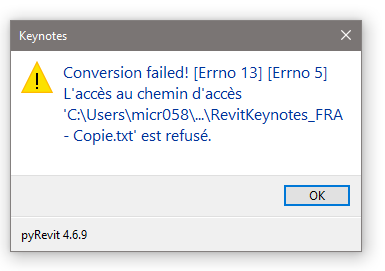
I try to open a Desktop copy of the RevitKeynotes_FRA.txt in an empty project file, and here is the error message :
danselkaz
on 4 Jan 2019
@danselkaz Would you please send me the original keynote file and also add translations for the French prompts in your comments? I can't read French, sorry.
 eirannejad
on 4 Jan 2019
eirannejad
on 4 Jan 2019
You can also start with a fresh empty text file and import your existing keynotes.
eirannejad
on 4 Jan 2019
Hello,
Here is the file for Keynote in French
RevitKeynotes_FRA - Copie.txt
" L'accès au chemin d'accès ...... est refusé "
Means : "Access to the ..... filepath is rejected"
" Fin de la trace de la pile d'exception interne " is untranslatable
Google says something like : "end of the internal exception stack trace"
The weird thing is that , in this file, I don't have the Keynote manager window that can permits to load an other file (like an empty one).
When I click on "Manage keynotes" it opens the windows that says, "Existing keynote file needs to be converted to a format .....Are you sure you ant to convert ?
I click "Convert" and then the error message with a single "OK" button to validate and close the command.
danselkaz
on 7 Jan 2019
@danselkaz Are you sure you have write access to that file?
eirannejad
on 7 Jan 2019
@danselkaz Any updates?
eirannejad
on 9 Jan 2019
I'm out of the office until week 4, I will try to edit the file when I'm back and tell you.
Nevertheless, I remember having tried with a copy of the file in the desktop and it doesn't work, but maybe that was not exactly the same error message. So I'll check this out also
Thank you
danselkaz
on 10 Jan 2019
@danselkaz Any updates?
eirannejad
on 23 Jan 2019
It seems that the file was on Read Only status... I don't understand why it was like this in my instalation but .. .problem solved
danselkaz
on 28 Jan 2019
Related issues
 pihglez
·
4Comments
pihglez
·
4Comments
 kuldeep3618x
·
4Comments
kuldeep3618x
·
4Comments
 amastrobera
·
3Comments
amastrobera
·
3Comments
 thumDer
·
4Comments
thumDer
·
4Comments
 jkcameron
·
5Comments
jkcameron
·
5Comments