Pyrevit: Pyrevit 4.6+ Load Error Revit 2019
Greetings,
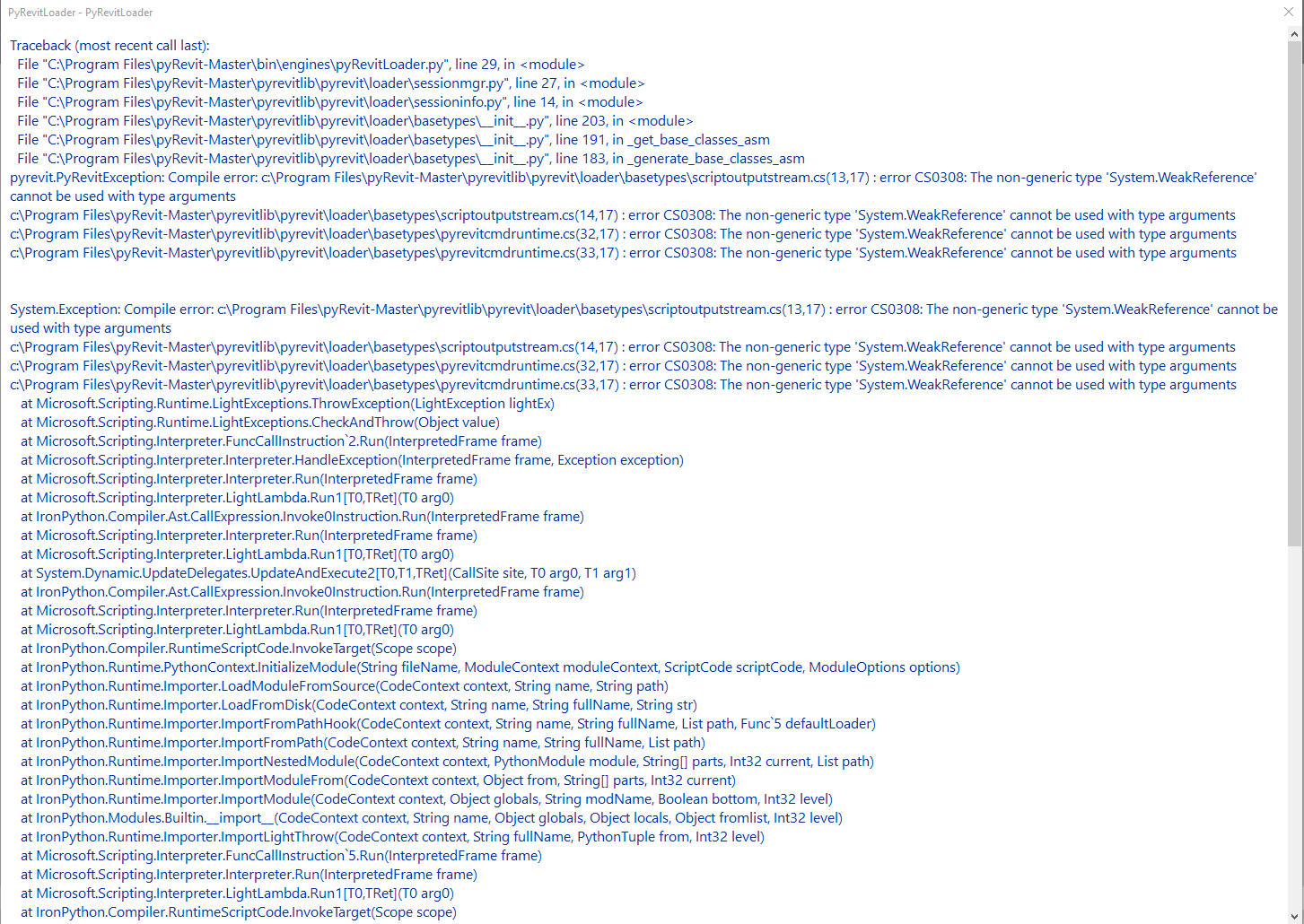
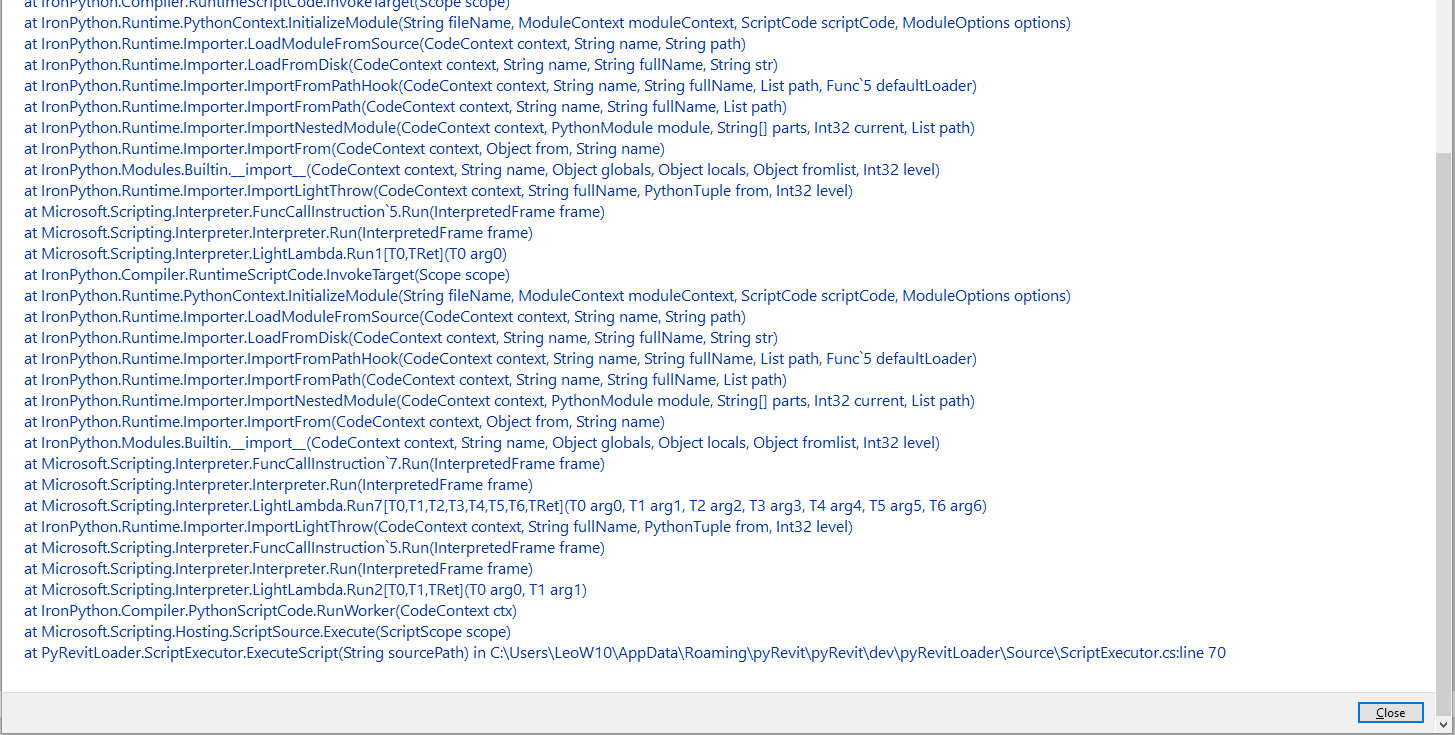
I have just installed Pyrevit 4.6.6 as 4.6.5 was giving a load error which results in Pyrevit not loading into Revit 2019. 4.6.6 is also giving a similar error.
I have included screenshots of the Pyrevit load screen for reference.
Any assistance for this awesome product would be greatly appreciated.
 DarioMariuzzi
All 52 comments
Hey would you be able to send me a list of directories under:
C:\Program Files (x86)\Reference Assemblies\Microsoft\Framework\.NETFramework
Curious to know if the compiler is somehow pulling an older version of System.dll
Also please replace the file below with the file in the attached zip and see if this resolves the issue.
pyrevitlib\pyrevit\loader\basetypes\__init__.py
 eirannejad
on 23 Nov 2018
eirannejad
on 23 Nov 2018
Greetings Ehsan,
Thanks for the help.
Folders listed are v3.5 and v4.0
File replaced still results in error. Am rebooting now will retry and screen grab if same
DarioMariuzzi
on 26 Nov 2018
No Joy,
Have screen grabbed Pyrevit startup
DarioMariuzzi
on 26 Nov 2018
Okay. Would you mind installing a more recent dotnet framework on your machine and test again?
Dotnet 4.7.1 Download Link is Here
I've also updated the cli tool to report the latest installed dotnet framework version for debugging. Download from here and run pyrevit env (Check the version first with pyrevit -V and make sure you have 0.2.11) in your terminal and share results:
eirannejad
on 29 Nov 2018
@eirannejad This is the exact same issue I'm having. I installed CLI v0.2.13 but when I run pyrevit -V I still get v0.2.10.0
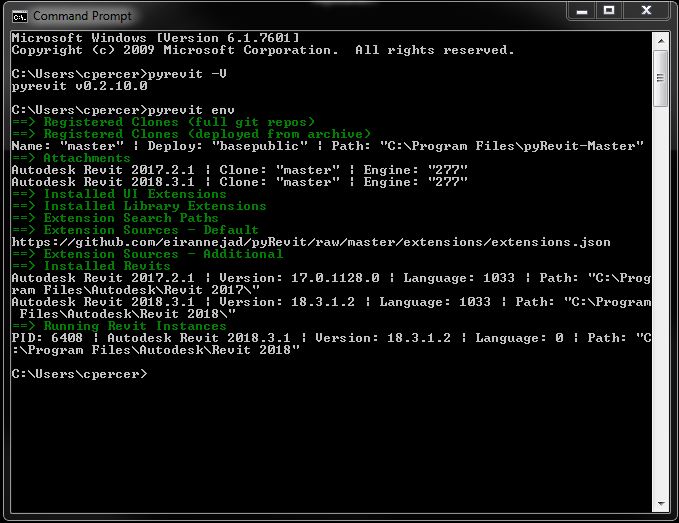
 cpercer
on 4 Dec 2018
cpercer
on 4 Dec 2018
@cpercer You have pyRevit installed separately as well. pyRevit includes the CLI tool in the bin directory and the installer adds it to the system %PATH%. Edit your system %PATH% environment variable and remove the path to the installed pyRevit bin directory Or move the pyRevit CLI path higher in the list of paths

eirannejad
on 4 Dec 2018
pyrevit -V now shows v0.2.13, but still receiving same load screen error on startup of Revit 2018.3.
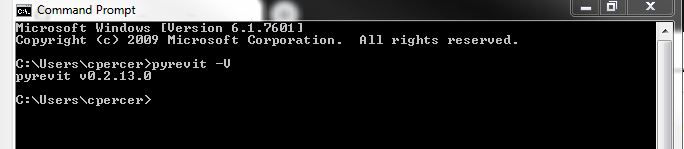
cpercer
on 4 Dec 2018
@cpercer Ok. Please share the results on pyrevit env command here. Thanks!
eirannejad
on 4 Dec 2018
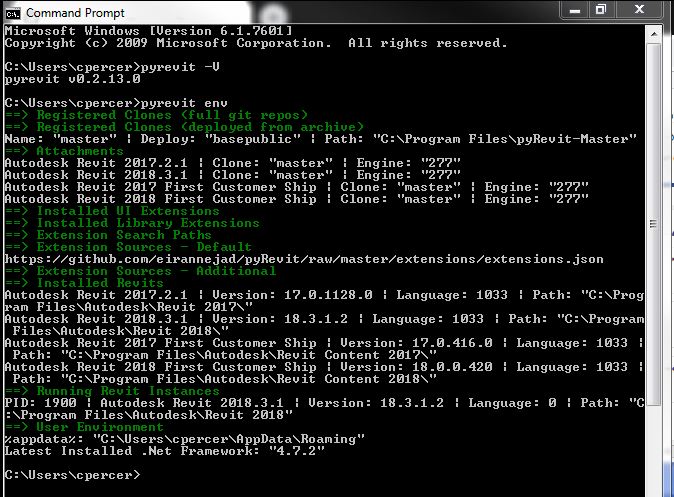
cpercer
on 4 Dec 2018
@DarioMariuzzi Any updates on this https://github.com/eirannejad/pyRevit/issues/429#issuecomment-442701509? Did installing dotnet 4.7.1 resolve the issue?
eirannejad
on 6 Dec 2018
@eirannejad I'm having the same issue and installing dotnet 4.7.1 did not resolve the issue.
cpercer
on 11 Dec 2018
Did my best at resolving the references to this issue (error in Visual studio). Updates will be published in 4.6.9 this weekend. Please re-open the issue if it persists.
eirannejad
on 20 Dec 2018
Please reopen this issue.
I could not install pyrevit 4.6.9 for 2018 version. I updated from 4.5 with RVT 2017 to 4.6.8 - same error shows up then completely uninstalled Revit 2017 and install Revit 2018. Stills same error
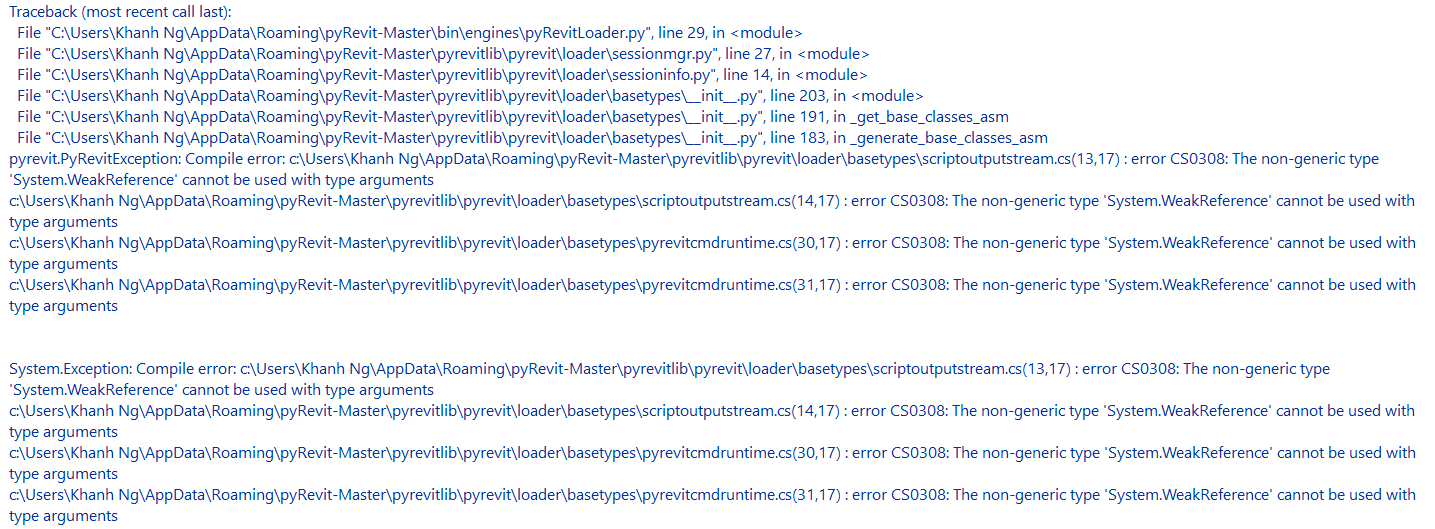

 wta12
on 1 Jan 2019
wta12
on 1 Jan 2019
@eirannejad still having the same issue 4.6.9 Revit 2018.3.2
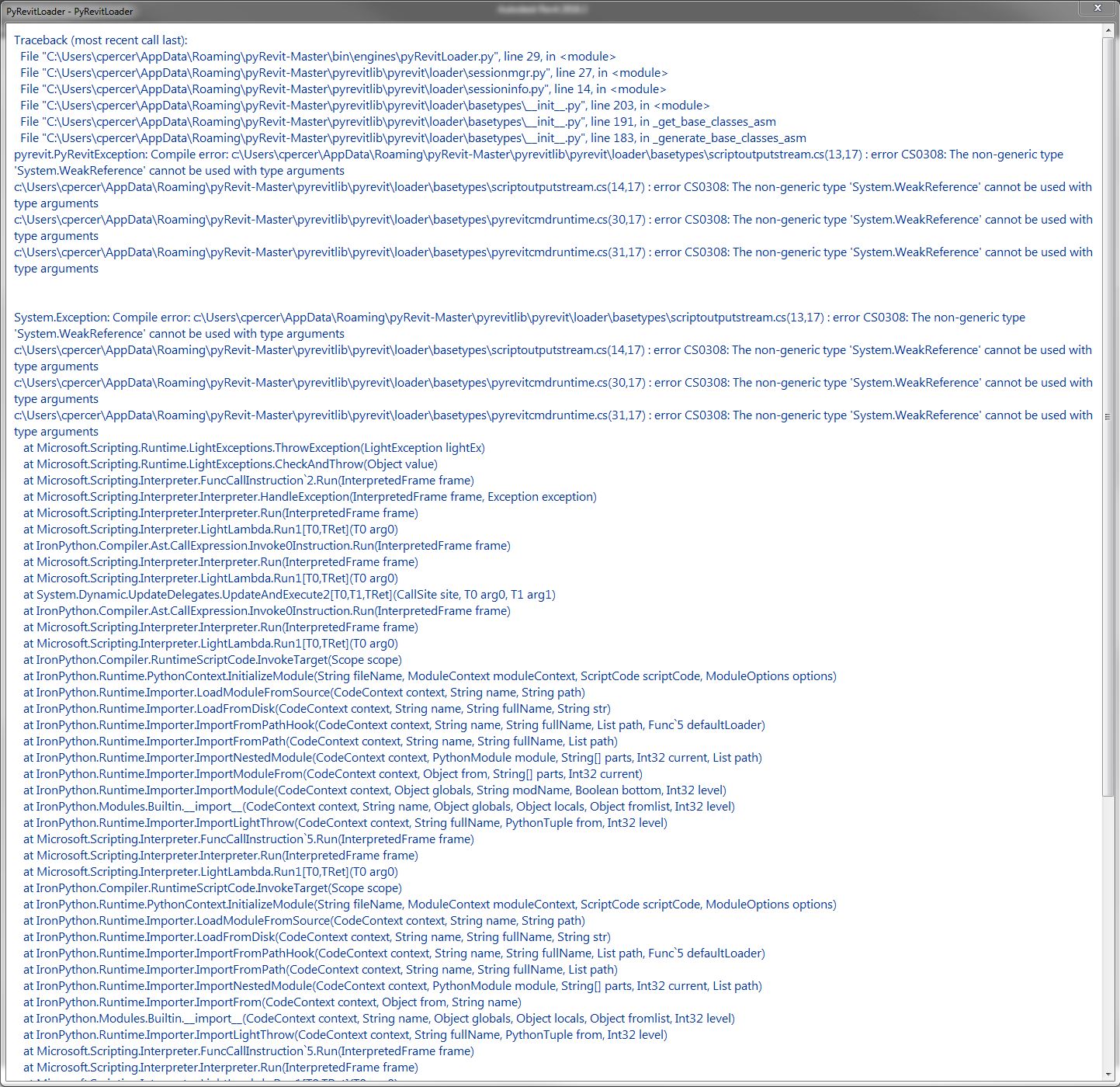
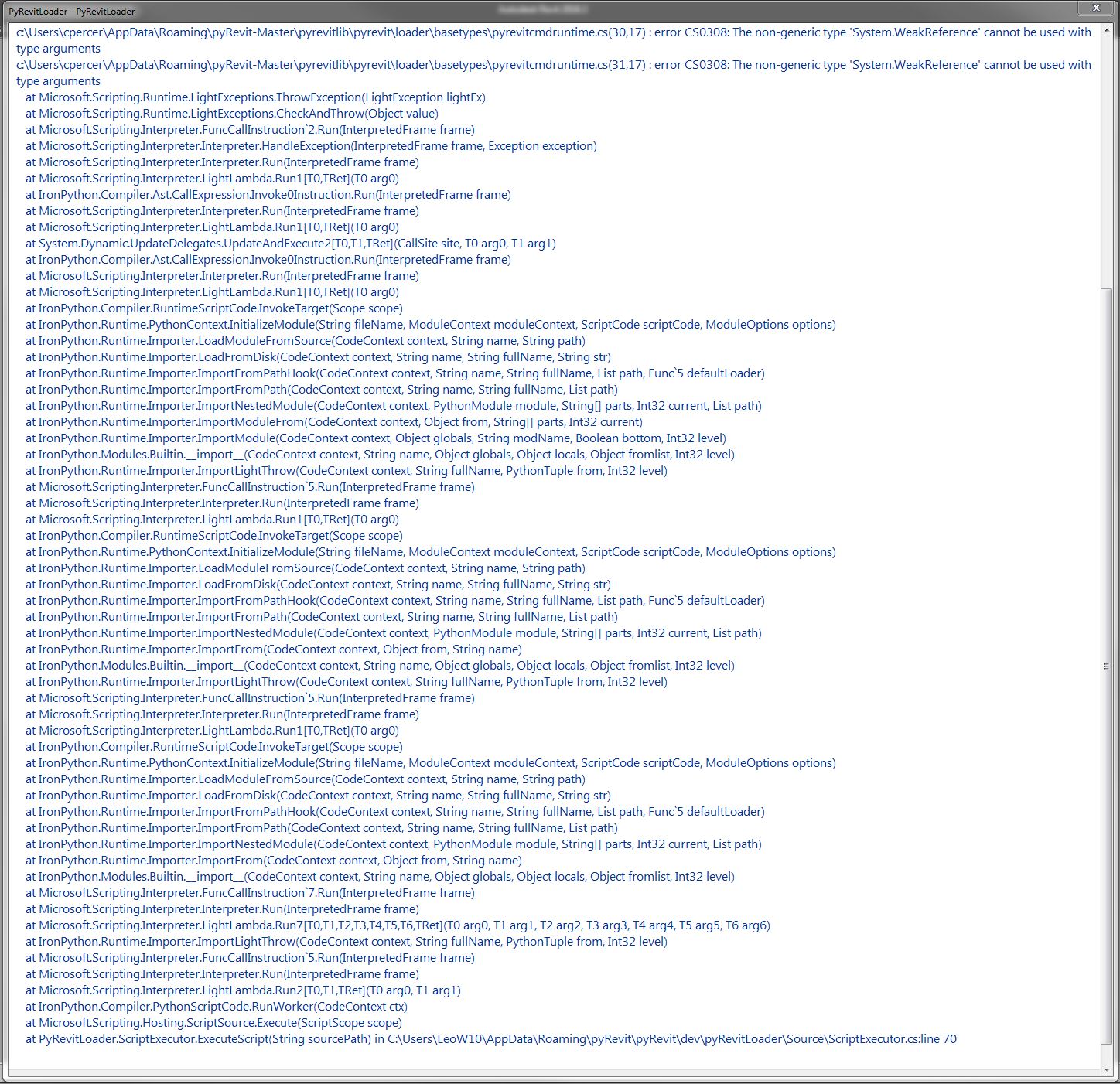
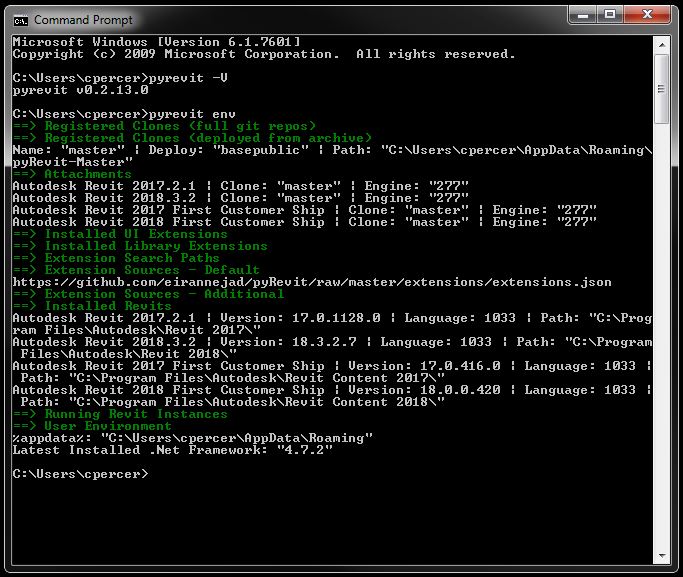
cpercer
on 2 Jan 2019
@cpercer This is beyond me! :/ So it's working fine in 2017 but not in 2018?
eirannejad
on 2 Jan 2019
@eirannejad I get the same errors in 2017.
The problems seem isolated to this machine. Working fine on another machine.
cpercer
on 2 Jan 2019
@cpercer Would you please download and extract the modified __init__.py file and:
- overwrite
...\pyrevitlib\pyrevit\loader\basetypes\__init__.pywith this file - open a prompt and run
pyrevit caches clear --all - Launch Revit again
eirannejad
on 2 Jan 2019
@eirannejad doing better, but still get errors with 2017 and 2018.

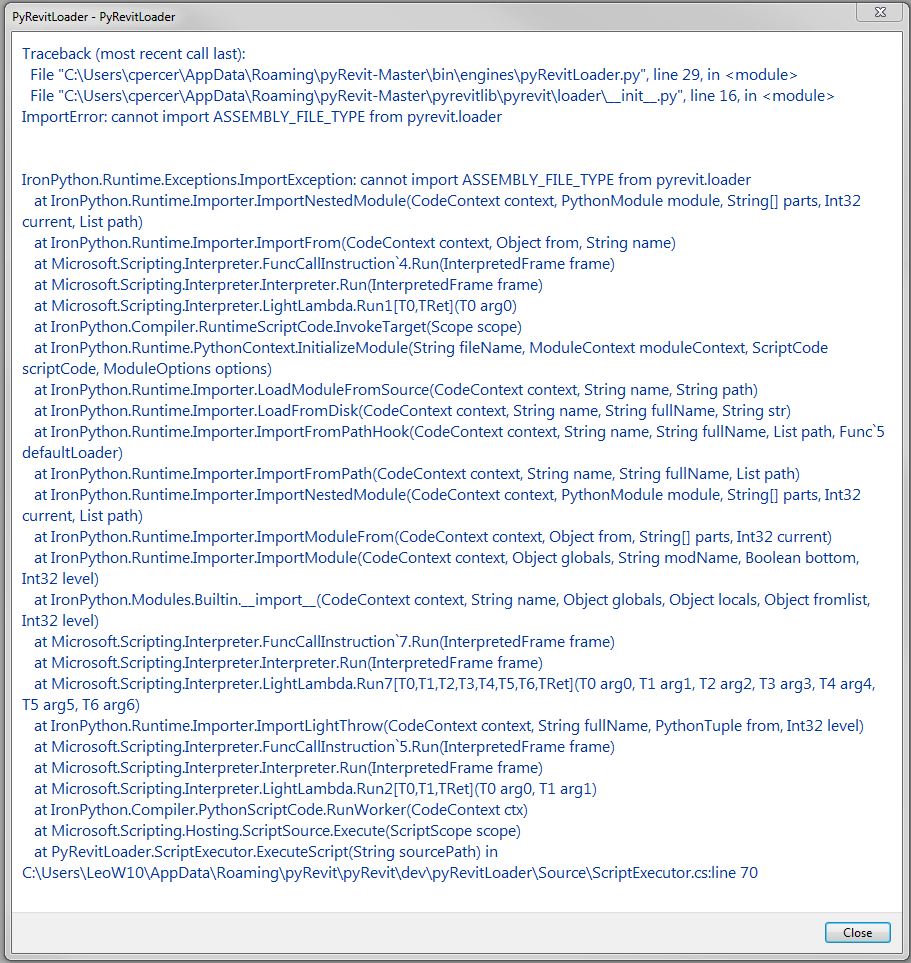
cpercer
on 2 Jan 2019
Are you sure you replaced the correct file??
..\pyrevitlib\pyrevit\loader\basetypes\__init__.py
not
..\pyrevitlib\pyrevit\loader\__init__.py
eirannejad
on 2 Jan 2019
D'oh! Let's try this again...
Still getting the same errors in 2017 and 2018
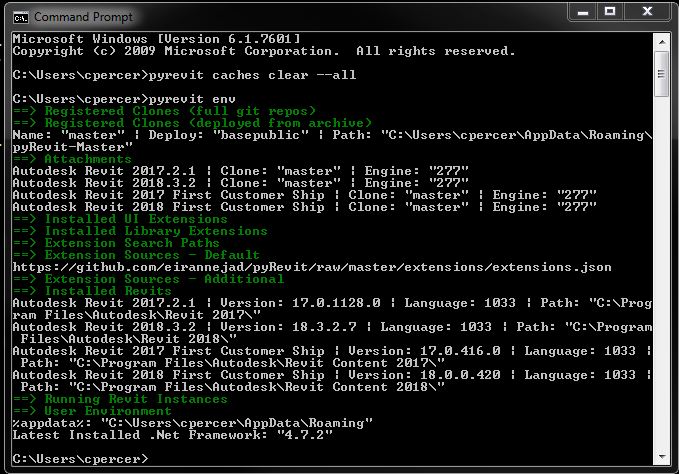


cpercer
on 2 Jan 2019
Okay. I really need to find a way to be able to replicate this issue. No matter what machine I use, I can't replicate it which is driving me crazy.
eirannejad
on 2 Jan 2019
Dunno if I am in similar situation with cpercer:
I am using mostly portable software for regular works. Some of my critical installed SWs are:
- Windows 10 Edu x64 1803
- Visual Studio 2017
- miniconda with Python 3.5
- Office 2016
- VS code Portable
- Kaspersky Total Sec
- Ameio Backupper
- VM player
- Java
@eirannejad: Is zip folder install of PyRevit 4.5 stills usable with Revit 2018 - I tried to run install .bat from zip folder, but it shows errors? My laptop (W7) stills run with Revit 2017 plus Pyrevit 4.5. Don't need more than that for developer works.
wta12
on 3 Jan 2019
I am been having the exact same issue.
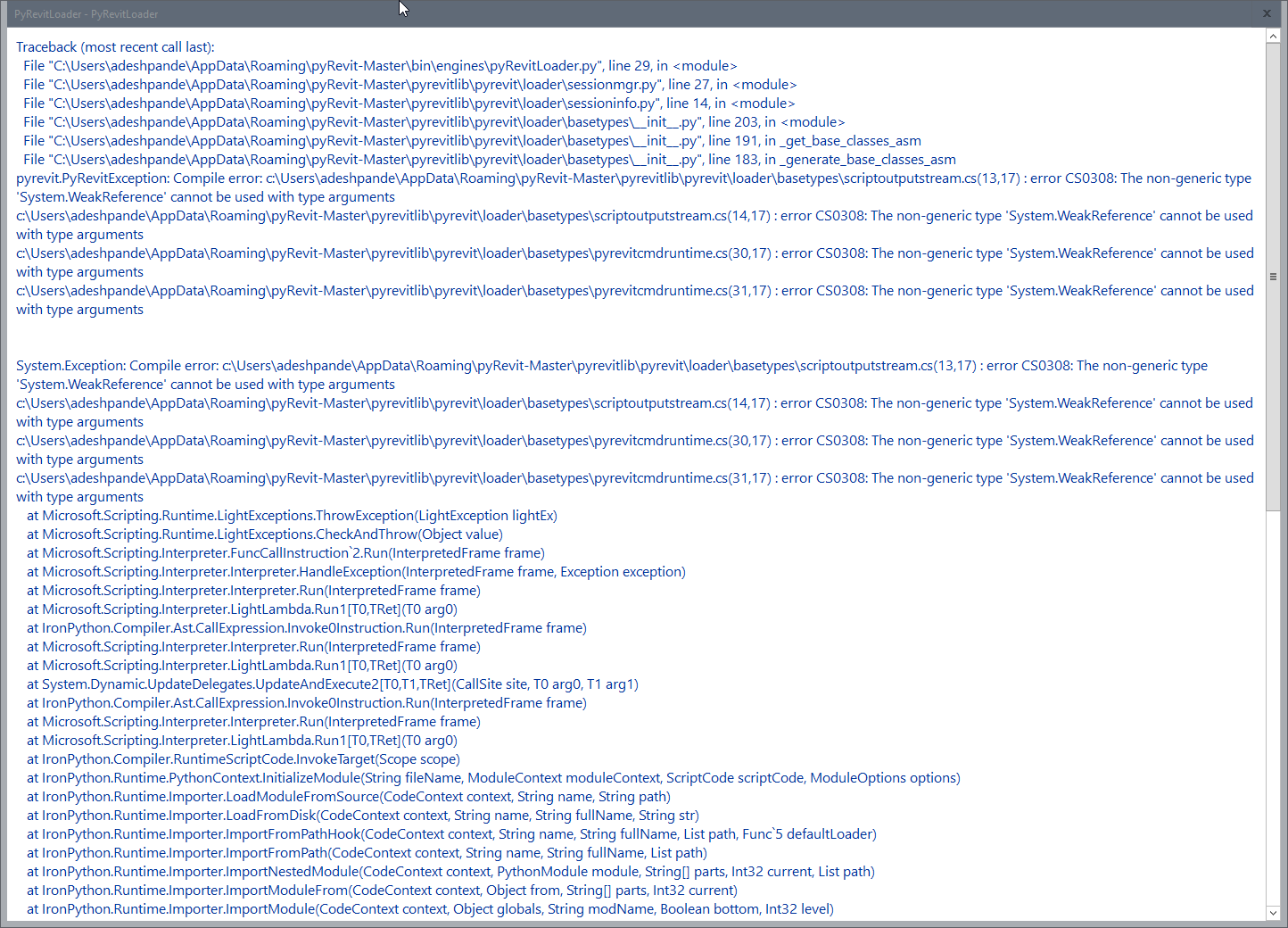

 FrenchQuarters
on 4 Jan 2019
FrenchQuarters
on 4 Jan 2019
Hey guys, is there anyway we can chat somewhere so I can quickly gather more info from you and test a few things? Let me know what time works best.
eirannejad
on 5 Jan 2019
Sure. would like you to call or chat? my email is [email protected]. Write to me and we can take it on from there. Thanks!
FrenchQuarters
on 5 Jan 2019
sent to your email from cn*[email protected].
I am at Central time zone. Let me know if I could anything.
wta12
on 5 Jan 2019
I am central time zone as well. email is [email protected]
cpercer
on 7 Jan 2019
I am in Central Time as well. We can schedule a conference call. I am open most of this week. Else, is you want to directly call me, feel free to.
Thanks.
FrenchQuarters
on 7 Jan 2019
Thanks guys. Let's start with @cpercer. I'll send you an invite soon.
eirannejad
on 7 Jan 2019
@cpercer Hey bud. Would you test something else please. Copy the System.dll file from C:\Windows\Microsoft.Net\assembly\GAC_MSIL\System\v4.0_4.0.0.0__b77a5c561934e089\ to ...\pyRevit-Master\bin directory. This would hopefully force pyRevit to load that dll instead. Let's see if this resolves the issue.
eirannejad
on 8 Jan 2019
Ehsan,
I realize you asked only @cpercer to try replacing the system.dll. Nonetheless, I went ahead and did that on my machine. But that did not fix the issue. I am still getting the exact error messag across all versions of Revit.
FrenchQuarters
on 8 Jan 2019
@FrenchQuarters Awesome thanks a lot. I did a few tests on @cpercer's machine today so hence I asked him to do the test. Thanks a lot for the quick feedback!
eirannejad
on 8 Jan 2019
@eirannejad It's still pulling from v4.5 that we put on my desktop. When I remove the folder from the desktop, I get the error, "pyRevitloader.dll can not be found."
Also, when I run the compile test from the python terminal no dll is created.
cpercer
on 8 Jan 2019
@FrenchQuarters @cpercer All I'm thinking right now is that this could be an addin conflict with another addin maybe. Could you guys share a list of addins or maybe temp remove all the files (copy to another location temporarily) in %programdata%/Autodesk/Revit/Addins/2018 and %appdata%/Autodesk/Revit/Addins/2018 and test with a clean Revit and no addons except pyRevit. (copy back the pyRevit.addin manifest file in %appdata%)
eirannejad
on 8 Jan 2019
@cpercer open a prompt and run pyrevit attach master 277 --installed. It would recreate the addin manifest file that we edited
eirannejad
on 8 Jan 2019
@eirannejad I removed all add-ins, but the error persists.
cpercer
on 9 Jan 2019
Ugh. @cpercer Thanks a lot.
eirannejad
on 9 Jan 2019
Ehsan,
You are having a bad moment here. But, let me take the opportunity to tell you that you have created one of the most useful, well designed, and well thought out addins for Revit. I have really appreciated having it. Thank you very much for that.
Hopefully you’ll straighten out this bug fast, and I look forward to once again start using this awesome tool.
Thanks!
FrenchQuarters
on 9 Jan 2019
@FrenchQuarters You made my day! Thanks a lot. Yeah hopefully we'll figure out the root issue soon and will get rid of this nasty bug.
eirannejad
on 9 Jan 2019
You have no idea how happy I am to see this error on my machine! Finally tracked down the root cause
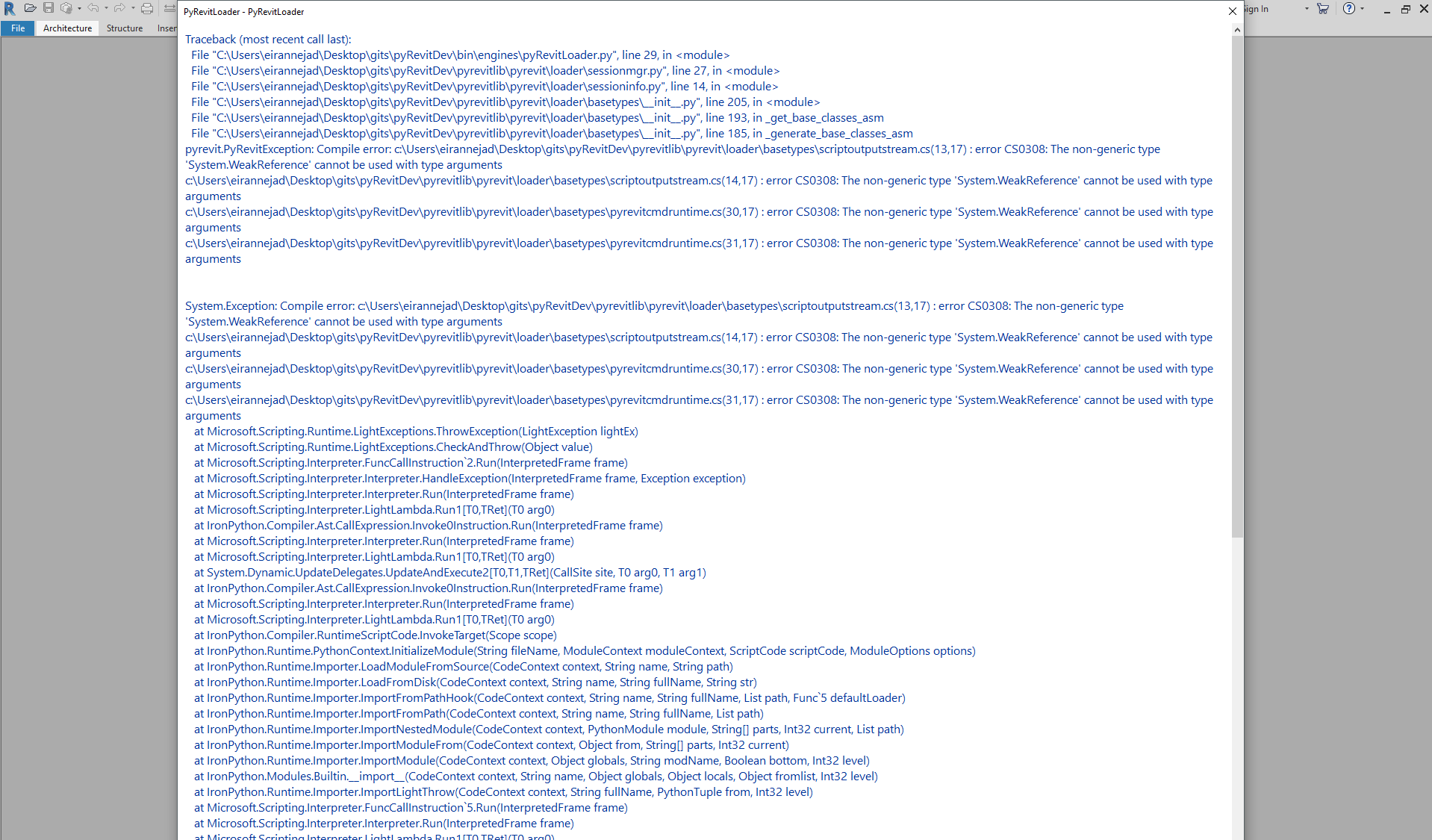
eirannejad
on 9 Jan 2019
Okay one more time and hopefully the last. Would you please download and extract the modified __init__.py file and:
- overwrite
...\pyrevitlib\pyrevit\loader\basetypes\__init__.pywith this file. There are many__init__.pyfiles in these directories so make sure you're replacing the correct one. - open a prompt and run
pyrevit caches clear --all - Launch Revit again
eirannejad
on 9 Jan 2019
PyRevit loaded in my PC. Great thanks for your effort.
wta12
on 9 Jan 2019
Greetings All,
Apologies for my lack of input over the last few weeks, have been on leave. I will be able to pick up again when in office on Monday.
Just wanted to take this opportunity to echo @FrenchQuarters sentiment that PyRevit is an indespensible tool for use with Revit. Ehsan the Revit world is grateful to you for PyRevit. Thank You!!
DarioMariuzzi
on 9 Jan 2019
SUCCESS!!!!!!!!!!!!!!!!!!!!!!!!!!!!!!!!!!!!!!!!!!!!!!!!!!!!!!!!!!!!!!!!!!!!!!!!!!!!!!!!!!!!!!!!!!!!!!!!!!!!!!!!!!!!
@eirannejad Thank you so much for the fantastic tools and the out of this world support! You've inspired me to start learning coding and hopefully contribute to these tools someday. I encourage everyone who benefits by using these tools to become a patron and support the best Revit add-in available.
Thank you!!!!
cpercer
on 9 Jan 2019
Yes! Success for me as well!!
Thank you very much Ehsan!
FrenchQuarters
on 9 Jan 2019
Viva pyRevit community and supporters. Thanks guys for helping me figure out this issue! Closing now and will publish with 4.6.10 tonight.
eirannejad
on 9 Jan 2019
Ehsan,
Bad new – the same problem is back with recent version of PyRevit.
FrenchQuarters
on 28 Feb 2019
That's so odd. Nothing has changed on pyRevit loading mechanism tho. What was the last working version of pyRevit you used?
eirannejad
on 28 Feb 2019
where is the directory
 mhmtbdr
on 9 May 2019
mhmtbdr
on 9 May 2019
The problem autoresolved…!
It happened the first time opening every version of Revit after the installation of PyRevit. But second time on, it worked fine.
Aseem Deshpande, AIA, LEED AP
Senior Associate | Director of Technology
EskewDumezRipple+
AIA National Architecture Firm Award Recipient
365 Canal Street Suite 3150
New Orleans, LA 70130
504.561.8686
eskewdumezripple.comhttp://www.eskewdumezripple.com/
From: mhmtbdr notifications@github.com
Sent: Thursday, May 09, 2019 11:25 AM
To: eirannejad/pyRevit pyRevit@noreply.github.com
Cc: Aseem Deshpande adeshpande@eskewdumezripple.com; Mention mention@noreply.github.com
Subject: Re: [eirannejad/pyRevit] Pyrevit 4.6+ Load Error Revit 2019 (#429)
where is the directory
—
You are receiving this because you were mentioned.
Reply to this email directly, view it on GitHubhttps://github.com/eirannejad/pyRevit/issues/429#issuecomment-490973256, or mute the threadhttps://github.com/notifications/unsubscribe-auth/ABIJFOBRXO7UY2GEFNHZZYLPURF7FANCNFSM4GFSVXFQ.
FrenchQuarters
on 9 May 2019
Okay one more time and hopefully the last. Would you please download and extract the modified
__init__.pyfile and:
- overwrite
...\pyrevitlib\pyrevit\loader\basetypes\__init__.pywith this file. There are many__init__.pyfiles in these directories so make sure you're replacing the correct one.- open a prompt and run
pyrevit caches clear --all- Launch Revit again
Have this problem. Understand it is resolved. Out of my element as soon as I have to do anything with a command prompt. Let's take some baby steps.
I found the pyrevitlib > pyrevit > loader folder. However there was no basetype folder within that folder. Should I add one and paste the _init_.py file from your zip in there?
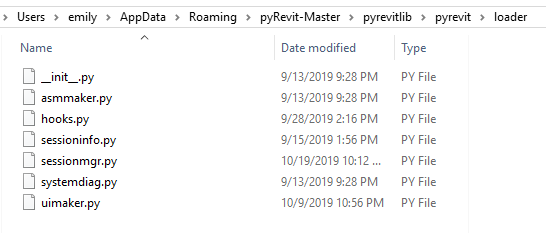
Thank you for your help with this.
Emily
 threexe
on 26 Feb 2020
threexe
on 26 Feb 2020
Hello! I think I'm having a similar problem where I can't install the new pyrevit due to it not being able to delete the old one. I've already gone in and deleted all the pyrevit folders from the previous version, but I'm still getting this error. Please help! (sorry, I have no coding skills)... trying to download pyrevit for Revit2020 - although had previously tried to download for 2019 and had the same error.
Any help greatly appreciated!
Thanks! ~Mish
trying to load pyrevit - fail MSIE019.LOG
 mbinkerd
on 7 Jul 2020
mbinkerd
on 7 Jul 2020
Related issues
 thumDer
·
4Comments
thumDer
·
4Comments
 jogilec
·
4Comments
jogilec
·
4Comments
 DanBoghean
·
3Comments
DanBoghean
·
3Comments
 DuncanLithgow
·
3Comments
DuncanLithgow
·
3Comments
 AlexVilaOrtega
·
3Comments
AlexVilaOrtega
·
3Comments
Most helpful comment
Yes! Success for me as well!!
Thank you very much Ehsan!