Pyrevit: use designscript in pyrevit code
is there a way to use dynamo methods within pyrevit?
i was trying to implement "myDynamoSolid =myRevitSolid.ToProtoType()"
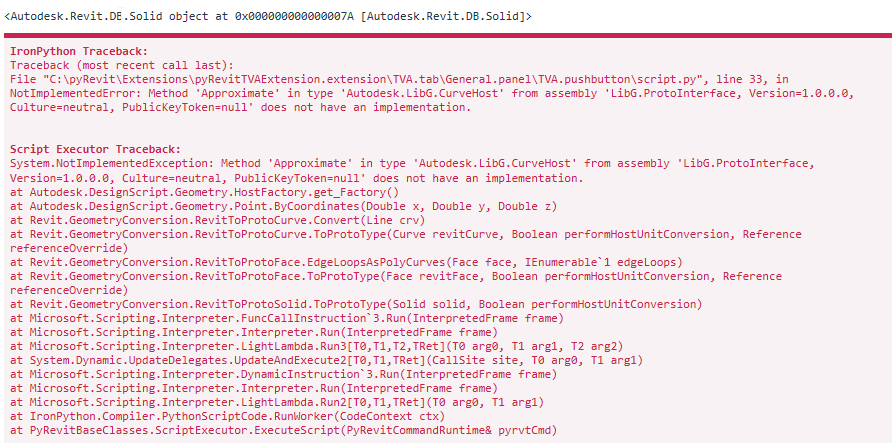
and was failing with an exception:
"The object reference was not set to an object instance"
why that: designscript offers some nice methods not available in RevitAPI like:
intersectioncurves = myDynamoSolid1.Intersect(myDynamoSolid2)
tx
 epeter-
All 16 comments
Ehsan, i cut it down to following code snippet, and actually i am wondering what is causing the exception. if run with Dynamo in background active, the code executes as expected. from pyrevit with no Dynamo in background it fails. so my first question
why does Dynamo running in background affect pyrevit execution?
here my code:
# coding: utf8

import clr

clr.AddReference('RevitAPI')
clr.AddReference('RevitAPIUI')
clr.AddReference('RevitNodes')

import Revit
from Autodesk.Revit.DB import FilteredElementCollector, BuiltInCategory, IntersectionResultArray, \
        SetComparisonResult, Options, ViewDetailLevel

clr.ImportExtensions(Revit.GeometryConversion)

doc = __revit__.ActiveUIDocument.Document

def collectWalls():
    curview = doc.ActiveView
    cl = FilteredElementCollector(doc, curview.Id)
    stdwalls = cl.OfCategory( BuiltInCategory.OST_Walls ).WhereElementIsNotElementType().ToElements()
    return(stdwalls)

walls = collectWalls()
options = Options()
options.DetailLevel= ViewDetailLevel.Fine

for wall in walls:
    wallSolid = list(wall.get_Geometry(options))[0]
    print wallSolid # for debug shall show Solids
    dynamoSolid = wallSolid.ToProtoType()
Is this the error you're getting?
 eirannejad
on 11 Oct 2018
eirannejad
on 11 Oct 2018
Yes, except the first line that is a debug message to know if I am handling a valid solid
epeter-
on 11 Oct 2018
@epeter- Hey I looked into this a couple of times but didn't have much time or design-script experience to understand the dll dependency with Dynamo Core vs Dynamo Revit RevitNode.dll. This is definitely a DLL reference and loading issue. You need to figure out which DLLs is dynamo loading to make the extensions available in Revit.GeometryConversions. I tried multiple dlls and seems like every time something is missing or more than one ToProtoType extension method is available.
Since this is not a conflict or a pyRevit issue I'm gonna close it. Please post a solution if you ever found one. Thanks!
eirannejad
on 20 Dec 2018
@eirannejad @epeter-
I really want this issue to be solved in order to manipulate Dynamo's geometry functions.
I've looked into some code in DynamoRevit project and found these lines:
https://github.com/DynamoDS/DynamoRevit/blob/master/src/DynamoRevit/DynamoRevit.cs#L477-L492
        internal static Version PreloadAsmFromRevit()
        {
            var asmLocation = AppDomain.CurrentDomain.BaseDirectory;
            Version libGVersion = findRevitASMVersion(asmLocation);
            var dynCorePath = DynamoRevitApp.DynamoCorePath;
            // Get the corresponding libG preloader location for the target ASM loading version.
            // If there is exact match preloader version to the target ASM version, use it,
            // otherwise use the closest below.
            var preloaderLocation = DynamoShapeManager.Utilities.GetLibGPreloaderLocation(libGVersion, dynCorePath);

            // [Tech Debt] (Will refactor the code later)
            // The LibG version maybe different in Dynamo and Revit, using the one which is in Dynamo.
            Version preLoadLibGVersion = PreloadLibGVersion(preloaderLocation);
            DynamoShapeManager.Utilities.PreloadAsmFromPath(preloaderLocation, asmLocation);
            return preLoadLibGVersion;
        }
In this method, DynamoRevit tries to load LibG from Dynamo install folder (on my PC: C:Program FilesDynamoDynamo Core1.3) depending on which version of Revit is installed.
For Revit 2018, installed version 223A is detected by the file C:Program FilesAutodeskRevit 2018ASMAHL223A.dll: https://github.com/DynamoDS/Dynamo/blob/master/src/Tools/DynamoShapeManager/Utilities.cs#L455-L465
        public static Version GetVersionFromPath(string asmPath, string searchPattern = "ASMAHL*.dll")
        {
            var ASMFilePath = Directory.GetFiles(asmPath, searchPattern, SearchOption.TopDirectoryOnly).FirstOrDefault();
            if (ASMFilePath != null && File.Exists(ASMFilePath))
            {
                var asmVersion = FileVersionInfo.GetVersionInfo(ASMFilePath);
                var libGversion = new Version(asmVersion.FileMajorPart, asmVersion.FileMinorPart, asmVersion.FileBuildPart);
                return libGversion;
            }
            throw new FileNotFoundException("$Could not find geometry library binaries at : {geometryLibraryPath}");
        }
However, in Dynamo folder there are only 220, 221, 222, 223, 224 of libg folders, no 223A. I'm wondering how they could load this LibG assembly.
One more thing to notice: in Revit 2018 installation folder, there's only libg_220 folder. I've used dotpeek to view LibG.ProtoInterface.dll in that folder and noticed it still had TSplineSurfaceBuildPipes method implemented. I wonder which version of LibG.ProtoInterface was referenced when calling ProtoGeometry from pyRevit so that it says
NotImplementedError: Method 'TSplineSurfaceBuildPipes' in type 'Autodesk.LibG.GeometryFactory' from assembly 'LibG.ProtoInterface, Version=1.0.0.0, Culture=neutral, PublicKeyToken=null' does not have an implementation.
Sorry for my poor C# reading skill, but I hope this finding will help solving the issue
Cheers.
 htlcnn
on 13 Sep 2019
htlcnn
on 13 Sep 2019
@eirannejad
Hi. I found a solution to this problem. Unfortunately, there is only one way to solve this problem. You need to run dynamo in background. You can easily see this if you run Dynamo player and run your script from pyRevit toolbar. Ehsan can you make that pyRevit run Dynamo in background?(It can be optional tool in settings). A lot of scripts use Dynamo libraries. It would be useful for many people.
 artmklgnv
on 4 Dec 2019
artmklgnv
on 4 Dec 2019
this was already known, respectively the reason for raising the topic ;-)
On 04.12.2019 12:38, artmklgnv wrote:
>
@eirannejad https://github.com/eirannejad
Hi. I found a solution to this problem. Unfortunately, there is only
one way to solve this problem. You need to run dynamo in background.
You can easily see this if you run Dynamo player and run your script
from toolbar. Ehsan can you make that pyRevit run Dynamo in
background?(It can be optional tool in settings). A lot of scripts use
Dynamo libraries. It would be useful for many people.—
You are receiving this because you were mentioned.
Reply to this email directly, view it on GitHub
https://github.com/eirannejad/pyRevit/issues/385?email_source=notifications&email_token=ABU3Q22JDW7R4IKSHTDSKILQW6JETA5CNFSM4F2U3QU2YY3PNVWWK3TUL52HS4DFVREXG43VMVBW63LNMVXHJKTDN5WW2ZLOORPWSZGOEF4XBSY#issuecomment-561606859,
or unsubscribe
https://github.com/notifications/unsubscribe-auth/ABU3Q26IQWE2DCJDXCPETALQW6JETANCNFSM4F2U3QUQ.
epeter-
on 4 Dec 2019
Oh, not carefully read your post =/. But if a solution exists, why not solve it? Loading DLL does not solve the problem. Problem still exist. @epeter-
artmklgnv
on 4 Dec 2019
@artmklgnv What do you mean by running Dynamo in the background? Running dynamo is quite complex since it can have multiple versions and the user needs to pick the correct version using the Dynamo's internal version picker.
eirannejad
on 5 Dec 2019
if you run dynamo and pyrevit in parallel all dynamo api calls are
available for pyrevit not only the revit api calls.
asfaik dynamo dlls are not loadable in pyrevit scripts directly
so the workaround is to first start dynamo and then execute your pyrevit
script
peter
On 05.12.2019 19:01, Ehsan Iran-Nejad wrote:
>
@artmklgnv https://github.com/artmklgnv What do you mean by running
Dynamo in the background? Running dynamo is quite complex since it can
have multiple versions and the user needs to pick the correct version
using the Dynamo's internal version picker.—
You are receiving this because you were mentioned.
Reply to this email directly, view it on GitHub
https://github.com/eirannejad/pyRevit/issues/385?email_source=notifications&email_token=ABU3Q27Y6ASBH6IODS5D3WDQXE6XDA5CNFSM4F2U3QU2YY3PNVWWK3TUL52HS4DFVREXG43VMVBW63LNMVXHJKTDN5WW2ZLOORPWSZGOEGBSQHQ#issuecomment-562243614,
or unsubscribe
https://github.com/notifications/unsubscribe-auth/ABU3Q2YYRAFJZ37VJFQLRODQXE6XDANCNFSM4F2U3QUQ.
epeter-
on 6 Dec 2019
@eirannejad I know that DYNO 0.9(similar addon) run dynamo core when Revit start. And all pyRevit script works good with it. I do not know how they run a core, but this is an existing solution at the moment. If you could implement this, it would be very nice.
artmklgnv
on 9 Dec 2019
Dyno makes a ribbon button and runs dynamo scripts, just like you have
pyRevit's Dynamo bundle with .dyn script inside. That's not similar to
adding reference to ProtoGeometry when you're in a IronPython bundle
On Mon, Dec 9, 2019, 17:39 Artem Kolganov notifications@github.com wrote:
@eirannejad https://github.com/eirannejad I know that DYNO 0.9(similar
addon) run dynamo core when Revit start. And all pyRevit script works good
with it. I do not know how they run a core, but this is an existing
solution at the moment. If you could implement this, it would be very nice.—
You are receiving this because you commented.
Reply to this email directly, view it on GitHub
https://github.com/eirannejad/pyRevit/issues/385?email_source=notifications&email_token=AAHDQVDPDPPSK2ICW5W3OSTQXYN5LA5CNFSM4F2U3QU2YY3PNVWWK3TUL52HS4DFVREXG43VMVBW63LNMVXHJKTDN5WW2ZLOORPWSZGOEGIVJ3Y#issuecomment-563172591,
or unsubscribe
https://github.com/notifications/unsubscribe-auth/AAHDQVEBPAIEEZLSTUULM2LQXYN5LANCNFSM4F2U3QUQ
.
htlcnn
on 9 Dec 2019
Hi all,
I think I've found a way to use Dynamo Geometry inside pyRevit.
Here's how I did:
Case 1. You use ProtoGeometry (Autodesk.DesignScript.Geometry namespace) only:
import clr
clr.AddReference("DynamoApplications")
from Dynamo.Applications import StartupUtils

def main():
    dynamo_model = StartupUtils.MakeModel(CLImode=True)
    dynamo_model.Start()
    clr.AddReference("ProtoGeometry")
    from Autodesk.DesignScript.Geometry import Point
    try:
        p = Point.ByCoordinates(1, 1, 1)
        print(p)
    finally:
        dynamo_model.ShutDown(shutdownHost=True)
Here's output:

Case 2: You want to convert from Revit Geometry to Proto Geometry and vice versa (using Revit.GeometryConversion from RevitNodes)
import clr
clr.AddReference("DynamoApplications")
from Dynamo.Applications import StartupUtils


def main():
    dynamo_model = StartupUtils.MakeModel(CLImode=True)
    dynamo_model.Start()
    clr.AddReference("RevitNodes")
    import Revit
    clr.ImportExtensions(Revit.GeometryConversion)
    clr.AddReference("RevitServices")
    from RevitServices.Persistence import DocumentManager
    from Autodesk.Revit.DB import XYZ
    from pyrevit import revit
    try:
        # this line is important because converting geometry needs a reference of
        # DocumentManager.Instance.CurrentUIDocument, which is None if we don't set it
        # to current uidoc (luckily, they leave it public get/set)
        DocumentManager.Instance.CurrentUIDocument = revit.uidoc
        revit_point = XYZ(1, 1, 1)
        dynamo_point = revit_point.ToPoint()
        print('Revit Point: {}'.format(revit_point))
        print('Dynamo Point: {}'.format(dynamo_point))

    finally:
        dynamo_model.ShutDown(shutdownHost=True)
Here's output:

I think I would make it a decorator in my lib so that I can use it whenever I need.
Cheers!
htlcnn
on 1 Mar 2020
Hey @htlcnn Can I put this on the Wiki?
eirannejad
on 3 Mar 2020
@eirannejad Sure.
htlcnn
on 3 Mar 2020
Making a decorator in lib didn't work for me. I had to keep my code logic inside 1 script file. Not sure why, but I'm happy it worked anyway.
If anyone has Exception about ProtoGeometry, please restart Revit and try again.
htlcnn
on 12 Mar 2020
Related issues
 kuldeep3618x
·
4Comments
kuldeep3618x
·
4Comments
 DanBoghean
·
3Comments
DanBoghean
·
3Comments
 varunbose
·
4Comments
varunbose
·
4Comments
 DuncanLithgow
·
3Comments
DuncanLithgow
·
3Comments
 Robbo1234
·
4Comments
Robbo1234
·
4Comments