Pyrevit: Revit Always Load not Sticking
Any thoughts on what the issue here might be? (tail between my legs I haven't rolled out 4.5 to all users yet.)
It's only occurring on a few computers in our network (maybe 2 out of 100), but on some of the computers the users are getting this pop-up every time they load Revit 2018?
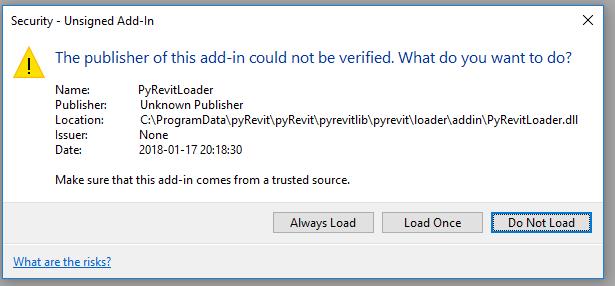
They always click "Always Load".
My thought was that the addin file or dll file were being recreated every night and that was triggering it, but IT said that the scripts aren't running, so I'm unsure why it could be happening.
 thazell
All 8 comments
We have checked and the Dll is unblocked. Next we are going to try to just replace all the files with a fresh set.
thazell
on 18 Jul 2018
Revit stores this info in Windows registry under HKEY_CURRENT_USER\Software\Autodesk\Revit\Autodesk Revit 2018\CodeSigning (for Revit 2018). Make sure this info gets saved correctly there. It might be a user access level issue.
 eirannejad
on 18 Jul 2018
eirannejad
on 18 Jul 2018
That's very interesting. It's listed in the codesigning as B39107C3-A1D7-47F4-A5A1-532DDF6EDB5D which is the same as listed in the .addins file.
thazell
on 18 Jul 2018
Yeah that's the App Id. But the fact that Revit can't determine that this addin has already been approved is very odd.
eirannejad
on 18 Jul 2018
Were you able to find any solutions to this?
eirannejad
on 22 Jul 2018
I haven't confirmed we have a solution yet.
thazell
on 26 Jul 2018
Just to confirm, it's still a problem after reinstalling on that PC, but it seems specific to a few select PC's (currently only one user is reporting the issue.)
thazell
on 31 Jul 2018
Signed all pyRevit loaders so this issue should go away. Closing since it's not a direct pyRevit issue.
eirannejad
on 12 Oct 2018
Related issues
 DanBoghean
·
3Comments
DanBoghean
·
3Comments
 amastrobera
·
3Comments
amastrobera
·
3Comments
 pihglez
·
4Comments
pihglez
·
4Comments
 pmcmm
·
3Comments
pmcmm
·
3Comments
 jogilec
·
4Comments
jogilec
·
4Comments