Pyrevit: Installer unable to download from GitHub
This is a follow up to our previous conversation. I had tried running it as an admin as suggested however this yielded the same results. Upon further investigation it looked as though the installer was attempting to download the GitHub files and was unable to for whatever reason. This then in turn created the errors listed below.

John Williams
I am having some trouble with the installation. Its the first time I have tried to use this so I am probably messing something up. Is there any requirements for this to work with R2017.2? The installer throws two errors.
Unable to execute file:
c:\usersname\appdata\roaming\pyRevit\pyrevit-v4\pyRevit\release\uninstall_addin.bat
CreateProcess failed; code 267
The directory name is invalid.
Unable to execute file:
c:\usersname\appdata\roaming\pyRevit\pyrevit-v4\pyRevit\releaseinstall_addin.bat
CreateProcess failed; code 267
The directory name is invalid.
• Edit• Reply•Share ›
Ehsan Iran Nejad:
Also please report all errors and issues to https://github.com/eirannej...
This way everyone else will also be able to benefit from the workarounds and solutions.
• Reply•Share ›
Ehsan Iran Nejad:
John the installer needs to execute these batch scripts to create the addin files necessary for Revit. You might not have admin privileges to your system. Try running the installer as Administrator.
 JohnWilliams39
All 19 comments
John, I have seen this error only once before and it was a secure connection access. The pyRevitCloner needs to make a secure connection to the github website to clone the repo. If the IT has any restrictions on such connections on the network, the installer can not work. Try installing git toolset for windows and cloning the repository manually and see if it works. If the repo gets cloned correctly, then you can manually run the install batch script inside pyrevit\release folder to create the necessary addin files for Revit.
 eirannejad
on 8 May 2017
eirannejad
on 8 May 2017
This workflow is a bit out of my comfort zone. Can you provide a link to the Git Toolset you are refering too? Is there a guide to the process available?
I really appreciate your help. Thank you for your time.
JohnWilliams39
on 8 May 2017
I took a stab at doing it. I downloaded the Zip and extracted it to ...
\AppData\Roaming\pyRevit\pyRevit-v4\pyRevit
Then as you suggested I ran the .bat files (as an administrator) in the pyrevit/release folder.
This however still didn't work.
When launching Revit I am presented with this error - this was popping up previously as well.

Is the workflow I used the same as you had intended? Is there a Github application that I should be using to 'clone' the repository? Would that make a difference?
JohnWilliams39
on 9 May 2017
John,
First off I would talk to the IT to get this issue resolved.
- You can download the git toolset for windows from here: https://git-scm.com/downloads
- Create a folder to place the pyrevit repo in. Then open your command prompt and browse to that directory.
- enter this command:
git clone https://github.com/eirannejad/pyRevit.git
this will clone the pyrevit repo into the directory - run /release/install_addin.bat again to create the addin files
- Run Revit and it should work properly.
eirannejad
on 9 May 2017
The complete github repository is not necessary but if you don't have the repo, you can never get the updates. Also please let me know what Revit version are you using.
eirannejad
on 9 May 2017
Using Revit 2017.2 - This new workflow worked properly. Thank you for your help!
JohnWilliams39
on 9 May 2017
Hi Eshan, Just thought you would like to know, I received the same install issue reported by JohnWilliams39. I don't have and IT department. This is on my personal laptop. I'm not sure what is causing the initial issue, but your steps to manually clone the git repository and install the add-in via the bat file worked fine. Thanks.
 OneSlowPony
on 12 May 2017
OneSlowPony
on 12 May 2017
@OneSlowPony Are you installing to default location or a different folder?
eirannejad
on 12 May 2017
Ehsan,
I am a novice to the programming world and I'm trying to install the pyRevit addin. I seem to be having similar issues to johnwilliams39 when attempting to install the addin. I followed the workflow you gave on May 8, however I am running Revit 2016 and I'm still getting the following errors when I run the installer:
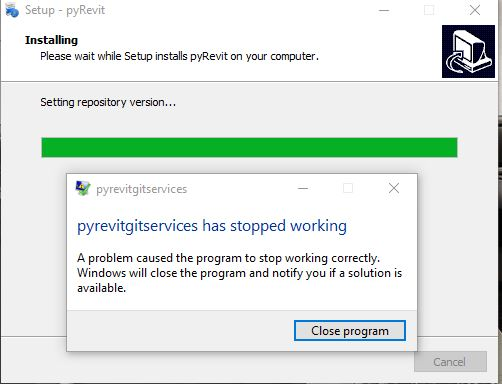
Then I get the following 2 Set up Errors:

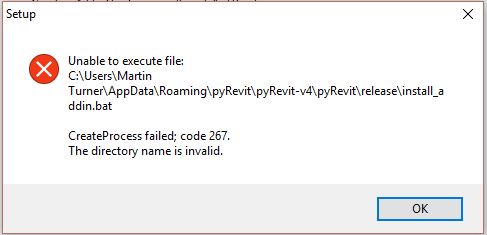
Could this be related to my version of Revit? and do you have any other ideas on the solution
Thanks.
-Martin
 MartinTurner72
on 30 Oct 2017
MartinTurner72
on 30 Oct 2017
@MartinTurner72 This is not related to the version of Revit you're using. The issue is that the pyRevit installer can not clone the git repository to your machine and is encountering some error. The installer needs to have access to internet, be able to connect to github.com to get the repository and have write access to the installation path.
See a couple of responses back for a workflow to manually install pyRevit to your machine. I also have a video on the channel that explains the manual installation.
eirannejad
on 30 Oct 2017
So I watched the video on how to manually install and I was able to do it using GitKraken. For some reason it was more apparent where the repo was located. So thanks!
MartinTurner72
on 30 Oct 2017
I'll keep working on getting the installer more robust
eirannejad
on 30 Oct 2017
I was having the same issue as JohnWilliams39. Also the same issue as MartinTurner72 with GetKraken. However, the steps you said about using git toolset seemed to work for me.
 bryandavis6315
on 8 Mar 2018
bryandavis6315
on 8 Mar 2018
http://eirannejad.github.io/pyRevit/pyrevit/installer/2018/03/01/githubtlschange.html
See this as well please
eirannejad
on 8 Mar 2018
i don't know what happened why i am not able to install pyrevit now after i have reinstalled windows 7 and revit 2017. it used to work in my machine. i am also stuck at this in GitKraken. what do i do now?
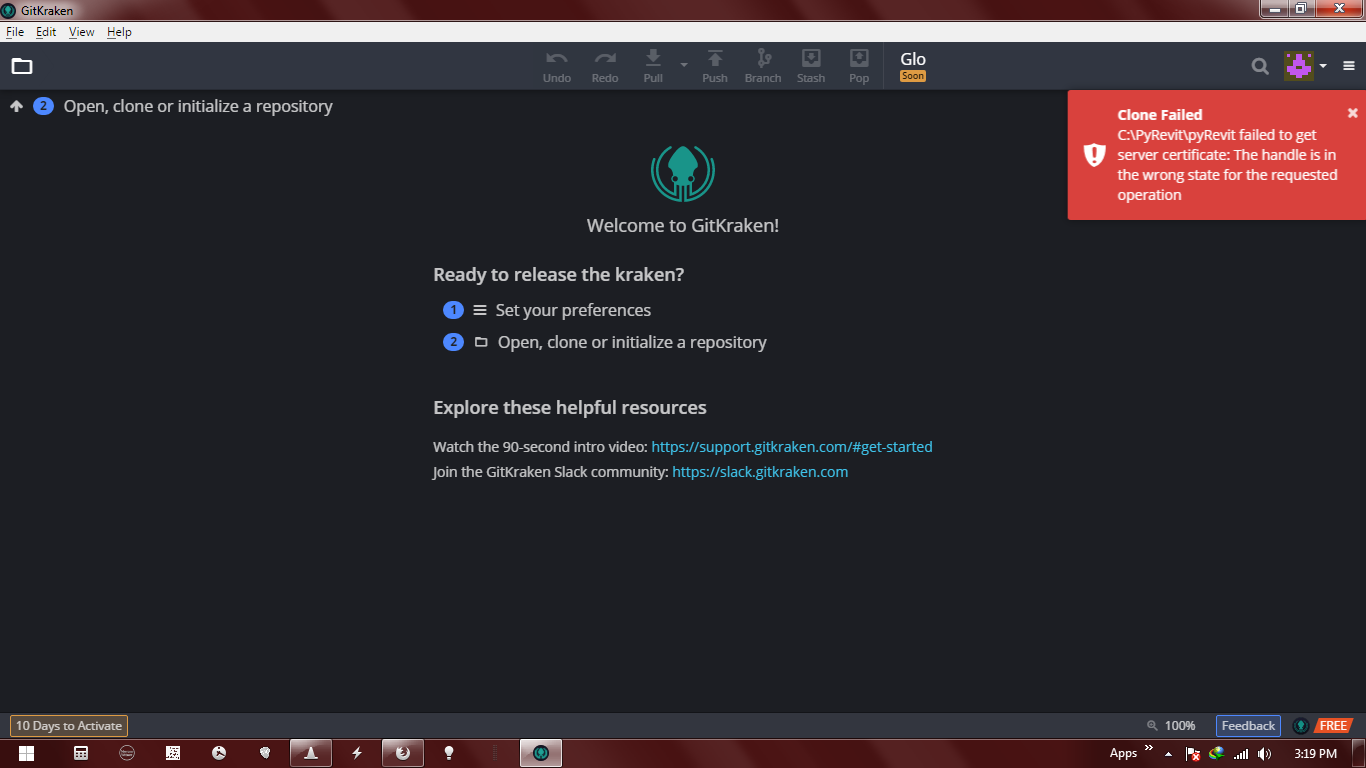
 redlayla
on 10 Mar 2018
redlayla
on 10 Mar 2018
See the link above and let me know if it resolves the issue
eirannejad
on 10 Mar 2018
looks like it's working. Cloning is on-going. Thanks!
redlayla
on 10 Mar 2018
I got it installed by following on the Manual Installation Video in the link above:
- GitKraken: Set Folder and Clone
- CMD: install_addin.bat
- Done, Run Revit
It's running in both Revit 2017 and 2018. @eirannejad how do you know how to do this? this is amazing! thanks again! long live, sir!
redlayla
on 10 Mar 2018
Hahaaa baby steps! Happy hacking 😁
eirannejad
on 10 Mar 2018
Related issues
 thazell
·
5Comments
thazell
·
5Comments
 DanBoghean
·
3Comments
DanBoghean
·
3Comments
 amastrobera
·
3Comments
amastrobera
·
3Comments
 Tyree
·
3Comments
Tyree
·
3Comments
 jkcameron
·
5Comments
jkcameron
·
5Comments