Pymupdf: Watermark image with showPDFPage sometimes appears "mirrored"
First of all, thank you very much for creating and maintaining this useful library.
Second, excuse me if this is not a bug (quite probably), and it's just me not knowing how to use the library well.
Describe the bug (mandatory)
Sometimes, when using showPDFPage to add a watermark, the watermark appears reversed.
To Reproduce (mandatory)
This is the code snippet I'm using to apply the watermarks:
def apply_watermark_to_pdf(pdf_stream, watermark_stream):
    """Return a watermarked PDF by merging two PDFs.

    Parameters
    ----------
    pdf_stream : BytesIO
        PDF contents to be watermaked.
    watermark_stream : BytesIO
        The image that will be used as watermark.

    Returns
    -------
    BytesIO
        The watermarked PDF.
    """
    original_pdf = fitz.open(stream=pdf_stream, filetype="pdf")
    watermark = fitz.open(stream=watermark_stream, filetype="pdf")

    for page in original_pdf:
        page.showPDFpage(page.rect, watermark)

    return original_pdf.write()
This is the PDF file where the watermark appears mirrored.
Expected behavior (optional)
The watermark image should appear as it originally is, not reversed, or mirrored, or rotated.
Screenshots (optional)
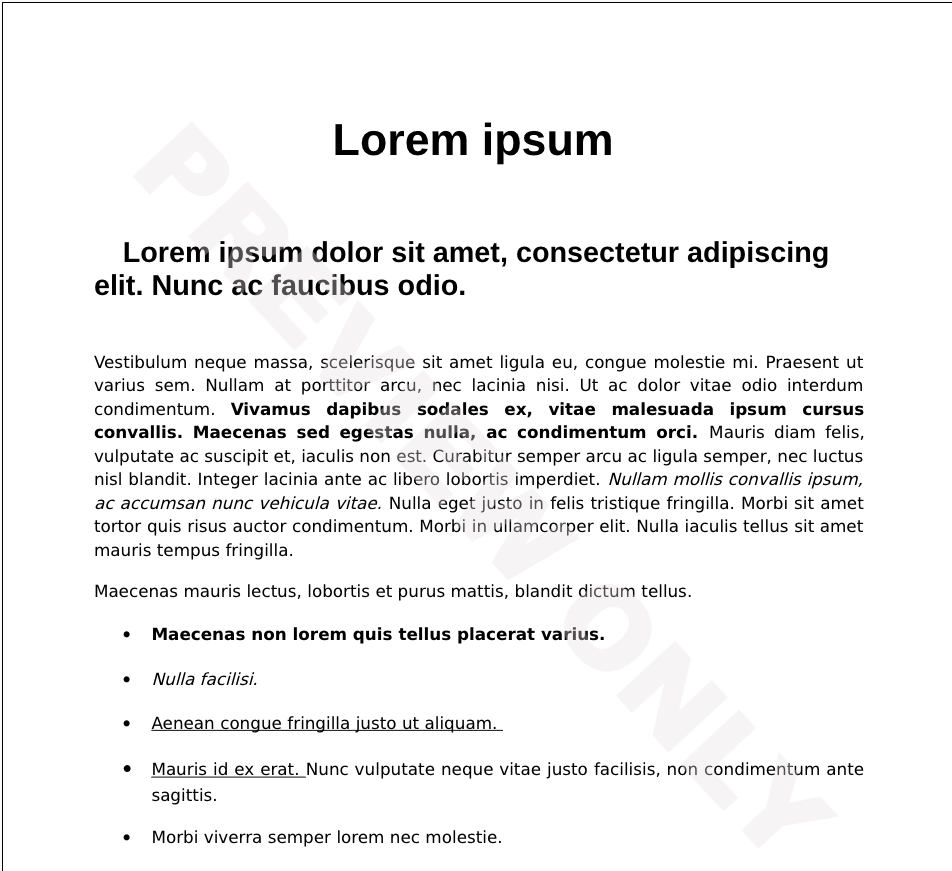
This is what I consider the expected behavior (notice the "Preview Only" watermark being properly displayed):
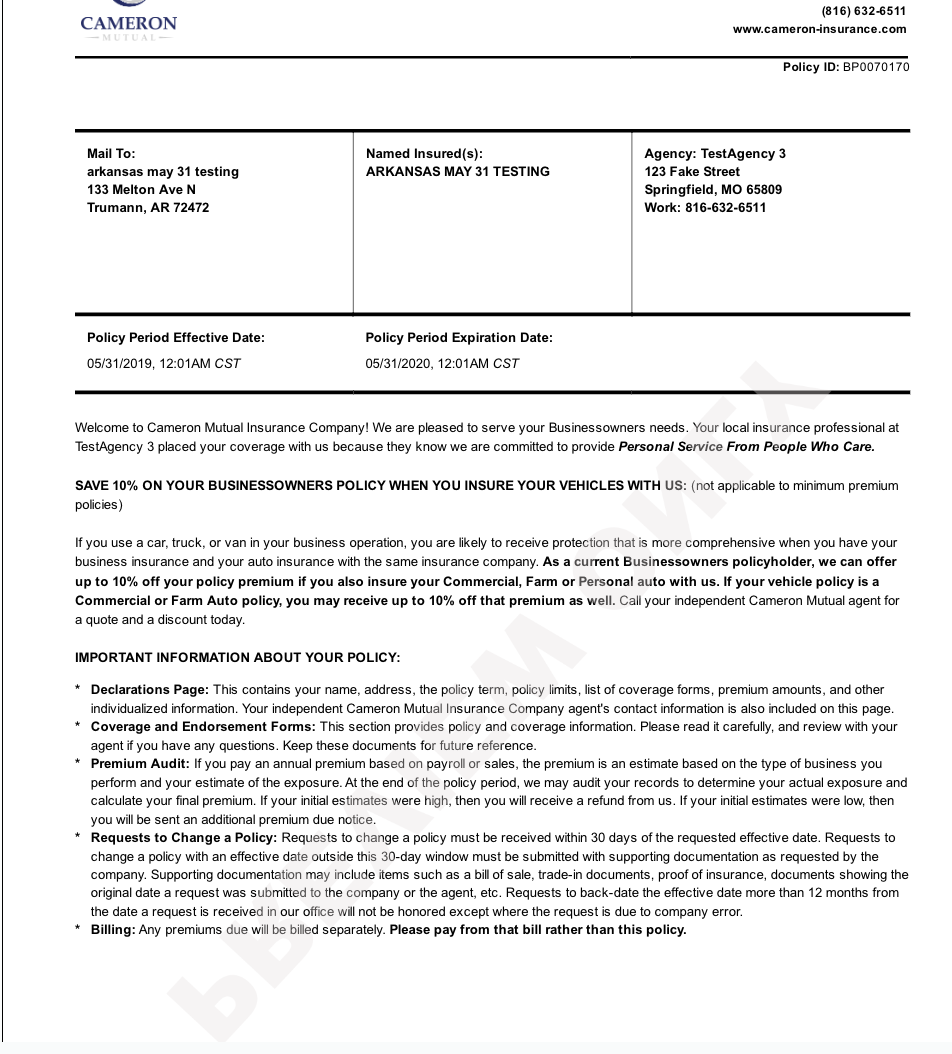
This is what I'm sometimes getting, the watermark appears "reversed" (notice the "Preview Only" watermark appearing reversed and starting at the bottom of the page):
Your configuration (mandatory)
>>> print(sys.version, "\n", sys.platform, "\n", fitz.__doc__)
3.6.12 (default, Sep 10 2020, 17:53:20)
[GCC 8.3.0]
 linux

PyMuPDF 1.18.7: Python bindings for the MuPDF 1.18.0 library.
Version date: 2021-01-31 00:00:01.
Built for Python 3.6 on linux (64-bit)
 Ricardomol
All 4 comments
This is a known (and frequent) problem. For some background, please read this section of the docu.
The PDF page has a "non-localized" geometry change - which in your case reverts up and down.
Check the proper containment of such instructions via page.is_wrapped() and, if false do page.wrap_contents() before your first insert (of images, text, annotations, etc.).
 JorjMcKie
on 24 Feb 2021
JorjMcKie
on 24 Feb 2021
@JorjMcKie thanks for your quick response!
Edit: Nevermind, fixed! I had a typo in the new function name. Thank you very much for your help Jorj!
In the documentation, I found some references to page._wrapContents() instead of page.wrap_contents() which led me to the below error.
Outdated:
~I've tried modifying my code to look like this:~
def apply_watermark_to_pdf(pdf_stream, watermark_stream):
    """Return a watermarked PDF by merging two PDFs.

    Parameters
    ----------
    pdf_stream : BytesIO
        PDF contents to be watermaked.
    watermark_stream : BytesIO
        The image that will be used as watermark.

    Returns
    -------
    BytesIO
        The watermarked PDF.
    """
    original_pdf = fitz.open(stream=pdf_stream, filetype="pdf")
    watermark = fitz.open(stream=watermark_stream, filetype="pdf")

    for page in original_pdf:
        if not page._isWrapped:
            page._wrapContents()
        page.showPDFpage(page.rect, watermark)

    return original_pdf.write()
~But I'm getting this error: AttributeError: 'Page' object has no attribute '_wrapContents'~
~Sorry, am I not using it correctly?~
Ricardomol
on 24 Feb 2021
The method name is wrap_contents() now. Changing to snake_case instead of camelCase ...
Von meinem iPhone gesendet
Am 24/2/21 um 12:56 schrieb Ricardo Molina notifications@github.com:
@JorjMcKiehttps://github.com/JorjMcKie thanks for your quick response!
I've tried modifying my code to look like this:
def apply_watermark_to_pdf(pdf_stream, watermark_stream):
"""Return a watermarked PDF by merging two PDFs.
Parameters
----------
pdf_stream : BytesIO
    PDF contents to be watermaked.
watermark_stream : BytesIO
    The image that will be used as watermark.

Returns
-------
BytesIO
    The watermarked PDF.
"""
original_pdf = fitz.open(stream=pdf_stream, filetype="pdf")
watermark = fitz.open(stream=watermark_stream, filetype="pdf")

for page in original_pdf:
    if not page._isWrapped:
        page._wrapContents()
    page.showPDFpage(page.rect, watermark)

return original_pdf.write()
But I'm getting this error: AttributeError: 'Page' object has no attribute '_wrapContents'
Sorry, am I not using it correctly?
—
You are receiving this because you were mentioned.
Reply to this email directly, view it on GitHubhttps://github.com/pymupdf/PyMuPDF/issues/919#issuecomment-785219736, or unsubscribehttps://github.com/notifications/unsubscribe-auth/AB7IDIVUAAHSFR7IFZKEE63TAUVSLANCNFSM4YE2WXQA.
JorjMcKie
on 24 Feb 2021
Thank you so much for your kind help Jorj! My problem has been solved :)
Ricardomol
on 24 Feb 2021
Related issues
 Matmaus
·
3Comments
Matmaus
·
3Comments
 gustavocidornelas
·
4Comments
gustavocidornelas
·
4Comments
 cherryjo18
·
3Comments
cherryjo18
·
3Comments
 deepanshug
·
3Comments
deepanshug
·
3Comments
 Gabriellavoura
·
4Comments
Gabriellavoura
·
4Comments
Most helpful comment
Thank you so much for your kind help Jorj! My problem has been solved :)