Pylint: Pylint slow when run on script with pandas
Sample script
> cat hello.py                                                                                                                                               (hodgepodge)
"""
Hello.
"""

import pandas as pd

def hello():
    """
    Hello.
    """

    test_pdf = pd.DataFrame([[1, 2, 3]])
Running pylint
> /usr/bin/time pylint hello.py
No config file found, using default configuration
************* Module hello
W: 12, 4: Unused variable 'test_pdf' (unused-variable)

------------------------------------------------------------------
Your code has been rated at 6.67/10 (previous run: 6.67/10, +0.00)

Command exited with non-zero status 4
48.05user 0.15system 0:44.80elapsed 107%CPU (0avgtext+0avgdata 193132maxresident)k
0inputs+8outputs (0major+72586minor)pagefaults 0swaps
pylint --version output
pylint --version No config file found, using default configuration
pylint 1.9.1,
astroid 1.6.4
Python 3.6.5 |Anaconda, Inc.| (default, Apr 29 2018, 16:14:56)
[GCC 7.2.0]
Q1. Is this expected behaviour?
Q1a. If so is there a way to make pylint ignore pandas?
 parantapa
All 95 comments
No, this is not the expected behaviour, there is probably a check that triggers a deep pandas inference leading to this result. You can try to ignore it with --ignored-modules=pandas but it seems it's not working, since it might be a check that doesn't consider this option.
 PCManticore
on 18 Jun 2018
PCManticore
on 18 Jun 2018
I'm definitely seeing this on Python 3.6.5 :: Anaconda, Inc. with
astroid==1.6.5
atomicwrites==1.1.5
attrs==18.1.0
certifi==2018.4.16
coverage==4.5.1
isort==4.3.4
lazy-object-proxy==1.3.1
mccabe==0.6.1
mkl-fft==1.0.0
mkl-random==1.0.1
more-itertools==4.2.0
numpy==1.14.5
pandas==0.23.1
pluggy==0.6.0
py==1.5.4
pylint==1.9.2
pytest==3.6.2
pytest-cov==2.5.1
pytest-pylint==0.9.0
python-dateutil==2.7.3
pytz==2018.4
scikit-learn==0.19.1
scipy==1.1.0
six==1.11.0
wrapt==1.10.11
It's fine if I disable all checks. I tried finding the 'culprit' check ... but a variety of checks cause the issue, and I stopped after ten or so.
 kodonnell
on 28 Jun 2018
kodonnell
on 28 Jun 2018
Sorry, about that. I hit the close issue by mistake.
parantapa
on 28 Jun 2018
Does this mean there are more than 10 checks that ignore the ignore-modules=pandas directive?
parantapa
on 28 Jun 2018
As mentioned by @PCManticore that directive seems to have no impact.
Some tests using the following:
$ cat test.py
import pandas
pandas.DataFrame()
$ cat time.py
from datetime import datetime
import os

times = []
with open("checkers.txt") as f:
    for i in f:
        i = i.strip()
        print(i, end="\r")
        t0 = datetime.now()
        _ = os.system("pylint --disable=all --enable=%s test.py > /dev/null 2>&1" % i)
        times.append({"checker": i, "time": datetime.now() - t0})
print()
for i in sorted(times, key=lambda x: -x["time"].total_seconds()):
    print(i["checker"].ljust(80), i["time"])
Results with above code (i.e. no ignored-modules=pandas) - showing only the long ones (all the rest were < 1 second).
missing-kwoa                                                                     0:00:43.373460
redundant-keyword-arg                                                            0:00:42.945230
unexpected-keyword-arg                                                           0:00:41.520050
consider-iterating-dictionary                                                    0:00:40.463160
abstract-class-instantiated                                                      0:00:40.146653
invalid-metaclass                                                                0:00:38.494744
logging-too-few-args                                                             0:00:38.419155
unsupported-binary-operation                                                     0:00:37.847943
invalid-slice-index                                                              0:00:37.419736
truncated-format-string                                                          0:00:37.097308
missing-format-string-key                                                        0:00:36.772325
invalid-sequence-index                                                           0:00:36.551161
unsupported-delete-operation                                                     0:00:36.546976
bad-open-mode                                                                    0:00:36.512247
bad-format-character                                                             0:00:36.458570
no-member                                                                        0:00:35.928044
format-needs-mapping                                                             0:00:35.898208
bad-format-string                                                                0:00:35.860376
invalid-unary-operand-type                                                       0:00:35.613437
unsupported-membership-test                                                      0:00:35.588740
not-context-manager                                                              0:00:35.584344
unused-format-string-key                                                         0:00:35.542302
logging-unsupported-format                                                       0:00:35.339732
mixed-format-string                                                              0:00:35.305616
assignment-from-none                                                             0:00:35.211583
repeated-keyword                                                                 0:00:35.161800
logging-too-many-args                                                            0:00:35.054962
logging-format-truncated                                                         0:00:34.871881
too-many-function-args                                                           0:00:34.859482
not-callable                                                                     0:00:34.792770
unsubscriptable-object                                                           0:00:34.770419
bad-str-strip-call                                                               0:00:34.757161
assignment-from-no-return                                                        0:00:34.727277
no-value-for-parameter                                                           0:00:34.664874
logging-not-lazy                                                                 0:00:34.529719
too-few-format-args                                                              0:00:34.459010
unsupported-assignment-operation                                                 0:00:34.373915
too-many-format-args                                                             0:00:34.195957
bad-format-string-key                                                            0:00:33.899370
unused-format-string-argument                                                    0:00:33.887841
missing-format-argument-key                                                      0:00:33.785160
redundant-unittest-assert                                                        0:00:33.740884
missing-format-attribute                                                         0:00:33.455067
logging-format-interpolation                                                     0:00:33.449355
bad-thread-instantiation                                                         0:00:33.306790
format-combined-specification                                                    0:00:33.294820
c-extension-no-member                                                            0:00:33.291890
keyword-arg-before-vararg                                                        0:00:33.234156
stop-iteration-return                                                            0:00:33.176356
invalid-format-index                                                             0:00:33.068345
deprecated-method                                                                0:00:33.047958
shallow-copy-environ                                                             0:00:32.959599
with ignored-modules=pandas
assignment-from-no-return                                                        0:00:47.875978
missing-kwoa                                                                     0:00:42.181332
invalid-sequence-index                                                           0:00:42.111520
logging-too-many-args                                                            0:00:41.893597
invalid-slice-index                                                              0:00:41.541294
no-value-for-parameter                                                           0:00:41.099715
not-callable                                                                     0:00:39.675871
bad-format-character                                                             0:00:39.205697
unsupported-binary-operation                                                     0:00:38.976457
repeated-keyword                                                                 0:00:38.825842
logging-too-few-args                                                             0:00:38.704934
no-member                                                                        0:00:38.503515
unexpected-keyword-arg                                                           0:00:38.427282
bad-open-mode                                                                    0:00:38.288543
unsubscriptable-object                                                           0:00:38.138226
redundant-keyword-arg                                                            0:00:38.018166
redundant-unittest-assert                                                        0:00:37.861007
logging-unsupported-format                                                       0:00:37.601585
too-many-function-args                                                           0:00:37.465114
unsupported-assignment-operation                                                 0:00:37.417673
logging-format-truncated                                                         0:00:37.258374
deprecated-method                                                                0:00:37.193201
bad-thread-instantiation                                                         0:00:37.192946
not-context-manager                                                              0:00:37.158083
assignment-from-none                                                             0:00:37.151823
unsupported-delete-operation                                                     0:00:37.124939
invalid-metaclass                                                                0:00:36.988846
truncated-format-string                                                          0:00:36.970254
shallow-copy-environ                                                             0:00:36.970162
mixed-format-string                                                              0:00:36.951497
invalid-unary-operand-type                                                       0:00:36.896878
unused-format-string-argument                                                    0:00:36.888768
unsupported-membership-test                                                      0:00:36.557271
format-needs-mapping                                                             0:00:36.517421
too-few-format-args                                                              0:00:36.205480
bad-format-string-key                                                            0:00:35.988614
missing-format-attribute                                                         0:00:35.296619
format-combined-specification                                                    0:00:34.861939
consider-iterating-dictionary                                                    0:00:34.782166
unused-format-string-key                                                         0:00:34.754750
abstract-class-instantiated                                                      0:00:34.620736
bad-format-string                                                                0:00:34.261011
invalid-format-index                                                             0:00:34.254017
c-extension-no-member                                                            0:00:33.711384
too-many-format-args                                                             0:00:33.553213
missing-format-string-key                                                        0:00:33.182854
stop-iteration-return                                                            0:00:33.017166
missing-format-argument-key                                                      0:00:32.750723
bad-str-strip-call                                                               0:00:32.468865
keyword-arg-before-vararg                                                        0:00:32.018734
logging-not-lazy                                                                 0:00:31.984399
logging-format-interpolation                                                     0:00:31.922702
Note: i7-7700HQ, so reasonable CPU.
kodonnell
on 28 Jun 2018
As mentioned earlier, ignored-modules is in fact used only by a handful of checks, as per its description:
List of module names for which member attributes should not be checked (useful for modules/projects where namespaces are manipulated during runtime and thus existing member attributes cannot be deduced by static analysis. It supports qualified module names, as well as Unix pattern matching.
It's not intended to ignore all the errors that happens to be with a given module.
Also if anyone wants to investigate which checks contribute to the slowness of pylint, the better way to do it is to use yappi or a different profiler. Here is an example of a PR where @nickdrozd used that profiler in order to determine some hotspots in astroid, an approach that should be far more reliable than running pylint for one check (as pylint already has an incurred overhead from both the subprocess start and from instantiating all the scaffolding needed for running the checks).
PCManticore
on 3 Jul 2018
While I was as of yet unable to find the root cause, I nevertheless traced this problem down to the 1.6.2 release of astroid.
I took a simple test program like the one above and varied the installed versions of Pandas, Numpy, Pylint, and astroid. I found that the Pandas, Numpy, and Pylint versions do not matter at all, I tested several versions of each from Summer 2017 up until today. But astroid <= 1.6.1 took only about 20-30 seconds, whereas anything >= 1.6.2 took 8-10 minutes! This also applies to the 2.x.y releases of Pylint and astroid, they take forever to analyse the simple test program.
 SeppMe
on 20 Jul 2018
SeppMe
on 20 Jul 2018
Thanks @SeppMe I don't out of the top of my head what features shipped with astroid 1.6, but most likely there's something odd going on with the inference, which triggers these abnormal running times.
PCManticore
on 20 Jul 2018
It's astroid.
strace pylint foo.py
Ctrl-c while you see a lot of mmap and munmap, you'll get a Keyboard exception with 1000 stacks.
 co-dh
on 20 Jul 2018
co-dh
on 20 Jul 2018
Is there any update on this?
 dickreuter
on 11 Aug 2018
dickreuter
on 11 Aug 2018
Did someone run git bisect for this? For me it looks like regression came in pycqa/astroid@206d8a296e5751ebaaa96db699ecd8b44351d9d1 (hope if it helps).
 kapsh
on 11 Aug 2018
kapsh
on 11 Aug 2018
@kapsh Could we just revert that commit?
dickreuter
on 15 Aug 2018
@kapsh and @dickreuter No one got to work on this ticket just yet. We're still trying to fix the issues created after 2.0 launch, so we didn't have the time to investigate this issue or any other reported performance issues. Bare with us while we're working on our way through the backlog in order to get to this issue or investigate yourselves what the root cause is and send a PR to fix the problem.
PCManticore
on 15 Aug 2018
Thanks for letting me know. But please note that the whole package is completely unusable at the moment after version 1.6.2. So not sure what other errors you're looking at, but most likely this problem deserves a higher priority.
dickreuter
on 15 Aug 2018
FYI @dickreuter , it seems to be 5-10x faster since I last tried it:
$ time pylint hello.py
************* Module hello
hello.py:12:0: C0304: Final newline missing (missing-final-newline)
hello.py:12:4: W0612: Unused variable 'test_pdf' (unused-variable)

------------------------------------------------------------------
Your code has been rated at 3.33/10 (previous run: 3.33/10, +0.00)


real    0m7.925s
user    0m6.016s
sys     0m1.859s
pylint: 7c103cd7e7e23011fd38629cb8d99cc2d85f8abd
astroid: 5b5cd7acbecaa9b587b07de27a3334a2ec4f2a79
$ pylint --version
pylint 2.2.0
astroid 2.0.4
Python 3.6.6 |Anaconda, Inc.| (default, Jun 28 2018, 17:14:51)
[GCC 7.2.0]
@dickreuter That's a bit of an exaggeration that the package is completely unusable. As @kodonnell mentioned, do make sure to test with the latest version.
PCManticore
on 15 Aug 2018
@PCManticore thanks for feedback! I understand that your hands are full and didn't try to blame someone. Unfortunately I barely understand what that commit is doing — have seen only pylint's codebase and don't know anything about astroid.
@dickreuter personally I wouldn't rush into it, there should be reasons for that commit and reverting it can break more things. Didn't check this though.
@kodonnell that's interesting. Confirmed with pylint 2.1.1 & astroid 2.0.3 (5 seconds vs 35). Doesn't help much in my case (my project using pandas still stuck on Python 2), but generally it's a good news.
kapsh
on 15 Aug 2018
Install an old version of pylint and asteroid can help.
co-dh
on 16 Aug 2018
have you tried incresing the number of jobs, does it really work?
 klahnen
on 30 Aug 2018
klahnen
on 30 Aug 2018
I most definitely cannot observe anything getting better with the most current versions.
Simple testcases, just as above, one with an import pandas, another without.
Latest pylint commit (66cb321), astroid 2.0.4, without import pandas: 5 seconds
Latest pylint commit (66cb321), astroid 2.0.4, with import pandas: I gave up after about 5 minutes
Pylint 1.9.3, astroid 1.6.1, without import pandas: 5 seconds
Pylint 1.9.3, astroid 1.6.1, with import pandas: 25 seconds
SeppMe
on 30 Aug 2018
@SeppMe Thanks for letting us know, we'll get to it. This issue is now part of the Faster pylint project, which is going to be my main focus this autumn, so we'll definitely get to see why pylint and astroid are slow and how we can improve that experience across the board.
PCManticore
on 31 Aug 2018
Can you provide more detail about the Faster pylint project @PCManticore (or a link to the announcement)? I'm interested (especially given the recent cython work I looked into).
kodonnell
on 31 Aug 2018
@kodonnell There's nothing formal per se, just a GitHub project to track all the issues that are related to performance: https://github.com/PyCQA/pylint/projects/3. This doesn't include the issues on astroid, but you might be interested in https://github.com/PyCQA/astroid/issues/610 (we probably need to do a project on astroid as well for easier tracking of planning)
PCManticore
on 31 Aug 2018
Can confirm the recommendations above solve the problem. The only solution that fixed the performance issues for me was installing the following exact versions, if I use a newer version of astroid it immediately changes from taking 5-10 seconds on my code base to over 5 minutes!
pylint==1.9.2
astroid==1.6.1
 gnu-user
on 11 Sep 2018
gnu-user
on 11 Sep 2018
@PCManticore any idea of a roadmap to when this problem will be solved and/or if there is ways to help?
 victornoel
on 25 Sep 2018
victornoel
on 25 Sep 2018
@victornoel We don't have a particular roadmap, but we have a project to make pylint faster, which includes a fix for this problem as well: https://github.com/PyCQA/pylint/projects/3. I don't have an ETA though, my plan is to finish the current milestone for pylint 2.2 (https://github.com/PyCQA/pylint/milestone/22) and then to tackle the performance issues. Regarding ways to help, I think investigating what is causing this slowdown would be great. A couple of commits have been linked in the past in this issue, so I would definitely start from that. Most likely the slowdown is caused by astroid, but I don't have an exact commit/changeset that introduced it.
PCManticore
on 25 Sep 2018
@PCManticore ok, thanks for the information :) if this problem makes me too crazy, I will investigate a bit :P
victornoel
on 25 Sep 2018
This issue should be treated differently. It’s more than just making pylint faster. It’s a serious bug that makes pylint unusable.
On 25 Sep 2018, at 09:42, Victor Noël notifications@github.com wrote:
@PCManticore ok, thanks for the information :) if this problem makes me too crazy, I will investigate a bit :P
—
You are receiving this because you were mentioned.
Reply to this email directly, view it on GitHub, or mute the thread.
dickreuter
on 25 Sep 2018
@dickreuter I appreciate your concern, but this only happens for pandas as far as I know. But this is the second time you are coming with exaggerations of the unusability of the tool, and it's getting annoying. There's a certain element of entitlement in your comments that is almost frustrating. This is a volunteer based project, to which I can only dedicate a few hours per week. If you find my approach to the maintenance of the project unfitting for your use case, feel free to investigate and contribute yourself a patch, fork it or move to a different linter.
PCManticore
on 25 Sep 2018
True, but pandas is everywhere. I'll see if I can find a fix myself and create a PR, so don't get too annoyed just yet, maybe we'll be friends in the end ;)
dickreuter
on 25 Sep 2018
@dickreuter Just use my fix from above, I've had no issues using the following exact versions of each library, all of my code makes use of pandas, numpy, scipy, etc.
pylint==1.9.2
astroid==1.6.1
Yes thanks. That’s what I’m doing at the moment. But would be nice to find out what exactly broke astroid and revert the specific commit in the latest version.
On 25 Sep 2018, at 17:14, Jonathan Gillett notifications@github.com wrote:
@dickreuter Just use my fix from above, I've had no issues using the following exact versions of each library, all of my code makes use of pandas, numpy, scipy, etc.
pylint==1.9.2
astroid==1.6.1
—
You are receiving this because you were mentioned.
Reply to this email directly, view it on GitHub, or mute the thread.
dickreuter
on 25 Sep 2018
Can someone of you try with the master branch for both pylint and astroid and let me know how it behaves? and if you happen to have a more comprehensive test that reproduces the performance regression, that would be helpful!
PCManticore
on 28 Sep 2018
On my codebase it doesn't seem to make any difference to run time pipenv run pylint datapipe --max-line-length=120 --disable=too-few-public-methods,missing-docstring,duplicate-code,fixme.
- with master:
- 112,22s user 2,87s system 99% cpu 1:55,64 total
- with 2.1.1/2.0.4:
- 102,12s user 2,52s system 99% cpu 1:45,01 total
- with 1.9.2/1.6.1:
- 16,13s user 0,32s system 99% cpu 16,493 total
- Note that with this one I got some warnings about numpy and
no-memberso maybe this could have impacted the depth of linting… who knows…
I don't have a small repro for the regression unfortunately…
victornoel
on 28 Sep 2018
@victornoel Is datapipe open source?
PCManticore
on 28 Sep 2018
@PCManticore no, sorry, it is an internal project. If nobody provides a repro I will try to make one this week-end :)
victornoel
on 28 Sep 2018
@PCManticore @dickreuter I'm sure both mean no harm... I understand it's frustrating as maintainer, but I also agree as a data scientist using pandas it makes pylint actually unusable.
I went on to investigate a little as to which version introduced the problem, and condensed the results in this post.
Minimal example that makes it slow (testpd.py):
import pandas as pd
data = pd.read_csv("") # or pd.DataFrame({})
data.columns
It is important that you "try to do something with the output of a pandas function" - that's what makes it slow... not 1. just importing pandas, or 2. just calling pd.read_csv (or e.g. pd.DataFrame({})).
It appears in later versions it is not even required to do something with the result.
The control setting is just importing pandas (test.py).
Results:
- 1.6.2 caused a lot of trouble, but was somehow a bit fixed in 2.0, though still 2x slower than before 1.6.2
- When nothing is done with the pandas result, the code runs in roughly 0.5s in ALL versions.
- Before 1.6.2, pandas code took 3s (still quite slow compared to 0.5s) but still better.
- You could say that with the current version, pandas makes pylint ~15 times slower.
- When adding an extra line of
data.columns, there's no increase - Both from master gives 7s
- The initial slowdown started way before astroid 1.5.1, even already in 1.2.0
White means pylint crashed, black was around 3s, light was around 36s and purpleish was around 8s:
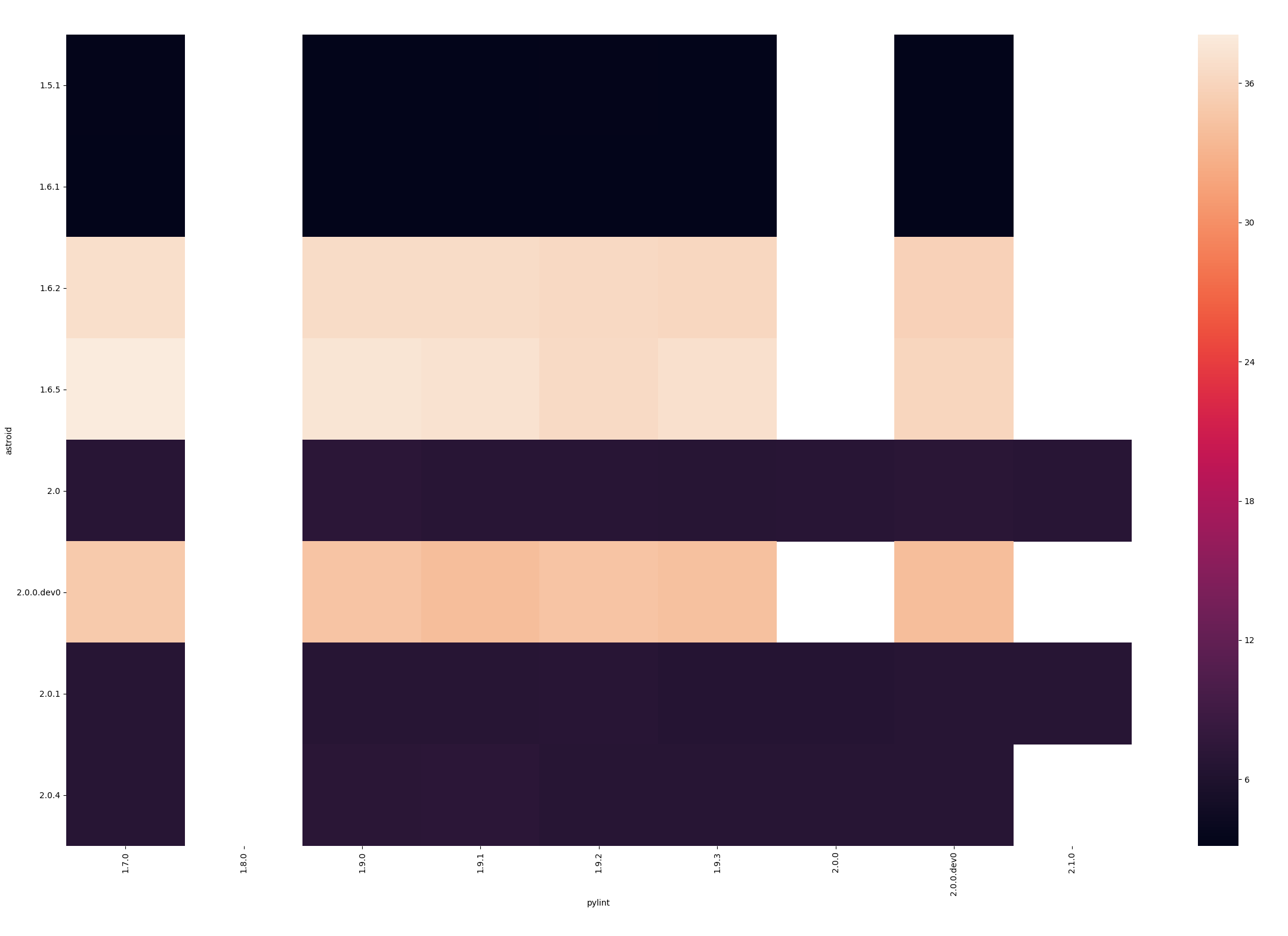
Here's roughly the benchmarking script (i took a subset of the notable combinations to generate the plot): https://gist.github.com/kootenpv/bdc2b650c275ca5691fe168f4b628125
 kootenpv
on 28 Sep 2018
kootenpv
on 28 Sep 2018
I went a bit deeper, realising pylint is leading and the "latest" available astroid should be picked up from pypi. No need for testing all combinations. I ensure this by looking up both packages' release dates from pypi, and picking the most recent astroid version at the time of a pylint release. First installing pylint, then installing the correct astroid over it (not using setup.py's info, because in that case it was installing super recent astroid suddenly - the astroid dependency was not consistently updated in pylint).
My conclusion is that something must have happened when working towards pylint==1.5.0 (which was created _before_ 1.4.5).
I hope someone would have an idea when looking at the changelog of 1.5.0
There are several noticeable moments, marked with comments:
       astroid      pylint   test.py  testpd.py
0        1.0.1       1.2.0  0.436993   0.427342
1        1.1.0       1.2.1  0.440859   0.431798
2        1.2.0       1.3.0  0.428614   0.421563
3        1.2.0       1.3.1  0.430654   0.416979
4        1.3.2       1.4.0  0.491325   0.439221
5        1.3.2       1.4.1  0.418719   0.428171
6        1.3.4       1.4.2  0.445312   0.442005
7        1.3.5       1.4.3  0.469746   0.494069
8        1.3.6       1.4.4  0.438407   0.443008
9        1.4.1       1.4.5  0.479370   0.485381
10       1.3.8       1.5.0   crash      crash
.        1.4.0       1.5.0     0.488      2.741
# first slowdown most likely occured at pylint==1.5.0
11       1.4.1       1.5.1  0.481399   2.594685
12       1.4.1       1.5.2  0.480204   2.717970
13       1.4.3       1.5.3  0.481589   2.694902
14       1.4.3       1.5.4  0.498066   2.802653
15       1.4.4       1.5.5  0.502328   2.717081
16       1.4.5       1.5.6  0.483014   2.619488
17       1.4.6       1.6.0  0.539388   2.934846
18       1.4.6       1.6.1  0.570620   2.924667
19       1.4.7       1.6.2  0.524301   3.103209
20       1.4.7       1.6.3  0.540824   2.937235
21       1.4.7       1.6.4  0.550925   2.718018
22       1.4.9       1.6.5  0.555481   2.955476
23       1.4.9       1.7.0   crashed    crashed
24       1.5.1       1.7.1  0.561748   3.298224
25       1.5.3       1.7.2  0.585844   3.417173
26       1.5.3       1.7.3  0.570153   3.323117
27       1.5.3       1.7.4  0.555369   3.410896
28       1.5.3       1.7.5  0.573911   3.161818
29       1.6.1       1.7.6  0.626498   3.426318
30       1.5.3       1.8.0  0.606537   2.419508
31       1.5.3       1.8.1  0.608448   3.362512
32       1.6.0       1.8.2  0.561504   3.145350
33       1.6.1       1.8.3  0.588313   3.376282
# things went insane here
34       1.6.2       1.8.4  0.629049  38.097017
35       1.6.3       1.9.0  0.594691  38.260360
36       1.6.4       1.9.1  0.572265  37.972687
37  2.0.0.dev1       1.9.2  0.691381   7.560932
38       2.0.1       1.9.3  0.688137   6.689155
# note that the order below looks weird, but it is correct
39       1.6.4  2.0.0.dev0  0.573624  36.688500
40  2.0.0.dev0  2.0.0.dev1  0.604605  34.479306
# the improvements here were a lot better, but we still came out twice as bad as b4
41  2.0.0.dev3  2.0.0.dev2  0.614821   6.144651
42  2.0.0.dev4       2.0.0  0.602748   6.745883
43       2.0.1       2.0.1  0.606165   6.824362
44       2.0.1       2.1.0  0.615653   6.893592
45       2.0.2       2.1.1  0.613608   7.327101
Thanks for the reproduction example @kootenpv This is definitely useful as we can investigate exactly what went in those releases that led to this slowdown.
PCManticore
on 30 Sep 2018
@PCManticore Note that it looks like the problem was introduced at pylint==1.5.0 and not at 1.6.0 (there is no significant change between 1.5.0 and 1.6.0)
EDIT: I see now 1.6.0 was mentioned of astroid, which also does not directly map to a timing issue considering the charts.
kootenpv
on 30 Sep 2018
I'm pretty sure https://github.com/PyCQA/astroid/commit/206d8a296e5751ebaaa96db699ecd8b44351d9d1 is what caused the slowdown at 1.6.2. In particular,
-        clone = InferenceContext(self.path, inferred=self.inferred)
+        clone = InferenceContext(copy.copy(self.path), inferred=self.inferred)
seems to be the source.
Related to https://github.com/PyCQA/astroid/issues/588?
 nickdrozd
on 30 Sep 2018
nickdrozd
on 30 Sep 2018
I ran master everything against the following script:
from pandas import DataFrame
_ = DataFrame
This takes ~8s on my 2012 MBP. Doing some profiling, it looks like most of that time is being spent parsing / building pandas:
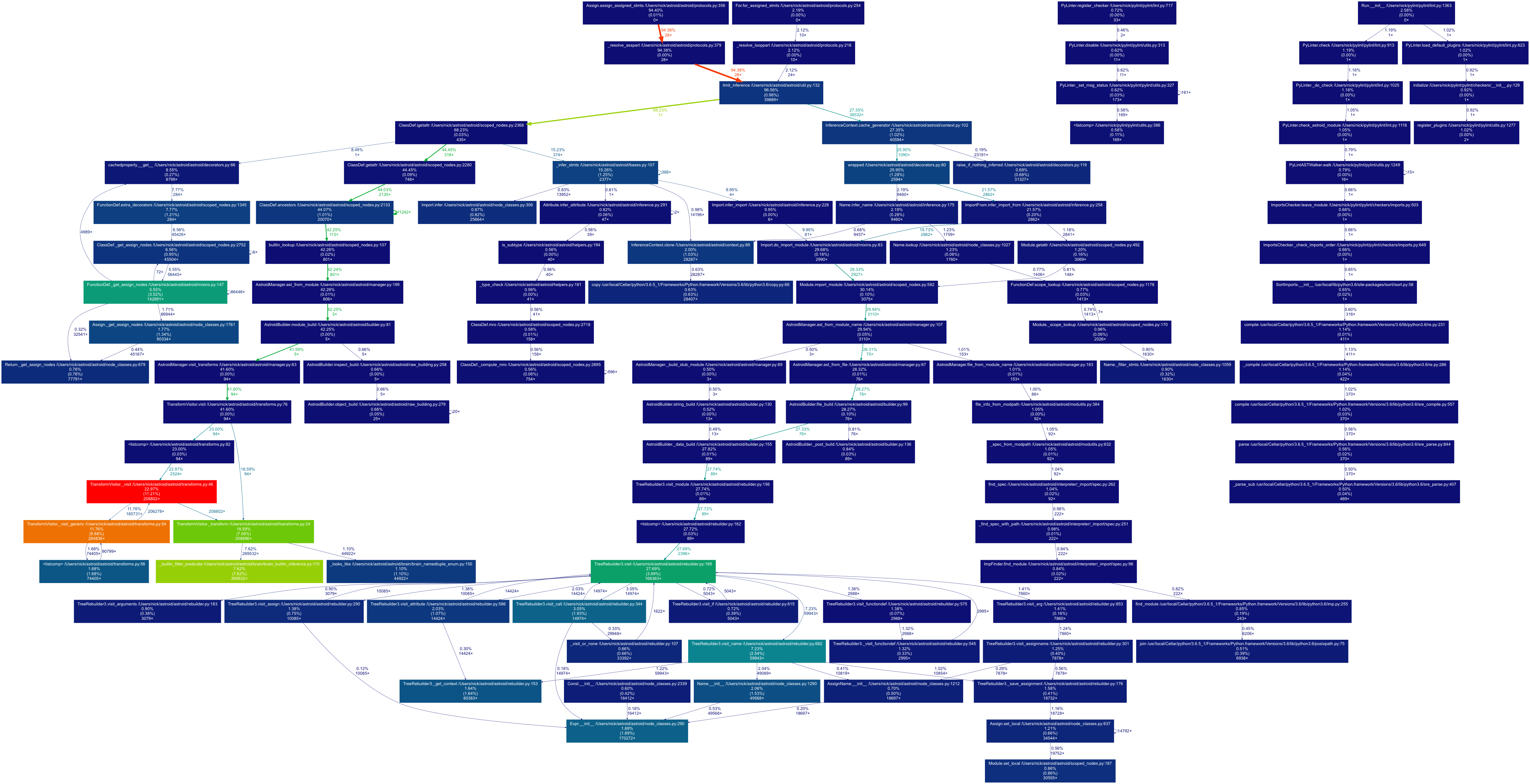
nickdrozd
on 30 Sep 2018
I have done some benchmarking as well, running the same code snippet as @nickdrozd above with current master:
from pandas import DataFrame
_ = DataFrame

It appeared that the slowdown was because of safe_infer() which took 4.86s specifically in the line:
value = next(inferit)
Interestingly, running the code snippet above along with some other code involving pandas reduces the slow down with safe_infer(). ie. The longest safe_infer() span was 200ms. This time the bottleneck was in LoggingChecker.visit_call()
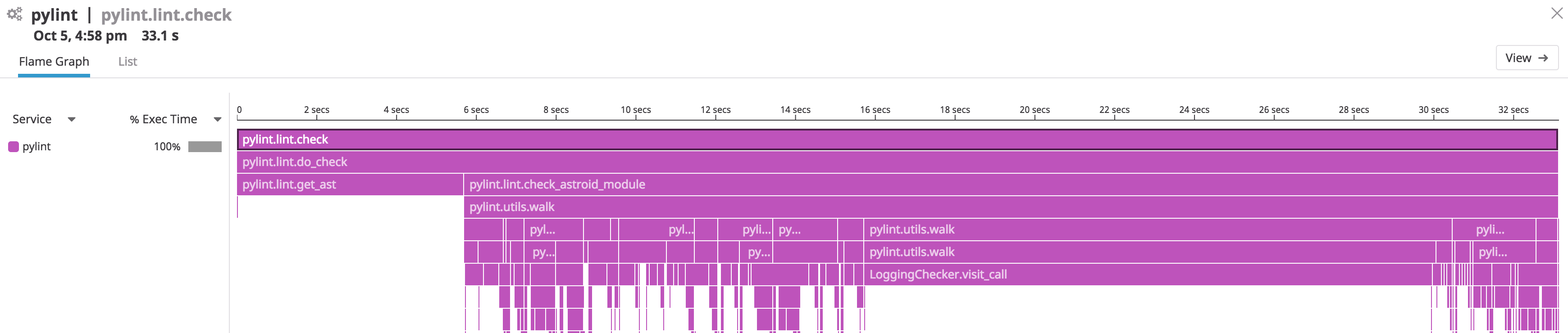
 taylor-chen
on 5 Oct 2018
taylor-chen
on 5 Oct 2018
Just landed a couple of small improvements in astroid's master, please give it a go and let me know how it is for you. There are still a couple of improvements in the pipeline, that hopefully will result in more significant performance boosts.
PCManticore
on 10 Oct 2018
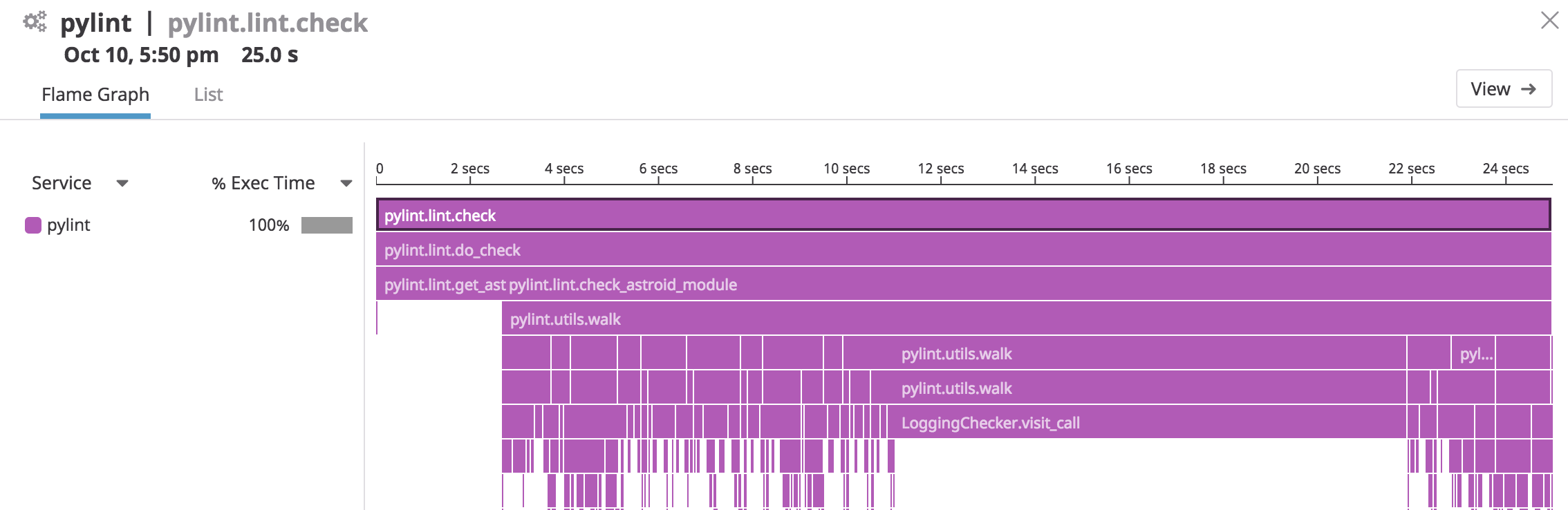
Hey @PCManticore, i ran the same tests as my previous posts using Datadog APM. It looks like there is a 30% increase in performance with astroid at master.
Just importing DataFrame. Before 5s~ to now 3s~
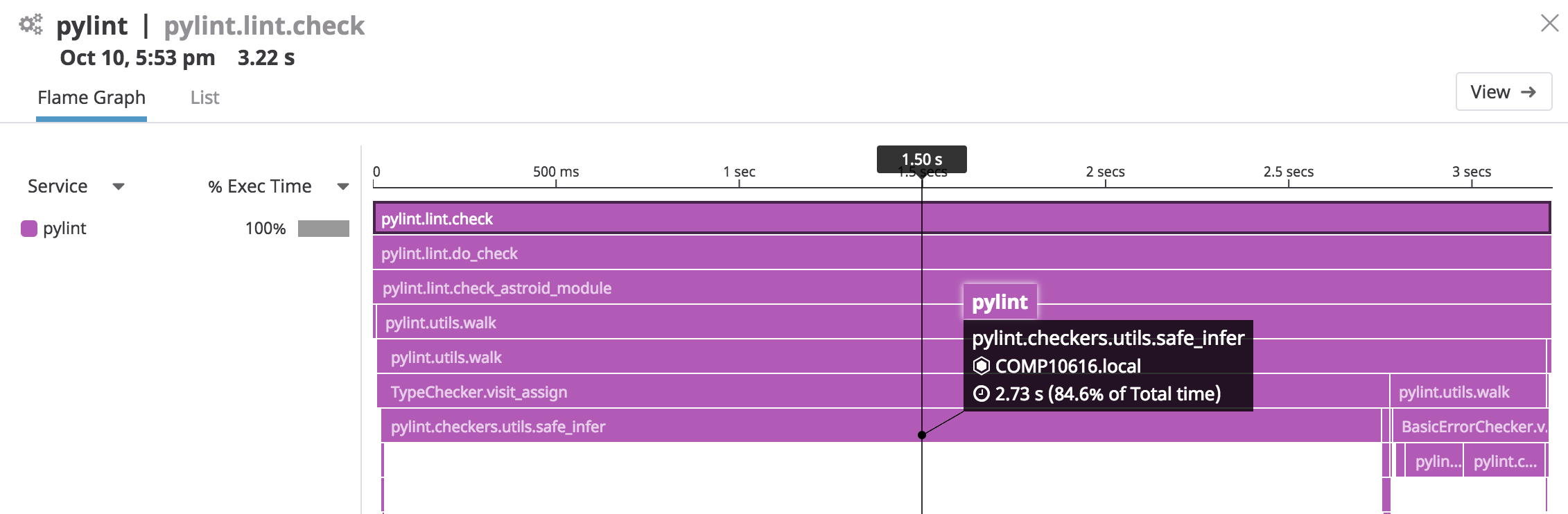
Larger file with pandas. Before 33s~ to now 25s~
taylor-chen
on 11 Oct 2018
It may be better but for my large project it’s still unusable. We downgraded at my organisation (80k employees) to asteroid 1.6.4, the whole code is analyzed in 3min. I just tried with the latest master and the test hasn’t completed after 45min. We cannot use it unfortunately and I would suggest to roll back everything to 1.6.4 as it cannot be easily fixed it seems.
dickreuter
on 11 Oct 2018
@dickreuter Is your project open source by any chance or does it have anything in particular other than pandas?
PCManticore
on 11 Oct 2018
Great job @PCManticore ! What's interesting is that while those changes have a noticeable effect here, they don't seem to do anything when the target file is pycodestyle.py, which is what I have been using as a benchmark. This underscores the need for a real performance testing suite covering a variety of targets.
nickdrozd
on 11 Oct 2018
That's a good point @nickdrozd it's something we should do at some point.
PCManticore
on 11 Oct 2018
I've confirmed that @nickdrozd is right about https://github.com/PyCQA/pylint/issues/2198#issuecomment-425724843, that is the commit that's creating this havok. The problem with reverting it is that we're losing some capabilities if we're not having separate inference paths. I'll try to figure out a solution, if not, I'll revert the commit. Additionally, the culprit on pylint's side are the checks from the typecheck module, disabling those results in half the time for pycodestyle.
PCManticore
on 12 Oct 2018
@PCManticore, it’s unfortuantly not open source, but it has lots of third party dependencies that are based on c++ dlls, maybe similar to pandas. Possibly the bug in astroid is related to that.
dickreuter
on 12 Oct 2018
@dickreuter If you can test locally with that commit reverted, what improvements do you see?
PCManticore
on 12 Oct 2018
@PCManticore is it because there are lots of duplicate computations for adding the same items to now-separate inference paths which don't need to be if the path is not copied? Maybe path items could be cached/memoized such that the inference paths remain separate but it's not necessary to perform duplicate computations? (I don't know how the structure works exactly so I'm just shooting blind).
 xmo-odoo
on 12 Oct 2018
xmo-odoo
on 12 Oct 2018
Thanks for confirming that now it's better for you @dickreuter The fix will be in pylint 2.2 and astroid 2.1, I'll try to do the release this week.
PCManticore
on 6 Nov 2018
Can confirm also the issue appears to be resolved for me as well, once there's a new release I can also re-run tests by installing directly from official package.
gnu-user
on 8 Nov 2018
Is there any eta for a new release? Thanks
dickreuter
on 12 Nov 2018
Ubuntu 18.04 users: running sudo apt install pylint3 improved runtime significantly while we wait for the next release. I only have the time for pylint3 from apt, but running latest version of pylint from pip3 install took 2-3x as long.
```
time pylint3 main.py
No config file found, using default configuration
Your code has been rated at 10.00/10 (previous run: 10.00/10, +0.00)
real 0m7.501s
user 0m7.359s
sys 0m0.141s
 yebo29
on 15 Nov 2018
yebo29
on 15 Nov 2018
@PCManticore any news on a relase for astroid and pylint? Thanks :)
victornoel
on 16 Nov 2018
Hey folks, thank you for waiting! 2.2 should be available now on PyPi, please give it a go and let me know if you still have issues. I would still keep this issue open as there might be some other improvements we can make to improve the situation for pandas and the likes.
PCManticore
on 25 Nov 2018
What about the new astroid 2.1? Isn’t that the one responsible for the slowdown? Any eta when it will be released? Tx
dickreuter
on 25 Nov 2018
@dickreuter They are usually released together, so you should already be able to get astroid==2.1.0.
PCManticore
on 25 Nov 2018
Excellent. Will give it a try. Will it also be in conda?
dickreuter
on 25 Nov 2018
On my codebase, there is an improvement, but it is still quite long compared to older version:
- with 2.1.1/2.0.4:
pipenv run pylint datapipe --max-line-length=120 170,01s user 4,80s system 96% cpu 3:01,54 total
- with 2.2.0/2.1.0:
pipenv run pylint datapipe --max-line-length=120 110,57s user 2,56s system 99% cpu 1:54,07 total
- with 1.9.2/1.6.1:
pipenv run pylint datapipe --max-line-length=120 22,04s user 0,53s system 98% cpu 22,859 total
(ran with time pipenv run pylint datapipe --max-line-length=120 --disable=too-few-public-methods,missing-docstring,duplicate-code,fixme).
victornoel
on 26 Nov 2018
I also gave it a go but it is still too slow for me to be usable :(
kootenpv
on 26 Nov 2018
Is there a way to complete disable pylint-inspections for pandas as a workaround?
 sscherfke
on 5 Dec 2018
sscherfke
on 5 Dec 2018
You might try with ignored-modules=pandas but not sure if that's going to solve the issue across the board for all checks.
My plan is to revert https://github.com/PyCQA/astroid/commit/206d8a296e5751ebaaa96db699ecd8b44351d9d1 and figure out from there a separate solution for what the commit was intended to fix, but haven't got to it just yet.
PCManticore
on 5 Dec 2018
ignored-modules=pandas did not help much. It reduced the run time from 35s to 31s while it was 1.5s with astrod 1.5.3 and pylint 1.8.4. :grimacing:
sscherfke
on 6 Dec 2018
Please let me know if you’d like me to test any changes regarding this issues. :)
sscherfke
on 6 Dec 2018
Unfortunately the current version of astroid still not usable. I recommend a roll back to astroid 1.6.1. In my project the pylint test lasted 3min. With the latest master it's still not finished after a full hour. According to the peofiler the most time is taken in ast3_parse. Profile is attached.
mre5.zip
dickreuter
on 11 Dec 2018
I am hitting the same problem - attached is a tiny (3 lines of code) minimal repro (in my case the runtime was 98 sec as shown):
$ time python3 setup.py test
running pytest
running egg_info
creating src/pylint_issue2198.egg-info
writing src/pylint_issue2198.egg-info/PKG-INFO
writing dependency_links to src/pylint_issue2198.egg-info/dependency_links.txt
writing requirements to src/pylint_issue2198.egg-info/requires.txt
writing top-level names to src/pylint_issue2198.egg-info/top_level.txt
writing manifest file 'src/pylint_issue2198.egg-info/SOURCES.txt'
reading manifest file 'src/pylint_issue2198.egg-info/SOURCES.txt'
writing manifest file 'src/pylint_issue2198.egg-info/SOURCES.txt'
running build_ext
======================= test session starts =======================
platform linux -- Python 3.6.7, pytest-4.0.2, py-1.6.0, pluggy-0.7.1
rootdir: /tmp/pylint2198, inifile: setup.cfg
plugins: pylint-0.13.0, cov-2.6.0
collected 2 items
-----------------------------------------------------------------
Linting files
..
-----------------------------------------------------------------

setup.py .                                          [ 50%]
src/pylint2198/__init__.py .                        [100%]

======================= 2 passed in 98.08 seconds =======================
python3 setup.py test  97.41s user 2.28s system 99% cpu 1:40.24 total
When checking the syscall it looks 90% of the time is spent looping over these (almost 74000 iterations):
chdir("/tmp/pylint2198")                = 0
getcwd("/tmp/pylint2198", 1024)         = 20
stat("/home/bbyk/.local/lib/python3.6/site-packages/pandas/core/base.py", {st_mode=S_IFREG|0664, st_size=40297, ...}) = 0
openat(AT_FDCWD, "/home/bbyk/.local/lib/python3.6/site-packages/pandas/core/base.py", O_RDONLY|O_CLOEXEC) = 9
fstat(9, {st_mode=S_IFREG|0664, st_size=40297, ...}) = 0
ioctl(9, TCGETS, 0x7fffb1744b70)        = -1 ENOTTY (Inappropriate ioctl for device)
lseek(9, 0, SEEK_CUR)                   = 0
read(9, "\"\"\"\nBase and utility classes for"..., 4096) = 4096
close(9)                                = 0
openat(AT_FDCWD, "/home/bbyk/.local/lib/python3.6/site-packages/pandas/core/base.py", O_RDONLY|O_CLOEXEC) = 9
fstat(9, {st_mode=S_IFREG|0664, st_size=40297, ...}) = 0
ioctl(9, TCGETS, 0x7fffb1744b70)        = -1 ENOTTY (Inappropriate ioctl for device)
lseek(9, 0, SEEK_CUR)                   = 0
lseek(9, 0, SEEK_CUR)                   = 0
lseek(9, 0, SEEK_CUR)                   = 0
fstat(9, {st_mode=S_IFREG|0664, st_size=40297, ...}) = 0
read(9, "\"\"\"\nBase and utility classes for"..., 40298) = 40297
read(9, "", 1)                          = 0
mmap(NULL, 262144, PROT_READ|PROT_WRITE, MAP_PRIVATE|MAP_ANONYMOUS, -1, 0) = 0x7f01c3d25000
mmap(NULL, 262144, PROT_READ|PROT_WRITE, MAP_PRIVATE|MAP_ANONYMOUS, -1, 0) = 0x7f01c3ce5000
munmap(0x7f01c3ce5000, 262144)          = 0
munmap(0x7f01c3d25000, 262144)          = 0
running with:
astroid                           2.1.0
pandas                            0.23.4
pylint                            2.2.2
pytest                            4.0.2
pytest-cov                        2.6.0
pytest-pylint                     0.13.0
 bykbrian
on 14 Dec 2018
bykbrian
on 14 Dec 2018
I am not using pandas, but I have decently sized project that I've decided to lint with pylint, and its taking over 10 minutes on my machine (it also takes so long on travis that it timeouts dedicated build step):
(misago) MacBook-Pro-Rafa-2:Misago rafalpiton$ /usr/bin/time pylint misago

-------------------------------------------------------------------
Your code has been rated at 10.00/10 (previous run: 9.99/10, +0.01)

      642.05 real       614.56 user        11.28 sys
My config:
[MASTER]

load-plugins=pylint_django
ignore=migrations
max-line-length=88


[MESSAGES CONTROL]

disable=
    abstract-method,
    arguments-differ,
    assignment-from-none,
    attribute-defined-outside-init,
    bad-continuation,
    cyclic-import,
    duplicate-code,
    expression-not-assigned,
    fixme,
    inconsistent-return-statements,
    invalid-name,
    missing-docstring,
    model-no-explicit-unicode,  # pylint-django
    no-member,
    no-self-use,
    protected-access,
    redefined-outer-name,
    too-few-public-methods,
    too-many-ancestors,
    too-many-arguments,
    too-many-instance-attributes,
    too-many-lines,  # FIXME
    too-many-public-methods,
    too-many-statements,  # FIXME
    ungrouped-imports,
    unsubscriptable-object,
    unused-argument


[REPORTS]

reports=no
 rafalp
on 25 Dec 2018
rafalp
on 25 Dec 2018
Astroid is broken in its current version and it not usable anymore. You need to downgrade to version 1.6.1 if you want to use pylint.
dickreuter
on 25 Dec 2018
Okay, I've downgraded from astroid==2.1.0 to astroid==1.6.5, from pylint==2.2.2 to pylint==1.9.3 and from pylint-django==2.0.5 to pylint-django==0.11.1 and ran linter again, but this time it took 40 minutes to complete:
Your code has been rated at 9.98/10 (previous run: 10.00/10, -0.02)

     2292.89 real      2054.91 user        32.20 sys
I'll try with astroid==1.6.1 next and see what this changes.
Your code has been rated at 9.99/10 (previous run: 9.98/10, +0.01)

      903.35 real       892.42 user         7.61 sys
Better, but still worse than 2.x line.
rafalp
on 25 Dec 2018
Another day, I'm back to latest versions but decided to play more with configs and running options.
First thing I've tried was adding -j 0 to run more linters in parrllel:
time pylint misago -s no --persistent=n -v -j 0

real    5m51.654s
user    18m34.291s
sys 0m27.280s
I'll say not bad.
Next step was going medieval on max_inferable_values:
time pylint misago -s no --persistent=n -v -j 0 --limit-inference-results=10

real    5m56.088s
user    18m43.971s
sys 0m27.377s
...and nothing has changed. 🤷♂️
rafalp
on 25 Dec 2018
Somebody has to create a PR to roll back to astroid 1.6.1
dickreuter
on 25 Dec 2018
This is fixed in astroid's master, should have similar performance to pylint 1.9 + astroid 1.6.1.
PCManticore
on 30 Dec 2018
Great news, can't wait to try it out! 👍
Thanks!
rafalp
on 30 Dec 2018
@PCManticore Thank you very much! When do you plan to release Astroid v2.2.0 with this fix? I am debating whether to update my organization's requirements.txt files to include git+https://github.com/PyCQA/astroid.git@master, or whether I should wait for the v2.2.0 release. I appreciate your work!
 DannyNemer
on 4 Jan 2019
DannyNemer
on 4 Jan 2019
For now installing from master should do it. I'm planning to release the next version in a couple of weeks, but might take a bit.
PCManticore
on 8 Jan 2019
Hi,
I tried linting a single file with these 2 lines with master versions of astroid & pylint:
from flask import Flask
app = Flask(__name__)
It still takes quite time on a macos i7:
$ pylint --version
pylint 2.3.0-dev0
astroid 2.2.0-dev
Python 3.7.2 (default, Jan 13 2019, 12:50:01)
[Clang 10.0.0 (clang-1000.11.45.5)]

time pylint app/flask.py
real    0m1.428s
user    0m1.315s
sys     0m0.088s
With pylint release 2.2.2 it takes roughly the same time
 sp-daniel-pinyol
on 22 Jan 2019
sp-daniel-pinyol
on 22 Jan 2019
@sp-daniel-pinyol Please report a separate issue. From a quick look it seems that both 1.9 and 2.2 exhibit the same behaviour, it doesn't seem to be caused by the regression which caused this particular issue with pandas.
PCManticore
on 23 Jan 2019
Any estimate when we'll get this released? many thanks
dickreuter
on 27 Jan 2019
@dickreuter I'll release 2.3 somewhere in February, in the meantime you can use the dev release.
PCManticore
on 28 Jan 2019
@dickreuter We've just switched to using flake8 for the time being until the new version is released.
gnu-user
on 8 Feb 2019
Yes it’s really odd that it takes months for a release that important. It should be done asap. Currently plyint is totallly unusable.
The only way is to take it directly from GitHub.
dickreuter
on 8 Feb 2019
@dickreuter you can install the dev package if you want.
PCManticore
on 8 Feb 2019
It’s tricky for large corporations as we can only use packages from anaconda.
dickreuter
on 8 Feb 2019
My company switched to using the dev release, and it reduced the duration of our _entire_ CI/CD from 25+ minutes to 4 minutes.
DannyNemer
on 8 Feb 2019
@dickreuter Cool, quick question: can those large corporations pay for provided support of one of these tools they're using, like pylint for instance? This is a genuine question. I find it that I feel burned out working as a volunteer for pylint, especially since I can't focus my time on improving the capabilities of the tool, and money could provide an additional incentive to make that work.
PCManticore
on 8 Feb 2019
I believe Microsoft has sponsored engineers who work solely on open source work not tied to the company (e.g., Lodash). Also, I know Stripe has sponsored several open source developers before.
However, @dickreuter, if you more publically state your case just as you have here, I feel it is reasonable for companies - even small startups like mine - to donate.
DannyNemer
on 8 Feb 2019
Can’t donate, but I contribute. But what I can’t do is the release. If you tell me how and give me the keys, I’m happy to do it.
On 8 Feb 2019, at 19:11, Danny Nemer notifications@github.com wrote:
I believe Microsoft has sponsored engineers who work solely on open source work not tied to the company (e.g., Lodash). Also, I know Stripe has sponsored several open source developers before.
However, @dickreuter, if you more publically state your case just as you have here, I feel it is reasonable for companies - even small startups like mine - to donate.
—
You are receiving this because you were mentioned.
Reply to this email directly, view it on GitHub, or mute the thread.
dickreuter
on 8 Feb 2019
Pylint taking ~7 minutes on 1500 files. Tried upgrading, tried ignoring pandas, and not seeing any improvements. Has anybody found a solution with pylint + pandas that doesn't take minutes to run? We already separated various rules into different pylintrc files and run those in parallel in an attempt to speed things up
 James-Quigley
on 24 Apr 2019
James-Quigley
on 24 Apr 2019
The issue has been fixed in the latest version of pylint. You may need to regenerate your pylintrc.
On 24 Apr 2019, at 15:29, James Quigley notifications@github.com wrote:
Pylint taking ~7 minutes on 1500 files. Tried upgrading, tried ignoring pandas, and not seeing any improvements. Has anybody found a solution with pylint + pandas that doesn't take minutes to run? We already separated various rules into different pylintrc files and run those in parallel in an attempt to speed things up
—
You are receiving this because you were mentioned.
Reply to this email directly, view it on GitHub, or mute the thread.
dickreuter
on 24 Apr 2019
Actually realizing its prospector causing the slowness. Pylint run on its own takes no time at all.
James-Quigley
on 24 Apr 2019
I'm experiencing major slowdowns for checking pandas/numpy files.
A 366 line file takes 128 seconds to check.
Other files don't have this problem.
pylint --version:
pylint 2.4.4
astroid 2.3.0
Python 3.6.9 (default, Oct 24 2019, 17:02:38)
[GCC 8.3.0]
 rvanlaar
on 11 Dec 2019
rvanlaar
on 11 Dec 2019
Related issues
 jrial
·
3Comments
jrial
·
3Comments
 GergelyKalmar
·
3Comments
GergelyKalmar
·
3Comments
 TBoshoven
·
3Comments
TBoshoven
·
3Comments
 pylint-bot
·
3Comments
pylint-bot
·
3Comments
 sambarluc
·
3Comments
sambarluc
·
3Comments
Most helpful comment
@dickreuter Cool, quick question: can those large corporations pay for provided support of one of these tools they're using, like
pylintfor instance? This is a genuine question. I find it that I feel burned out working as a volunteer forpylint, especially since I can't focus my time on improving the capabilities of the tool, and money could provide an additional incentive to make that work.