Pylance-release: This extension doesn't seem to work at all
I never get the dialogue prompting me if I want to make pylance the default language server. And, manually adding "python.languageServer": "Pylance" in the setting.json, tells me "Value is not accepted. Valid values: "Jedi", "Microsoft", "None""
I'm on the OSS build of Code. The details are as follows
Version: 1.47.1
Commit: 485c41f9460bdb830c4da12c102daff275415b53
Date: 2020-07-14T22:01:14.734Z
Electron: 7.1.14
Chrome: 78.0.3904.130
Node.js: 12.8.1
V8: 7.8.279.23-electron.0
OS: Linux x64 5.7.8-arch1-1
Also, I can see general linting and such aren't working either. When I reinstall Pyright, everything starts working as expected again.
Update
I just verified in a VM that it works fine in the latest version of VS-code on Windows.
Update 2
The Flatpaked version of Microsofts builds, as available on Flathub, also works. Not sure where to report this, but, I have a lot of extensions installed, for Python, Rust, Haskell, Javascript, Typescript and more. This is the first-ever extension I installed that didn't work.
 justdanyul
All 8 comments
Same issue on macOS:
Version: 1.47.2
Commit: 17299e413d5590b14ab0340ea477cdd86ff13daf
Date: 2020-07-15T18:18:50.054Z (3 days ago)
Electron: 7.3.2
Chrome: 78.0.3904.130
Node.js: 12.8.1
V8: 7.8.279.23-electron.0
OS: Darwin x64 19.5.0
 carica
on 19 Jul 2020
carica
on 19 Jul 2020
The newest version of this extension will not give you the prompt like this.
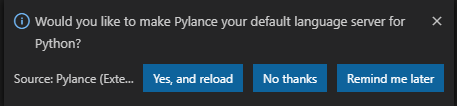
Install the 2020.7.0 version and it will be okay in my case. After installing the old version, the prompt popped up and I enabled it successfully.
 ElectronicElephant
on 19 Jul 2020
ElectronicElephant
on 19 Jul 2020
Having the same issue after installing Version: 1.47.2 on Ubuntu (first version I have installed). Did not see prompt and adding "python.languageServer": "Pylance" to settings.json, gives "Value is not accepted. Valid values: "Jedi", "Microsoft", "None""
 ly-pa
on 19 Jul 2020
ly-pa
on 19 Jul 2020
Same here, it didn't work for me on windows 10. even tho I get the prompt, nothing works after I click "yes ..."
 LeOndaz
on 19 Jul 2020
LeOndaz
on 19 Jul 2020
Same here (2020.7.2):
Show Error: "python.languageServer": "Pylance" to settings.json, gives "Value is not accepted. Valid values: "Jedi", "Microsoft", "None""
 zxl777
on 20 Jul 2020
zxl777
on 20 Jul 2020
Hey @justdanyul!
Thanks for reporting this. Pylance is not designed to run on unofficial builds of VSCode. We're looking into making this more obvious and improving the error messaging.
 savannahostrowski
on 22 Jul 2020
savannahostrowski
on 22 Jul 2020
This same issue happens to me on Visual Studio Code Insiders though...
 KurioHonoo
on 22 Jul 2020
KurioHonoo
on 22 Jul 2020
The above answer is to the original issue, but I think other users are reporting different things in this same thread (as many things can cause it to "not work at all").
Insiders should work. Which symptoms are you experiencing? If you open the developer tools in Help, do you see an error message about not being VS Code? I'd suggest making a new issue if it's not loading in the official VS Code Insiders build.
Note that the setting saying "not accepted" is expected behavior; see #16.
 jakebailey
on 22 Jul 2020
jakebailey
on 22 Jul 2020
Related issues
 yankyhoffman
·
5Comments
yankyhoffman
·
5Comments
 ynouri
·
3Comments
ynouri
·
3Comments
 BrunoBlanes
·
4Comments
BrunoBlanes
·
4Comments
 albireox
·
5Comments
albireox
·
5Comments
 Godsmith
·
3Comments
Godsmith
·
3Comments
Most helpful comment
Same here (2020.7.2):
Show Error: "python.languageServer": "Pylance" to settings.json, gives "Value is not accepted. Valid values: "Jedi", "Microsoft", "None""