Pyinstaller: Add an option for displaying a Splash Screen
Hi, all, thanks for the awesome project!
I have a suggestion about splash screen.
When I tried to run a big project packaged by pyinstaller (use --windowed --onefile option),
unzipping time is very long before the program's GUI appear. During this time, users can't see anything, and UX is not wonderful.
I know that packaging with --onedir can skip the unzip process, but in my case, comparing to one folder, keeping all in one file is much easier to deploy and manage.
So IMHO, adding a splash screen (at least when use -w -F option) is an awesome feature for UX. I believe that it's a feature need by many :)
Let me know if you have any idea :)
 longqzh
All 48 comments
Please provide a pull-request for this.
 htgoebel
on 5 Aug 2019
htgoebel
on 5 Aug 2019
What about an OS notification?
I tried out something simple in Python on Ubuntu. Added the code to pyiboot01_bootstrap.py right after if not hasattr(sys, 'frozen'): on line 29.
https://askubuntu.com/questions/108764/how-do-i-send-text-messages-to-the-notification-bubbles
While I did get the notification it was really late. I got the notification right before the GUI of my program showed up.
 michielz
on 28 Aug 2019
michielz
on 28 Aug 2019
@michielz Thanks very much for your ideal! It works for me.
And I'm finding a way to show the splash screen as early as possible in Win and *nix. To implement it, I guess the best method is changing the bootloader/src :)
longqzh
on 29 Aug 2019
Assuming the splash screen is implemented in the bootloader, how should the Python program communicate with it?
I thought that the signal to close the splash screen should be sent from the actual users Python program, because it takes some time until the application GUI starts. This would also give the Python program time to start.
Possibilities that I have considered would be:
- write a Python module in C that is connected to the Python interpreter as a module with the help of
PyImport_AppendInittab. But I think Cython told me that Python modules in C have to be compiled explicitly to a special API version, which would not allow backward compatibility. Or are there ways to bypass this?
- since Python 3.8 there is the possibility to add Runtime Audits to the Python interpreter after PEP 578. So the bootloader code could create a hook with
PySys_AddAuditHookwhich can be called by Python withsys.audit(). But here the backwards compatibility is not given again.
Do you have any other suggestions how the Python program can communicate with the bootloader?
 Chrisg2000
on 26 Oct 2019
Chrisg2000
on 26 Oct 2019
I have an idea, but most of you should dislike this:
- pyinstaller -D
- Package _dist_ into a NSIS installer
- Only one page as splash in .nsi
- Call _%temp%/UUID/exe_ & hide splash
- Clean _%temp%/UUID_ directory once _exe_ ended
Or other installers like Inno
 keelung-yang
on 29 Oct 2019
keelung-yang
on 29 Oct 2019
@keelung-yang This would probably be a good "third-party solution". I just see the problem that the Python program has no control over when the splash screen closes.
I would tend to prefer the 2nd option with the runtime hook, as it doesn't add much overhead to the Bootloader and should work with future Python releases without recompiling.
Chrisg2000
on 30 Oct 2019
@Chrisg2000 Communication is one essential thing, another is the implement: none of GUI backends in python should be used.
So I guess the best way is leaving communication & implement to users: just add an --splash option:
pyinstaller --splash path_of_splash
And then start the splash process firstly no matter whether -F or -D used.
Of cause, the splash process should be run once it's uncompressed to _MEIxxxxxx before uncompressing others if -F used.
Or use _--boot_ instead of _--splash_ for more general using
keelung-yang
on 31 Oct 2019
@keelung-yang I agree that no Python GUI backends should be used because they also need time to extract and this contradicts the purpose of the splash screen.
I guess I would like to allow the user to send a signal to the bootloader/splash screen to close the splash screen.
@htgoebel If I would now open a pull request that adds a splash screen only under Windows, would it even be accepted? For now, this would just be a "Windows-only" feature until someone implements it for *nix systems. It would also be a feature that would only work with Python 3.8 or higher.
Under MS Windows it is very easy to start a splash screen from the bootloader using the win32 API. The bootloader is even linked under Windows against most of the necessary DLLs.
Chrisg2000
on 31 Oct 2019
@Chrisg2000 Just image this: Once you supply a very simple splash window, then poeple always want more: text, font, kinds of colors, progressbar, picture, animations, even sound playing in backgroud...
So, just close the door, let users do what they want out of door
keelung-yang
on 31 Oct 2019
@keelung-yang If users want to have features like animations or sound effects, they are welcome to add them. What I'm aiming for is the simple form of the splash screen, which initially works "out of the box" without much extra functionality. The bootloader splash screen is not a requirement. If the user finds a better way to show a splash screen for his application, he can use it.
What would be your suggestion on how to implement a splash screen?
Chrisg2000
on 31 Oct 2019
@Chrisg2000 It's depended on users and targets:
- It's for all user who using pyinstaller?
- It's cross-platform?
- It's support theme to match the desktop settings?
- It's support custom style to match the application's style?
Well, the basic elements in splash should be supported at least:
- Title with mulitline, alignment, font support
- Progressbar with text, percent, state setting(like PBM_SETSTATE in win32) support
- Backgroud picture with alignment, zoom and padding support
Yeap, I think we should make targets clear before talking about implement details. and GUI subjects is out of pyinstaller.
keelung-yang
on 1 Nov 2019
This is how I would have approached it now:
A simple splash screen that displays only one bitmap, without a window manager frame. This would also solve styling problems. On the bitmap the user can then show what he wants, whether it is the title, the logo or something else.
I would omit a progress bar, because there is no iterated list at startup that would make a progress bar useful. And if the user's python program "takes over" the splash screen, a progress bar is not always desired.
The only additional feature I suggest is to display messages from the bootloader (messages via VS) and from the python program.
About the GUI: I can think of two possibilities
- code is written into the bootloader for each distribution. A platform-independent API is provided for the splash screen, which then calls the necessary platform-dependent functions.
- Advantage: a small overhead, since only the code necessary for the platform is compiled.
Disadvantage: For the time being, only users on platforms for which code has already been written can benefit.
including a multi-platform GUI API into the bootloader. If it's possible, parts from it can be removed, which aren't needed to display a splash screen.
- Advantage: One GUI API for all/many operating systems.
- Disadvantage: A lot of overhead for the bootloader and possible licensing problems.
Chrisg2000
on 1 Nov 2019
IMO the approach of having a very simple bitmap displayed "as soon as possible" by the bootloader itself would already be a fantastic improvement in the feeling of responsiveness.
The bootloaders are anyhow platform specific, so that could probably be rather easily added.
Right now the user has to wait multiple seconds before "anything happens". A simple bitmap (iOS style) would already be a great improvement.
 kubaraczkowski
on 15 Nov 2019
kubaraczkowski
on 15 Nov 2019
@kubaraczkowski I totally agree with you. What I want is simply showing a picture/text to telling the user to wait. And I don't think it's easy to implement, because the bootloader seems doesn't consider the GUI part, and in *nix, there are dozens of Desktop Environment. I'm not very sure that bitmap showing function can be implemented in Xwindow level or not. Let me know if I'm wrong :)
longqzh
on 18 Nov 2019
I suppose you are right here regarding *nix systems! Maybe a good start
would be a splash screen for Windows/MacOS ?
On Mon, 18 Nov 2019 at 14:08, 용성지 notifications@github.com wrote:
@kubaraczkowski https://github.com/kubaraczkowski I totally agree with
you. What I want is simply showing a picture/text to telling the user to
wait. And I don't think it's easy to implement, because the bootloader
seems doesn't consider the GUI part, and in *nix, there are dozens of
Desktop Environment. I'm not very sure that bitmap showing function can be
implemented in Xwindow level or not. Let me know if I'm wrong :)—
You are receiving this because you were mentioned.
Reply to this email directly, view it on GitHub
https://github.com/pyinstaller/pyinstaller/issues/4354?email_source=notifications&email_token=AAEHNHE4R4OI3774ULUUX3TQUKHUBA5CNFSM4IJFNTFKYY3PNVWWK3TUL52HS4DFVREXG43VMVBW63LNMVXHJKTDN5WW2ZLOORPWSZGOEEKL22A#issuecomment-555007336,
or unsubscribe
https://github.com/notifications/unsubscribe-auth/AAEHNHD47YWQMNZNXTGVRQLQUKHUBANCNFSM4IJFNTFA
.
kubaraczkowski
on 18 Nov 2019
@Chrisg2000 I prefer the first idea you mentioned(written into bootloader for each dist). Because as far as I know, pyinstaller doesn't include any GUI function, so for displaying a splash screen, Adding a multi-platform GUI API is a kind of 'heavy'.
And I also like your idea about Audit Hooks, displaying splash screen is optinal option, so lacking of backward compatibility is accepted. But is there any side effect of audit hook?
longqzh
on 18 Nov 2019
@kubaraczkowski @longqzh I don't know how to realize such a window under *nix systems either, perhaps with the X-window system, but I am not sure about that. Is there an API for windows under MacOS? I have no experience with MacOS because I don't own any Apple products.
@longqzh I would have chosen both approaches too (with audit hooks and platform-specific code for the GUI).
As far as I know there are no side effects with audit hooks. According to the specification (PEP 578) each event is sent to all hooks, which they should filter by the type of event (which is a string) and perform actions accordingly. The only thing to be aware of is that if a hook is added and Python is already initialized, all other hooks will be notified. But that shouldn't be a big problem, since we are able to add an hook before Python is even initialized.
I'm currently writing the platform independent code and the platform specific code for Windows. I should soon be able to show at least one working prototype.
Chrisg2000
on 18 Nov 2019
Now comes the next question:
How should the user define a splash screen in the spec file? As a WIP version I have a dictionary where options (like the path to the bitmap or position of the text) are saved, which I later simply extract into a function call.
I can imagine different options:
- write an own target for the splash screen (like for EXE or COLLECT):
- Advantage: If the bitmap needs to be prepared, this can be done in the
self.assemble()method and saved as a GUT - Disadvantage: If I get this correct, then the preparation of a bitmap does not necessarily correspond to the actual purpose of a target, And it can conflict with already existing mechanisms which processes targets in other ways.
This idea would probably look like this in the spec file:
splash = SPLASH(bitmap=path_to_bitmap,  # path-like object
                text_rect=text_rect,    # rect for text to be displayed
                text_color=0xAABBCC)    # text color for messages

exe = EXE(...,
          splash=splash,
          ...)
- implement the splash screen like MERGE (
PyInstaller.building.api.MERGE): - Advantage: The bitmap can be prepared again. The PyInstaller cache can also be used to prevent useless bitmap re-processing.
- Disadvantage: Perhaps a somewhat exaggerated type of dictionary, since the bitmap can be prepared when the bitmap is actually attached to the application as a splash.
This idea would look exactly like idea 1.
- Since this is a feature that is only supported from Python 3.8 and the "average" user probably doesn't need it much, just leave it at the WIP version and let the user pass a dict as splash argument to EXE.
This idea would look like this in the spec file:
splash = {
    "bitmap": path_to_bitmap,
    "text_rect": text_rect,
    "text_color": 0xAABBCC
}

exe = EXE(...,
          splash=splash,
          ...)
The reason why I assume that a bitmap might need to be prepared is that under Windows you can display a splash screen with a bitmap containing transparent pixels. So the splash screen doesn't have to be rectangular, but can take any shape. For this the bitmap has to be prepared (under Windows).
Are there any other suggestions?
Chrisg2000
on 18 Nov 2019
Known issues in my attempt:
- the bitmap bits (RGB color data) within the
SPLASHstructure may no longer be used after being copied to the DIB section for the splash bitmap. This is due to Windows, because theSetDIBitscan use the already provided bitmap bits as source or copy them to a new location. This leads to a higher memory consumption by gdi. - After the splash screen is closed Windows might keep the
SPLASHstruct in memory, since there is no way to delete/free the memory taken up by it. - Log/VS output is not synchronized: The VS method is not able to be used from two separate threads. So the command line output is unordered.
At the moment, I am just a hobby developer who learned C from this task. So if there are any bugs, please inform/correct me.
UPDATE
I found a bug in my code that will take a little more work: When the bootloader is started in onefile-mode, the bootloader starts itself again in unpacked form. In my current code so far, the splash screen would start twice because it doesn't check if there is already a splash screen. Furthermore, the closeing/updating of the splash screen is nearly too impossible, because two different processes manage two windows. The child process must communicate with the parent process so that the parent process can close the splash screen.
Chrisg2000
on 20 Nov 2019
Hello everyone,
First a big thanks for the amazing work! I never found time until today look at the internals (just doing now) and its great inside and outside :)
As @kubaraczkowski already pointed out a simple bitmap would be already a big improvement.
But a MVP could be to provide a hook of some kind such that the user can do "something" before the app launch. This being to display a bitmap, playing sound or whatever. That would not solve all the compatibilities and use-cases but it would already unblock many I believe (And give you time to polish a nice API).
If this is already possible in the current code-base, wouldn't it be an idea to provide a "hacking guide" to point devs to where this could be done?
@Chrisg2000
Is the work in progress accessible somewhere?
 treetoc
on 28 Nov 2019
treetoc
on 28 Nov 2019
I think @treetoc has a good idea here: To display a splash screen, additionally provide an API that developers who need a splash screen can access. This API can then be used to build more sophisticated splash screens. If I understood it correctly.
@treetoc I had originally hoped to be able to push a more finished version, but exams caught me. I'm about to push my WIP version.
Chrisg2000
on 28 Nov 2019
I have now fixed the biggest bug, that if the bootloader is a one-file bundle, the splash screen is launched again. For this I had to implement an IPC system for which I used named pipes (to avoid rewriting the way child-processes are spawned). This codebase should actually be some kind of working version for Windows, except for a few problems I will fix, like ignoring the endian between packing the splash resources and reading.
Chrisg2000
on 11 Dec 2019
PyInstaller
I have now implemented a proper system with which you can pack the splash screen resources. I'm not really satisfied with the integration of the class, so feel free to make suggestions.
Nevertheless, I've now choosen this way of adding the splash screen to the user's application:
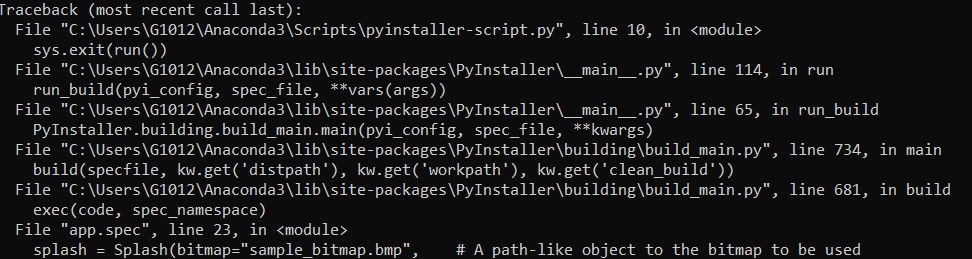
splash = Splash(bitmap="sample_bitmap.bmp",    # A path-like object to the bitmap to be used
                text_rect=(10, 220, 490, 270), # (optional) rect for the text to be displayed
                text_color=0x5454AE)           # (optional) RGB text color, i.e. 0xRRGGBB

exe = EXE(...,
          splash=splash,
          ...)
A more detailed description can be found in building/splash
Python code
For people who don't want to dive into the code: To communicate with the splash screen from the Python program, audit hooks from Python >= 3.8 must be used.
To close the splash screen, call sys.audit("splash.finish").
For the splash screen to display a text, sys.audit("splash.update", msg: str) must be called. This text is then displayed in the area specified by text_rect in the color text_color. If no string msg is passed, a TypeError is raised.
Chrisg2000
on 15 Dec 2019
Okay, after more failures than I would have liked, I have now made the splash screen independent of the Python Audithook system. So the splash screen is now _backwards compatible_ up to Python 2.7 (even though support has expired). So the discussion about the Audit Hooks was useless...
Python
The Python interpreter now communicates with the bootloader through the same IPC system that was previously used for communication in onefile mode. This means that the Python interpreter connects to a named pipe through which the commands are sent. To improve the handling in Python, PyInstaller now has an "internal module" called pyi_splash, which can be imported by the user into their Python script. This allows the splash screen to be used as a sort of module in Python. This Python module pyi_splash, once imported, connects to the bootloader and manages this connection. Therefore the user no longer has to deal with the audit hooks, but can simply call functions of the module that take care of the whole connection. Thereby this module acts as an RPC system. Here is an example:
import pyi_splash                                      # "fake-module" inside PyInstaller

pyi_splash.update_text("PyInstaller is a great software!")  # text will be printed
pyi_splash.close()                                     # closes itself
Of course the import should be in a try ... except block, in case the program is used externally as a normal Python script, without a bootloader.
Bootloader & Building
In addition, the resources for the splash screen are no longer attached to the application as application resources in Windows, but are attached to the application file together with/inside the CArchive. This also solves the problem that the relatively large bitmap data is stored several times in memory. This is also a basis to implement a splash screen for *nix systems relatively easy, because the transfer of the resources is already available. Only the code for the GUI and the communication has to be written.
This also changes the usage inside the spec file:
splash = Splash(bitmap="sample_bitmap.bmp",    # A path-like object to the bitmap to be used
                text_rect=(10, 220, 490, 270), # (optional) rect for the text to be displayed
                text_color=0x5454AE)           # (optional) RGB text color, i.e. 0xRRGGBB

exe = EXE(pyz,
          a.scripts,
          splash,      # <--
          ...)
First of all: thank you for the hard work! This would really be nice feature to have.
For the love of god, I cannot get this to work in a test scenario.
I'm working in a virtual environment with the splash_feature branch installed by pip.
upon executing
pyinstaller.exe --onefile --splash .\splash24b.bmp .\splash_test.py,
I see the splash feature being recognized by pyinstaller:
INFO: PyInstaller: 4.0.dev0+g0ca59363.mod
INFO: Python:  3.6.10 (conda)
INFO Platform: Windows-10-10.0.18362-SP0
[...]
INFO: checking Splash
INFO: Building Splash because Splash-00.toch is non existent
INFO: Building splash \path\to\build\splash_test\Splash-00.res
[...]
Processing pre-find module path hook pyi_splash
adding pyi_splash module to application dependencies
[...]
and yet, when I try to execute the .exe, I get
Traceback (most recent call last):
  File "splash_test.py", line 13, in <module>
  File "PyInstaller\fake-modules\pyi_splash.py", line 132, in wrapper
ConnectionError: The connection is not initialized. Did this module failed to load?
[7052] Failed to execute script splash_test
splash_test.py:
from time import sleep
import pyi_splash

pyi_splash.update_text("PyInstaller is a great software!")
sleep(10)
pyi_splash.update_text("Second time's a charm!")
sleep(10)

pyi_splash.close()
What am I doing wrong here?
 ErwinP
on 14 Jan 2020
ErwinP
on 14 Jan 2020
You are probably not doing anything wrong when using it, but I didn't mention above that if you want to test the branch locally, you have to recompile the bootloader because the source code has changed. See Building The Bootloader for details.
I hope this helps!
~Added: I compiled the bootloader once for testing, so you don't have to install MSVC to test the feature. Please note that this is an unofficial build.
splash-feature_build-unofficial-git_rev0ca59363.zip~
Chrisg2000
on 14 Jan 2020
Working with your compiled bootloader does indeed seem to do the trick, thanks!
I however don't see any of the text? I've used both "custom" splash image, as well as the images provided in \tests\functional\data\splash.
Kind regards,
Erwin
ErwinP
on 15 Jan 2020
If you use the --splash command line option, the option to show text is disabled by default. The bootloader does not know where to place the text. In order to see text, you must adjust the text_rect parameter in the generated spec file.
For more details, the pull request also contains documentation about this feature. See Improving and Building the Documentation to see how to generate the documentation from the splash-feature branch. Alternatively, the text_rect parameter is also described in splash.py.
Otherwise, you can also run py.test tests\functional -k test_windows_pyi_splash to test if the splash screen works properly.
Chrisg2000
on 15 Jan 2020
Hi, sorry for my delayed response.
Although I did go trough the documentation, I failed to see that requirement, my appologies.
I tested the feature in a small test app and a larger one, en both times it seemed to work fine.
However, compiling with PyInstaller pulled from github, leads to problems with my program: most submodules doesn't seem to be included in the compilation (my program is only 8 mb, vs 350mb when compiling using the pip-distributed version). This happens both using the developper branch as well as the master branch, and limits my options for testing the splash feature.
Nonetheless, for what it's worth, here's my 2 cents:
- There's no indication of the splash screen on the Windows Taskbar. The resulting splash "ghost screen" feels kind of weird, and can get "lost" if the user is opening/using other programs. This is especially true if loading of the program takes quite some time. Having an icon on the Taskbar would furthermore allow you to close the splash screen/loading of the program when you accidentally launched it, or when it's taking abnormally long.
- Submitting the coordinates of the text box in pixels is kind of counterintuitive, and it took me quite some trial and error to get it on my bitmap. Although it's easier if you determine the coordinates in (for example) photoshop, I would suggest (1) providing them as percentages of bitmap width and height and (2) providing them as 1 coordinate only, being the lower left corner of the text box only. If time is limited, I can make suggest such change as a pull request, but given my limited experience in programming, I'd rather have your oppinion on this.
Thanks for all the effort!
Erwin
ErwinP
on 20 Jan 2020
Your errors when compiling with PyInstaller have nothing to do with the splash screen feature, right? The Splash build target should actually give error messages when something doesn't work as it should.
About your two points:
- A splash screen has no indicator in the taskbar in most applications, at least in MS Office programs. Most of all, it would be hard to implement, since the close signal is sent to the unpacking bootloader, which then has to communicate with the Python interpreter to close it properly. This would require a communication between the two bootloader instances to be established again. As a suggestion one could keep the splash screen permanently in the foreground, but this would be annoying if the program takes a long time to unpack.
- I don't think the coordinates are complicated, mainly because pretty much every graphical library I have worked with so far has defined a rect like this on a coordinate grid.
(1): I think to specify the rect by percent on the image would be cunter intuitive, especially if a developer wants to position the text very exactly on the bitmap. Maybe there is still room for improvement in the documentation here.
(2): Again, I find this problematic, because the exact positioning would be more difficult.
Thanks for testing the feature and contributing ideas!
PS: Percentage positioning could be introduced if the bootloader supports splash screen scaling, which is not (yet) provided in my version. Maybe this can be introduced by a later pull request. I personally think it is more important that a Linux/MacOS version of the splash screen is implemented first.
Chrisg2000
on 24 Jan 2020
Your errors when compiling with PyInstaller have nothing to do with the splash screen feature, right? The
Splashbuild target should actually give error messages when something doesn't work as it should.
That is correct: I cannot compile with the master or dev branch, even without your commits merged. Interestingly, I don't get any errors: it compiles, but it's only part of the program.
About your two points:
- A splash screen has no indicator in the taskbar in most applications, at least in MS Office programs. Most of all, it would be hard to implement, since the close signal is sent to the unpacking bootloader, which then has to communicate with the Python interpreter to close it properly. This would require a communication between the two bootloader instances to be established again. As a suggestion one could keep the splash screen permanently in the foreground, but this would be annoying if the program takes a long time to unpack.
- I don't think the coordinates are complicated, mainly because pretty much every graphical library I have worked with so far has defined a rect like this on a coordinate grid.
(1): I think to specify the rect by percent on the image would be cunter intuitive, especially if a developer wants to position the text very exactly on the bitmap. Maybe there is still room for improvement in the documentation here.
(2): Again, I find this problematic, because the exact positioning would be more difficult.Thanks for testing the feature and contributing ideas!
Thanks for clarifying! Perhaps, when merging of this feature is eminent, indeed a little bit more details about the positioning can be added to the docs.
PS: Percentage positioning could be introduced if the bootloader supports splash screen scaling, which is not (yet) provided in my version. Maybe this can be introduced by a later pull request. I personally think it is more important that a Linux/MacOS version of the splash screen is implemented first.
Personally, I follow your reason :) Cross-platform implementation should be indeed the focus now, rather than adding additional features.
Thanks for your clarification!
ErwinP
on 25 Jan 2020
 shyamStarwalt
on 5 Feb 2020
shyamStarwalt
on 5 Feb 2020
NameError: name 'Splash' is not defined
shyamStarwalt
on 5 Feb 2020
@shyamStarwalt this isn't implemented yet, see #4581
 Legorooj
on 19 Apr 2020
Legorooj
on 19 Apr 2020
At the moment I'm rethinking a bit the proposal of @treetoc and @keelung-yang, which I didn't quite understood at that time (maybe linguistically).
The suggestion is to attach a custom executable to the bootloader, which (before the rest of the application is unpacked) is extracted and started.
This would have the advantage that a developer could start a self-programmed splash screen instead of the built-in one (maybe #4581). Another advantage would be, that the custom progam could be choosen depending on the platform, if the developer supports it.
There are a few questions that came to my mind:
- could this make the program a security risk? An attacker could replace the splash program with a malicious one afterwards or add one if it was not previously attached. Could this be ignored, since attackers were previously able to modify the python bytecode?
- If a user sees that a program was created with PyInstaller, he would probably rather scan the Python code for security risks and not the (compressed) splash screen program
- A virus scanner might have a hard time to detect a harmful splash program, because the bootloader would save the splash program compressed and starts it immediately after extraction.
- does it make any sense to implement such a feature and call it "splashscreen"? There could be much more scenarios of use than just a splashscreen (prepare environment, check license, etc.) So should maybe such a feature be called "Autostart Program"?
Chrisg2000
on 27 Apr 2020
@Chrisg2000: now that you have mentioned a "custom executable [...] that is run before the rest of the application is unpacked" I'd like to bring forth an idea, that has been in my head for a while.
The whole purpose of this is to provide some feedback to the user that something is happening, should the unpacking take a bit longer (large assortment of libraries, additional data files or both).
In my opinion only a very minimal set of libraries - possibly only one - may be required to get the application started and the other stuff is required later.
My idea now is to tell via spec file what is the minimum that has to be unpacked, so the appliation will start. This would provide a certain freedom and flexibility how to provide feedback to the user and if the minimum stuff is unpacked fast enough the wait could be tolerable.
If the application would be a GUI application, only a GUI library needs to unpacked first to run the app and bring up e.g. the main window, or a custom designed splash or other wait dialog based on that GUI library.
After starting the basic application, PyInstaller would continue unpacking the rest of the package in parallel and report the current progress or at least the end of the unpacking to the running application via IPC (e.g. zeroMQ has static linking exception). The application then knows when it has all its dependencies available and can do all the imports.
Too crazy or is there something to it?
 antimatter84
on 27 Apr 2020
antimatter84
on 27 Apr 2020
@antimatter84 there's something to it, but would require a major rewrite of the lot of the bootloader and packaging system if I'm not mistaken. (But I could mistaken; the bootloader is my weak point in the codebase)
Legorooj
on 28 Apr 2020
@antimatter84 I agree, there is something to this idea but I think it is not trivial to accomplish or implement.
I am thinking the GUI libraries are in most cases the reason why the unpacking takes so long, because they tend to be quite heavy. For the idea to work the developer would need to figure out which components of a specific library are necessary to use it and I think libraries like Qt don't like to be used while not all of its dependencies are available.
In python code the developer would need to be quite careful on what to load when, since the code would need to operate in a very limited environment. Python (therefor the program) would probably crash if it encounters an import which has not been unpacked At that moment. This would be a huge race between unpacking and using.
@Legorooj As far as my understanding of the bootloader goes, extracting files after Python has been initialized would be in some way doable to implement, but it would need a huge overhaul of the packaging and extracting system (e.g. implement a hierarchy system for the files to unpack).
Chrisg2000
on 29 Apr 2020
Agreed, there are substantial changes involved. It is questionable, if such endeavor like this makes much sense without large demand for such a feature.
I was interested in unpacking duration. I created dummy files of various sizes, e.g. few large files (100m), more medium files (100k) and hundreds of smaller files (5 or 10k). I packed around 600m of additional data files into the single file. The Python application was just a hello world script. It took around 20 to 30 seconds to unpack and run the script.
I dug into the bootloader code. It seems the unpacking boils down to that call to the inflate() function in pyi_archive.c. The parameter Z_FINISH will extract the whole archive in one go, if I understand it correctly.
I think this could be rewritten in a relatively short amount of time to do the decompressing chunk-wise (Z_BLOCK ?) within a loop. According to the zlib documentation, some values have to be set in each iteration, so the next chunk gets correctly decompressed. Could not get my head around this yet.
However, this solution would allow to output progress information.
antimatter84
on 29 Apr 2020
@antimatter84 progress? Maybe you and @Chrisg2000 could collaborate? A show_progress=True/False in the Splash spec class.
Legorooj
on 30 Apr 2020
@antimatter84 progress?
When you run the onefile binary, you would get progress information on stdout, e.g.
Decompressing...
1%
2%
or other information such an refreshing line "x of y bytes decompressed...".
antimatter84
on 30 Apr 2020
@antimatter84 even better would be a progress bar on the splash screen. But that would help.
Legorooj
on 1 May 2020
It is another question how helpful stdout output would be on Windows, if the binary is compiled without terminal support.
But yes, the progress information can be routed to the splash screen. So far, I haven't had a look at the current splash screen implementation by @Chrisg2000.
If the splash would be a separate executable, it sure could read progress data from the other processes stdout.
antimatter84
on 1 May 2020
@antimatter84 @Chrisg2000 is redoing his implementation from scratch, using Tk linked into the bootloader directly. It'll be as part of the bootloader as onefile
Legorooj
on 1 May 2020
I stumbled across this thread while facing the problem of slow starting of a program that I've recently written and packaged with pyinstaller. I think that this is a very worthy effort and I have an idea for implementation that may be helpful...
The Nullsoft Scriptable Install System (NSIS) does this exact thing with a plugin called splash and some simple scripting in the init stage of NSIS startup. The README file at this link shows how that works. https://nsis.sourceforge.io/Docs/Splash/splash.txt
Using an existing piece of working software (splash.exe from NSIS), at least as a reference implementation, may help make this project easier and more successful.
Just for reference, NSIS: https://sourceforge.net/projects/nsis/
 hightowe
on 18 May 2020
hightowe
on 18 May 2020
@antimatter84 I think I found a good solution to the progress update problem in #4887. I took a look into zlib's z_stream struct, which has a field, which contains the current amount of bytes decompressed. The problem I encountered while my PR was, that when the Splash screen thread came around to process the field, it has already been deallocated because the extraction function finished.
So I changed it up to send the name of the TOC,which is being extracted, to the Splash screen and show it instead. This works, since the name of the TOC is in the heap.
Chrisg2000
on 25 May 2020
Assuming the splash screen is implemented in the bootloader, how should the Python program communicate with it?
I thought that the signal to close the splash screen should be sent from the actual users Python program, because it takes some time until the application GUI starts. This would also give the Python program time to start.Possibilities that I have considered would be:
- write a Python module in C that is connected to the Python interpreter as a module with the help of
PyImport_AppendInittab. But I think Cython told me that Python modules in C have to be compiled explicitly to a special API version, which would not allow backward compatibility. Or are there ways to bypass this?- since Python 3.8 there is the possibility to add Runtime Audits to the Python interpreter after PEP 578. So the bootloader code could create a hook with
PySys_AddAuditHookwhich can be called by Python withsys.audit(). But here the backwards compatibility is not given again.Do you have any other suggestions how the Python program can communicate with the bootloader?
IMO, we just need the splash screen to show when we are unpacking. It could be dismissed after that. Which means there would be a slight time in between when it is dismissed and the application window starts. Probably similar to the time elapsed when we are not using --onefile and start the exe.
 ws1088
on 1 Oct 2020
ws1088
on 1 Oct 2020
@ws1088 see #4887
Legorooj
on 2 Oct 2020
Related issues
 phirst
·
40Comments
phirst
·
40Comments
 LeighKorbel
·
83Comments
htgoebel
·
45Comments
LeighKorbel
·
83Comments
htgoebel
·
45Comments
 klasy
·
48Comments
klasy
·
48Comments
 ghost
·
43Comments
ghost
·
43Comments
Most helpful comment
This is how I would have approached it now:
A simple splash screen that displays only one bitmap, without a window manager frame. This would also solve styling problems. On the bitmap the user can then show what he wants, whether it is the title, the logo or something else.
I would omit a progress bar, because there is no iterated list at startup that would make a progress bar useful. And if the user's python program "takes over" the splash screen, a progress bar is not always desired.
The only additional feature I suggest is to display messages from the bootloader (messages via
VS) and from the python program.About the GUI: I can think of two possibilities
Disadvantage: For the time being, only users on platforms for which code has already been written can benefit.
including a multi-platform GUI API into the bootloader. If it's possible, parts from it can be removed, which aren't needed to display a splash screen.