Pyinstaller: Can't install package (could not open 'PyInstaller\bootloader\Windows-32bit\runw.exe': Invalid argument error)
I had a problem yesterday when the IT deparment reactivated some group policies on my Windows client, that deny running executibles from some folder (i.e. user folder where my pyCharm projects are located). I removed them, with no success as usual. At some point I tried to reinstall pyinstaller but I'm always running into the same error (see below).
I tried this on a fresh installation of 32bit 3.7.0 python and also on 64bit 3.7.1rc1 python. Same problem with my existing 3.6 version. Also, this occurs with the latest development version.
I tried installing the package also from an elevated shell, with the same result. I also deactivated my anti-virus protection...
I honestly don't believe, that this is a bug within pyinstaller's setup script, nevertheless can be wrong on this. Can somebody check, if this is a problem within pyinstaller or, if not, provide some help on how to get things working again?
I attached a console log below. Thanks for the help!
Tilman
Pip verbose output: https://pastebin.com/A0LjEK4D
Installation fails here:
copying PyInstallerbootloaderWindows-32bitrun.exe -> buildlibPyInstallerbootloaderWindows-32bit
copying PyInstallerbootloaderWindows-32bitrun_d.exe -> buildlibPyInstallerbootloaderWindows-32bit
copying PyInstallerbootloaderWindows-32bitrunw.exe -> buildlibPyInstallerbootloaderWindows-32bit
error: could not open 'PyInstallerbootloaderWindows-32bitrunw.exe': Invalid argument
error
 TilmanK
All 3 comments
This looks like an error in setuptools or pip. Unfortunately the trace does not say more then "Invalid argument".
As you can seen after line 1139 , pip simply runs python setup.py install --record ... --single-v, ersion-externally-managed --compile` which then fails. There is not special handling for Windows-32bitrunw.exe in PyInstaller. Thus I'm afraid, I ca not help here.
 htgoebel
on 20 Oct 2018
htgoebel
on 20 Oct 2018
I'm seeing the exact same thing in a new docker based install.
After an initial checkout, python setup.py build fails,
error: could not open 'PyInstaller\bootloader\Windows-32bit\runw.exe': Invalid argument
The runw.exe file is in a "strange" state now. Git says its modified, but I can't restore or reset it. Git diff yields the same file system error showing up while building PyInstaller:
PS C:\build\pyinstaller> git status
Not currently on any branch.
Changes not staged for commit:
  (use "git restore <file>..." to discard changes in working directory)
        modified:   PyInstaller/bootloader/Windows-32bit/runw.exe
PS C:\build\pyinstaller> git diff
error: open("PyInstaller/bootloader/Windows-32bit/runw.exe"): Invalid argument
fatal: cannot hash PyInstaller/bootloader/Windows-32bit/runw.exe
After waiting? or running setup build a few times, the file eventually disappears:
PS C:\build\pyinstaller> git status
Not currently on any branch.
Changes not staged for commit:
  (use "git add/rm <file>..." to update what will be committed)
  (use "git restore <file>..." to discard changes in working directory)
        deleted:    PyInstaller/bootloader/Windows-32bit/runw.exe
If the file is deleted, i.e. not there, setup build finally succeeds.
I haven't looked into the PyInstaller build process. Is the deletion of files in the source distribution during the build by design or is this an accident? If it is by design.. there seems to be some kind of race condition related to the deletion of runw.exe, like a background process blocking the file for some time before finally deleting it..
 pwuertz
on 16 Jan 2020
pwuertz
on 16 Jan 2020
Found the reason. Windows Defender is messing with that file:
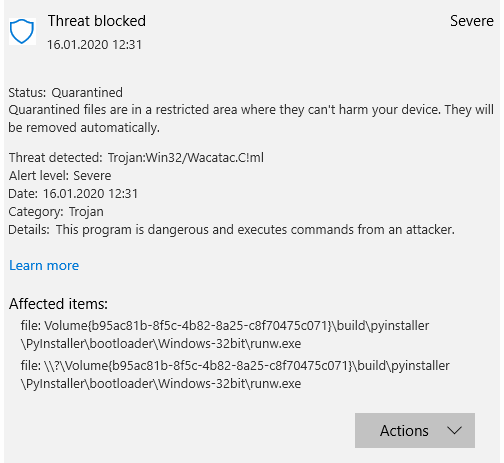
Other virus scanners seem to pick it up too (also reported here #4633)
pwuertz
on 16 Jan 2020
Related issues
 shane-zhang
·
3Comments
shane-zhang
·
3Comments
 Hasimir
·
4Comments
Hasimir
·
4Comments
 alimp5
·
3Comments
alimp5
·
3Comments
 rostyslavnikitin
·
4Comments
rostyslavnikitin
·
4Comments
 AFAgarap
·
3Comments
AFAgarap
·
3Comments
Most helpful comment
Found the reason. Windows Defender is messing with that file:

Other virus scanners seem to pick it up too (also reported here #4633)