Pyinfra: from windows: does not work as expected due to missing stty
Trying pyinfra from windows server 2019.
(venv) PS C:\Users\vagrant> pyinfra --user vagrant --password vagrant -vv --debug 192.168.2.232 exec -- echo hello
'stty' is not recognized as an internal or external command,
operable program or batch file.
Traceback (most recent call last):
  File "c:\users\vagrant\appdata\local\programs\python\python37\Lib\runpy.py", line 193, in _run_module_as_main
    "__main__", mod_spec)
  File "c:\users\vagrant\appdata\local\programs\python\python37\Lib\runpy.py", line 85, in _run_code
    exec(code, run_globals)
  File "C:\Users\vagrant\venv\Scripts\pyinfra.exe\__main__.py", line 4, in <module>
  File "c:\users\vagrant\venv\lib\site-packages\pyinfra_cli\__main__.py", line 8, in <module>
    import pyinfra
  File "c:\users\vagrant\venv\lib\site-packages\pyinfra\__init__.py", line 21, in <module>
    from . import facts  # noqa
  File "c:\users\vagrant\venv\lib\site-packages\pyinfra\facts\__init__.py", line 11, in <module>
    from . import * # noqa
  File "c:\users\vagrant\venv\lib\site-packages\pyinfra\facts\apk.py", line 1, in <module>
    from pyinfra.api import FactBase
  File "c:\users\vagrant\venv\lib\site-packages\pyinfra\api\__init__.py", line 2, in <module>
    from .deploy import deploy  # noqa: F401 # pragma: no cover
  File "c:\users\vagrant\venv\lib\site-packages\pyinfra\api\deploy.py", line 15, in <module>
    from .host import Host
  File "c:\users\vagrant\venv\lib\site-packages\pyinfra\api\host.py", line 7, in <module>
    from .connectors import EXECUTION_CONNECTORS
  File "c:\users\vagrant\venv\lib\site-packages\pyinfra\api\connectors\__init__.py", line 3, in <module>
    from . import ansible, docker, local, mech, ssh, vagrant
  File "c:\users\vagrant\venv\lib\site-packages\pyinfra\api\connectors\docker.py", line 13, in <module>
    from pyinfra.progress import progress_spinner
  File "c:\users\vagrant\venv\lib\site-packages\pyinfra\progress.py", line 23, in <module>
    if IS_TTY else 0
IndexError: list index out of range

(venv) PS C:\Users\vagrant> pyinfra --version
'stty' is not recognized as an internal or external command,
operable program or batch file.
Traceback (most recent call last):
  File "c:\users\vagrant\appdata\local\programs\python\python37\Lib\runpy.py", line 193, in _run_module_as_main
    "__main__", mod_spec)
  File "c:\users\vagrant\appdata\local\programs\python\python37\Lib\runpy.py", line 85, in _run_code
    exec(code, run_globals)
  File "C:\Users\vagrant\venv\Scripts\pyinfra.exe\__main__.py", line 4, in <module>
  File "c:\users\vagrant\venv\lib\site-packages\pyinfra_cli\__main__.py", line 8, in <module>
    import pyinfra
  File "c:\users\vagrant\venv\lib\site-packages\pyinfra\__init__.py", line 21, in <module>
    from . import facts  # noqa
  File "c:\users\vagrant\venv\lib\site-packages\pyinfra\facts\__init__.py", line 11, in <module>
    from . import * # noqa
  File "c:\users\vagrant\venv\lib\site-packages\pyinfra\facts\apk.py", line 1, in <module>
    from pyinfra.api import FactBase
  File "c:\users\vagrant\venv\lib\site-packages\pyinfra\api\__init__.py", line 2, in <module>
    from .deploy import deploy  # noqa: F401 # pragma: no cover
  File "c:\users\vagrant\venv\lib\site-packages\pyinfra\api\deploy.py", line 15, in <module>
    from .host import Host
  File "c:\users\vagrant\venv\lib\site-packages\pyinfra\api\host.py", line 7, in <module>
    from .connectors import EXECUTION_CONNECTORS
  File "c:\users\vagrant\venv\lib\site-packages\pyinfra\api\connectors\__init__.py", line 3, in <module>
    from . import ansible, docker, local, mech, ssh, vagrant
  File "c:\users\vagrant\venv\lib\site-packages\pyinfra\api\connectors\docker.py", line 13, in <module>
    from pyinfra.progress import progress_spinner
  File "c:\users\vagrant\venv\lib\site-packages\pyinfra\progress.py", line 23, in <module>
    if IS_TTY else 0
IndexError: list index out of range
(venv) PS C:\Users\vagrant> python --version
Python 3.7.6
(venv) PS C:\Users\vagrant> pip --version
pip 20.0.1 from c:\users\vagrant\venv\lib\site-packages\pip (python 3.7)
(venv) PS C:\Users\vagrant> type .\venv\Lib\site-packages\pyinfra\version.py
__version__ = '0.13'
 mkinney
All 9 comments
If you want to reproduce, use 'StefanScherer/windows_2019' box.
You could download python using this: https://github.com/mkinney/pywinrm_example/blob/master/run_ps_download.py (but probably have to change ip)
Getting the exe to run as Admin is a PITA. So, you'll have to do that manually (for now).
or just follow https://github.com/Fizzadar/pyinfra/blame/master/docs/getting_started.rst#L86
mkinney
on 22 Jan 2020
This should be fixed in v0.13.1 now (https://github.com/Fizzadar/pyinfra/commit/a9284a80c962a144fe1ee31dc405febfffd19a78).
 Fizzadar
on 23 Jan 2020
Fizzadar
on 23 Jan 2020
Better, but not fixed.
(venv) PS C:\Users\vagrant> pyinfra --version
'stty' is not recognized as an internal or external command,
operable program or batch file.
pyinfra: v0.13.1
Executable: C:\Users\vagrant\venv\Scripts\pyinfra.exe
(venv) PS C:\Users\vagrant>
ooh... but me likey...
(venv) PS C:\Users\vagrant> pyinfra --user vagrant --password vagrant -vv --debug 192.168.2.232 exec -- echo hello
'stty' is not recognized as an internal or external command,
operable program or batch file.
--> Loading config...
--> Loading inventory...
[pyinfra_cli\inventory] Creating fake inventory...
--> Connecting to hosts...
[pyinfra\api\connectors\ssh] Connecting to: 192.168.2.232 ({'allow_agent': False, 'look_for_keys': False, 'username': 'vagrant', 'timeout': 10, 'password': 'vagrant'})
[192.168.2.232] Connected
[pyinfra\api\state] Activating host: 192.168.2.232
[pyinfra\api\operation] Adding operation, {'Server/Shell'}, called @ c:\users\vagrant\venv\lib\site-packages\pyinfra_cli\main.py:484, opLines=(0, 484), opHash=8b22bdcfbff4c6c59d47a9e6ef37d9158a19783b
--> Proposed changes:
Ungrouped:
[192.168.2.232] Operations: 1 Commands: 1
--> Beginning operation run...
--> Starting operation: Server/Shell ('echo hello',)
[pyinfra\api\operations] Starting operation Server/Shell on 192.168.2.232
[pyinfra\api\util] Building command (shell_executable: sh): echo hello
[pyinfra\api\connectors\ssh] Running command on 192.168.2.232: (pty=None) sh -c 'echo hello'
[192.168.2.232] >>> sh -c 'echo hello'
[192.168.2.232] hello
[pyinfra\api\connectors\ssh] Waiting for exit status...
[pyinfra\api\connectors\ssh] Command exit status: 0
[192.168.2.232] Success
--> Results:
Ungrouped:
[192.168.2.232] Successful: 1 Errors: 0 Commands: 1/1
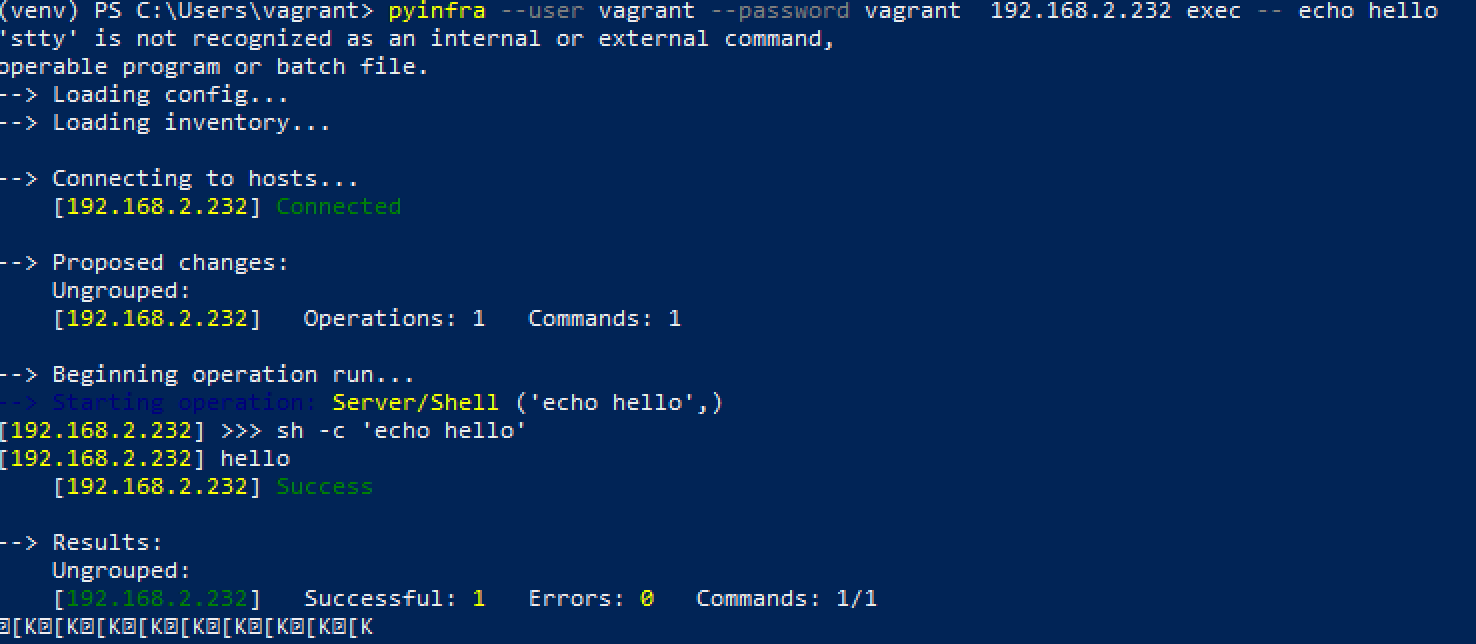
[K[K[K[K[K[K[K[K[K[K[K[K[K[K[K[K[K[K[K[K[K[K[K[K[K[K[K[K[K[K[K[K[K[K[K[K[K[K
(venv) PS C:\Users\vagrant>
Not sure where all of the garbage at the end is coming from...
mkinney
on 23 Jan 2020
The stty output should be fixed by https://github.com/Fizzadar/pyinfra/commit/613084a1f1563478f2f0762650eea1f209f07c1a. Not sure where those end characters are coming from :/
Fizzadar
on 28 Jan 2020
Thanks
Let me know when a new version drops so I can test this.
mkinney
on 28 Jan 2020
Releasing v0.13.3 just now!
Fizzadar
on 28 Jan 2020
Looks great! Works, too. :-)
Still has weird escape sequences at the end. Not sure why. The weird escape sequences show up when I see the spinner. Then the output clears. (until the end of the pyinfra run)
I'm going to close this issue and open a new issue for the garbage at the end. (mainly because I want to "test" the new bug stuffs.
(venv) PS C:\Users\vagrant> pyinfra --help
Usage: pyinfra.exe [OPTIONS] INVENTORY OPERATIONS...
pyinfra manages the state of one or more servers. It can be used for
app/service deployment, config management and ad-hoc command execution.
Documentation: pyinfra.readthedocs.io
# INVENTORY
+ a file (inventory.py)
+ hostname (host.net)
+ Comma separated hostnames:
host-1.net,host-2.net,@local
# OPERATIONS
# Run one or more deploys against the inventory
pyinfra INVENTORY deploy_web.py [deploy_db.py]...
# Run a single operation against the inventory
pyinfra INVENTORY server.user pyinfra home=/home/pyinfra
# Execute an arbitrary command on the inventory
pyinfra INVENTORY exec -- echo "hello world"
# Run one or more facts on the inventory
pyinfra INVENTORY fact linux_distribution [users]...
pyinfra INVENTORY all-facts
Options:
-v Print std[out|err] from operations/facts.
--user TEXT SSH user to connect as.
--port INTEGER SSH port to connect to.
--key PATH Private key filename.
--key-password TEXT Privte key password.
--password TEXT SSH password.
--sudo Whether to execute operations with sudo.
--sudo-user TEXT Which user to sudo when sudoing.
--su-user TEXT Which user to su to.
--parallel INTEGER Number of operations to run in parallel.
--fail-percent INTEGER % of hosts allowed to fail.
--dry Don't execute operations on the target hosts.
--limit TEXT Restrict the target hosts by name and group name.
--no-wait Don't wait between operations for hosts to complete.
--serial Run operations in serial, host by host.
--facts Print available facts list and exit.
--operations Print available operations list and exit.
--support Print useful information for support and exit.
--version Show the version and exit.
--help Show this message and exit.
(venv) PS C:\Users\vagrant> pyinfra --user vagrant --password vagrant -vv --debug 192.168.3.134 exec -- echo hello
--> Loading config...
--> Loading inventory...
[pyinfra_cli\inventory] Creating fake inventory...
--> Connecting to hosts...
[pyinfra\api\connectors\ssh] Connecting to: 192.168.3.134 ({'allow_agent': False, 'look_for_keys': False, 'username': 'vagrant', 'timeout': 10, 'password': 'vagrant'})
[192.168.3.134] Connected
[pyinfra\api\state] Activating host: 192.168.3.134
[pyinfra\api\operation] Adding operation, {'Server/Shell'}, called @ c:\users\vagrant\venv\lib\site-packages\pyinfra_cli\main.py:501, opLines=(0, 501), opHash=32e45051b2c095fb874a05ed0ff99f986219f38c
--> Proposed changes:
Ungrouped:
[192.168.3.134] Operations: 1 Commands: 1
--> Beginning operation run...
--> Starting operation: Server/Shell ('echo hello',)
[pyinfra\api\operations] Starting operation Server/Shell on 192.168.3.134
[pyinfra\api\util] Building command (shell_executable: sh): echo hello
[pyinfra\api\connectors\ssh] Running command on 192.168.3.134: (pty=None) sh -c 'echo hello'
[192.168.3.134] >>> sh -c 'echo hello'
[192.168.3.134] hello
[pyinfra\api\connectors\ssh] Waiting for exit status...
[pyinfra\api\connectors\ssh] Command exit status: 0
[192.168.3.134] Success
--> Results:
Ungrouped:
[192.168.3.134] Successful: 1 Errors: 0 Commands: 1/1
[K[K[K[K[K[K[K[K[K[K[K[K[K[K[K[K[K[K[K[K[K[K[K[K[K[K[K[K[K[K[K[K
(venv) PS C:\Users\vagrant>
(venv) PS C:\Users\vagrant> pyinfra --user vagrant --password vagrant -vv --debug 192.168.3.134 exec -- echo hello
--> Loading config...
--> Loading inventory...
[pyinfra_cli\inventory] Creating fake inventory...
--> Connecting to hosts...
[pyinfra\api\connectors\ssh] Connecting to: 192.168.3.134 ({'allow_agent': False, 'look_for_keys': False, 'username': 'vagrant', 'timeout': 10, 'password': 'vagrant'})
[192.168.3.134] Connected
[pyinfra\api\state] Activating host: 192.168.3.134
[pyinfra\api\operation] Adding operation, {'Server/Shell'}, called @ c:\users\vagrant\venv\lib\site-packages\pyinfra_cli\main.py:501, opLines=(0, 501), opHash=32e45051b2c095fb874a05ed0ff99f986219f38c
--> Proposed changes:
Ungrouped:
[192.168.3.134] Operations: 1 Commands: 1
--> Beginning operation run...
--> Starting operation: Server/Shell ('echo hello',)
[pyinfra\api\operations] Starting operation Server/Shell on 192.168.3.134
[pyinfra\api\util] Building command (shell_executable: sh): echo hello
[pyinfra\api\connectors\ssh] Running command on 192.168.3.134: (pty=None) sh -c 'echo hello'
[192.168.3.134] >>> sh -c 'echo hello'
[192.168.3.134] hello
[pyinfra\api\connectors\ssh] Waiting for exit status...
[pyinfra\api\connectors\ssh] Command exit status: 0
[192.168.3.134] Success
--> Results:
Ungrouped:
[192.168.3.134] Successful: 1 Errors: 0 Commands: 1/1
[K[K[K[K[K[K[K[K[K
(venv) PS C:\Users\vagrant> pyinfra --user vagrant --password vagrant 192.168.3.134 exec -- echo hello
--> Loading config...
--> Loading inventory...
--> Connecting to hosts...
[192.168.3.134] Connected
--> Proposed changes:
Ungrouped:
[192.168.3.134] Operations: 1 Commands: 1
--> Beginning operation run...
--> Starting operation: Server/Shell ('echo hello',)
[192.168.3.134] >>> sh -c 'echo hello'
[192.168.3.134] hello
[192.168.3.134] Success
--> Results:
Ungrouped:
[192.168.3.134] Successful: 1 Errors: 0 Commands: 1/1
[K[K[K[K[K[K[K[K[K
(venv) PS C:\Users\vagrant> pyinfra --user vagrant --password vagrant 192.168.3.134 fact os
--> Loading config...
--> Loading inventory...
--> Connecting to hosts...
[192.168.3.134] Connected
--> Gathering facts...
Loaded fact os- {192.168.3.134}
--> Fact data for: os
{
"192.168.3.134": "Linux"
}
[K[K[K[K[K[K[K[K[K
Related issues
mkinney
·
3Comments
 rajgouravjain
·
5Comments
rajgouravjain
·
5Comments
 Senhaji-Rhazi-Hamza
·
3Comments
Senhaji-Rhazi-Hamza
·
3Comments
 morrison12
·
3Comments
morrison12
·
3Comments
 gnat
·
4Comments
gnat
·
4Comments