Pyfa: Error when attempting to browse Subsystems on new Tengu fit
Bug Report
Error when attempting to browse subsystem on new Tengu fit
Expected behavior:
Drop down will show available subsystem groups
Actual behavior:
Error message, drop down does not work, drop down button disappears. Must quit and restart to get it back.
Detailed steps to reproduce:
Create new Tengu fit
Go to Market tab, click drop down button on Subsystems
Fits involved in EFT format (Edit > To Clipboard > EFT):
[Tengu, Cloaky PVP]
[Empty Rig slot]
[Empty Rig slot]
[Empty Rig slot]
[Empty Subsystem slot]
[Empty Subsystem slot]
[Empty Subsystem slot]
[Empty Subsystem slot]
Release or development git branch? Please note the release version or commit hash:
Not sure of branch, version 2.5.0
Operating system and version (eg: Windows 10, OS X 10.9, OS X 10.11, Ubuntu 16.10):
Mac OSX 10.13.6
Other relevant information:
pyfa vv2.5.0
EVE Data Version: 1399820 (2018-10-09 15:27:02)
OS version: Darwin-17.7.0-x86_64-i386-64bit
Python version: 3.6.3 (default, Oct 22 2017, 22:24:50)
[GCC 4.2.1 Compatible Apple LLVM 7.0.0 (clang-700.0.72)]
wxPython version: 4.0.0b2 (wxWidgets 3.0.4)
SQLAlchemy version: 1.1.10
Logbook version: 1.0.0
Requests version: 2.18.4
Dateutil version: 2.6.1
#
Traceback (most recent call last):
File "/Users/ryan/pyfa/gui/builtinMarketBrowser/marketTree.py", line 61, in expandLookup
File "/Users/ryan/pyfa/gui/builtinMarketBrowser/marketTree.py", line 43, in addImage
File "/Users/ryan/pyfa/gui/cachingImageList.py", line 37, in GetImageIndex
wx._core.wxAssertionError: C++ assertion "(bitmap.GetScaledWidth() >= m_width && bitmap.GetScaledHeight() == m_height) || (m_width == 0 && m_height == 0)" failed at /Users/robind/projects/buildbots/macosx-vm6/dist-osx-py36/Phoenix/ext/wxWidgets/src/osx/imaglist.cpp(79) in Add(): invalid bitmap size in wxImageList: this might work on this platform but definitely won't under Windows.
 brianhultin
All 15 comments
Hi, it's not just a Tengu fit. You can open Pyfa and browse to the Subsystem tab right away to reproduce this issue. I'm running a rather fresh install of Mac OS 10.14.
 AlphaCzech
on 13 Oct 2018
AlphaCzech
on 13 Oct 2018
Thanks for the report! Will take a look tonight. Was planning a release to address #1768 but if I can get this fixed as well, bonus!
 blitzmann
on 14 Oct 2018
blitzmann
on 14 Oct 2018
Can't reproduce on windows, might be mac specific
blitzmann
on 14 Oct 2018
This might be because both the 2x and 1x version of these images are 16x16... I'm not sure why though
blitzmann
on 14 Oct 2018
yep, eve images only provide a 16x16 version, but our new scaling stuff expects 32x32 if you have retina support...
Will try to fix this in the icon script. It'll be hard for me to test it though as I don't have a mac with retina screen
blitzmann
on 14 Oct 2018
Won't be able to test, but I'm almost positive the tweak I make to the icon update script should deal with this.
blitzmann
on 14 Oct 2018
I don't have a mac with retina screen
I do. With master at da601c9a (which includes the changes from #1770), the missing icons no longer break the browser, but the icons themselves are missing so it looks a bit silly:
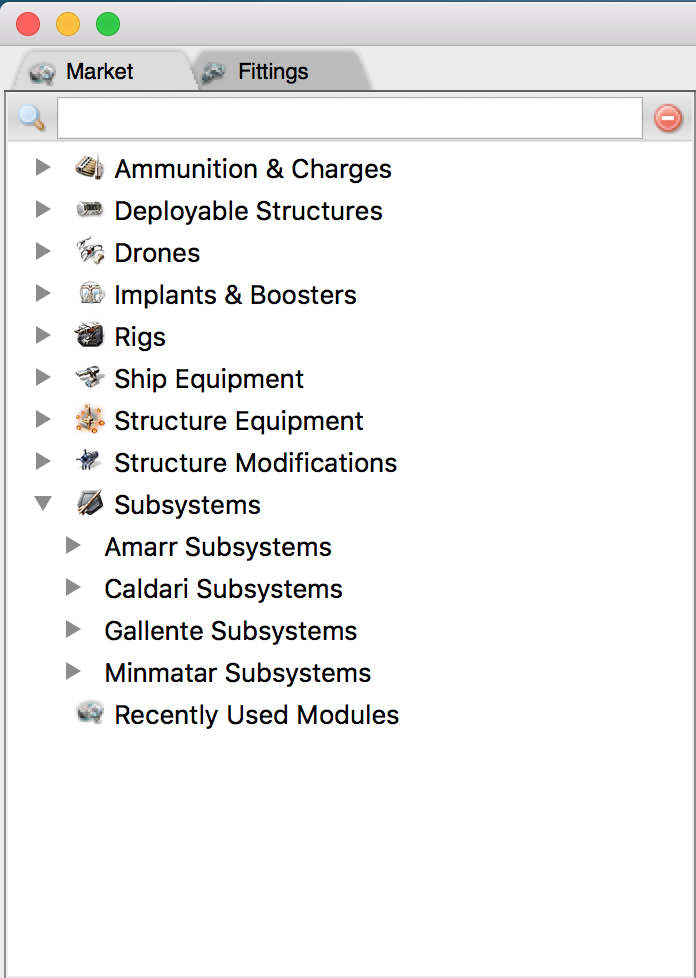
However
gui/bitmap_loader.py falls back to loading the 16x16 images if a scaled version isn't present:
if img is None:
    # can't find the scaled image, fallback to no scaling
    filename = "{0}.png".format(name)
    img = cls.loadImage(filename, location)
    scale = 1
And I can confirm that the icons do render if I rename the @1x versions to the fallback scheme on commit 20fbda9e (was master prior to merging in #1770):
 imgs/icons/{[email protected] => 20959.png} | Bin
 imgs/icons/[email protected]                | Bin 602 -> 0 bytes
 imgs/icons/{[email protected] => 20966.png} | Bin
 imgs/icons/[email protected]                | Bin 462 -> 0 bytes
 imgs/icons/{[email protected] => 20967.png} | Bin
 imgs/icons/[email protected]                | Bin 730 -> 0 bytes
 imgs/icons/{[email protected] => 20968.png} | Bin
 imgs/icons/[email protected]                | Bin 638 -> 0 bytes
 imgs/icons/{[email protected] => 21420.png} | Bin
 imgs/icons/[email protected]                | Bin 494 -> 0 bytes
I think something like this would do it:
diff --git a/scripts/icons_update.py b/scripts/icons_update.py
index 03bbb9fd..738d132d 100644
--- a/scripts/icons_update.py
+++ b/scripts/icons_update.py
@@ -206,9 +206,14 @@ if toadd:
             scale = i+1
             icon = get_icon_file(key, tuple([x*scale for x in ICON_SIZE]))
             if icon is None:
-                missing.add(fname)
-                continue
-            fullname = '{}@{}x.png'.format(fname, scale)
+                # Try fetching the unscaled version instead
+                icon = get_icon_file(key)
+                if icon is None:
+                    missing.add(fname)
+                    continue
+                fullname = '{}.png'.format(fname)
+            else:
+                fullname = '{}@{}x.png'.format(fname, scale)
             fullpath = os.path.join(icons_dir, fullname)
             icon.save(fullpath, 'png')
     if missing:
I'd test it, but I suspect icons_update isn't designed to work on OSX:
$ python scripts/icons_update.py -e /Users/tron/Library/Application\ Support/EVE\ Online/p_drive/Local\ Settings/Application\ Data/CCP/EVE/SharedCache/ -i scripts/icons.json
Traceback (most recent call last):
  File "scripts/icons_update.py", line 60, in <module>
    import graphicIDsLoader
ModuleNotFoundError: No module named 'graphicIDsLoader'
 tron1point0
on 14 Oct 2018
tron1point0
on 14 Oct 2018
@tron1point0 excellent work, thanks for all the info! You're correct that the icons update script needs to be run on Windows machines because it uses pyd files directly from the EVE client, and pyd only works on Windows.
Ah, so the fallback isn't falling back to 1x, it's simply falling back to the file, but the icon update script sets it to 1x... hrm.. in bitmap loader, could you try to get the image with scale-1 instead? I think I would prefer to keep the images with the @1x, and just handle the fallback on the code side
blitzmann
on 14 Oct 2018
in bitmap loader, could you try to get the image with scale-1 instead?
Yep, that works:
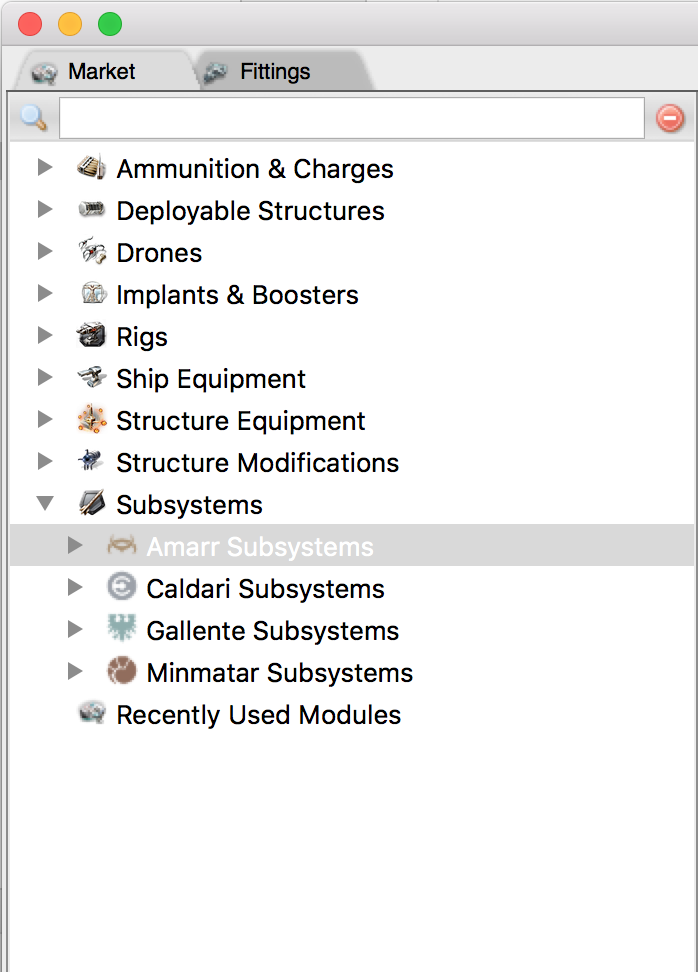
With this diff on top of da601c9a (current master):
diff --git a/gui/bitmap_loader.py b/gui/bitmap_loader.py
index dd7b3cc0..e1ef308e 100644
--- a/gui/bitmap_loader.py
+++ b/gui/bitmap_loader.py
@@ -85,12 +85,19 @@ class BitmapLoader(object):
             import gui.mainFrame
             cls.scaling_factor = int(gui.mainFrame.MainFrame.getInstance().GetContentScaleFactor())
         scale = cls.scaling_factor
+        scaledNameTemplate = "{0}@{1}x.png"

-        filenameScaled = "{0}@{1}x.png".format(name, scale)
+        filenameScaled = scaledNameTemplate.format(name, scale)
         img = cls.loadImage(filenameScaled, location)

+        while img is None and scale > 0:
+            # can't find the scaled image, try the next scale down
+            scale -= 1
+            filename = scaledNameTemplate.format(name, scale)
+            img = cls.loadImage(filename, location)
+
         if img is None:
-            # can't find the scaled image, fallback to no scaling
+            # still can't find the scaled image, fall back to no scaling
             filename = "{0}.png".format(name)
             img = cls.loadImage(filename, location)
             scale = 1
pyd only works on Windows.
TIL.
tron1point0
on 14 Oct 2018
Note: We can't drop the "{0}.png" name template yet because the same code also loads pyfa.png, ctabclose.png, etc.
tron1point0
on 14 Oct 2018
Can golf that down to:
diff --git a/gui/bitmap_loader.py b/gui/bitmap_loader.py
index dd7b3cc0..cb1c59cd 100644
--- a/gui/bitmap_loader.py
+++ b/gui/bitmap_loader.py
@@ -84,10 +84,15 @@ class BitmapLoader(object):
         if cls.scaling_factor is None:
             import gui.mainFrame
             cls.scaling_factor = int(gui.mainFrame.MainFrame.getInstance().GetContentScaleFactor())
-        scale = cls.scaling_factor

-        filenameScaled = "{0}@{1}x.png".format(name, scale)
-        img = cls.loadImage(filenameScaled, location)
+        scaledNameTemplate = "{0}@{1}x.png"
+        img = None
+        scale = cls.scaling_factor * 2
+
+        while img is None and scale > 1:
+            scale = scale // 2
+            filename = scaledNameTemplate.format(name, scale)
+            img = cls.loadImage(filename, location)

         if img is None:
             # can't find the scaled image, fallback to no scaling
Also, I suspect future scale values will be powers of 2. (Is there such a thing as a 3x display?)
tron1point0
on 14 Oct 2018
There is currently no 3x in Mac OS X, but the newer iPhones do have 3x scale, so OS X might get it too, eventually.
 m-sasha
on 14 Oct 2018
m-sasha
on 14 Oct 2018
Lets not focus on 3+x, still trying to get basic 2x working right :P
@tron1point0 can you submit a PR with the changes you've made? I think simply handling 2x and then -1 to 1x if it can't find 1x, then down to nothing should suffice. Eventually, the other icons will also be migrated over to the scaled naming conventions, but you're correct we still need to support the old names
blitzmann
on 14 Oct 2018
1772 should be ready to go. It includes a few minor unrelated fixes to get flake8 to stop complaining. (They were causing the Travis build to fail, both on master and in the PR.)
Not sure what to do about the AppVeyor build - it's failing every time because we have no requirements_test. Is the build misconfigured or do we want to create one?
tron1point0
on 15 Oct 2018
Thanks @tron1point0 , saw it last night but didn't get a chance to actually review. Don't worry about the travis and appveyor crap - it's been broken since 2.0 release, and I haven't got around to fixing it :)
blitzmann
on 15 Oct 2018
Related issues
 rinakondur
·
7Comments
rinakondur
·
7Comments
 Dawnkeeper
·
5Comments
Dawnkeeper
·
5Comments
 BessieBusybody
·
3Comments
BessieBusybody
·
3Comments
 kshannoninnes
·
10Comments
kshannoninnes
·
10Comments
 sup3rb
·
3Comments
sup3rb
·
3Comments