Py3status: mpris - problem with mousewheel on_click for volume (hardcoded playback toggle?)
I have this in my config;
mpris {
  format = "[[[{artist} - ]{title}]|[{title}]]{previous}{play}{next}"
  on_click 5 = "exec amixer set Master 3%+"
  on_click 4 = "exec amixer set Master 3%-"
}
But every time I mousewheel up or down to change volume, the playback also stops and starts.
Previously I had setup an on_click 1 to toggle mpc/mpd playback, but with that, clicking the area started and quickly stopped, so I guess there is a hardcoded playback toggle in the module already?
Ninja edit: though thinking about it, there must be a difference between the mousewheel issue and my previous left mouse button toggle issue - if there is a hardcoded toggle on any mouse button, then in the mousewheel case, the volume should change and the playback should toggle only once (on to off), not twice like it is (quickly off then on again) as if there were three events (volume change, off and on).
 mxmilkiib
All 15 comments
Ah. I didn't provide enough information.
Firstly, I think I have things reversed. Wheeldown increases volume.
Secondly, mousewheel up or down is changing entries in the playlist. I cleared mpd playlist, did mpc load http://jungletrain.net/128kbps.pls, then mpc playlist which showed entries for three stream servers from the .pls.
I clicked the mpris module to play, then mousewheel up (which is the wrong way around) both decreased the volume and moved mpd to the next item in the playlist.
Doing it again repeated this behaviour. Doing it on the last entry and mpd stops playing and the bar says "No Track".
Doing it /once more/ and nothing changes in the bar, but I have mpDris2 running in terminal, and it outputs;
2019-03-07 17:53:46,672 mpDris2 WARNING: Disconnected
2019-03-07 17:53:46,675 base INFO: Calling MPD disconnect()
2019-03-07 17:53:46,675 base INFO: Calling MPD connect('localhost', 6600, timeout=None)"
Doing mousewheel down (which is the wrong way around) after this does increase the volume, but mpd is already in a stopped state so the music doesn't start again.
If I mpc clear, load and click to play again, mousewheel down (the wrong way around) just stops and starts the music, staying on the first entry of the playlist, as well as increase the volume.
(After this post, I'm going to swap the 4 and 5 in the config so down = down.)
(Also, I get two notifications on mousewheel, but I guess that's an mpDris2 issue)
mxmilkiib
on 7 Mar 2019
Without digging too deep into this issue, can you try this first?
diff --git a/py3status/modules/mpris.py b/py3status/modules/mpris.py
index 8c2705c..04c7a2c 100644
--- a/py3status/modules/mpris.py
+++ b/py3status/modules/mpris.py
@@ -567,7 +567,7 @@ class Py3status:
         index = event["index"]
         button = event["button"]

-        if index not in self._control_states.keys():
+        if index in self._control_states.keys():
             if button == self.button_toggle:
                 index = "toggle"
             elif button == self.button_stop:
This explanation might mess with your on_click.
There are two ways to control the media player. Either by clicking with a mouse
button in the text information or by using buttons. For former you have to define the button parameters in your config.
 lasers
on 8 Mar 2019
lasers
on 8 Mar 2019
So I made your suggested change. Before I made the change, if I scrolled enough upwards, it rather.. messed up the state of mpd. The module went to "no player running", systemctl showed the service as having exited, but there was still an mpd process running. I had to kill that and restart both the mpd and mpDris2 service (the latter being a user service).
After the change, scrolling over the area does change the volume - though not entirely in the expected way - if I scroll enough the balance goes out of whack!
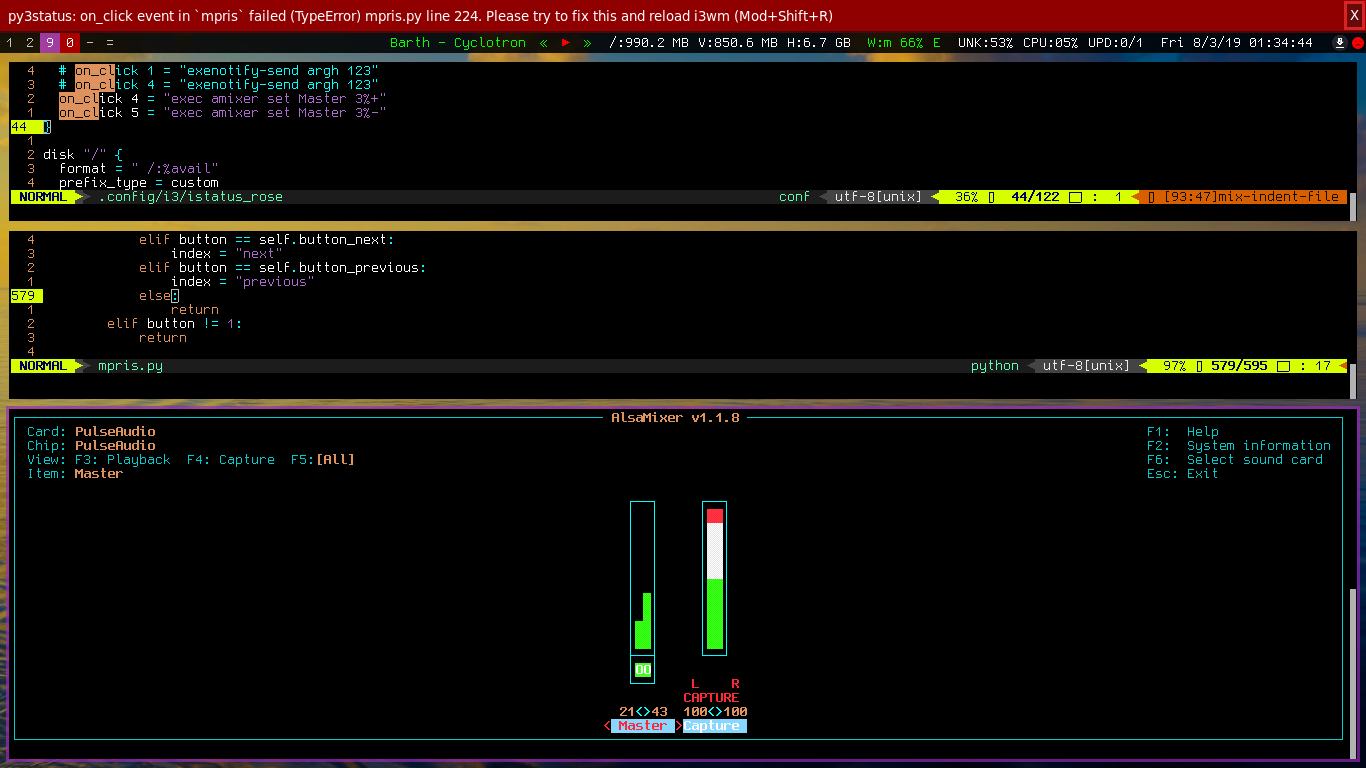
If I left click on it however, I get that error message.
I tried resetting the change (revert edit, remove __py* directory, restart the services), but mpDris2.service: Failed with result 'timeout'.. It just sits there before failing when I try start it, unlike before. Oof, this is a strange one. I'll be rebooting shortly to put a new SSD in, will try test again to confirm the symptoms step by step.
mxmilkiib
on 8 Mar 2019
If I left click on it however, I get that error message.
I get that too. It is not a complete solution. Minimal diff to see if it solves your on_click issue.
After the change, scrolling over the area does change the volume
Okay, we know it's related to on_click since you likely scrolled on song title to change volume. You could use volume_status instead to adjust volume.
The problem might be that several button_* works anywhere on the module and we have button placeholders working only on the said placeholders. We could deprecate either one to reduce issues.
if I scroll enough the balance goes out of whack!
You can try pactl/pamixer instead as amixer could be inaccurate. See https://github.com/ultrabug/py3status/pull/1337 (Ohhh! 1337 d00d!)
The mpdris2 issue seems unrelated to mpris module so I think there is no interest in pursuing this.
lasers
on 8 Mar 2019
Understood that it's not a fix, just reporting what happens :)
I'll have a look at using volume_status for now.
Hehe, nice issue number. I'd like to avoid pulseaudio, as volume changes with that on this older laptop are both lag and create stuttering in the audio.
I'll try find some time in the next few days to test the other mpris solutions for mpd, though mpDris2 appeared to be the more mature of those available on initial investigation.
mxmilkiib
on 10 Mar 2019
Small but related aside; there's a documentation typo
https://py3status.readthedocs.io/en/latest/modules.html#mpris
"Tested players:
bomipowerful and easy-to-use gui multimedia player based on mpv Cantata: qt5 client for the music player daemon (mpd)"
There should be a linebreak before Cantata.
mxmilkiib
on 10 Mar 2019
If you log this... using py3status -d -l /tmp/py3status.log and the diff below... You may notice that clicking clickable buttons can sometimes hang up there... or generally are stuck somewhere... as if it is not able to perform the requested behavior. Note: {state} is not one of the clickable buttons.
Clicking on state/artist/title will update mpris without any hiccups. Tested with vlc and mpdris2.
diff --git a/py3status/modules/mpris.py b/py3status/modules/mpris.py
index 8c2705c..3cd5097 100644
--- a/py3status/modules/mpris.py
+++ b/py3status/modules/mpris.py
@@ -564,21 +564,17 @@ class Py3status:
         """
         Handles click events
         """
-        index = event["index"]
         button = event["button"]
-
-        if index not in self._control_states.keys():
-            if button == self.button_toggle:
-                index = "toggle"
-            elif button == self.button_stop:
-                index = "stop"
-            elif button == self.button_next:
-                index = "next"
-            elif button == self.button_previous:
-                index = "previous"
-            else:
-                return
-        elif button != 1:
+        index = event["index"]
+        self.py3.log('=' * 30)
+        out = 'button:{}... index:{}... ignore:{}...'.format(
+            button, index, isinstance(index, int)
+        )
+        self.py3.log(out)
+        self.py3.log(out)
+        self.py3.log(out)
+        self.py3.log('=' * 30)
+        if button != 1 or isinstance(index, int):
             return

         control_state = self._control_states.get(index)
@mxmilkb I fixed the typo. Thank you. <3
Can you try https://github.com/ultrabug/py3status/tree/mpris-buttons?
Merging this would break the ui. Users would need to use button placeholders instead of anywhere... and this would work with on_click too. If you click anywhere and have on_click assigned , then both events would be processed (your issue).
I hardcode this to button 1 too assuming users wouldn't set up on_click with button 1.
@ultrabug What do you want to do with this issue?
lasers
on 17 Mar 2019
With that branch, scroll wheel on_click works. The spacings are somewhat uneven, though I have a pango bitmap font space bug.

mxmilkiib
on 26 Mar 2019
The alternative (to the branch) could be to disable the scrolling buttons:
mpris {
    format = "[[[{artist} - ]{title}]|[{title}]]{previous}{play}{next}"
    on_click 5 = "exec amixer set Master 3%+"
    on_click 4 = "exec amixer set Master 3%-"
    button_next = None
    button_previous = None
}
EDIT: Config throws an exception.
I tried to keep the spacing consistent but configurable. If this turns out to be a default nuisance, then we can try something different. Reason for padding is also for clicks as single characters meshed together could cause misclicks. Ouch on font's limitation. Here's what mpris looks like with Ubuntu Mono.

EDIT: Try branch again. New commit haz new symbols.
lasers
on 26 Mar 2019
New branch - with just the;
    on_click 5 = "exec amixer set Master 3%+"
    on_click 4 = "exec amixer set Master 3%-"
It doesn't work.
I've added the button_next/previous, but I don't want to restart sway right now as the current build closes all my apps when I do so ;)
mxmilkiib
on 10 Apr 2019
Try swaymsg exec amixer set Master 3%- to see if it works and/or what it printed. Also, run py3status --help to make sure it printed (default: sway) for --wm as pgrep i3 is generous and could pick up unintended processes. --wm sway switches from i3-msg, i3-nagbar to swaymsg, swaynag.
lasers
on 10 Apr 2019
Aah, it was because I had USB headphones also connected. Switched the line to amixer -c 0 ... will test shortly.
mxmilkiib
on 10 Apr 2019
It's working :) Thank you!
mxmilkiib
on 10 Apr 2019
We unassigned button_next and button_previous because there is already {next} and {previous} in the format. Also, we updated the format to get rid of {state}, unexpected glyph spaces, emojis in some fonts, and your original spacing issue. Hope everybody will like the new format. Thanks.
lasers
on 22 Apr 2019
Related issues
 maximbaz
·
8Comments
maximbaz
·
8Comments
 XenHat
·
7Comments
XenHat
·
7Comments
 tobes
·
4Comments
tobes
·
4Comments
 CorruptCommit
·
5Comments
maximbaz
·
6Comments
CorruptCommit
·
5Comments
maximbaz
·
6Comments