Py3status: usbguard is not working as expected
@cyrinux and I ended up using some old version of usbguard because what got in master is behaving weirdly (or we don't know how to configure it). This issue is to consider what to do about usbguard, from fixing a bug (if this is a bug) to reverting to an original "simple" version of usbguard.
@cyrinux has promised to look into this 😛
Marking as 3.16 milestone.
 maximbaz
All 8 comments
behaving weirdly
Behaving weirdly how? Tbh, this sounds like https://github.com/ultrabug/py3status/pull/1376#issuecomment-449652973 / https://github.com/ultrabug/py3status/pull/1376#issuecomment-419310706.
 lasers
on 16 Jan 2019
lasers
on 16 Jan 2019
sorry for the absence of description, we discussed this in irc back when 3.15 was released, and Ultrabug reminded me to create an issue. I'd need to repeat the tests, if I remember correctly it was not detecting newly plugged devices.
maximbaz
on 16 Jan 2019
behaving weirdly
Behaving weirdly how? Tbh, this sounds like #1376 (comment) / #1376 (comment).
@lasers yes it is this, when I check to valid or not the PR I missed I was using version in my home directory at this moment.
 cyrinux
on 16 Jan 2019
cyrinux
on 16 Jan 2019
I gave another test round for the module, my impressions as a user are below. They are intentionally a bit emotionally exaggerated because I'm playing a role of a user who doesn't know the codebase and is discovering this module for the first time.
When the module has no custom configuration, it looks like this:

It took me a while to understand what I'm seeing, lots of colors, and I even have no unknown devices connected at this time. Now I know that I'm seeing previously approved devices, but I don't think this view is a good default, I think by default I should only see newly plugged devices that need my approval.
I see
1/5and I understand that I probably need to scroll to see more. I hover my mouse over the module, scroll the mouse wheel down, and my mouse stops working. Why? Apparently because I was hovering the "Block" word and by scrolling I blocked my mouse 😞Knowing that I have to be pixel-precise not to accidentally approve or reject something, I put my cursor over
1/5and scroll up, I'm getting0/5. The device is not shown, is this an out of index bug or do I have some internal device with no name? In any case I vote for not having zero-based indexing.
I plug a usb stick in, nothing happens to the module, I plug it out and nothing happens again. At first I thought the module is unable to recognize new devices, but after testing turns out I need to wait around 5 seconds for the module to be updated. This has to be instant.
Because of this huge delay, it is possible to approve a device that has already been plugged out. The module both throws an error and mistakenly reports as if the device was successfully approved:
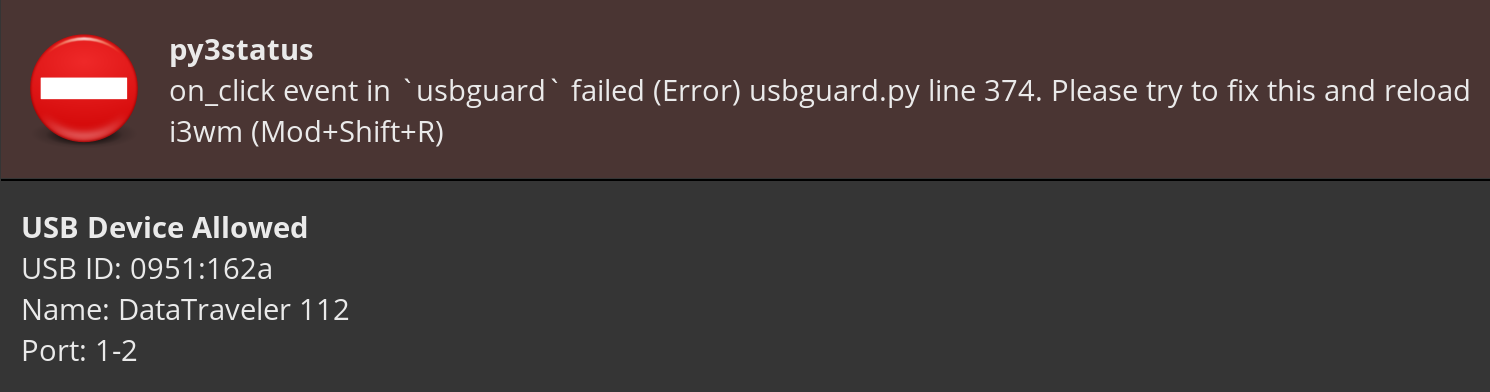
Guys we need a decision on what to do about this module. On the one hand it's a pity to throw away work, on the other hand nobody is actually using this functionality and there are bugs that we don't know about; also maintaining this module is hard, the code is quite complicated to understand.
In practice, what cyrinux and I need is a name of newly plugged device and two buttons, "approve" and "reject". Everything else like scrolling, filters, "permanently", we both disabled with a custom config (we also turned up to be using an older version of this module, that recognizes new devices instantly, but this is minor detail).
If we choose to keep the code as it is, I suggest we change the defaults to a much simpler view, only showing new devices that need approval.
Alternatively, we can try to significantly simplify the module, at a risk that 2 weeks later we get a feature request asking for functionality that was just removed.
Thoughts?
maximbaz
on 21 Jan 2019
On the one hand it's a pity to throw away work
I am fine with throwing away my work if it does not satisfy your need. I was addressing issues such as multiple devices wanting an approval and trying to approve only the one you want... and not having to use up buttons (I think it was something like 1 to accept, 2 to block, 3 to reject?).
Also, @cyrinux had problems and not feeling like he can keep working on this module so I stepped in to help him out. To hopefully let him understand more about composite indexes and how we pass it through event data.
Whatever you and @cyrinux want to do, go ahead (imho).
lasers
on 21 Jan 2019
Thanks guys for your patience and understand, @maximbaz has promised he will try to re-implement it based our discussion and tries.
Goal is to keep it very simple, reactive and secure.
cyrinux
on 22 Jan 2019
- When the module has no custom configuration, it looks like this:
What is the exact issue? Your colors decolorized good Allow too.
- I think by default I should only see newly plugged devices that need my approval.
Change filter to block by default may help. It's not there by default to allow users to play with all filters before settling on a filter (or no filter).
- I was hovering the "Block" word and by scrolling I blocked my mouse disappointed
See if we can add a button to listen to 1 clicks for certain placeholders.
- The device is not shown.
I think it's there to hide device. Without this, we always have to see devices. This allows users to have a filter and still hide devices until we do something with them. By default, it's zero to avoid annoying users with taking up precious bar space. It's not for block filter only. This should allow you to ignore block devices (by leaving it in 0/5 instead of always seeing that blocked device name).
- I need to wait around 5 seconds for the module to be updated. This has to be instant.
Bug relating to daemon / Event. Sorry.
- The module both throws an error and mistakenly reports as if the device was successfully approved.
Fixing 5. will fix this.
lasers
on 22 Jan 2019
Wait for #1547 first, me think.
lasers
on 23 Jan 2019
Related issues
 CuriousFu
·
4Comments
CuriousFu
·
4Comments
 tobes
·
4Comments
tobes
·
4Comments
 ddurieux
·
8Comments
ddurieux
·
8Comments
 claiire
·
4Comments
claiire
·
4Comments
 gmagno
·
6Comments
gmagno
·
6Comments
Most helpful comment
I am fine with throwing away my work if it does not satisfy your need. I was addressing issues such as multiple devices wanting an approval and trying to approve only the one you want... and not having to use up buttons (I think it was something like 1 to accept, 2 to block, 3 to reject?).
Also, @cyrinux had problems and not feeling like he can keep working on this module so I stepped in to help him out. To hopefully let him understand more about composite indexes and how we pass it through
eventdata.Whatever you and @cyrinux want to do, go ahead (imho).