Py3status: Block rules may not be fully applicable to the composites

format = '{format_device} {permanent} {rules} {button}'
format_action_allow = '[\?if=!rule=allow&color=good Allow]'
format_action_block = '[\?if=!rule=block&color=degraded Block]'
format_action_permanent = '[\?if=permanent&color=white \[P\]|\?color=darkgray \[P\]]'
format_action_reject = '[\?if=!rule=reject&color=bad Reject]'
format_device = ('[{name}|Unknown {id} [\?color=darkgray {usb_id}]]'
                 '[ {format_action_allow}]'  # <-- extra space
                 '[ {format_action_block}]'  # <-- extra space
                 '[ {format_action_reject}]')
format_device_separator = ' '
format_notification = 'Applying {rule} on {name}'
rules = []
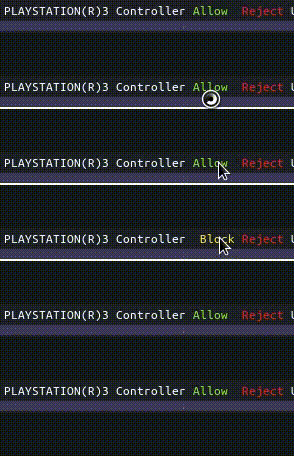
The problem is that there is an extra space between Allow and Reject. The extra space comes from a Block word that are sitting in between both words... ie [ {format_action_block}] in format_device.
Inside [ {format_action_block}] is '[\?if=!rule=block&color=degraded Block]'.
The data is {'rule': 'block'} with some other information about device.
I think the block rules may not be fully applicable to the composites.
# '', None, and False are ignored
# numbers like 0 and 0.0 are not.
valid = not (value_ in ['', 'None', None] or value_ is False)
 lasers
All 10 comments
There is hidden message? :stuck_out_tongue_closed_eyes:
 cyrinux
on 29 Aug 2018
cyrinux
on 29 Aug 2018
@lasers can you create a standalone minimal test case for this? If so the fix becomes easy
 tobes
on 30 Aug 2018
tobes
on 30 Aug 2018
@tobes What should I test in usbguard? I can't reproduce this in a minimal standalone.
lasers
on 30 Aug 2018
lasers
on 30 Aug 2018
This works okay with [\?if=composite ...], but not [ {composite}].
# good output
    format_device = ('[{name}|Unknown {id} [\?color=darkgray {usb_id}]]'
                     '[\?if=format_action_allow  {format_action_allow}]'
                     '[\?if=format_action_block  {format_action_block}]')
# bad output
    format_device = ('[{name}|Unknown {id} [\?color=darkgray {usb_id}]]'
                     '[ {format_action_allow}][ {format_action_block}]')
EDIT: Nevermind. It's bad too...
lasers
on 31 Aug 2018
@tobes https://github.com/lasers/py3status/tree/usbguard-fake
Don't try static_string as it does not work. Try usbguard. I made a fake copy.
lasers
on 31 Aug 2018
Now I am more confused.also the link does not help much. If you made it as a pr in your repo then it would be more useful but also I'm just trying to understand what the problem actually is. For example is the composite empty or does it have content?
I don't really want to have to run a module. The best would be to add a test in test_format.py
tobes
on 31 Aug 2018
I don't really want to have to run a module.
This is a fake module. You don't have to install usbguard. Just click Allow/Block and see it move left/right repeatedly. If the device have block policy, then Block button won't be shown... only Allow and/or Reject.
The composite is empty when the \?if= rule match inside the composite is empty too. Otherwise, it'll be exposed... but this time, it's exposed empty with a space. TLDR: Extra spaces eveywhere.
lasers
on 31 Aug 2018
@tobes I wanted to know if you're seeing this bug okay.
lasers
on 31 Aug 2018
lasers
on 1 Sep 2018
Related issues
 PetrusZ
·
4Comments
PetrusZ
·
4Comments
 XenHat
·
7Comments
XenHat
·
7Comments
 maximbaz
·
7Comments
maximbaz
·
7Comments
 mxmilkiib
·
8Comments
mxmilkiib
·
8Comments
 gmagno
·
6Comments
gmagno
·
6Comments
Most helpful comment