Py-faster-rcnn: I want change anchor size?
Hi guys,
I already changed the code in lib/rpn/generate_anchors.py and nub_output like this:
ratios and num_output like this


However, I got the following error.

Could you please help?
Best
 moyans
All 23 comments
layer {
name: 'rpn_cls_prob_reshape'
type: 'Reshape'
bottom: 'rpn_cls_prob'
top: 'rpn_cls_prob_reshape'
reshape_param { shape { dim: 0 dim: 18 dim: -1 dim: 0 } }
}
You should change this 18 to 24
 catsdogone
on 30 Apr 2016
catsdogone
on 30 Apr 2016
@catsdogone The problem has been solved, thanks for your answer help me a lot,best wish.
moyans
on 5 May 2016
@catsdogone Hello, may I ask you a question again? I change scales=2**np.arange(3,6) to scales=2**np.arange(3,6),the anchor number should be increased ,and rpn_cls_score layer and rpn_bbox_pred layer num_output should be change to.however, If I change num_output program will be reported to the error.
moyans
on 23 May 2016
@moyans Hello, I also met this issue , have you found the reason?
 yytzjgsu
on 25 Jun 2016
yytzjgsu
on 25 Jun 2016
@moyans Hello! Do you solve the problem? I changed aspect ratios and followed catsdogone's method, it's works, but when I changed scales just like you, it didn't work.Do you have any idea how to fix it?
These are my changes:


As you see, I just changed "dim: 18" to "dim: 140" and I don't know whether it's right or not!
The error goes like this:

 JayMarx
on 8 Nov 2016
JayMarx
on 8 Nov 2016
@JayMarx I have meet the same error with you. I have found the solutions as follows:
at function " def generate_anchors(base_size=16, ratios=[0.3, 0.5, 1, 1.5, 2], scales=2**np.arange(1, 6)): ",
but at anchor_target_layer.py:
def setup(self,bottom,top)
layer_params = yaml.load(self.param_str_)
anchor_scales =layer_params.get('scales', (8, 16, 32))
self._anchors = generate_anchors(scales=np.array(anchor_scales))
we should change this code by:
layer_params = yaml.load(self.param_str_)
anchor_scales =layer_params.get('scales', (8, 16, 32))
self._anchors = generate_anchors()
at last the generate_anchors() can use the scales that we defintion
 liuhyCV
on 3 Dec 2016
liuhyCV
on 3 Dec 2016
@liuhyCV @catsdogone Thank you! I have solved this problem several days ago,and just like your solution @liuhyCV ,we should also change the scales in the archor_target_layer.py:) and I just write the parameter in anchor_target_layer.py like this:
def setup(self,bottom,top)
layer_params = yaml.load(self.param_str_)
anchor_scales =layer_params.get('scales', (scales I want...))
self._anchors = generate_anchors(scales=np.array(anchor_scales))
which has the same effects
JayMarx
on 5 Dec 2016
Sorry for the noob question here, but what are the numbers in the ratios list (ratios=[0.3, 0.5, 1, 1.5, 2]) and the as the arguments for the np.arrange function?
I also want to be able to find smaller objects in images and I found this thread, but I am trying to understand what the answers given here actually mean. And is this supposed to change in runtime or in the training process?
Thank you.
 paulomarcos
on 9 Dec 2016
paulomarcos
on 9 Dec 2016
@JayMarx I did the changes you mentioned, the code runs fine however my regressor's results are completely off after i make the changes. Did you get expected results after just changing the scales in generate_anchor.py and anchor_target_layer.py ?
 harjatinsingh
on 3 Jan 2017
harjatinsingh
on 3 Jan 2017
@liuhyCV I did the changes you mentioned, the code runs fine however my regressor's results are completely off after i make the changes. Did you get expected results after just changing the scales in generate_anchor.py and anchor_target_layer.py ?
harjatinsingh
on 3 Jan 2017
@harjatinsingh I simply changed the scales and it didn't work well same like yours, actually it's even worse than the ariginal case.
JayMarx
on 4 Jan 2017
@catsdogone why do u think the anchor_target is 21?
 lolongcovas
on 6 Feb 2017
lolongcovas
on 6 Feb 2017
@lolongcovas In its generate_anchor.py: 7ratios * 3scales
 Microos
on 25 Feb 2017
Microos
on 25 Feb 2017
if you want change ratios ,you need change ## lib/rpn/generate_anchor.py ratios=[0.5, 1, 2] to [x,x,x,x, you want] ; if you want change scale, you need change## lib/rpn/proposal_layer.py and anchor_target_layer.py
anchor_scales = layer_params.get('scales', (8, 16, 32))
moyans
on 13 Mar 2017
How can I change the anchor scale to (30^2, 40^2, 50^2) ? Also, How can I attached the anchor boxes to conv4_3 instead of conv5_3?.
I am trying to detect small objects in the image.
 aldarabs
on 22 Mar 2017
aldarabs
on 22 Mar 2017
hi @moyans
Could you please share your all steps of the method for detecting small objects?
Thank you !
 albertyou2
on 18 May 2017
albertyou2
on 18 May 2017
@moyans there is any other things to modify? Thank you!
 315386775
on 25 May 2017
315386775
on 25 May 2017
@aldarabs did you manage to attach rpn to conv4_3 instead of conv5_3?
 hadi-ghnd
on 5 Aug 2017
hadi-ghnd
on 5 Aug 2017
You can change two things, one is scale of anchors and another is aspect ratios of anchors.
You can choose to change both or any one.
for an additional scale you have to change code in lib/rpn/anchor_target_layer.py and lib/rpn/proposal_layer.py.
Example you can change to anchor_scales = layer_params.get('scales', (4, 8, 16, 32)) from anchor_scales = layer_params.get('scales', ( 8, 16, 32))
for additional aspect ratio you have to change code in lib/rpn/generate_anchors.py
After all the code change you also need to change the prototxt files.
these are the layers need to be changed .
.........................................................................................................
name: "rpn_cls_score"
In this in the output you have to change from
num_output: 18 # 2(bg/fg) * 9(anchors) 3 scales and 3 aspect ratios
(if you change only scale and did not change aspect ratio then total 4 scales ( 4,8,16,32) and 3 aspect ratios.)
to num_output: 24 # 2(bg/fg) * 12(anchors) 4 scales and 3 aspect ratios
........................................................................................
in layer rpn_bbox_pred"
you have to change from
num_output: 36 # 4 * 9(anchors)
to num_output: 48 # 4 * 12(anchors)
.................................................................
also layer 'rpn_cls_prob_reshape'
from reshape_param { shape { dim: 0 dim: 18 dim: -1 dim: 0 } }
to reshape_param { shape { dim: 0 dim: 24 dim: -1 dim: 0 } }
 rnsandeep
on 19 Sep 2017
rnsandeep
on 19 Sep 2017
@liuhyCV I have two questoins :
- I change my anchor to [16 32 64] and keep the ratio as [0.5 1 2 ] , caused me unable to detect some class in my dataset , and returns failure. It was fine and gives a result when the anchor is [8 16 32] and [0.5 1 2], but it fails with some class with [16 32 64] and [0.5 1 2] . Do you know how to solve this problem?

- the second question is , I train my dataset twice without changing any parameters,it returns different mAp value. I used the original authors anchor parameters [ 8 16 32] and [0.5 1 2] . I feel wierd about the result, if I use the same dataset with the same parameters , no matter I train how many times with my dataset , it should give me the same result , but it gives me different result as pictures show below. I wonder what is the definition of faster rcnn "mAp value".
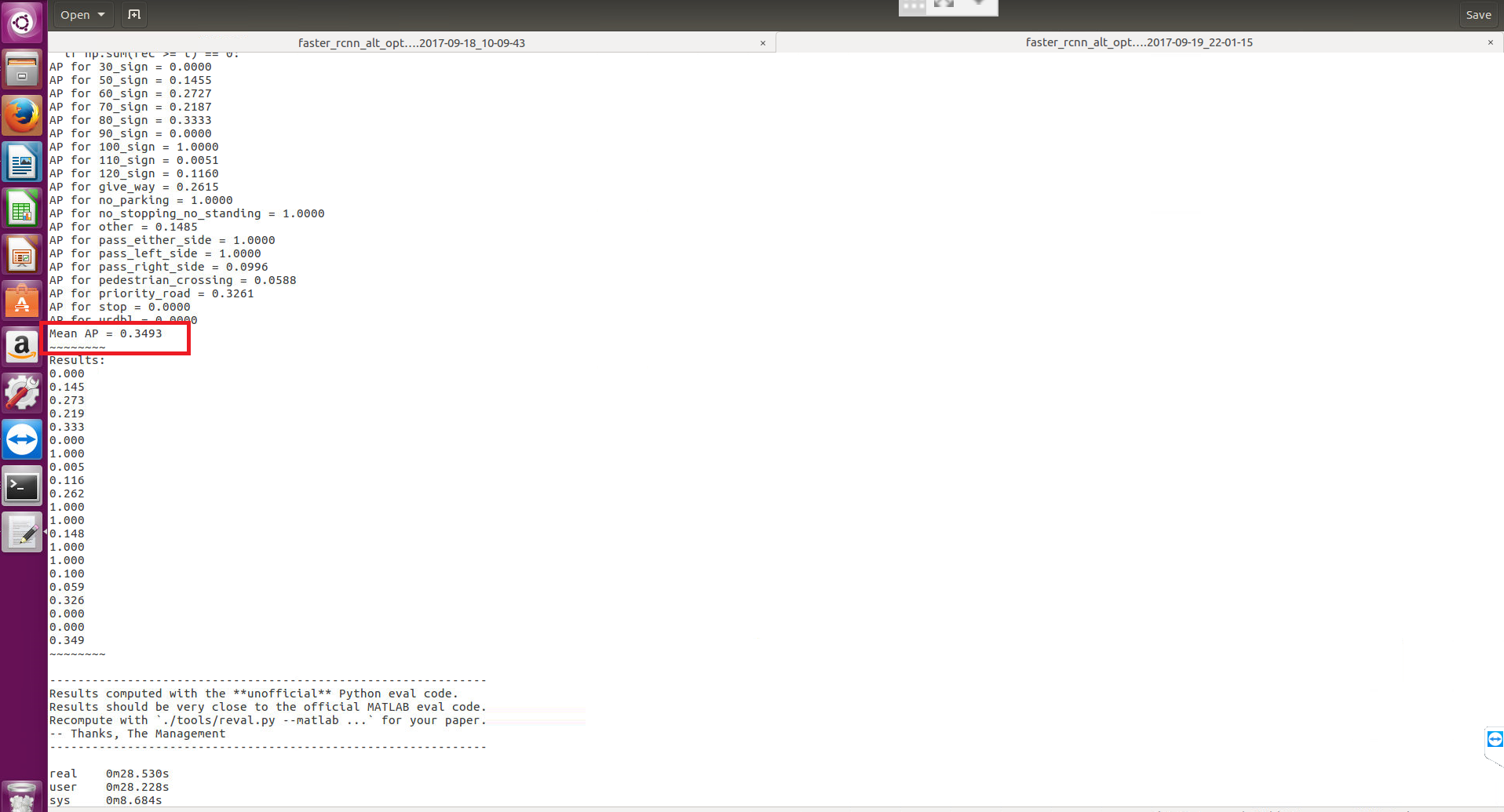
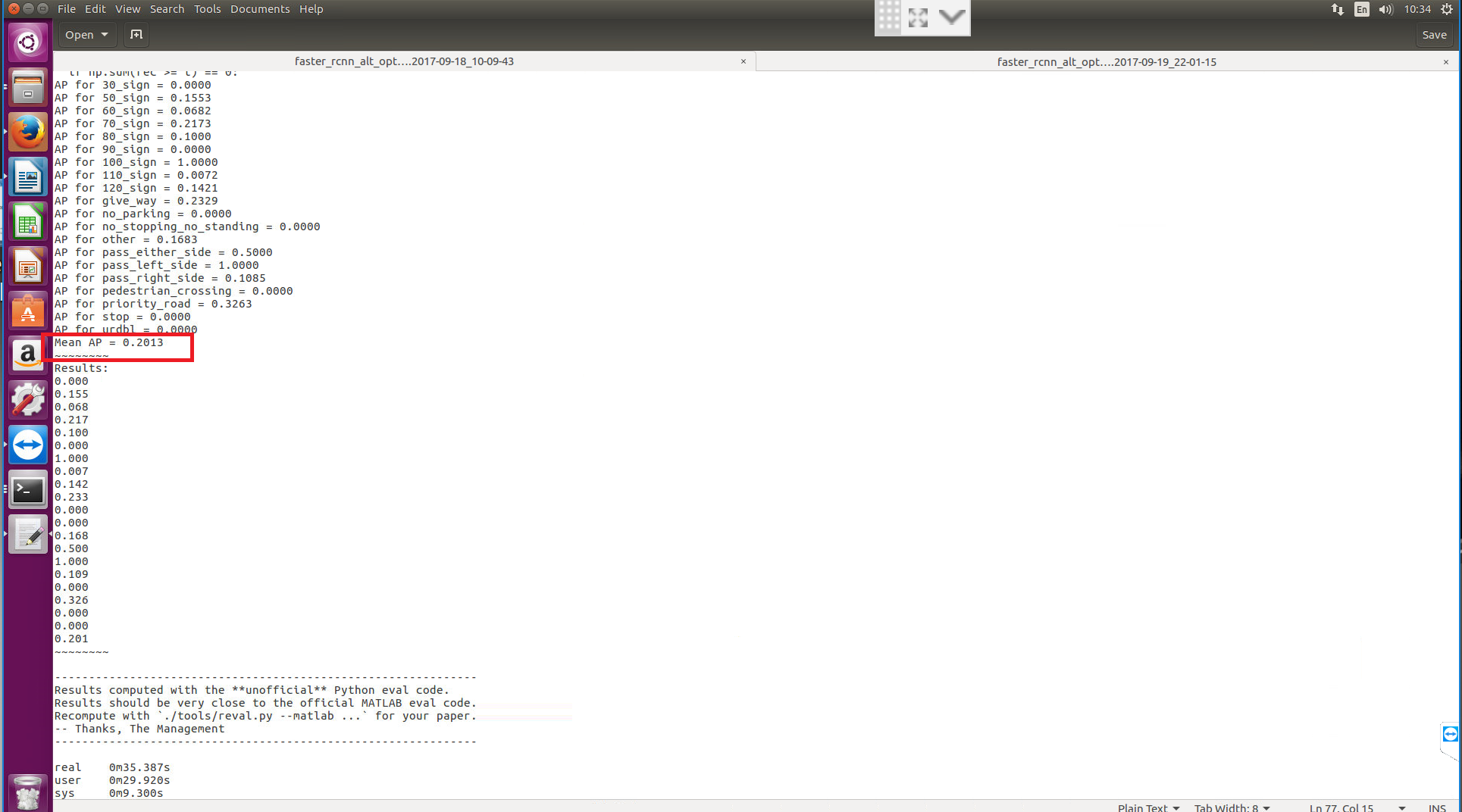
thank you very much !
 ubenz55555
on 20 Sep 2017
ubenz55555
on 20 Sep 2017
hello, do you solve the problem?my image size is 1920*1080,how i change the anchor size? @ubenz55555
 gentlebreeze1
on 12 Dec 2017
gentlebreeze1
on 12 Dec 2017
@ubenz55555 Sorry, I haven't work with this code for long time. But I guess the reason of your first problem maybe for the anchor size. Maybe you should change some parameters in eval code, to keep the anchor size same with your change in training. I have no idea about the second problem.
liuhyCV
on 12 Dec 2017
When I change the scare of the anchor box . I met the problem through I try demo.py like this
Traceback (most recent call last):
File "./tools/demo.py", line 143, in
_, _= im_detect(net, im)
File "/home/omnisky/faster-rcnn-resnet-master/tools/../lib/fast_rcnn/test.py", line 154, in im_detect
blobs_out = net.forward(**forward_kwargs)
File "/home/omnisky/faster-rcnn-resnet-master/tools/../caffe-fast-rcnn/python/caffe/pycaffe.py", line 131, in _Net_forward
self._forward(start_ind, end_ind)
File "/home/omnisky/faster-rcnn-resnet-master/tools/../lib/rpn/proposal_layer.py", line 122, in forward
proposals = bbox_transform_inv(anchors, bbox_deltas)
File "/home/omnisky/faster-rcnn-resnet-master/tools/../lib/fast_rcnn/bbox_transform.py", line 46, in bbox_transform_inv
pred_ctr_x = np.dot(dx,widths[:, np.newaxis]) + ctr_x[:, np.newaxis]
ValueError: shapes (21546,1) and (28728,1) not aligned: 1 (dim 1) != 28728 (dim 0)
Who knows why? I google many answers,but I can't find the causes.
 zhuyanfang000
on 29 Mar 2018
zhuyanfang000
on 29 Mar 2018
Related issues
 monajalal
·
4Comments
monajalal
·
5Comments
monajalal
·
4Comments
monajalal
·
5Comments
 limorbagizada
·
5Comments
limorbagizada
·
5Comments
 MeghaRohilla
·
5Comments
MeghaRohilla
·
5Comments
 kaishijeng
·
4Comments
kaishijeng
·
4Comments
Most helpful comment
layer {
name: 'rpn_cls_prob_reshape'
type: 'Reshape'
bottom: 'rpn_cls_prob'
top: 'rpn_cls_prob_reshape'
reshape_param { shape { dim: 0 dim: 18 dim: -1 dim: 0 } }
}
You should change this 18 to 24