Px4-autopilot: T1 ethernet connection on FMUK66 terminates several min after boot
Describe the bug
The internet connection on the T1 ethernet port of FMUK66 terminates 2-3min after boot.
To Reproduce
Steps to reproduce the behavior:
- FMU boot up
- ping 10.0.0.2 - standard IP of FMUK66
- ping succesfully returns values
- after several minutes no ping response
Expected behavior
stable connection via ethernet
Log Files and Screenshots
Log file with debug enabled - https://logs.px4.io/plot_app?log=c5b2fcf9-edd9-4cb9-9abd-607273b133ec
Add screenshots to help explain your problem.
Screen recording on Linux PC - IP 10.0.0.5 -> https://youtu.be/3KvUtH3y0gM
Video on HW setup -> https://youtu.be/VA7hAinNPpo
Drone (please complete the following information):
- AION R6
- FMUK66 running PX4 11.1
- D2X board with T1 ethernet switch connection to FMUK66 and media converter towards PC
Additional context
T1 media converter used to connect 100Base-TX to T1 Ethernet of Drone.
D2X linux system was still accesible via T1.
No difference in case of direct connection to FMUK66 or via D2X T1 switch.
 dk7xe
dk7xe
All 23 comments
@PetervdPerk-NXP @davids5 ??
dk7xe
on 4 Jun 2020
@dagar doesn't have a T1 ethernet adapter. @davids5 does.
It may take a bit of time before we can get one to @dagar
 igalloway
on 10 Jun 2020
igalloway
on 10 Jun 2020
@dagar I am having one of our new (prototype) T1 adapters sent to you directly today.
igalloway
on 10 Jun 2020
@igalloway I will try to get a quick look at this in the AM.
 davids5
on 11 Jun 2020
davids5
on 11 Jun 2020
@dagar I am having one of our new (prototype) T1 adapters sent to you directly today.
Thank you!
 dagar
on 11 Jun 2020
dagar
on 11 Jun 2020
I am testing it now. @dk7xe Will ping work from both sides without using QGC. IE just pinging. Or does it only die, when QGC is used? If so, what is does your qgc setup pages look like (screen shots).
davids5
on 12 Jun 2020
@dk7xe - answered my own question. Just ping and it dies
davids5
on 12 Jun 2020
@dk7xe Please test https://github.com/PX4/Firmware/pull/15112. if it works OK I will upstream the changes an back port them
davids5
on 15 Jun 2020
@davids5 looks good!
Tested your branch this morning and ping is giving succesful results for more than 2 hours continously now.
dk7xe
on 17 Jun 2020
The only issue that i still have is getting mavlink to work.
If i fire mavlink start -n eth0 -u 14556 -o 14555 -t 10.0.0.5 -r 50000 it says
ERROR [mavlink] port 14556 already occupied
While there is no mavlink instance running on 14556.
And if i use another local port i don't get a mavlink stream over UDP to port 14555 on my computer nor can i establish a connection to port 14554 (thats the one i had finally used with -u flag) on the FMU.
dk7xe
on 17 Jun 2020
@dinomani can you advise @dk7xe on the setup you tested on 5X
@dk7xe once you up and running I will upstream the driver fixes. And either back port or upgrade nuttx
davids5
on 17 Jun 2020
@dk7xe Hi,
How it worked for me on the 5X was:
mavlink stop-all
mavlink start -x -u 14570 -r 200000 -t 192.168.0.254 -m onboard
mavlink start
 dinomani
on 19 Jun 2020
dinomani
on 19 Jun 2020
FMU: 10.0.0.2
Linux PC: 10.0.0.5
tried now with
'nsh> mavlink start -x -u 14570 -r 200000 -t 10.0.0.5 -m onboard
INFO [mavlink] mode: Onboard, data rate: 200000 B/s on udp port 14570 remote port 14550
nsh> mavlink start
INFO [mavlink] mode: Normal, data rate: 2880 B/s on /dev/ttyS1 @ 57600B
WARN [mavlink] hardware flow control not supported'
Mavlink status shows
'nsh> mavlink status
instance #0:
mavlink chan: #0
type: GENERIC LINK OR RADIO
flow control: OFF
rates:
tx: 0.000 kB/s
txerr: 1.272 kB/s
tx rate mult: 0.050
tx rate max: 200000 B/s
rx: 0.000 kB/s
FTP enabled: YES, TX enabled: YES
mode: Onboard
MAVLink version: 2
transport protocol: UDP (14570, remote port: 14550)
instance #1:
mavlink chan: #1
type: GENERIC LINK OR RADIO
flow control: OFF
rates:
tx: 0.694 kB/s
txerr: 0.000 kB/s
tx rate mult: 1.000
tx rate max: 2880 B/s
rx: 0.000 kB/s
FTP enabled: NO, TX enabled: YES
mode: Normal
MAVLink version: 2
transport protocol: serial (/dev/ttyS1 @57600)'
But no data is showing up at QGC.
dk7xe
on 19 Jun 2020
telnet via ethernet works. i can access the console and i'm getting data
dk7xe
on 19 Jun 2020
Telnet is TCP, maybe the problem might related to UDP. I will try to test as well this afternoon
 PetervdPerk-NXP
on 19 Jun 2020
PetervdPerk-NXP
on 19 Jun 2020
BTW: i compared the CONFIG_NETxxxx part of defconfig between 5X and K66. The difference is huge:
5X ---------------------------------
CONFIG_NET=y
CONFIG_NETDB_DNSCLIENT=y
CONFIG_NETDB_DNSCLIENT_ENTRIES=8
CONFIG_NETDB_DNSSERVER_NOADDR=y
CONFIG_NETDEV_PHY_IOCTL=y
CONFIG_NETINIT_DRIPADDR=0XC0A800FE
CONFIG_NETINIT_IPADDR=0XC0A8007B
CONFIG_NETINIT_THREAD=y
CONFIG_NETINIT_THREAD_PRIORITY=49
CONFIG_NETUTILS_TELNETD=y
CONFIG_NET_ARP_IPIN=y
CONFIG_NET_ARP_SEND=y
CONFIG_NET_BROADCAST=y
CONFIG_NET_ICMP=y
CONFIG_NET_ICMP_SOCKET=y
CONFIG_NET_SOCKOPTS=y
CONFIG_NET_SOLINGER=y
CONFIG_NET_TCP=y
CONFIG_NET_TCPBACKLOG=y
CONFIG_NET_TCP_WRITE_BUFFERS=y
CONFIG_NET_UDP=y
CONFIG_NET_UDP_CHECKSUMS=y
K66 --------------------------------
CONFIG_NETUTILS_TELNETD=y
CONFIG_NET_BROADCAST=y
CONFIG_NET_ICMP=y
CONFIG_NET_ICMP_SOCKET=y
CONFIG_NET_SOCKOPTS=y
CONFIG_NET_TCP=y
CONFIG_NET_UDP=y
i have changed defconfig to have the following included
CONFIG_NET_BROADCAST=y
CONFIG_NET_ICMP=y
CONFIG_NET_ICMP_SOCKET=y
CONFIG_NET_SOCKOPTS=y
CONFIG_NET_SOLINGER=y
CONFIG_NET_TCP=y
CONFIG_NET_TCPBACKLOG=y
CONFIG_NET_TCP_WRITE_BUFFERS=y
CONFIG_NET_UDP=y
CONFIG_NET_UDP_CHECKSUMS=y
Now i'm able to initiate a UDP connecton from QGC manually via Comm Links
The FMU does not establish the connection.
in etc/extras.txt i have the following entry still
mavlink start -x -u 14570 -o 14555 -r 200000 -t 10.0.0.5
Port 14555 is mavlink router on my PC. I have on a 2nd UDP port a app that displays all messages send.
dk7xe
on 19 Jun 2020
@davids5 @dagar @dinomani is there anywhere a description what the different config options do? Because there is maybe more than what i have added needed to have good user experience on using ethernet.
You are the experts there and i would have expected a bit more help.
Cheers, Gerald
dk7xe
on 20 Jun 2020
@dk7xe - I will update the defconfig on master.
davids5
on 20 Jun 2020
@dk7xe Have a look here:
https://cwiki.apache.org/confluence/display/NUTTX/Configuration+Variables
davids5
on 20 Jun 2020
@dk7xe PR https://github.com/PX4/Firmware/pull/15154
k66 side:
mavlink start -x -u 14550 -r 200000 -t 192.168.0.254 -m onboard
QGC Side
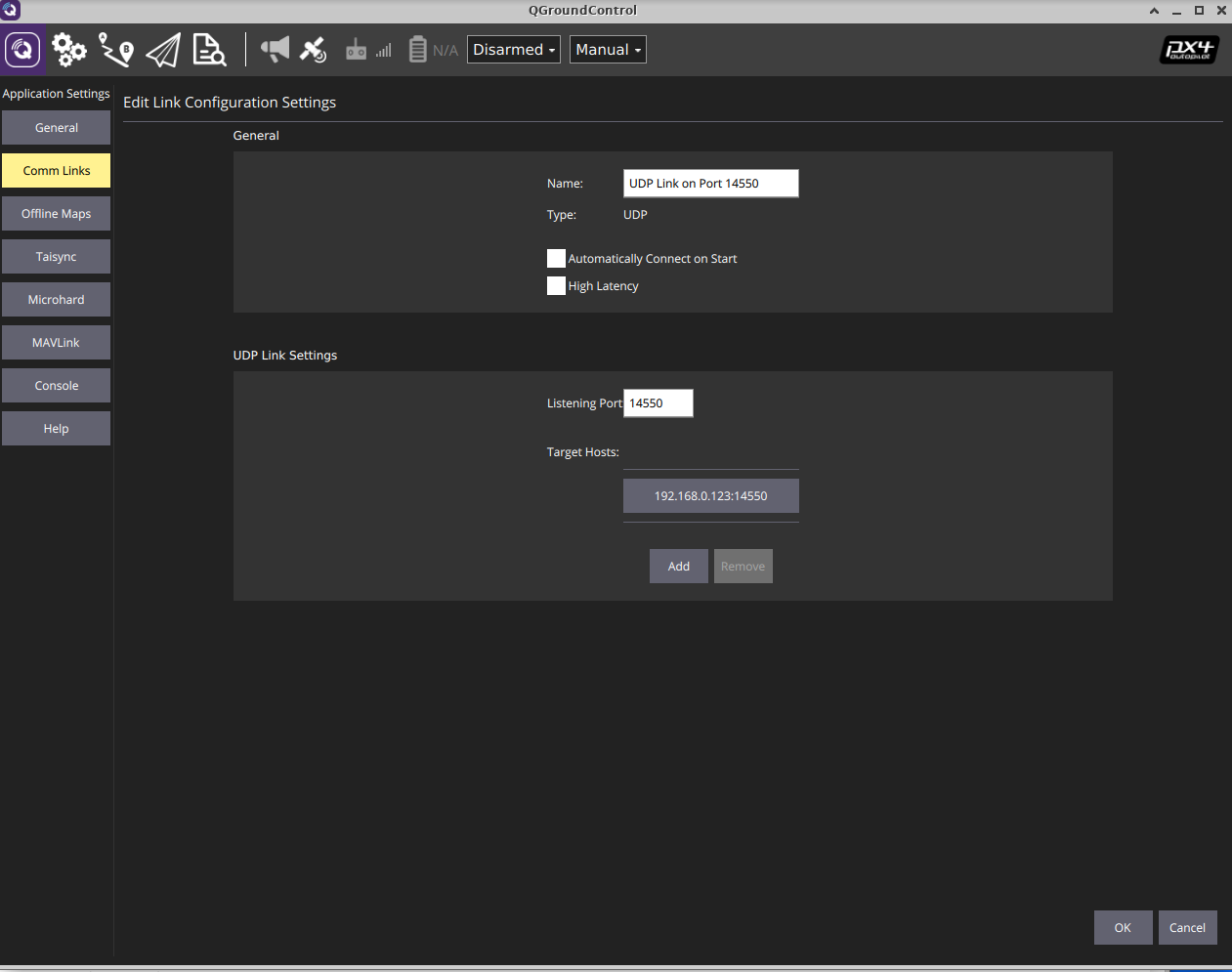
My IP are different, replace with yours
Not sure why you using a different ports it is not necessary
davids5
on 20 Jun 2020
@davids5 the reason for using different ports was because that was my interpretation of https://dev.px4.io/v1.9.0/en/middleware/modules_communication.html
Either the documentation is wrong @hamishwillee or i'm simply too stupid. ;)
I interprete -u flag for the local port on the FMU. if only the -u flag is set i assume that the FMU just listens for a connection being established by the remote PC.
With -o and the -t my assumption is that the FMU sends UDP packet to this destination with mavlink start command. And that's what i have tried to test.
dk7xe
on 23 Jun 2020
But waiting for incoming connection is good enough since our D2X communication board anyhow initiates the UDP connection.
I have tested now with master and it works fine. Thank you!
my /etc/extras.txt looks now that way
set +e
mavlink start -n eth0 -x -u 14570 -r 200000
Related issues
 huangwen0907
·
3Comments
huangwen0907
·
3Comments
 alexcherpi
·
4Comments
alexcherpi
·
4Comments
 kainism
·
4Comments
kainism
·
4Comments
 julianoes
·
3Comments
julianoes
·
3Comments
 Stifael
·
3Comments
Stifael
·
3Comments
Most helpful comment
@dinomani can you advise @dk7xe on the setup you tested on 5X
@dk7xe once you up and running I will upstream the driver fixes. And either back port or upgrade nuttx