Px4-autopilot: [FW]Fixed wing can't land to home point when I choose RTL mode
Run make px4_sitl_default gazebo_plane
My operation flow: start gazebo FW simulation --> upload a FW landing point ---> send take off command ---> switch mode to RTL
FW can't land after I use the latest master branch.
sitl log : https://logs.px4.io/plot_app?log=e409a27b-aa70-4ddd-a7b0-f3118a4e6a41 (I added some debug code for debugging.)
EDIT : Please use this same log link as the master branch: https://logs.px4.io/plot_app?log=5c633144-1470-4bd1-af18-68d189d75a7e
What parameters can be set, when I choose RTL mode, the fixed wing can automatically land to the ground.
I have read this carefully: https://docs.px4.io/master/en/flight_modes/return.html#fixed-wing-fw
 xdwgood
All 24 comments
@RomanBapst Do you know the correct parameter configuration? Thank you
xdwgood
on 15 Nov 2019
RTL_TYPE =1 is typically the best option for fixed wing. It uses the mission landing pattern to RTL.
 Antiheavy
on 15 Nov 2019
Antiheavy
on 15 Nov 2019
@Antiheavy thanks your replay
I also try set RTL_TYPE =1, but still not land when I switch RTL mode.
How should I set the mission land?
xdwgood
on 16 Nov 2019
Huh. Did you upload a mission with a landing pattern? See https://docs.px4.io/master/en/flight_modes/return.html
Antiheavy
on 16 Nov 2019
@Antiheavy FW can land when I choose mission mode and add a landing point.
just like this:
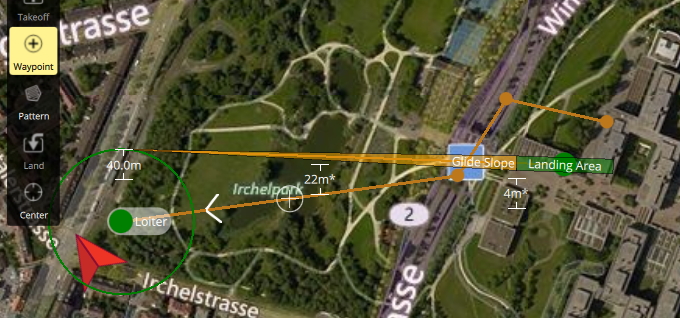
But when I choose RTL mode, FW will not land but hover.
Sorry, I still don't understand what I should do, I just want to get an RTL similar to the rotor (automatic landing to the takeoff point).
xdwgood
on 16 Nov 2019
Are you simulating a fixed wing or a VTOL aircraft? I don’t understand how a forced wing could hover. There must be something strange with your setup, I just can’t tell what.
Antiheavy
on 16 Nov 2019
Are you simulating a fixed wing or a VTOL aircraft?
FW
There must be something strange with your setup,
maybe,But I have not changed other parameters.
Anyway, thank you again for your reply.
xdwgood
on 16 Nov 2019
@xdwgood I notice that you are using the very latest daily build versions of QGC. I know there are a lot of changes happening right now with the mission planning section. Have you tried this with the official released version? Maybe there is a bug with the landing pattern in the daily builds?
http://qgroundcontrol.com/downloads/
Antiheavy
on 16 Nov 2019
@Antiheavy I tried to use the released version of qgc. After executing rtl, the drone will not land, and do circular motion at 100 meters.
xdwgood
on 17 Nov 2019
and do circular motion at 100 meters.
does it do this around the Home location or somewhere else?
Antiheavy
on 17 Nov 2019
does it do this around the Home location or somewhere else?
@Antiheavy it around the Home location
xdwgood
on 17 Nov 2019
do you get errors when trying to upload the mission to the autopilot?
Antiheavy
on 17 Nov 2019
I have not updated the mission. My operation flow is: commander take off--> switch RTL mode
xdwgood
on 17 Nov 2019
Or currently px4 does not support automatic landing in rtl mode, we have to upload a mission and then execute rtl?
xdwgood
on 17 Nov 2019
huh... i'm unfamiliar with these new log messages:
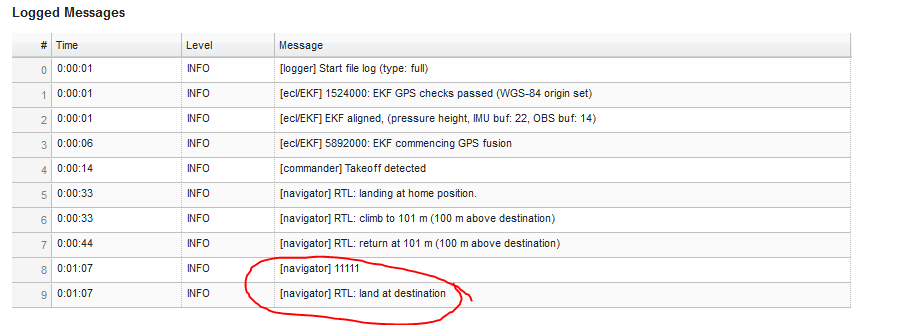
I wonder if something is broken with the new RTL stuff around safe points. @sfuhrer can you take a look at this?
Antiheavy
on 17 Nov 2019
@sfuhrer @Antiheavy
My operation flow: start gazebo FW simulation --> upload a FW landing point ---> send take off command ---> switch mode to RTL
log link: https://logs.px4.io/plot_app?log=5c633144-1470-4bd1-af18-68d189d75a7e
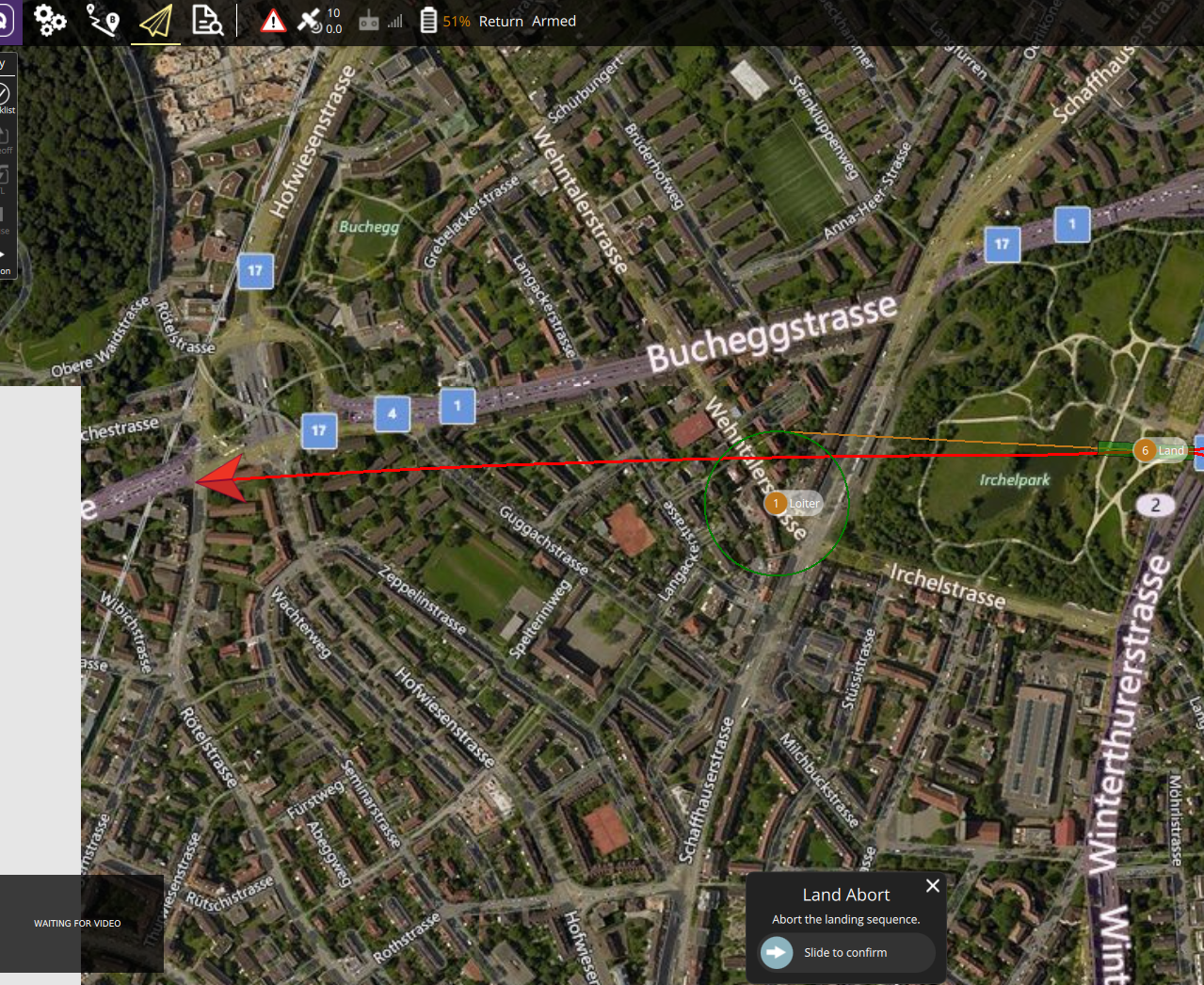
In the log print information, the landing has been prompted, but in the simulation, the drone has been flying forward without landing.

xdwgood
on 17 Nov 2019
Hi @xdwgood,
I've just tried it with the same setup as you described, and it worked for me as expected (landing at mission landing).
https://review.px4.io/plot_app?log=693a3338-5cb1-4059-9f0e-48a261ff8146
https://review.px4.io/plot_app?log=c8686c3f-23c4-4090-bfb0-b62cc32df9c4
Looking at the logged messages of your flight I can only think of that the mission (in your case landing point) upload failed for some reason. It looks like it has no mission landing, and thus chooses Home to go to in the RTL. Ofc it doesn't land there, but circles. I'm wondering though why it then says "Landing at destination" - it should instead should say "RTL: completed, loitering". I just checked, that's what you get when you RTL in a flight without any mission planned.
Did you check if you get any mission feasibility errors while uploading or when starting the flight? And did you also try with a complete mission, meaning with takeoff, normal wp and then the mission landing?
 sfuhrer
on 17 Nov 2019
sfuhrer
on 17 Nov 2019
If you were using RTL_TYPE 1 it should force you to use the mission landing in all except certain cases like you deleted the mission mid-flight or something.
Another weird thing is I’d expect to see a logged message that says something like “unable to use mission landing, returning to Home”
Also, the weird thing is that you should not even be able to takeoff in an auto mode if the vehicle does not have a valid mission.
Antiheavy
on 17 Nov 2019
Also, the weird thing is that you should not even be able to takeoff in an auto mode if the vehicle does not have a valid mission
That was the case, I had to trigger takeoff over the command line as the mission was not valid (only had a landing pattern but no takeoff). What was your exact procedure @xdwgood ?
sfuhrer
on 18 Nov 2019
That was the case, I had to trigger takeoff over the command line as the mission was not valid (only had a landing pattern but no takeoff). What was your exact procedure @xdwgood ?
@sfuhrer I send the takeoff through the command line:
Commander takeoff
And did you also try with a complete mission, meaning with takeoff, normal wp and then the mission landing?
yes,I have tried a mission(wp) and will land automatically when the drone is executed.
Clarify my detailed operation again: start gazebo FW simulation -->open qgc---> upload a FW landing point ---> send take off command by commander takeoff ---> switch mode to RTL(by qgc)--->FW can't land
@Antiheavy @sfuhrer Thanks Reply
xdwgood
on 19 Nov 2019
@xdwgood this was the exact same procedure I used in this flight. In your first log you seem to have RTL_TYPE=0, in which case it is normal that it will go to home and loiter there. In your second log though, with RTL_TYPE=1, the logged messages indicate that it actually did go to the mission landing. Was this not the case?
sfuhrer
on 19 Nov 2019
the logged messages indicate that it actually did go to the mission landing. Was this not the case?
FW did not land, but continued to fly straight.
xdwgood
on 19 Nov 2019
@xdwgood could you maybe try again? To see if it reproducible. As I couldn't reproduce it so far.
sfuhrer
on 19 Nov 2019
@Antiheavy @sfuhrer
I updated the code and tried again, everything worked fine, FW landed on the ground. I am sorry to bother you, thank you for your reply, thank you.
xdwgood
on 20 Nov 2019
Related issues
 zhanghouxin07
·
5Comments
zhanghouxin07
·
5Comments
 julianoes
·
3Comments
julianoes
·
3Comments
 robin-shaun
·
4Comments
robin-shaun
·
4Comments
 RomanBapst
·
5Comments
RomanBapst
·
5Comments
 JacobCrabill
·
4Comments
JacobCrabill
·
4Comments
Most helpful comment
@Antiheavy @sfuhrer
I updated the code and tried again, everything worked fine, FW landed on the ground. I am sorry to bother you, thank you for your reply, thank you.