Px4-autopilot: flight termination circuit braker not working
Describe the bug
As reported by Michael as well on https://discuss.px4.io/t/pixhawk-2-px4-fd-fail-flight-termination-not-working/13281 the CBRK_FLIGHTTERM seems not to work.
To Reproduce
Steps to reproduce the behavior:
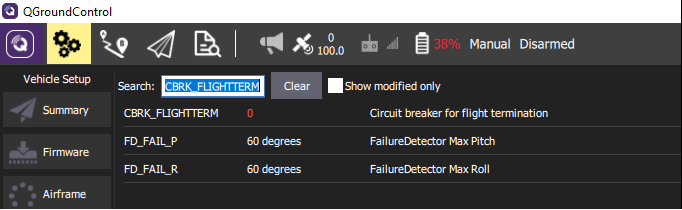
- set CBRK_FLIGHTTERM to 0 to enable circuit breaker
- set one of the PWM_MAIN_FAIL to 2000us and connect e.g. servo to that PWM port.
- arm drone and take off
- force drone to exeed the max roll/pitch angle of the default 60° (FD_FAIL_P and FD_FAIL_R)
- motors DO NOT stop now and a programmed PWM_MAIN_FAIL is not set (servo not moving)
Expected behavior
angle of more than 60 degrees should be detected. Motors to be stopped and PWM_MAIN_FAIL settings to become active.
Log Files and Screenshots
https://logs.px4.io/plot_app?log=58de9b83-0cf3-4e7f-9a0e-55df674bfdbf
Add screenshots to help explain your problem.

Drone (please complete the following information):
- LJI500S test drone with NXP FMUK66 revC
- Red flash light connected to PWM6 port (flash light starts blinking at >1500us) to indicate status of PWM output.
- CBRK_FLIGHTTERM set to 0
- PWM_MAIN_DIS6 set to 900us
- PWM_MAIN_FAIL6 set to 2000us
Additional context
Testing of the PWM_MAIN_FAIL6 settings was previously done by setting RC loss Failsave to "Terminate". With this configuration and by swithing off the RC transmitter motors were shut down and PWM_MAIN_FAIL6 set to 2000us got active. So the issue seems to be related to the CBRK_FLIGHTTERM (FD_FAIL_P and FD_FAIL_R) behaviour only.
Test was executed without propellers! Drone was armed at ground floor and throttle value was set to 50%. Drone was carried up to 5th floor of building and flipped over (upside down).
 dk7xe
dk7xe
All 3 comments
Hi @dk7xe ,
unfortunately the actual termination logic isn't present on v1.9.2, the implementation went just after the release.
See here the difference: https://github.com/PX4/Firmware/pull/10179/files#diff-eb94b84d1c6e5b1530f8ad834cef9b22 , you can see on the left side that it doesn't do anything but printing a message.
In your log, the flag is set, the message is printed so the logic works but you need to go to master of wait for v1.10 to have the complete logic in place.
 bresch
on 22 Oct 2019
bresch
on 22 Oct 2019
@bresch ..thanx. i will give it a try with master.
dk7xe
on 22 Oct 2019
I can confirm it works well with master! Thank you!
dk7xe
on 22 Oct 2019
Related issues
 CarlOlsson
·
5Comments
CarlOlsson
·
5Comments
 prothen
·
5Comments
prothen
·
5Comments
 huangwen0907
·
3Comments
huangwen0907
·
3Comments
 felix-west
·
4Comments
felix-west
·
4Comments
 kainism
·
4Comments
kainism
·
4Comments