Px4-autopilot: Custom firmware crash
Describe the bug
This is a vtol plane I flew for about 15+ flights.
- The FC is a hex cube.
- Firmware version is derived from 1.8.1 stable, RTK gps driver is modified.
- Before this crash flight, I encontered
This time when plane is in mission, reached the 5th waypoint, the plane didn't continue mission, however, it continued to fly towards the 5th point, the flight path is like a "8", then all the command from QGC became useless, still I can see all the plane status (attitude/vel/pos...). At the end the plane ran out of battery and crashed. (no RC, or I would have saved the plane)
To Reproduce
Two ways to reproduce the behavior:
- Prepare the plane with RC, upload the mission, then plug out the sd card before manually take-off. Fly the plane, then switch to mission mode, the plane would fly to the only known point, the flght path is an "8".
- In HIL with rotory wing (can't use fw hil), make the rw excecuting mission, then plug out the sd card, the rw would stop at the moment it reaches the current waypoint and stop there. Made several tests, seems that MAVLINK_MISSION and NAVIGATOR modules stopped. COMMANDER module works normally. Switching mode in QGC is useless, mavlink console is dead. RTL is also useless. Only RC can truely switch the mode to manual/altitude/position.
I checked code, I doubt it's a datamanager problem, maybe one semaphore is blocked... But I don't know how to dig this deeper.
Log Files and Screenshots
Here is the 4 minutes log for this crash, sorry I don't have a tlog as I use Ipad.
https://logs.px4.io/plot_app?log=34ff913a-5414-4046-87db-181a0ea7b507
Additional context
The same thing I suffered one year ago is shown below, after that crash, I changed my SD card to a Kingston card. Then this problem seems solved. However it crashed again as the SD card is obviously not good enough. I will use industriel sd card in the future, but I hope we can do something in code side, we can't guarantee the sd card quality every time...
https://github.com/PX4/Firmware/issues/9271#issuecomment-383260595
Please help me out of this, I would like to offer any message you need.
 JohnSnowball
All 26 comments
Thanks for reporting!
 LorenzMeier
on 25 May 2019
LorenzMeier
on 25 May 2019
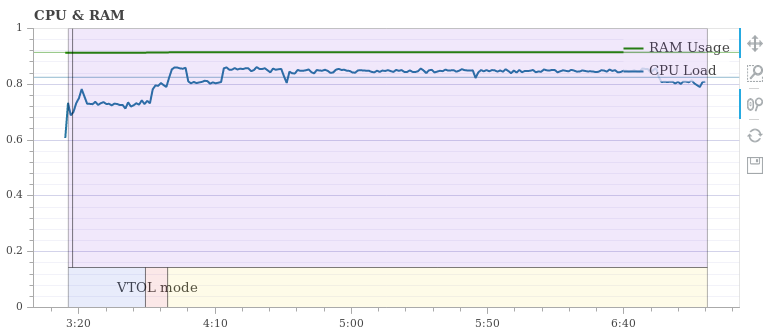
Wow, your CPU and RAM usage is so high, and why not use fmuv3 firmware?
 bys1123
on 26 May 2019
bys1123
on 26 May 2019
Setting SYS_FMU_TASK to 0 also makes you slower.
bys1123
on 26 May 2019
Wow, your CPU and RAM usage is so high, and why not use fmuv3 firmware?
As I'm using a hex cube, the recommanded firmware is fmuv3.
JohnSnowball
on 27 May 2019
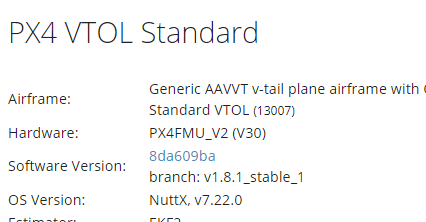
But you are using FMUV2
bys1123
on 27 May 2019
@JohnSnowball For us to look at this, please share the branch you're flying with. Any software change you're doing could be causing this and without the code, we're not able to support it.
We have many companies flying 1.8 with VTOL, so it is unlikely there is a fundamental, undiscovered issue. Please also look at 1.9 which releases this week.
LorenzMeier
on 27 May 2019
@LorenzMeier please tell me how to share my branch with you, make a pull request?
As one year ago I use 1.6.5 version and encountered the same problem, I don't think this crash is unique and my branch only changed gps driver part.
And I tested in both hil and real test for different firmware versions( 1.8.2\1.8.1\1.7.2), things are the same. You could easily reproduce this bug.
I will try 1.9 as soon as possible.
JohnSnowball
on 31 May 2019
hi, I reproduced it in firmware 1.9.0, nothing changed , and run this on HITL(quad) and also a real quad copter with RC. Please check this, it's really dangerous if SD card broken during mission!
JohnSnowball
on 13 Jun 2019
Thanks for reproducing. @bkueng Could you please put this in your backlog and cross-test and fix? Thanks!
LorenzMeier
on 13 Jun 2019
This came up during the dev call on October 9, 2019.
@PX4/testflights can you please do a test flight on v1.8.1 using the cube and report here?
 mrpollo
on 9 Oct 2019
mrpollo
on 9 Oct 2019
Tested on Pixhawk 2 Cube V3: Firmware version 1.8.1
Modes Tested
Position Mode: Good.
Altitude Mode: Good.
Stabilized Mode: Good.
Mission Plan Mode (Automated): Good.
RTL: Good.
- Procedure
Arm and Takeoff in position mode, after flying for approximately one minute, switched to altitude then stabilized mode proceeds to switch to mission plan mode then make sure that vehicle follows all waypoints as shown in QGC, once completed all waypoint activate RTL and see landing behavior.
Notes:
No issues noted, good flight in general.
Log:
https://review.px4.io/plot_app?log=019ecb92-6c41-4d12-a2aa-879f9040bfeb
https://review.px4.io/plot_app?log=cfb20c43-0ca6-4666-943e-65f997f86640
 jorge789
on 15 Oct 2019
jorge789
on 15 Oct 2019
Thanks for posting this logs @jorge789 , would you mind gathering a flight log from current master with that hardware as well so we can compare CPU/RAM with the current code base?
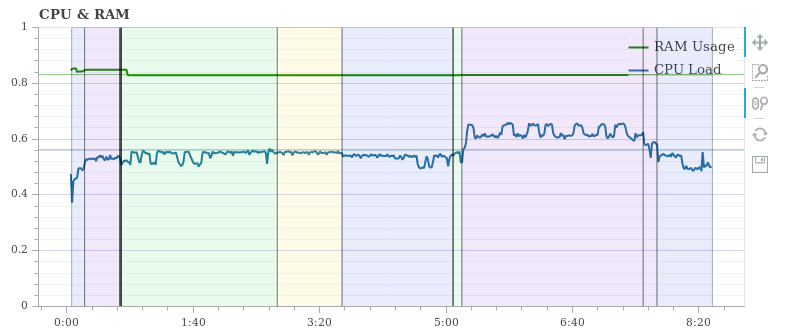
@JohnSnowball , it seems like you might have an additional mavlink stream enabled, or some other code that is eating up CPU and RAM. If you look at the logs posted by @jorge789, the CPU load is a lot less.
Your log:
Flight test team:
The other thing I notice about your logs is that there is a lot of angular rate noise on all three axes. With the rates estimates that noisy you could also be eating up CPU in the state estimator.
Bottom line, I think your CPU/RAM is maxing out because of at least one of the following contributors: 1) the customization you made to your code, 2) additional mavlink streams, and/or 3) body rate noise due to how the autopilot is mounted.
The first thing I'd recommend is to update your code to current PX4:master status so that your code can be compared apples to apples with where current development is taking place.
Let us know where your current status is and what you need help with next.
 mcsauder
on 15 Oct 2019
mcsauder
on 15 Oct 2019
With the rates estimates that noisy you could also be eating up CPU in the state estimator.
How?
 mhkabir
on 15 Oct 2019
mhkabir
on 15 Oct 2019
I'm looking into this. I think I can reproduce it in HITL multicopter by removing the SD card mid-mission.
From what I can see is that navigator does not switch to the next mission item because that's of course not available. When you try a Goto or RTL mode also nothing happens, and that's the scary part.
 julianoes
on 15 Oct 2019
julianoes
on 15 Oct 2019
On further inspection it looks like the file read() never returns if the SD card is not there. This would explain why the navigator gets stuck.
julianoes
on 15 Oct 2019
On further inspection it looks like the file
read()never returns if the SD card is not there. This would explain why the navigator gets stuck.
@julianoes - https://github.com/PX4/Firmware/issues/13087
 dagar
on 15 Oct 2019
dagar
on 15 Oct 2019
Braindump before I call this a day:
fat_semgive
fat_semtake
nxsem_wait ret 0
fat_semgive

fat_semtake
nxsem_wait ret 0
fat_semgive
--> remove SD card here
fat_semtake
nxsem_wait ret 0
I've set a breakpoint on fat_semtake and found that (of course) it's the logger writing:
(gdb) bt
#0  fat_semtake (fs=fs@entry=0x10004680) at fat/fs_fat32util.c:367
#1  0x08013f88 in fat_write (filep=0x20019d54, buffer=0x20020040 "", buflen=4134)
    at fat/fs_fat32.c:770
#2  0x08012f26 in nx_write (fd=<optimized out>, buf=buf@entry=0x20020040, nbytes=nbytes@entry=4134)
    at vfs/fs_write.c:174
#3  0x08012f3c in write (fd=<optimized out>, buf=buf@entry=0x20020040, nbytes=nbytes@entry=4134)
    at vfs/fs_write.c:239
#4  0x08096610 in px4::logger::LogWriterFile::LogFileBuffer::write_to_file (call_fsync=false,
    size=4134, buffer=0x20020040, this=0x2001bda0)
    at ../../src/modules/logger/log_writer_file.cpp:486
#5  px4::logger::LogWriterFile::run (this=this@entry=0x2001bda0)
    at ../../src/modules/logger/log_writer_file.cpp:254
#6  0x080966fc in px4::logger::LogWriterFile::run_helper (context=0x2001bda0)
    at ../../src/modules/logger/log_writer_file.cpp:193
#7  0x0801821a in pthread_start () at pthread/pthread_create.c:210
#8  0x00000000 in ?? ()
Backtrace stopped: previous frame identical to this frame (corrupt stack?)
This could mean that a log write operation doesn't return the semaphore when the SD card is removed.
julianoes
on 15 Oct 2019
@mcsauder the cube is broken in the current master, and there's no maintainer for this hardware, we can't test this until it gets fixed.
@Tony3dr what is the last known good commit for the cube? can you please post a log
mrpollo
on 15 Oct 2019
The last working commit was v1.9.2 (10690587)
This is the last working log, I was able to fly but getting the error message primary compass.
https://review.px4.io/plot_app?log=71a782cc-7979-4ff1-a6e8-f3d8f4757f55
With this flight, I was getting several error messages from the barometer and the compass.
https://review.px4.io/plot_app?log=ed9929c4-be0a-4f41-ae87-a0ba6a6a42a4
 Tony3dr
on 15 Oct 2019
Tony3dr
on 15 Oct 2019
Note that this issue is not cube specific. I have been reproducing it on a Pixracer.
julianoes
on 16 Oct 2019
Without logger logging and thus writing to the SD card, read() correctly fails and navigator does not get stuck. To me this means we need to investigate why write() doesn't return and give back the semaphore.
julianoes
on 16 Oct 2019
@julianoes that's true, I tested it on FMU-V5 (holybro), same result.
But the bug locates too deep, I'm not capable to dig it out.
JohnSnowball
on 16 Oct 2019
I'm digging further into where write() hangs and currently I can see that stm32_eventwait() hangs even though it has a timeout as an argument.
julianoes
on 16 Oct 2019
@davids5 this issue does not happen if CONFIG_MMCSD_SDIOWAIT_WRCOMPLETE is not set.
To me it looks like some kind of race for the timeout used in https://github.com/PX4/NuttX/blob/px4_firmware_nuttx-7.29%2B/arch/arm/src/stm32/stm32_sdio.c#L2433-L2601.
julianoes
on 16 Oct 2019
@davids5 I don't entirely understand what is going on but I found a workaround which seems to fix this particular issue: https://github.com/PX4/NuttX/pull/65
julianoes
on 16 Oct 2019
@julianoes - I got finally my head wrapped around it.
Write or read does a wrbusy check. The wrbusy check is done to see if the last operation was a write and if the card is still busy.
The CONFIG_MMCSD_SDIOWAIT_WRCOMPLETE adds a hw detection of busy that does not busy wait (uses a semaphore) as a prefix to busy waiting (looping with a timeout) on reading the card status. The idea here is that we wait on a event until ready and busy wait ~0 because the result is ready when we awake to read it.
The act if writing to the SD armes the GPIO, D0 is low while the card is busy. The rising edge signals completion.
The upper level sdio code is not clearing the wrbusy because after the ready condition, resulting from card eject, the result is not able to be read, because the card has been removed and this then leaves the next operation calling eventwait with no set.
I will work on a proper fix in the AM.
 davids5
on 25 Oct 2019
davids5
on 25 Oct 2019
Related issues
 kainism
·
4Comments
kainism
·
4Comments
 bosskwei
·
3Comments
bosskwei
·
3Comments
 huangwen0907
·
3Comments
huangwen0907
·
3Comments
 prothen
·
5Comments
prothen
·
5Comments
 mwiatt
·
5Comments
mwiatt
·
5Comments
Most helpful comment
@julianoes - I got finally my head wrapped around it.
Write or read does a wrbusy check. The wrbusy check is done to see if the last operation was a write and if the card is still busy.
The
CONFIG_MMCSD_SDIOWAIT_WRCOMPLETEadds a hw detection of busy that does not busy wait (uses a semaphore) as a prefix to busy waiting (looping with a timeout) on reading the card status. The idea here is that we wait on a event until ready and busy wait ~0 because the result is ready when we awake to read it.The act if writing to the SD armes the GPIO, D0 is low while the card is busy. The rising edge signals completion.
The upper level sdio code is not clearing the wrbusy because after the ready condition, resulting from card eject, the result is not able to be read, because the card has been removed and this then leaves the next operation calling eventwait with no set.
I will work on a proper fix in the AM.