Px4-autopilot: SF11/C Laser Altimeter Missing Documentation
Hello, I'm using SF11/C for distance sensor. I tried to connect SF11/C to Pixhawk 2.1 (Cube) by using https://docs.px4.io/en/sensor/sfxx_lidar.html documentation via serial connection. However, I got no data from SF11/C until change Firmware of SF11/C.
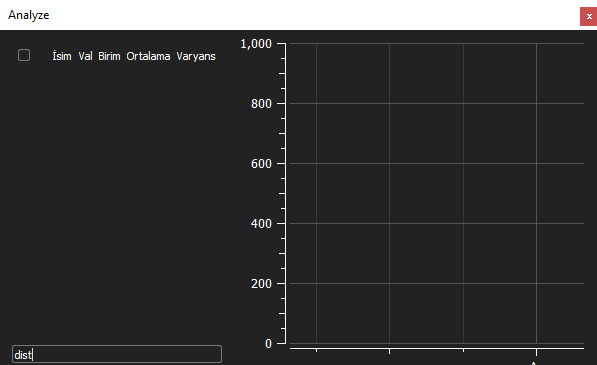
Addition, there was a no data in QGroundControl Analyze tool.
SF11/C comes with 115200 baudrate.
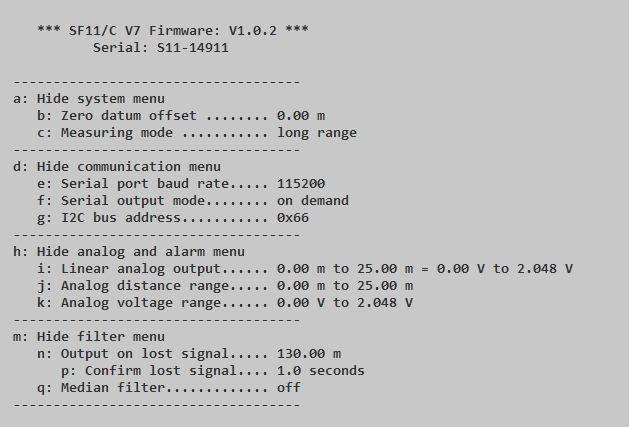
But, src/drivers/distance_sensor/sf0x/sf0x.cpp definition has 9600 baud rate.
https://github.com/PX4/Firmware/blob/a08b1682e39c2a63c732f9edc10019d55b269498/src/drivers/distance_sensor/sf0x/sf0x.cpp#L593
I tried to change the line 9600 to 115200 and flashed. But, Pixhawk didn't boot. So, from SF11/C user manual I connected SF11/C directly to PC via micro-USB cable.
Default Menu comes with some default configuration like second image.
I changed baud rate of SF11/C from 115200 to 9600 and tried. But again, there was no data. After that step, I changed serial output mode from "On demand" to "Continuous".
And boom, the data came.
Can we add to https://docs.px4.io/en/sensor/sfxx_lidar.html documentation which may help users who struggling this issue.
Furthermore, I wanted to try with I2C connection. But, I didn't see any option for I2C in SF11/C menu. I saw the Firmware upgrading from this site https://github.com/LightWare-Optoelectronics/pixhawk-guide.
After Firmware upgrade SF11/C presents I2C option for Pixhawk like below.
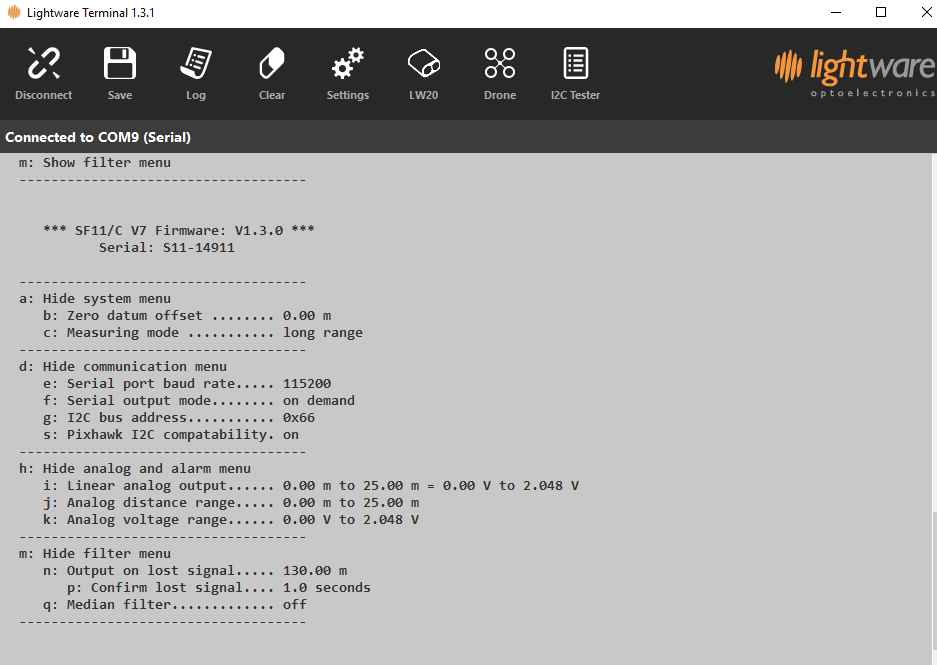
I turned on "Pixhawk I2C compatability". After this step, data came to the Pixhawk.
Also, https://github.com/LightWare-Optoelectronics/pixhawk-guide should be add to "LightWare SF1X/SF02/LW20 Lidar" documentation. It may provide more understandable to how connect SF11/C to Pixhawk.
Thanks!
 bozkurthan
All 21 comments
@bozkurthan Thank you very much for your help!
When you say
I tried to change the line 9600 to 115200 and flashed. But, Pixhawk didn't boot. So, from SF11/C user manual I connected SF11/C directly to PC via micro-USB cable.
Default Menu comes with some default configuration like second image.
Do you mean the default menu of some LightWare-Optoelectronics firmware update software??
@bkueng Have you played with one of these? My concern is why this would not have come up before? Can we change the default setting to match the factory setting? Is changing the baud to 9600 also going to affect I2C usage?
My thought is that I should make the update as suggested?
 hamishwillee
on 25 Mar 2019
hamishwillee
on 25 Mar 2019
@DanielePettenuzzo might have more experience here.
 bkueng
on 25 Mar 2019
bkueng
on 25 Mar 2019
@hamishwillee Sorry for insufficient information
I mean I changed Driver code from this unsigned speed = B9600; to unsigned speed = B115200; which is defined in:
https://github.com/PX4/Firmware/blob/a08b1682e39c2a63c732f9edc10019d55b269498/src/drivers/distance_sensor/sf0x/sf0x.cpp#L593
My purpose in doing so is that the SF11/C and PX4 Driver do not meet requirement with the default configuration.
And after this step I flashed firmware to my Cube. But it didn't go well. PX4 didn't boot.
So, I changed baudrate of SF11/C device(from its terminal software) to meet baudrate of PX4 driver.
bozkurthan
on 25 Mar 2019
Thanks @bozkurthan for the clarification. Can you confirm which software you use for updating the firmware on the SF11/C?
@DanielePettenuzzo can you please comment on this issue. Specifically, it seems odd to me that we specify a baud rate in the driver that does not match the factory rate for the rangefinder, and that this issue has not been reported before.
My leaning is to just add the information provided here, but I want to make sure we're not missing anything.
hamishwillee
on 26 Mar 2019
LightWareUpgrader can be use for upgrading Firmware or changing baudrate and opening I2C support which mentioned under the topic Upgrading LightWare devices (SF11C/SF20C/LW20C) in this site.
Lightware Terminal can be use for the baudrate change. It has own manual for the configuration which mentioned here
It has more option then LightWareUpgrader for configuration but you cannot upgrade Firmware.
bozkurthan
on 26 Mar 2019
@bozkurthan @hamishwillee personally I've never used the sensor on a serial port, but just via I2C. To which serial port are you connecting on the cube side? Moreover for serial we use the sf0x driver while for i2c we use the sf1xx driver which use two different parameters. For the serial driver are you setting SENS_EN_SF0X to choose the sensor and SENS_SF0X_GFG to choose the serial port you what to use on the pixhawk side?
I will try to see if I can reproduce this issue.
 DanielePettenuzzo
on 26 Mar 2019
DanielePettenuzzo
on 26 Mar 2019
Hello @DanielePettenuzzo,
I'm using Telemetry 1 for this device. And yes, I changed 2 parameter which are named SENS_EN_SF0X and SENS_SF0X_CFG for SF0X driver.
SENS_EN_SF0X is changed from "SF02" to "SF11/c"
SENS_SF0X_CFG is changed from "Disabled" to "TELEM 1"
In this setup I can receive values via Telemetry 1. But when I connect the PX4Flow Camera to I2C input and leave SF11/C on Telemetry 1, I can't receive any data from SF11/C sensor.
And yes, you are right with SF1XX driver is working well with PX4Flow Camera while SF0X driver isn't.
bozkurthan
on 26 Mar 2019
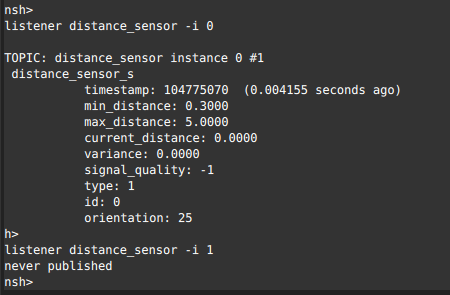
@bozkurthan you are checking for distance_sensor data on the qgc analyze widget right? When you activate the px4flow do you see the data coming from the sonar on the flow board? Maybe you have two distance_sensor instances. To check that you can run in the mavlink shell the following commands:
listener distance_sensor -i 0
listener distance_sensor -i 1
This will show you both distance sensors. You can also get the status of the drivers by running:
sf0x status
px4flow status
Moreover regarding the default baudrate I tried changing it to B115200 and the pixhawk boots. Is this the only change you made?
DanielePettenuzzo
on 26 Mar 2019
Ops sorry I closed accidentally..
bozkurthan
on 27 Mar 2019
@DanielePettenuzzo FYI There appear to be a few open bugs in Firmware about using distance sensors and PX4Flow, in particular on 1.8.2 ... e.g. https://github.com/PX4/Firmware/issues/11227
IN addition, Daniele, are you saying that you did have to update the baud rate to 115200 to get it to connect by default to the rangefinder - ie that our driver baud rate for the uart driver version default setting of 9600 is incorrect?
hamishwillee
on 27 Mar 2019
I made some changes in Firmware so I just downloaded 1.9.0 beta version again.
Actually, PX4Flow which I currently use doesn't have Sonar sensor. I think the problem is that the PX4FLow is trying to publish the distance sensor data even though there is no sonar.
Here is PX4FLow Camera:
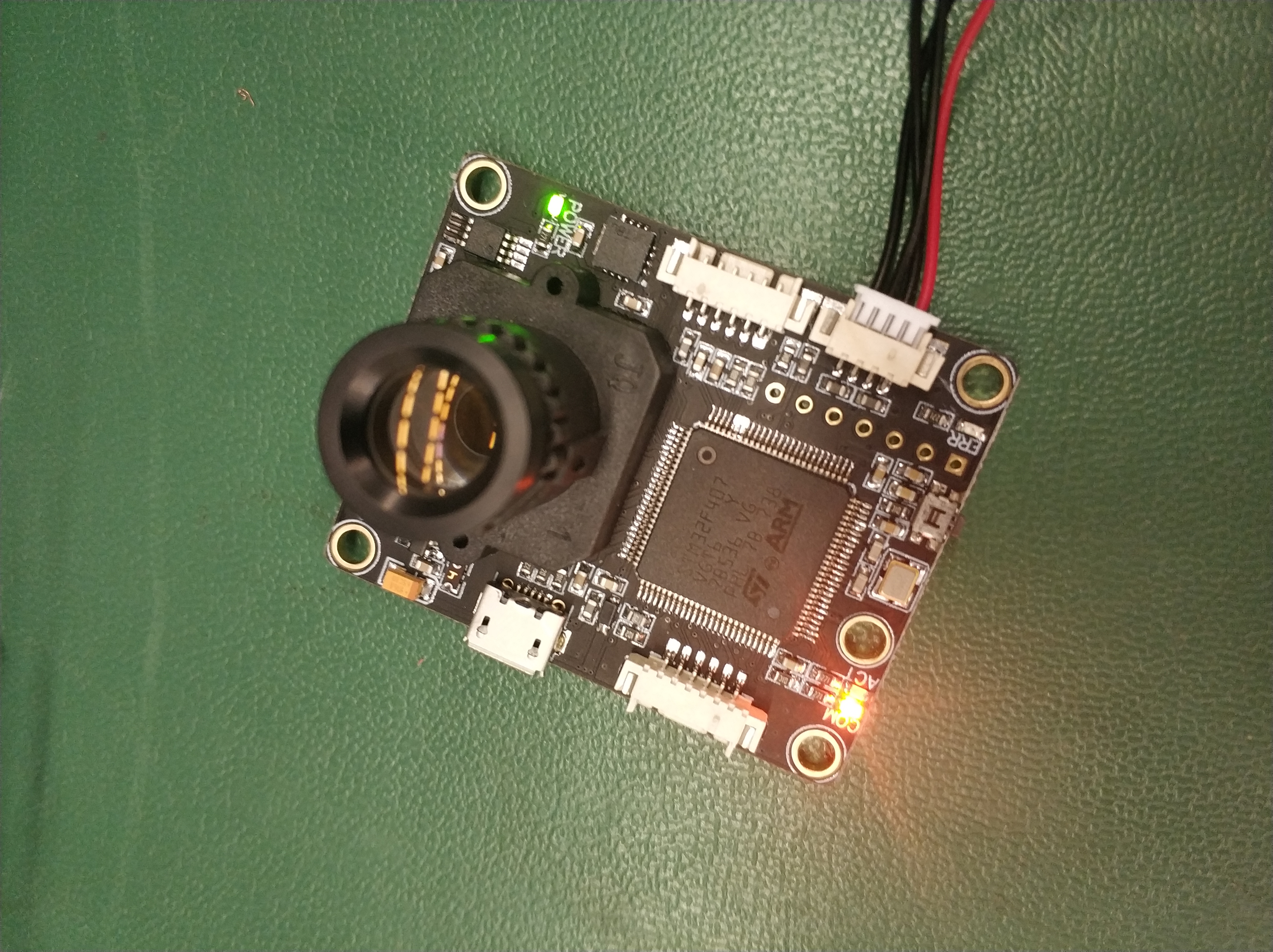
Without any distance sensor, only PX4Flow is connected to Pixhawk.
Furthermore, @DanielePettenuzzo . There is a huge problem on Telemetry 1.
First of all, I disabled all Mavlink Config.

Secondly, I changed SF0X driver baudrate to 115200 from 9600 and also changed baudrate of SF11/C to 115200 from 9600.
I connected SF11/C to Telemetry 1 and configured SENS_SF0X_CFG param for TELEM 1. But It didn't boot.
After I changed SENS_SF0X_CFG parameter to "TELEM 2" and connected to TELEM 2, the data came.
Here it comes, I didn't configure SENS_SF0X_CFG param and left it "TELEM 2" . And I just connected SF11/C to TELEM 1 and "EURUKA!" Pixhawk didn't boot. Also I disabled SF0X and left it again on TELEM 1 but it didn't boot again.
I think it's not related only this driver because I disabled SF0X driver and just connected Arduino UNO to TELEM 1 which publish same string continuously at 115200 baudrate. Again it's not booted.
There is also problem with GPS 2 it hasn't option for SENS_EN_SF0X whereas TELEM 1 and TELEM 2 have.



Now, there are 2 problems.
- SF11/C doesn't publish distance sensor data even it has 9600 baudrate when SF11/C connected to UART input (TELEM1, TELEM2 etc..) and PX4Flow Camera is connected I2C.
SF11/C only publishes correct data when PX4Flow isn't connected to I2C or SF11/C and PX4Flow are on the same I2C bus. - Pixhawk doesn't boot when something which has 115200 baudrate is connected on Telem 1 except Mavlink configuration.
bozkurthan
on 27 Mar 2019
@bozkurthan It seems that the px4flow driver is started before the sf11 distance sensor. The px4flow is started in rc.sensors while the distance sensor is in rc.serial (which is later in the rcS). I will look at how we can solve this. Regarding the second issue would it be possible to capture the serial console output during bootup? I currently don't have this sensor to try it.
DanielePettenuzzo
on 27 Mar 2019
@bozkurthan the following branch should fix the startup ordering issue: https://github.com/PX4/Firmware/pull/11724
DanielePettenuzzo
on 27 Mar 2019
Thanks for it. I'll going to try tomorrow. And for boot up issue, you can use Arduino UNO, Raspberry pi or something like which has uart communication.
(And really sorry for closing issue, sometimes I comment from my phone and accidentally touching screen)
bozkurthan
on 27 Mar 2019
@DanielePettenuzzo thanks for solving issue. But there are still issues those need to be clarified.
1. SF11/C doesn't publish distance sensor data even it has 9600 baudrate when SF11/C connected to UART input (TELEM1, TELEM2 etc..) and PX4Flow Camera is connected I2C. SF11/C only publishes correct data when PX4Flow isn't connected to I2C or SF11/C and PX4Flow are on the same I2C bus.
- Pixhawk doesn't boot when something which has 115200 baudrate is connected on Telem 1 except Mavlink configuration.
- Should we change SF0X driver baudrate from 9600 to 115200 for default configuration of SF11/C which defined here?
https://github.com/PX4/Firmware/blob/0b4751d03167c4ee147f2e91a94f9919baea70e1/src/drivers/distance_sensor/sf0x/sf0x.cpp#L593
NOTE: I don't know about other distance sensor like SF02, SF10/a, SF10/b maybe they have different values in default configuration. Maybe new parameter can be define for changing baudrate.
FYI, @hamishwillee
bozkurthan
on 28 Mar 2019
or for now we could just add a check to change it for SF11/c since it's the only one we are sure about
DanielePettenuzzo
on 28 Mar 2019
or for now we could just add a check to change it for SF11/c since it's the only one we are sure about
Yes. @bozkurthan Can you please create a PR for that? If it turns out they need different default baud rates we can address at that point (probably with docs)
My assumption is that if that is changed, this PR can be closed (rather than merged). Correct?
hamishwillee
on 28 Mar 2019
OK. For a now should I change line from unsigned speed = B9600; to unsigned speed = B115200; .
Or something like this:
/* if model is SF11/C, then set baudrate 115200, else 9600*/
int hw_model;
param_get(param_find("SENS_EN_SF0X"), &hw_model);
unsigned speed;
if(hw_model==5)
speed = B115200;
else
speed = B9600;
Do you mean the default menu of some LightWare-Optoelectronics firmware update software??
@hamishwillee
Actually, I didn't understand your reply properly when I first read. Sorry for that, I'm busy nowadays :/ When I'm saying "default menu" I mean the software which is called menu of "Lightware Terminal" with default Firmware version. It is not Firmware upgrader program. It is only for monitoring values or changing configuration of SF11/C sensor via USB cable. There is an another software which is called "LightWareUpgrader". With LightWareUpgrader, Firmware of sensor can be update newer version or other configuration of sensor can be change. If user doesn't update Firmware, he/she cannot use the sensor in I2C bus because of "Pixhawk I2C Compatibility". This option comes with newer version of Firmware. But user can still change Baudrate with default version with Lighware Terminal. Sorry for misunderstanding.
Regarding the second issue would it be possible to capture the serial console output during bootup? I currently don't have this sensor to try it.
@DanielePettenuzzo
I missed this line. I'll try to capture bootup messages.
bozkurthan
on 3 Apr 2019
@DanielePettenuzzo and @hamishwillee we completed all issues. Thank you all for helping kindly. There is no problem on boot up anymore. Maybe I changed something else but I couldn't find. Today I tested and everything is ok. So, only document is missing about LightWare Sensors.
~~1. SF11/C doesn't publish distance sensor data even it has 9600 baudrate when SF11/C connected to UART input (TELEM1, TELEM2 etc..) and PX4Flow Camera is connected I2C. SF11/C only publishes correct data when PX4Flow isn't connected to I2C or SF11/C and PX4Flow are on the same I2C bus.
- Pixhawk doesn't boot when something which has 115200 baudrate is connected on Telem 1 except Mavlink configuration.
- Should we change SF0X driver baudrate from 9600 to 115200 for default configuration of SF11/C which defined here?~~
bozkurthan
on 4 Apr 2019
@bozkurthan Thanks for this. I only just got back from holiday last week, so sorry for the delay.
I am going to close this issue because I believe it has been resolved. Specifically, if you connect the sensor as described in https://docs.px4.io/en/sensor/sfxx_lidar.html it should now work "out of the box".
The other information you provided about "Lightware Terminal" etc is therefore interesting, but should not be needed by most users.
I hope my understanding is correct! If not, then can you please post a new bug against the user guide https://github.com/PX4/px4_user_guide/issues stating the specific docs issue. You can link against this issue too.
If
hamishwillee
on 6 May 2019
Related issues
 nicovanduijn
·
32Comments
nicovanduijn
·
32Comments
 zalessio
·
33Comments
zalessio
·
33Comments
 taileron
·
51Comments
taileron
·
51Comments
 shrit
·
36Comments
shrit
·
36Comments
 anuppari
·
30Comments
anuppari
·
30Comments