Px4-autopilot: ERROR: ld.so: object 'libgtk3-nocsd.so.0' from LD_PRELOAD cannot be preloaded (cannot open shared object file): ignored.
Hi, I have just upgrade to Ubuntu18. From then whenever i build the px4 firmware i got the error-
ERROR: ld.so: object 'libgtk3-nocsd.so.0' from LD_PRELOAD cannot be preloaded (cannot open shared object file): ignored.
Is this really due to Ubuntu Upgradation? How can i solve it?
Thanks
 rahulsharma11
All 16 comments
Yes this is likely Ubuntu updated related.
What are you running exactly? PX4 itself shouldn't be using gtk3, is that from gazebo?
 dagar
on 4 May 2018
dagar
on 4 May 2018
Hi, Its not from gazebo. I am building px4fmu-v2_default.
rahulsharma11
on 4 May 2018
Exactly when do you see the error? Screenshot?
dagar
on 4 May 2018
After running make px4fmu-v2_default,
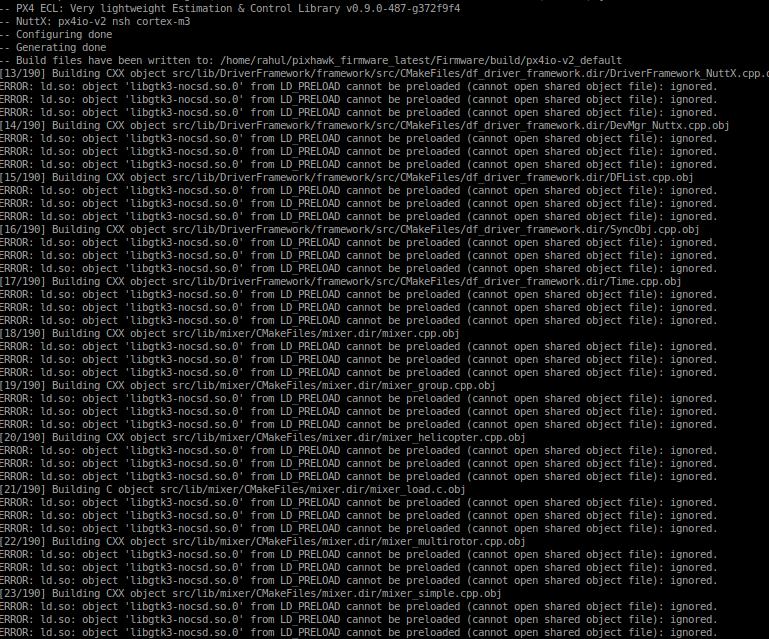
rahulsharma11
on 4 May 2018
Weird. Did you do a fresh install of Ubuntu 18.04 or an upgrade from an older release?
dagar
on 4 May 2018
I upgraded from previous 17.10
rahulsharma11
on 4 May 2018
Hi,
Any suggestion?
rahulsharma11
on 7 May 2018
I get the same error after updating to Ubuntu 18.04 when building our firmware (completely unrelated to PX4) too, so I'd say this is a bug in Ubuntu.
The firmware build is completely unaffected by this nuisance.
 benVolatiles
on 9 May 2018
benVolatiles
on 9 May 2018
Ok. Thanks for the confirmation.
rahulsharma11
on 9 May 2018
I solved the same issue by adding the following line in .bashrc file in my home folder:
export LD_PRELOAD=/usr/lib/x86_64-linux-gnu/libgtk3-nocsd.so.0
Make sure you have libgtk3-nocsd.so.0 in /usr/lib/x86_64-linux-gnu/
If you didn't have it, try sudo apt-get install gtk3-nocsd
 imambungo
on 26 Aug 2018
imambungo
on 26 Aug 2018
I solved the same issue by adding the following line in
.bashrcfile in my home folder:export LD_PRELOAD=/usr/lib/x86_64-linux-gnu/libgtk3-nocsd.so.0Make sure you have
libgtk3-nocsd.so.0in/usr/lib/x86_64-linux-gnu/
If you didn't have it, trysudo apt-get install gtk3-nocsd
That works for me. Besides, you can run find /usr -name libgtk3-nocsd.so.0 -print to find it.
 worstprogrammerCN
on 15 Oct 2018
worstprogrammerCN
on 15 Oct 2018
Happy to help :blush:
imambungo
on 15 Oct 2018
I had the same problem and this solve helped me too. Thanks!
 neokos90
on 10 Nov 2018
neokos90
on 10 Nov 2018
It is helped with me too! Thanks!
 wizardion
on 13 Feb 2019
wizardion
on 13 Feb 2019
I was running Ubuntu 16.04 in a virtual machine on iMAC, I stupidly updated to 18.04 and now I'm getting these issues, unfortunately none of the fixes I've found so far have helped and I don't have the folder /usr/lib/x86_64-linux-gnu, could this be because I'm on an iMAC ?
 SPlatten
on 27 May 2019
SPlatten
on 27 May 2019
See also https://github.com/lutris/lutris/issues/905#issuecomment-514185518
 Bost
on 23 Jul 2019
Bost
on 23 Jul 2019
Related issues
 prothen
·
5Comments
prothen
·
5Comments
 RomanBapst
·
5Comments
RomanBapst
·
5Comments
 robin-shaun
·
4Comments
robin-shaun
·
4Comments
 kainism
·
4Comments
kainism
·
4Comments
 lgh5054
·
4Comments
lgh5054
·
4Comments
Most helpful comment
I solved the same issue by adding the following line in
.bashrcfile in my home folder:Make sure you have
libgtk3-nocsd.so.0in/usr/lib/x86_64-linux-gnu/If you didn't have it, try
sudo apt-get install gtk3-nocsd